AI workflows can fail due to issues like API rate limits, server errors, or network disruptions. Without safeguards, these failures can halt operations, waste resources, and damage trust. Fault-tolerant workflows are designed to detect and recover from these disruptions, ensuring reliability and minimizing downtime.
Key strategies include:
- Retry Logic: Use exponential backoff with jitter to handle transient errors like timeouts or rate limits. Limit retries and ensure operations are idempotent to avoid duplicate actions.
- Load Balancing: Distribute workloads across multiple endpoints or regions to prevent overload and ensure availability.
- Redundancy: Implement failover systems with backup providers or models to handle outages.
- Checkpointing: Save workflow states periodically to resume tasks from the last successful step after a failure.
- Fallbacks and Monitoring: Use secondary systems, graceful degradation, and real-time monitoring to maintain partial functionality and detect issues early.
- Workflow Orchestration: Leverage tools like Temporal, AWS Step Functions, or Prefect to automate state management and recovery.
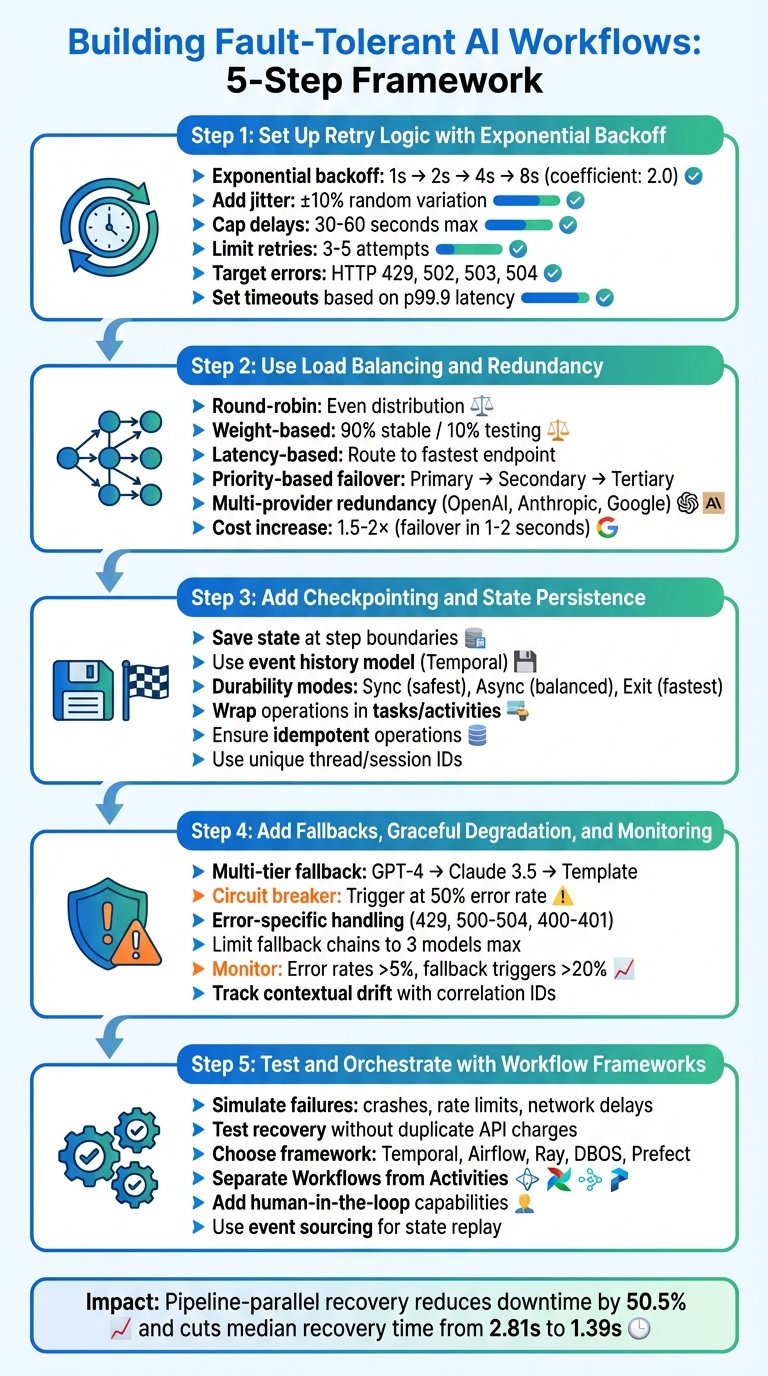
5-Step Framework for Building Fault-Tolerant AI Workflows
Durable AI Agents – They’re Failure Proof | Cornelia Davis, Temporal l The Next Wave of AI
Step 1: Set Up Retry Logic with Exponential Backoff
When dealing with API timeouts or rate limits, immediate retries can backfire, potentially making the situation worse. Instead, a brief pause can allow transient failures – short-lived issues – to resolve on their own, giving the system a chance to recover.
Configure Exponential Backoff and Jitter
Exponential backoff gradually increases the wait time between retries, typically doubling the delay each time (e.g., 1, 2, 4, 8 seconds). The standard backoff coefficient is 2.0. However, when multiple clients retry simultaneously on the same schedule, they can overwhelm the server, a phenomenon known as the "thundering herd". To combat this, adding a small random variation, or jitter (±10%), to each delay can help spread out retries and avoid synchronized spikes.
"Retries are ‘selfish.’ In other words, when a client retries, it spends more of the server’s time to get a higher chance of success." – Amazon Builders’ Library
It’s also wise to cap delays – usually at 30 to 60 seconds – and limit retries to 3–5 attempts. For example, AWS introduced token bucket throttling in its SDK back in 2016 to ensure clients don’t overburden servers with excessive retries.
Set Timeouts and Idempotency Checks
Timeouts are essential to avoid indefinite waits that can lock up critical resources. A good rule of thumb is to set timeouts based on your downstream service’s p99.9 latency, allowing for a 0.1% chance of false timeouts while still protecting your system.
Before retrying, ensure the operation is idempotent – meaning repeated attempts yield the same result. Without this safeguard, retries could cause issues like double-billing, duplicate database entries, or corrupted data. Using unique request IDs can help track whether an operation has already been processed.
Not all errors should trigger a retry. Focus on transient errors such as HTTP 429 (rate limits) or server-side issues like 502, 503, and 504. Permanent errors, such as 400 (bad request) or 401 (unauthorized), require a different strategy since retrying them is a waste of resources. For instance, Google Cloud Workflows specifically targets transient codes – 429, 502, 503, and 504 – in its default retry policy. Once you’ve set up retries, you can further improve fault tolerance by incorporating load balancing and redundancy.
Step 2: Use Load Balancing and Redundancy
Once retries are in place, the next step is to ensure your system can handle failures gracefully by optimizing your workflow across multiple endpoints and incorporating backup systems. This approach minimizes the risk of downtime caused by single points of failure.
Apply Load Balancing Techniques
Load balancing goes beyond retry mechanisms by distributing API calls across several model endpoints. This prevents any single endpoint from becoming overwhelmed. The simplest method is round-robin, where requests are evenly cycled through available endpoints. However, more advanced strategies can make your system far more resilient.
Deploying your model across multiple regions is a smart way to expand capacity and reduce latency. For example, running the same model in different geographic locations ensures better resource availability and quicker responses.
Health-aware routing takes this a step further by actively monitoring metrics like RPM (requests per minute), TPM (tokens per minute), and error rates. It automatically removes unhealthy endpoints from the pool, ensuring only functional ones handle traffic. Tools like TrueFoundry‘s AI Gateway, for instance, add minimal latency (around 3–4 ms at 250 requests per second) while managing routing effectively.
For precision, weight-based distribution allows you to split traffic proportionally. This is particularly useful during testing phases. Imagine routing 90% of traffic to a stable model while directing 10% to a newer version. This lets you identify issues with the new model before fully committing to it. On the other hand, latency-based routing dynamically directs requests to the endpoint that has been the fastest over the last 100 calls. This ensures a consistent experience, even if one provider slows down.
You can also use tools like Redis to track token usage in real-time. By monitoring which endpoint has the most capacity left, your system can intelligently route traffic, avoiding rate limit errors.
Add Redundancy for Failover
Redundancy ensures your workflow continues smoothly, even when parts of the system fail. One common approach is priority-based failover, where endpoints are organized into tiers. If the primary model returns an error (like a 429 or 5xx), the system automatically switches to a secondary endpoint, and then to a tertiary one if needed.
For even greater reliability, consider multi-provider redundancy. By distributing workloads across providers like OpenAI, Anthropic, and Google Gemini, you safeguard against vendor-specific outages. Utilizing a variety of top-tier AI tools can further diversify your infrastructure. If your primary provider goes down, your workflow seamlessly transitions to an alternative. You can even combine strategies – for instance, a primary endpoint might include its own regional failover mechanism.
To prevent overloading failing endpoints, a circuit breaker can temporarily block requests to those endpoints. This gives them time to recover while avoiding a cascade of retries from multiple clients.
While redundancy can increase costs by 1.5× to 2×, it provides near-instant failover (within 1–2 seconds). For production AI workflows where downtime could directly impact revenue, this added expense is often a worthwhile trade-off.
| Routing Strategy | Best Use Case | Key Benefit |
|---|---|---|
| Round-Robin | General distribution | Simple, even distribution across nodes |
| Weight-Based | Canary testing / quota management | Precise control over traffic proportions |
| Latency-Based | Real-time user applications | Reduces response time by selecting the fastest node |
| Priority-Based | Cost optimization / failover | Ensures preferred models are used first |
With load balancing and redundancy in place, your system is well-prepared to handle more advanced monitoring and checkpointing strategies.
Step 3: Add Checkpointing and State Persistence
Preserving workflow progress is essential to ensure fault tolerance. Checkpointing achieves this by saving the workflow’s state at critical points, allowing you to resume exactly where you left off in case of a crash. Once you’ve addressed load balancing and redundancy, checkpointing becomes the next step in solidifying your system’s resilience.
Save Workflow States Periodically
Checkpointing involves saving progress at strategic moments. Most frameworks automate this at step or activity boundaries. For instance, if your workflow involves calling an LLM API, processing the response, and then writing to a database, each of these operations should be treated as a checkpoint. If a failure occurs, the system can resume from the database step instead of starting over.
"Durable Execution ensures that your application behaves correctly despite adverse conditions by guaranteeing that it will run to completion." – Temporal
Frameworks like Temporal use an event history model, which records the inputs and outputs of each function call. During recovery, this history is replayed to reconstruct the exact state without re-executing external operations. LangGraph, on the other hand, offers multiple durability modes:
- Sync: Saves state before each step begins, ensuring maximum reliability.
- Async: Saves state while the next step is running, balancing reliability and performance.
- Exit: Saves state only upon workflow completion, which is faster but riskier.
For long-running tasks, such as multi-day model training, checkpointing within the task itself is critical. Frameworks like Metaflow provide a @checkpoint decorator, allowing you to save intermediate data like model weights or dataframes at regular intervals, not just at step boundaries. This approach minimizes the risk of losing significant progress if a task fails midway.
A key best practice is to wrap operations – like API calls, random number generation, or file writes – inside tasks or activities. This ensures the persistence layer can retrieve recorded results during recovery, avoiding duplicate side effects or inconsistent outcomes. To further safeguard against issues, tasks should be idempotent, meaning they produce the same result even if executed multiple times.
Use Workflow Management Tools
Choosing the right tool depends on the complexity of your workflow. For example, Temporal is ideal for scenarios where operations, such as multi-step LLM chains, must be reliably executed. Temporal uses a dedicated server to store event history, enabling workflows to resume even after extended downtime. AWS Step Functions offers similar state management along with visual tracing, making it easier to debug failures and identify where they occurred. For those seeking no-code alternatives, business process automation with Make.com provides similar visual orchestration capabilities.
For Python-based AI workflows, LlamaIndex allows you to manually snapshot workflow contexts to external storage like Redis, giving you control over what gets saved and when. Flyte specializes in handling long-running tasks, such as model training, by providing in-task checkpoints. If a compute instance fails – like an AWS spot instance – Flyte resumes from the last checkpoint instead of restarting the task.
| Framework | Best Use Case | Resume Point | Storage Mechanism |
|---|---|---|---|
| Temporal | Multi-step LLM chains, reliability | Last completed activity | Event history on Temporal server |
| LangGraph | Complex agentic workflows | Last completed node | Pluggable (e.g., Postgres) |
| AWS Step Functions | Visual tracing, enterprise workflows | Last completed state | AWS managed service |
| Metaflow | ML training, data science | Step or in-task level | Metaflow datastore |
| Flyte | Long-running computations | Task-internal state | Local/remote files |
When implementing checkpointing, use a unique thread or session identifier for each workflow execution. This ensures the system can accurately track history and recover the correct workflow instance. For workflows that might run indefinitely, set termination criteria and cap iterations to prevent infinite loops.
sbb-itb-58f115e
Step 4: Add Fallbacks, Graceful Degradation, and Monitoring
Once you’ve established state persistence, it’s time to add fallback systems to handle unexpected service failures. Even with robust retry logic and state-saving measures, there will be moments when your primary AI model or service fails. The objective here is to ensure your workflow keeps running – maybe not at full capacity, but enough to prevent a complete shutdown.
Design Fallback Logic
A well-planned fallback system can make all the difference. Start with a multi-tier approach: if your primary model (like GPT-4) encounters an issue (e.g., a 500 error), switch immediately to a secondary model (such as Claude 3.5). If that also fails, fall back to a pre-designed template response. Use a circuit breaker to take action when error rates spike – say, over 50% in a single minute. This prevents wasted time on prolonged timeouts (10–30 seconds) and ensures quicker responses.
For error handling, tailor your responses based on the type of error:
- 429 errors (rate limit exceeded): Use exponential backoff with some randomness (±25%) to avoid retrying too quickly.
- 500–504 errors (server/gateway issues): Switch to your secondary provider immediately.
- 400 or 401 errors (client-side issues): Skip retries altogether and notify an administrator instead.
Here’s a quick reference table for handling common errors:
| Error Code | Description | Recommended Action |
|---|---|---|
| 429 | Rate limit exceeded | Retry with exponential backoff or switch region |
| 500, 502, 503, 504 | Server/Gateway errors | Immediate fallback to secondary provider |
| 400, 401, 404 | Permanent errors | Fail fast, log error, and alert human admin |
| Content Policy | Safety violation | Return pre-generated "safe" response or escalate |
Graceful degradation is another essential tool. If your primary model goes offline, consider switching to a read-only mode, disabling heavy features like real-time personalization, or serving cached responses from a system like Redis for frequently asked queries. For issues like context length errors, route requests to a model with a larger context window automatically. Limit fallback chains to three models at most – any more and you’ll risk excessive latency and rising costs.
By integrating these fallback strategies with your existing load balancing and checkpointing, you’ll create a more resilient system capable of handling disruptions without major interruptions.
Set Up Real-Time Monitoring and Alerts
Monitoring isn’t just about uptime; it’s about keeping an eye on how your system behaves. For example, you should track contextual drift, which happens when an AI agent loses track of the conversation during extended interactions. Use correlation IDs to tag each step in a multi-step pipeline, making it easier to pinpoint where failures occur in complex workflows like retrieval-augmented generation (RAG) or agent-based systems.
Key metrics to monitor include fallback trigger rates, success rates for each fallback tier, and the added latency caused by sequential fallbacks. Set up alerts for situations like error rates exceeding 5% over a five-minute window or fallback activations climbing above 20%. Use orchestration hooks (e.g., onError) to send immediate alerts via Slack, email, or PagerDuty when critical thresholds are hit.
To prevent errors like 429s (rate limits), implement real-time capacity tracking. For example, use counters in Redis to monitor token and request usage, ensuring you stay within provider limits. For high-stakes tasks, consider dynamic confidence thresholds: if the AI’s confidence score drops below a certain level, route the task to a human for review. Lastly, always redact sensitive information (like PII or API tokens) in your logs to remain compliant.
Step 5: Test and Orchestrate with Workflow Frameworks
When testing your AI workflows, it’s essential to go beyond the "happy path" scenarios. You need to ask tough questions like: "What happens if this process fails right here?" Testing should simulate unexpected failures – such as workers restarting mid-task, network delays, or sudden rate limits – to ensure your system can handle real-world challenges.
Simulating Failures
Introduce error conditions into your tests to see if your system’s fallback logic and automatic retries work as intended. For example, test high-cost API calls by crashing the process right after a successful call but before completing the next step (like generating a PDF). This ensures you’re not charged twice for the same API request. Temporal showcased this in January 2026 with a durable research app: after simulating a crash post-LLM call, the system resumed at the PDF generation step without repeating the expensive API request, saving both time and money.
Rate limiting is another critical failure to simulate. Trigger HTTP 429 "Too Many Requests" errors to verify that your system can shift traffic to alternative regions or use backoff logic to prevent overwhelming retries. For instance, a multi-region load balancing setup for Azure OpenAI endpoints routed primary traffic to EastUS, with EastUS2 and WestUS as backups. When the primary region hit its limit, requests automatically shifted to the next available region, maintaining full uptime even during traffic spikes.
Once you’ve rigorously tested failure scenarios, apply these insights to your workflow orchestration.
Orchestrate Complex Workflows
managing complex workflows with business automation demands a framework that can reliably handle state transitions and resume operations after interruptions. Modern orchestration tools separate "Workflows" (which define the plan and track state) from "Activities" (which handle external tasks like API calls or database updates). This separation ensures completed steps are logged, and pending steps can resume seamlessly, even after a crash.
Temporal is a standout choice for orchestrating long-running, mission-critical workflows. By using event sourcing, it records every state transition, allowing the system to "replay" events and resume from where it left off. As Temporal explains:
Distributed systems break, APIs fail, networks flake… That’s not your problem anymore.
For new users, Temporal even offers $1,000 in free credits to test durable AI applications.
Other options include:
- Apache Airflow: Great for managing complex batch processes and ETL/ML pipelines. It uses DAG-based task tracking, provides task-level retries with exponential backoff, and offers visual monitoring.
- Ray (Serve): Designed for high-performance, multi-model inference pipelines. It enables distributed task scaling with shared memory and fractional resource allocation.
- Prefect: A Python-based solution with strong observability features. It supports state handlers, centralized storage, and configurable retries with jitter.
-
DBOS: A lightweight option for smaller teams. It embeds durability into application code using databases like Postgres, ensuring functions resume exactly where they left off. Sai Kumar Yava, an AI Engineer, highlights its reliability:
In production, AI agents aren’t just about intelligence – they’re about reliability.
Compare Workflow Orchestration Frameworks
Each orchestration framework has its strengths, so picking the right one depends on your specific needs.
| Framework | Primary Strength | State Management | Failure Handling |
|---|---|---|---|
| Temporal | Durable execution for long-running AI workflows | Event sourcing (Replay) | Built-in retries, signals, child workflows |
| Apache Airflow | Scheduling and monitoring batch/ETL pipelines | DAG-based task tracking | Task-level retries with exponential backoff |
| Ray (Serve) | High-performance multi-model inference | Distributed cluster state | Flexible scheduling and resource allocation |
| DBOS | Lightweight durability for small teams | Postgres transactions | Automatic checkpointing and recovery |
| Prefect | Python-based workflows with strong observability | State handlers, centralized storage | Configurable retries with jitter |
Enhancing Workflow Control
When implementing orchestration frameworks, consider adding human-in-the-loop capabilities to improve control over complex workflows. Features like "Signals" allow you to pause workflows for human approval, while "Queries" let you inspect the state of a long-running process. These tools provide the flexibility and oversight needed to manage intricate AI systems effectively.
Using God of Prompt for Reliable AI Prompts

Creating fault-tolerant AI workflows starts with reliable inputs. In fact, data preparation and prompt crafting can take up to 60–80% of an AI project’s effort. Just like technical fault tolerance measures, starting with well-designed prompts is essential for building effective workflows.
God of Prompt provides access to over 30,000 carefully crafted AI prompts, all neatly categorized for specific business needs like SEO, Marketing, Productivity, and Finance. Instead of starting from scratch, you can use proven templates tailored for your goals. With over 20,000 entrepreneurs and 17,000 customers already using the platform, it boasts a stellar 4.9/5 rating based on more than 7,000 reviews. Reliable prompts lay the groundwork for strong workflows – next, let’s explore how their prompt bundles can help reduce operational errors.
Use Prompt Bundles to Reduce Errors
A common issue in AI workflows is inconsistent behavior. Manually written prompts often contain vague instructions, leading to hallucinations or irrelevant responses. God of Prompt addresses this with categorized prompt bundles that are rigorously tested across various AI models, including ChatGPT, Claude, Gemini, and Grok.
For example, the Text AI Prompt Bundle features over 10,000 premium prompts designed to work seamlessly with multiple models. These prompts use structured commands and "mega-instructions" to standardize AI behavior, which is vital for maintaining consistency in multi-step workflows. A standout tool is the ChatGPT Custom Instructions Pack, which lets you automate tasks using specific commands like "/SEO" or "/save", eliminating repetitive manual input. As Ken Porter puts it, these tools are a "Godsend".
For more technical workflows, God of Prompt also offers n8n automation templates. These templates integrate AI prompts directly into business processes, reducing manual errors and ensuring smoother operations. This approach aligns with best practices for building resilient machine learning systems that can detect and recover from faults.
Access Lifetime Updates for Changing Needs
AI technology evolves quickly, and what works today might not work tomorrow. God of Prompt tackles this challenge by offering lifetime updates. These updates automatically add new prompts, tools, and resources as AI models and strategies change. This helps address "concept drift", ensuring your prompts stay effective as AI systems evolve.
The platform frequently updates its guides and optimizations for major AI models like ChatGPT, Claude, and Gemini. These updates are included at no extra cost, so you won’t need to make additional purchases as new tools emerge. Long-time user Misel@MiselGPT shared their experience:
"Subscribed 10+ months ago and never really questioned my decision. Alex and the team are working tirelessly to provide more and more value every single day." – Misel@MiselGPT
For a one-time payment of $150.00, you get lifetime access to the Complete AI Bundle. This includes all 30,000+ prompts, unlimited custom prompt generation, and continuous updates. It’s a comprehensive solution to keep your workflows efficient and reliable, even as AI technologies continue to evolve.
Conclusion and Key Takeaways
Creating fault-tolerant AI workflows is no longer a luxury – it’s a necessity for ensuring dependable and efficient operations. A system designed to handle outages not only preserves LLM calls but also avoids the need for complete process resets. For instance, pipeline-parallel recovery can cut downtime by 50.5% compared to full restarts, while advanced recovery mechanisms can slash median recovery time from 2.81 seconds to just 1.39 seconds.
These strategies come together to build a resilient system. Techniques like retry logic with exponential backoff manage transient errors without overwhelming infrastructure. Distributing workloads across multiple regions effectively doubles capacity since rate limits are region-specific. Checkpointing ensures progress is saved periodically, preventing costly restarts after failures. Fallback mechanisms and graceful degradation allow systems to operate, albeit at reduced capacity, during partial outages. Workflow orchestration tools like Temporal or AWS Step Functions automate these processes, delivering the "durable execution" critical for enterprise applications.
As MJ, an expert in architecture and generative AI, aptly puts it:
"Resilience is a feature of your AI system – one that users may not explicitly see, but will definitely feel in the reliability of the service you provide." – MJ, Architecture & Generative AI Expert
The backbone of fault-tolerant systems lies in reliable inputs. Incorporating dependable prompts, such as those from God of Prompt, simplifies debugging and strengthens workflow consistency. By combining these tools with technical safeguards, you can build AI systems that users trust – even when unexpected issues arise.
FAQs
What is exponential backoff with jitter, and how does it improve AI workflows?
Exponential backoff with jitter is a retry method aimed at managing temporary errors in distributed systems, particularly in AI workflows. The strategy increases the wait time between retry attempts following an exponential pattern. Adding jitter introduces randomness to these intervals, which helps avoid synchronized retries that could overload systems and lead to failures.
This technique plays a key role in ensuring dependable AI workflows, especially when interacting with external APIs like large language models or cloud services. By spacing retries more effectively and reducing repeated failures, it supports stable and fault-tolerant pipelines while easing the load on external systems. This approach enhances reliability and improves the likelihood of tasks completing successfully in complex AI environments.
What role does load balancing play in making AI systems fault-tolerant?
Load balancing plays a key role in keeping AI systems running smoothly by spreading incoming requests across multiple servers or models. This approach prevents any single server from being overloaded, ensuring operations remain steady even during traffic spikes or when parts of the system experience issues.
Beyond just distributing traffic, load balancers also keep an eye on the health of system components. If a server becomes overloaded or fails, the load balancer can redirect traffic to functioning servers. This helps reduce downtime and keeps performance steady, making AI workflows more dependable.
How do workflow orchestration tools help create fault-tolerant AI workflows?
Workflow orchestration tools play a key role in creating reliable AI workflows by managing task coordination, handling errors, and ensuring seamless interaction between various AI systems and components. Acting as a central hub, these tools identify issues, manage task dependencies, and apply strategies like retries or failovers to keep processes running smoothly.
By automating tasks such as error handling, retrying failed operations, and logging issues for debugging, these tools help workflows handle unexpected challenges like API rate limits or system outages. This reduces downtime and boosts the overall reliability of AI-driven solutions, making them a dependable choice for enterprise applications.
Related Blog Posts
- Predicting Product Failures with Machine Learning
- Shifting From AI Agents to Agentic Workflows
- AI in Web Ops: The Few Automations that Actually Save Time
- Best Practices for GPT Workflow Scalability
Put this into practice: browse productivity prompts and business prompts in the God of Prompt library — copy, paste, and run.