AI-generated image prompts are a game-changer for creating visuals across platforms like Instagram, Facebook, LinkedIn, and TikTok. They save time, maintain consistency, and spark new ideas, making them essential for marketers and content creators. Here’s what you need to know:
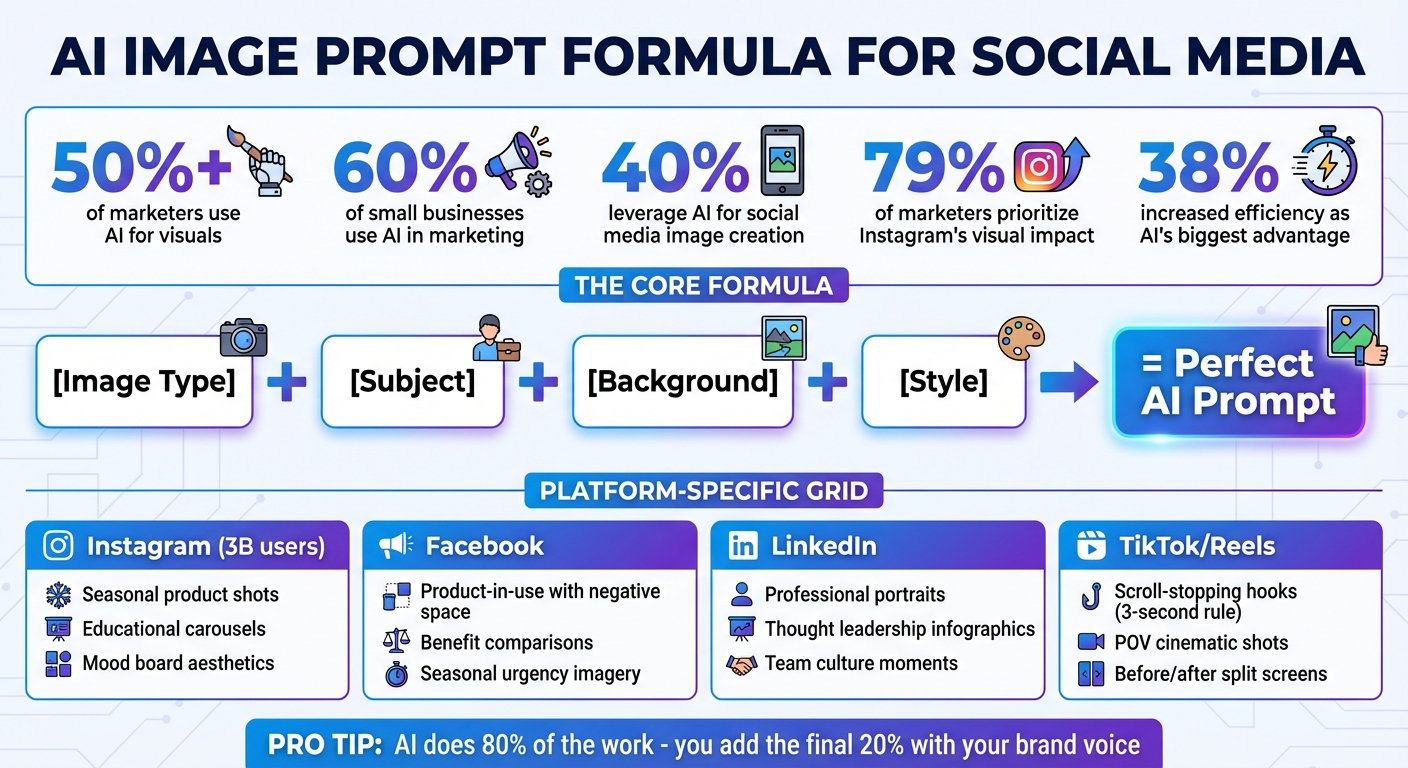
- Why it matters: Over 50% of marketers already use AI for visuals, cutting production time significantly.
- Key formula: Use this structure for prompts: [image type] + [subject] + [background] + [style].
- Platform-specific tips: Tailor prompts to match the tone and audience of each platform.
Want examples? Think festive product shots for Instagram, ad-ready images with negative space for Facebook, polished LinkedIn portraits, and attention-grabbing TikTok visuals. The secret is in the details – specificity leads to better results. AI tools do 80% of the work, but your brand’s voice completes the picture.
AI Image Prompt Formula for Social Media Content Creation
How to Write Great Prompts for AI Image Generators
1. Instagram Content Prompts
With three billion monthly active users, Instagram’s reach is undeniable. And since 79% of marketers prioritize its visual impact, it’s clear that captivating imagery is a must for standing out on this platform. The key? Eye-catching visuals paired with the right AI-driven prompts to boost engagement. Here are some tried-and-true ideas tailored for Instagram success.
Seasonal Product Lifestyle Shots
Seasonal imagery can make your product feel timely and relatable. in late 2026, Typeface used a highly engaging prompt to craft a festive perfume ad: "A photo of a perfume bottle set against a holiday setup in soft, ambient lighting photography style… Add pinecones, fairy lights, and sprigs of holly around the edges for authentic ambiance." The result? A visually stunning image that captured both the product and the holiday spirit. Start with your product’s core details, then weave in seasonal elements to create a lifestyle moment.
Educational Carousel Graphics
Carousel posts are perfect for breaking down complex ideas into bite-sized, swipeable content. To create a cohesive and visually appealing carousel, try this prompt: "A minimalist illustration series in [brand colors], flat design style, with negative space on the right third for text placement." This approach not only ensures a consistent look across all frames but also leaves plenty of room for text, making it easier for users to absorb information. Plus, carousels naturally encourage swiping, which can boost engagement and keep viewers on your post longer.
Mood Board Aesthetics
Mood boards are a fantastic way to establish or reinforce your brand’s visual identity. Prompt the AI with something like: "An aesthetic mood board featuring [your industry theme], soft pastel tones, natural textures like linen and marble, minimalist composition." These mood boards can serve as versatile assets – use them as grid fillers, Story backgrounds, or even inspiration for your overall Instagram aesthetic. They’re especially effective when launching new products or refining your brand’s look, helping to tie your feed together seamlessly between product-focused posts.
2. Facebook Ad Prompts
Creating Facebook ads that grab attention and drive engagement is no small task. Your visuals need to catch the eye, complement the ad copy, and leave space for call-to-action buttons – all while competing in a landscape where over 50% of marketers are now using AI to craft their images. To make your ads stand out, focus on crafting prompts that align with your campaign goals. Here are a few examples to help you create scroll-stopping visuals.
Product-in-Use Shots with Negative Space
Highlight your product in action while leaving room for text overlays. A well-crafted prompt might look like this: "Product photo of [your product] being used by [person] in [specific environment], warm natural lighting, negative space on the right third."
For example, if you’re marketing a laptop, you could prompt for an image of someone working on it in a cozy café with sunlight streaming through the windows. The negative space on the right ensures your headline and call-to-action button pop. As Frank Chen from Typeface puts it:
With any AI tools, the key is to iteratively get to the result you want. Modify the prompt, generate it multiple times, and iterate until you get a set of images that you can then filter down to the ones you like.
Benefit-Focused Comparison Visuals
Side-by-side comparisons are excellent for showcasing what makes your product better. A useful prompt could be: "Split-screen comparison showing generic [product category] on left versus [your branded product] on right, clean studio lighting, professional photography style."
This approach works especially well for ads aimed at conversions. By keeping the lighting and photography style clean and consistent, you can emphasize your product’s strengths while maintaining a polished look.
Seasonal Urgency Imagery
Seasonal visuals can create a sense of urgency and tap into timely emotions. A prompt like "[Your product] surrounded by seasonal decor, captured in lifestyle photography with golden hour lighting and shallow depth of field" can evoke the right mood.
For example, picture your product amidst autumn leaves, soft holiday lights, or other seasonal elements. Including details like "soft diffused lighting" or "cinematic framing" ensures your images remain consistent with your brand’s aesthetic while standing out in a crowded feed.
sbb-itb-58f115e
3. LinkedIn Branding Prompts
LinkedIn visuals need to strike a balance – projecting authority while remaining approachable. With around 60% of small businesses already using AI in marketing and 40% leveraging it for social media image creation or editing, the quality of your visuals can make or break your professional presence. To stand out, craft prompts that combine professionalism with a personal touch, moving away from stiff, outdated stock images. The goal? Create polished yet relatable visuals that strengthen your LinkedIn brand identity.
The Modern Professional Portrait
Your LinkedIn profile and posts should feature visuals that exude confidence and competence without coming across as overly formal or distant. A strong example of a prompt might be:
"Mid-body portrait of a professional wearing a tailored dark emerald wool blazer, with a confident expression, set against a softly blurred open office backdrop with morning sunlight filtering through."
Why be so specific? Because details matter. As Frederick Hill from LocaliQ explains:
Specificity is not just a detail, but the strategy for your brand’s impactful communication.
Adding elements like "iPhone camera quality" ensures realistic skin textures and natural color tones. These small touches make a big difference, creating visuals that feel authentic while maintaining a professional edge. This approach also keeps your branding consistent across platforms like Instagram and Facebook.
Thought Leadership Infographics
Infographics are a powerful way to share industry knowledge and establish yourself as a thought leader. A well-crafted prompt could be:
"Minimalist infographic featuring [insert industry statistic], using bold sans-serif fonts, brand colors, and clean, simple data visualization."
This type of visual works perfectly when presenting research findings or debunking common industry misconceptions. For example, in 2024, Highperformr‘s Social AI generated a tailored post that achieved over 50,000 impressions, demonstrating the impact of high-quality AI visuals on LinkedIn engagement. Keep your designs sleek and let the data shine – LinkedIn users value substance over flashy aesthetics.
In addition to data-driven content, incorporating visuals that highlight your team’s culture can further solidify your brand’s credibility.
Behind-the-Scenes Team Culture
Show the human side of your company while maintaining a polished look. Try this prompt:
"Photorealistic image of a diverse team collaborating at a minimalist marble desk under natural light, with genuine expressions."
This approach helps build trust by showcasing real moments – whether it’s a brainstorming session, a conference outing, or a team volunteering event. Ditch the generic handshake photos and focus on capturing authentic interactions that reflect your company’s values. The result? Images that feel real yet professional, perfectly suited for LinkedIn’s audience.
4. TikTok and Reels Visual Prompts
The Scroll-Stopping Hook Visual
TikTok and Reels thrive on visuals that grab attention immediately. To succeed on these platforms, your content needs to stop viewers mid-scroll within the first three seconds. This is where creating a "pattern interrupt" becomes essential – something visually striking that makes people pause. Here’s an example of an attention-grabbing visual:
"POV shot from an iPhone camera, a rain-soaked neon-lit alley at night, featuring a sharply focused face with cinematic bokeh and soft, long shadows, captured in 35mm quality with natural skin texture."
Including details like "iPhone camera quality" ensures the image feels authentic rather than overly polished. Adding elements like "rain-soaked streets" or "misty backgrounds" creates a cinematic vibe, tapping into the Analog Revival trend. This trend leans on film grain and disposable camera aesthetics to evoke nostalgia. Such visuals also set the tone for creative techniques, like split-screen storytelling.
For transformation content, split-screen visuals work wonders. Here’s an example:
"Before and after split-screen comparison: the left side shows a cluttered workspace under flat lighting; the right side reveals an organized, minimalist desk bathed in golden hour tones with hyper-detailed textures."
This format tells a complete story in a single frame.
Digital Creator Drew Deltz explains it best:
AI isn’t replacing photographers; it’s empowering them. Viral AI imagery has become the new marketing currency.
When crafting prompts, specificity is key. Instead of vague terms like "trendy outfit", describe it precisely: "a patchwork colorful jumpsuit paired with a chunky knit vest." Similarly, swap general phrases like "blurred background" for something more vivid: "a blurry hip vinyl record store backdrop".
With 38% of marketing professionals citing increased efficiency as AI’s biggest advantage, getting your prompts right from the start can save you hours of editing later.
Conclusion
AI-generated image prompts are reshaping the way marketers and content creators approach social media. In fact, 60% of small businesses are already incorporating AI into their marketing efforts, and nearly 40% use it specifically to create or edit images for social platforms.
Why is this shift happening? The answer lies in the combination of speed and quality. AI enables marketers to produce high-quality visuals in minutes – no need for time-consuming brainstorming sessions or expensive photoshoots. This balance between creativity and efficiency allows for scalable content production without compromising on quality.
To make the most of AI-generated prompts, experiment with different variations, analyze performance data, and refine your approach. A good rule of thumb? Let AI handle the bulk of the work – about 80% – and focus your energy on adding the final 20%: your brand’s unique voice and personality.
The tools are accessible, and the creative possibilities are vast. Whether you’re a solo entrepreneur juggling multiple accounts or part of a team managing large-scale campaigns, AI image prompts level the playing field. They empower you to compete with brands that have much larger budgets by enabling agile and impactful content creation. Start integrating these prompts into your strategy today to keep your social media presence dynamic and ahead of the curve.
FAQs
How can AI-generated image prompts help improve my social media content?
AI-generated image prompts are a game-changer for creating platform-specific visuals that resonate with your audience. They help you maintain consistent branding while boosting engagement across different channels. By using tools like Midjourney or DALL-E and crafting clear, descriptive prompts, you can generate high-quality graphics that reflect your brand’s tone, colors, and messaging – without the constant need for a professional designer.
These prompts also open the door to experimenting with various styles, themes, and layouts. This flexibility makes it easier to test what works best with your audience through A/B testing, fine-tuning your content strategy along the way. For small teams or solo entrepreneurs, this approach is a huge time-saver and cost-cutter, allowing you to consistently produce polished, eye-catching content while focusing on other critical parts of your business.
What are some effective AI image prompts for creating social media content?
AI-generated image prompts are a powerful way to craft eye-catching visuals tailored to the unique style and audience of each social media platform. To create an effective prompt, include essential details like the subject, mood, color palette, aspect ratio, and any branding elements (such as logos or brand colors). For the best results, also specify platform-specific requirements – for example, “square 1:1 for Instagram posts” or “vertical 9:16 for Stories.” Tools like Midjourney, DALL-E, or Stable Diffusion can bring these prompts to life.
Here are a few examples of detailed prompts designed for different platforms:
- Facebook: “Create a 1.91:1 carousel image for a summer sale featuring a group of friends laughing on a beach, pastel teal and coral tones, with the brand logo in the lower-right corner.”
- Instagram: “Design a square 1:1 post showcasing a coffee-brew kit on a marble countertop, warm amber tones, soft morning light, and the hashtag #MorningFuel written in elegant script.”
- LinkedIn: “Generate a professional 1.91:1 header image for a fintech article, featuring a city skyline, subtle data-flow graphics, and a corporate blue and gray color scheme.”
These prompts can be easily tailored to include your brand’s specific details, like custom colors, taglines, or other elements, ensuring your visuals stay consistent and resonate with your audience across all platforms.
How can I create AI image prompts that match my brand’s unique style and voice?
To craft AI image prompts that truly represent your brand’s personality, start by outlining what makes your brand unique. Define its core traits – whether it’s bold, friendly, or sophisticated – and think about the visual elements that embody these traits, like specific colors, textures, or patterns. When writing prompts, include these details to set the tone. For instance, instead of a generic prompt like "a coffee cup on a desk," you could say: "a matte-black coffee cup on a light-wood desk, illuminated by warm amber lighting, with a clean, minimalist aesthetic that feels modern and welcoming."
Clarity and detail are key. Begin with the main subject, then add layers of specifics, such as the artistic style (watercolor, 3D render), mood (calm, energetic), and brand-focused details (teal accents, sleek lines). Experiment with variations and tweak your wording until the visuals align perfectly with your brand’s identity. This approach helps your content maintain a cohesive and recognizable look, whether it’s featured on Instagram, Facebook, LinkedIn, or any other platform.
Related Blog Posts
- Top Midjourney Prompts for Marketable Art
- Easy AI Prompt Collections for Small Business Beginners
- Top Image Generation Prompt Collections for Professionals
- Ultimate Image Prompt Collections for Visual Marketing
Keep going: the prompt library has AI design prompts and Midjourney prompts ready to copy and run.