


Gemini 3 API Guide: How To Use Google's Most Intelligent Model



Google just launched Gemini 3 Pro on November 18, 2025, and it's not just another model update.
This is Google's smartest AI yet, built on state-of-the-art reasoning that handles agentic workflows, autonomous coding, and complex multimodal tasks better than anything they've released before.
If you're a developer building with AI, Gemini 3 changes what's possible.
The catch: it works differently than previous models, and using it the same way you used Gemini 2.5 means missing most of its capabilities.
This guide shows you exactly how to integrate Gemini 3 into your applications, optimize for cost and performance, and avoid the common mistakes that break reasoning quality.
Let's start with what makes Gemini 3 actually different.
ALSO READ: Introducing ChatGPT 5.1: Here's Everything You Need to Know
What Is Gemini 3 Pro (And Why It Matters)
Gemini 3 Pro is the first model in Google's new Gemini 3 family, and it represents a genuine leap forward in AI capability.
What Changed From Gemini 2.5
Better reasoning depth
Gemini 3 scored 91.9% on GPQA Diamond (PhD-level science questions) and 95% on AIME 2025 (high school math competition). It handles complex, multi-step reasoning significantly better than Gemini 2.5.
Stronger multimodal understanding
The model achieved 81% on MMMU-Pro (visual understanding) and 87.6% on Video-MMMU. It processes text, images, and video with much higher accuracy.
Autonomous coding capability
On Terminal-Bench 2.0 (which tests a model's ability to use tools and operate a computer via terminal), Gemini 3 Pro scored 54.2%. That's production-ready agentic coding performance.
Context Window and Pricing
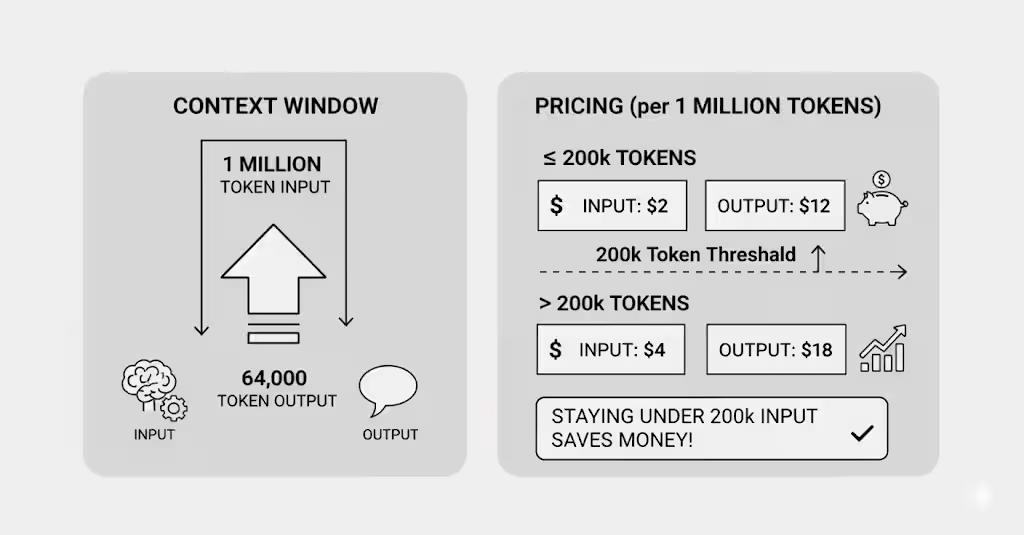
Context limits:
- 1 million token input window
- 64,000 token output limit
Pricing (per 1 million tokens):
- Input ≤200k tokens: $2
- Output ≤200k tokens: $12
- Input >200k tokens: $4
- Output >200k tokens: $18
The pricing jumps when you cross 200k input tokens, so staying under that threshold saves money.
Where You Can Access Gemini 3
Google AI Studio: Free tier with rate limits, perfect for prototyping
Vertex AI: Enterprise deployment with full controls and monitoring
Gemini CLI: Terminal-based development with Gemini 3 integration
Google Antigravity: New agentic development platform for autonomous coding
Third-party platforms: Cursor, GitHub, JetBrains, Replit, and more
The model is available now as gemini-3-pro-preview, with more Gemini 3 variants coming soon.
Getting Started With Gemini 3 API
Setting up Gemini 3 takes less than 15 minutes. Here's exactly what to do.
Setting Up Your Environment
Step 1: Create your Google AI Studio account
Visit aistudio.google.com and sign in with your Google account. You'll land in the AI Studio interface where you can test models and generate API keys.
Step 2: Generate your API key
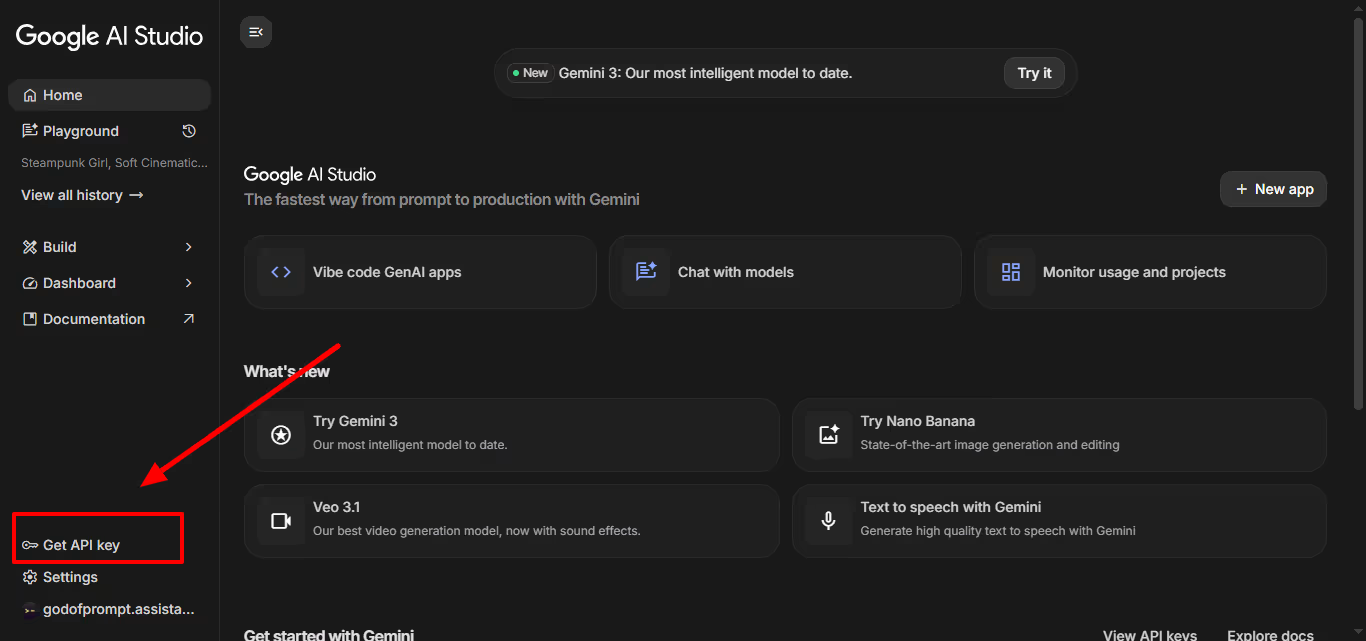
Click the "Get API Key" button in the top right. Google generates a key immediately. Copy it and store it somewhere safe.
Never paste your API key directly in code or commit it to GitHub. Use environment variables instead.
Step 3: Install the SDK
Choose your language:
Python (requires Python 3.9+):
pip install google-generativeai
JavaScript/Node:
npm install @google/generative-ai
REST API: No installation needed, just use curl or your HTTP client of choice.
Step 4: Make your first API call
Python:
from google import genai

client = genai.Client(api_key="YOUR_API_KEY")

response = client.models.generate_content(
    model="gemini-3-pro-preview",
    contents="Explain quantum entanglement in simple terms"
)

print(response.text)
JavaScript:
import { GoogleGenAI } from "@google/genai";

const ai = new GoogleGenAI({ apiKey: "YOUR_API_KEY" });

async function run() {
  const response = await ai.models.generateContent({
    model: "gemini-3-pro-preview",
    contents: "Explain quantum entanglement in simple terms"
  });

  console.log(response.text);
}

run();
REST:
curl "https://generativelanguage.googleapis.com/v1beta/models/gemini-3-pro-preview:generateContent" \
  -H "x-goog-api-key: YOUR_API_KEY" \
  -H 'Content-Type: application/json' \
  -X POST \
  -d '{
    "contents": [{
      "parts": [{"text": "Explain quantum entanglement in simple terms"}]
    }]
  }'
If you get a response, you're set up correctly.
Free Tier vs Paid Access
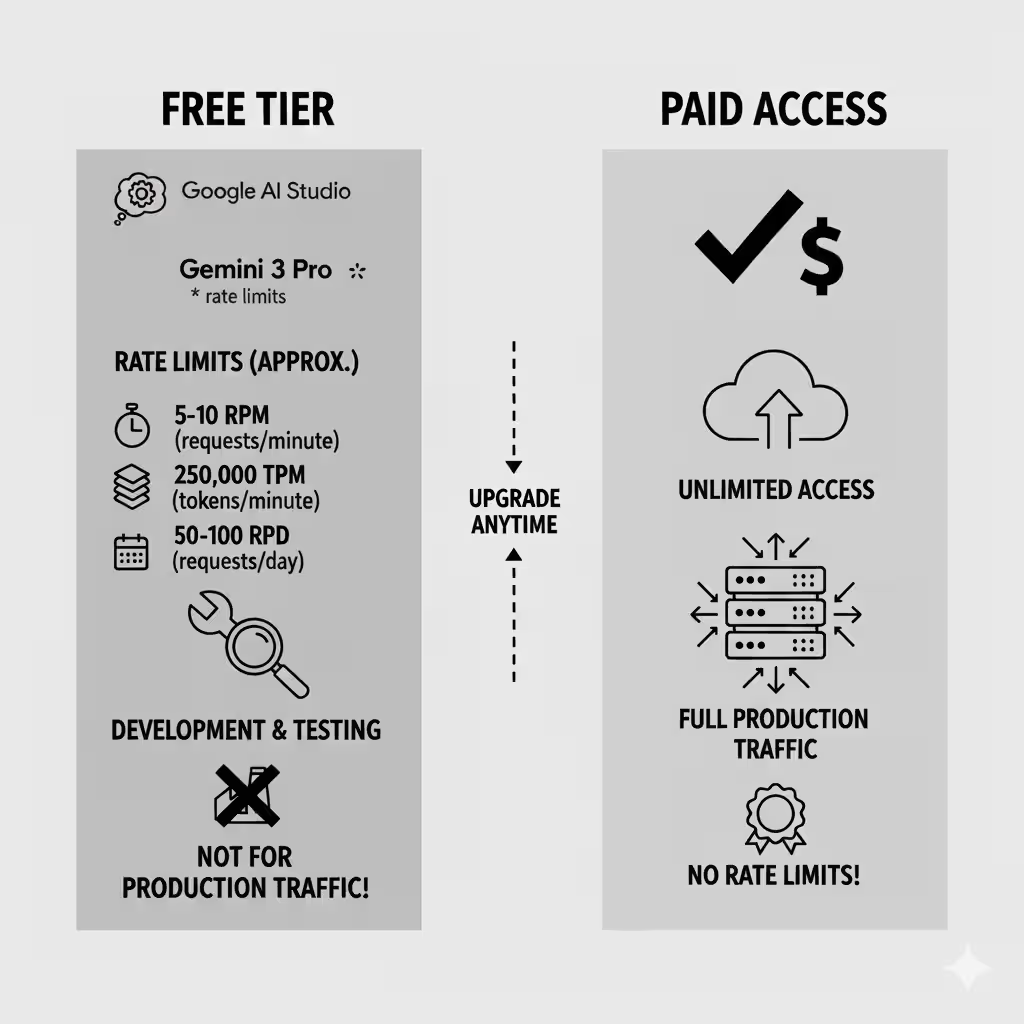
What's included in the free tier:
Google AI Studio gives you free access to Gemini 3 Pro with rate limits. You can prototype, test, and build small applications without paying anything.
Rate limits (approximate):
- 5-10 requests per minute (RPM)
- 250,000 tokens per minute (TPM)
- 50-100 requests per day (RPD)
These limits are enough for development and testing, but not for production traffic.
When to upgrade to paid access:
You need paid access when:
- Your traffic exceeds free tier limits
- You need higher throughput
- You're deploying to production
- You require enterprise features (Vertex AI)
Cost optimization tip:
If you're staying on the free tier, create multiple Google accounts (each gets its own key) and rotate between them. Common practice among developers staying within free limits.
Understanding Thinking Levels (Your Speed vs Intelligence Control)
Gemini 3 introduces a new way to control how much reasoning the model uses.
What Thinking Levels Actually Do
The thinking_level parameter controls the maximum depth of the model's internal reasoning process before responding.
Think of it like this: Gemini 3 can think longer about hard problems and respond quickly to easy ones. The thinking level sets the upper limit on how much time it takes to reason.
Important: Gemini 3 uses dynamic thinking by default. Even on high thinking level, it won't waste time on simple questions. It only uses deep reasoning when the prompt needs it.
Choosing The Right Thinking Level
low - Minimize latency and cost
Use when:
- Simple instruction following
- Chat and conversational AI
- High-throughput applications
- Speed matters more than depth
Example: Customer support chatbot answering FAQs
high - Maximize reasoning depth (default)
Use when:
- Complex problem-solving
- Multi-step reasoning
- Code generation with intricate logic
- Accuracy matters more than speed
Example: Debugging race conditions in multi-threaded code
medium - Coming soon
Will offer a balance between the two. Not available at launch.
Default behavior:
If you don't specify thinking_level, Gemini 3 Pro defaults to high. For most applications, this is what you want.
Code Examples For Each Level
Python (setting to low):
from google import genai

client = genai.Client()

response = client.models.generate_content(
    model="gemini-3-pro-preview",
    contents="What's the capital of France?",
    config={"thinking_level": "low"}
)

print(response.text)
Python (default high):
response = client.models.generate_content(
    model="gemini-3-pro-preview",
    contents="Find the race condition in this multi-threaded C++ snippet: [code here]"
)
# Uses high thinking level by default
JavaScript:
const response = await ai.models.generateContent({
  model: "gemini-3-pro-preview",
  contents: "What's the capital of France?",
  config: { thinkingLevel: "low" }
});
REST:
curl "https://generativelanguage.googleapis.com/v1beta/models/gemini-3-pro-preview:generateContent" \
  -H "x-goog-api-key: $GEMINI_API_KEY" \
  -H 'Content-Type: application/json' \
  -X POST \
  -d '{
    "contents": [{"parts": [{"text": "What is the capital of France?"}]}],
    "generationConfig": {"thinkingLevel": "low"}
  }'
Common Mistakes to Avoid
Don't use both thinking_level and thinking_budget
The old thinking_budget parameter is still supported for backward compatibility, but using both in the same request returns a 400 error.
If you have old code using thinking_budget, migrate to thinking_level for better performance.
Don't set low for everything
It's tempting to use low thinking for speed, but complex tasks need deep reasoning. If your results are worse after switching to low, try high instead.
Media Resolution: Getting The Best From Images and Video
Gemini 3 gives you granular control over how it processes visual content through the media_resolution parameter.
Why Media Resolution Matters
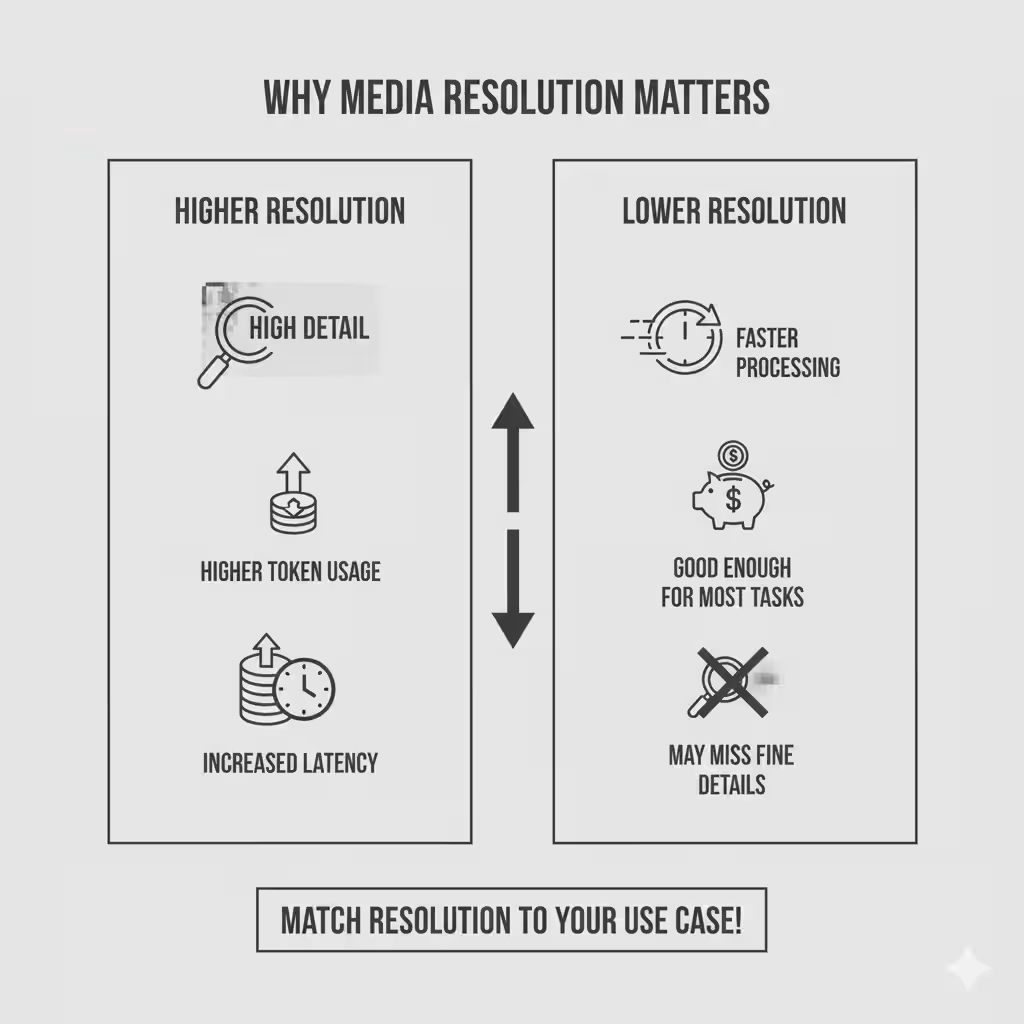
Higher resolution means:
- Better text recognition in images
- More accurate detail identification
- Higher token usage
- Increased latency
Lower resolution means:
- Faster processing
- Lower costs
- Good enough for most tasks
- May miss fine details
The key is matching resolution to your use case.
Choosing The Right Resolution
Images: Use media_resolution_high (1120 tokens)
Recommended for most image analysis tasks. This ensures maximum quality for reading text, identifying small objects, and understanding complex visuals.
PDFs: Use media_resolution_medium (560 tokens)
Optimal for document understanding. Quality saturates at medium for standard documents. Going to high rarely improves OCR results and just costs more.
Video (general): Use media_resolution_low (70 tokens per frame)
Sufficient for action recognition, scene description, and general video understanding.
Note: For video, both low and medium are treated identically at 70 tokens per frame to optimize context usage.
Video (text-heavy): Use media_resolution_high (280 tokens per frame)
Required only when reading dense text within video frames or identifying very small details.
Implementation Examples
Setting resolution per image (Python):
from google import genai
from google.genai import types
import base64

# Media resolution is in v1alpha API
client = genai.Client(http_options={'api_version': 'v1alpha'})

response = client.models.generate_content(
    model="gemini-3-pro-preview",
    contents=[
        types.Content(
            parts=[
                types.Part(text="What is in this image?"),
                types.Part(
                    inline_data=types.Blob(
                        mime_type="image/jpeg",
                        data=base64.b64decode("..."),
                    ),
                    media_resolution={"level": "media_resolution_high"}
                )
            ]
        )
    ]
)

print(response.text)
JavaScript:
import { GoogleGenAI } from "@google/genai";

const ai = new GoogleGenAI({ apiVersion: "v1alpha" });

async function run() {
  const response = await ai.models.generateContent({
    model: "gemini-3-pro-preview",
    contents: [
      {
        parts: [
          { text: "What is in this image?" },
          {
            inlineData: {
              mimeType: "image/jpeg",
              data: "...",
            },
            mediaResolution: {
              level: "media_resolution_high"
            }
          }
        ]
      }
    ]
  });

  console.log(response.text);
}

run();
REST:
curl "https://generativelanguage.googleapis.com/v1alpha/models/gemini-3-pro-preview:generateContent" \
  -H "x-goog-api-key: $GEMINI_API_KEY" \
  -H 'Content-Type: application/json' \
  -X POST \
  -d '{
    "contents": [{
      "parts": [
        { "text": "What is in this image?" },
        {
          "inlineData": {
            "mimeType": "image/jpeg",
            "data": "..."
          },
          "mediaResolution": {
            "level": "media_resolution_high"
          }
        }
      ]
    }]
  }'
Global resolution configuration:
You can also set media resolution globally in generation_config instead of per-image. This applies the same setting to all media in the request.
Optimizing for Cost and Performance
Cost optimization:
If token usage is exceeding your context window after migrating from Gemini 2.5, explicitly reduce media resolution:
- PDFs: Try
mediuminstead ofhigh - Video: Use
lowunless OCR is critical - Images: Only use
highwhen detail truly matters
Performance optimization:
Lower resolution processes faster. For real-time applications where speed matters, start with low and only increase if results aren't good enough.
Temperature Settings (Why You Should Leave It Alone)
For Gemini 3, Google strongly recommends keeping temperature at the default value of 1.0.
Why Gemini 3 Works Best at Temperature 1.0
Previous models often benefited from tuning temperature to control creativity versus determinism. Gemini 3's reasoning capabilities are optimized specifically for temperature 1.0.
What Happens When You Lower Temperature
Setting temperature below 1.0 can cause:
- Looping (the model repeats itself)
- Degraded performance on complex tasks
- Worse results on math and reasoning problems
This is especially true for reasoning models. The internal reasoning process works best at the default setting.
The One Exception
If you're doing something very specific that absolutely requires deterministic outputs and you've tested thoroughly, you might adjust temperature. But start at 1.0 and only change it if you have a compelling reason.
Thought Signatures: Maintaining Reasoning Context
Thought signatures are one of the most important new concepts in Gemini 3.
What Are Thought Signatures
Thought signatures are encrypted representations of the model's internal reasoning process. They let Gemini 3 maintain its reasoning chain across multiple API calls.
Think of them as breadcrumbs the model leaves to remember how it arrived at conclusions. When you send a thought signature back to the model, it can continue from where it left off instead of starting fresh.
When Thought Signatures Are Critical
Function calling: strict validation enforced
When using function calling, thought signatures are required. Missing them returns a 400 error.
The model needs the signature to process tool outputs correctly. Without it, the reasoning chain breaks.
Text/chat: recommended but not required
For standard text generation, signatures aren't strictly validated. But including them significantly improves reasoning quality across multi-turn conversations.
What happens if you omit them:
For function calling: Your request fails with a 400 error.
For text/chat: The model loses context and reasoning quality degrades. Follow-up questions won't have access to the full reasoning chain.
Handling Thought Signatures Correctly
Good news: If you use official SDKs (Python, Node, Java) with standard chat history, thought signatures are handled automatically. You don't need to manually manage them.
When you need to handle them manually:
- Building custom conversation management
- Using REST API directly
- Implementing advanced multi-turn workflows
Rules for handling signatures:
Single function call: The functionCall part contains one signature. Return it in your next request.
Parallel function calls: Only the first functionCall in the list has a signature. Return parts in exact order received.
Multi-step sequential calls: Each function call has its own signature. Return all accumulated signatures in the conversation history.
Code Examples
Multi-step function calling (sequential):
The user asks something requiring two separate steps (like checking a flight, then booking a taxi based on the result).
// Step 1: Model calls flight tool and returns Signature A
{
  "role": "model",
  "parts": [
    {
      "functionCall": { "name": "check_flight", "args": {...} },
      "thoughtSignature": "<Sig_A>" // Save this
    }
  ]
}

// Step 2: You send flight result, must include Sig_A
[
  { "role": "user", "parts": [{ "text": "Check flight AA100..." }] },
  {
    "role": "model",
    "parts": [
      {
        "functionCall": { "name": "check_flight", "args": {...} },
        "thoughtSignature": "<Sig_A>" // Required
      }
    ]
  },
  { "role": "user", "parts": [{ "functionResponse": { "name": "check_flight", "response": {...} } }] }
]

// Step 3: Model calls taxi tool, returns Signature B
{
  "role": "model",
  "parts": [
    {
      "functionCall": { "name": "book_taxi", "args": {...} },
      "thoughtSignature": "<Sig_B>" // Save this too
    }
  ]
}

// Step 4: You send taxi result, must include both Sig_A and Sig_B
[
  // ... previous history including Sig_A ...
  {
    "role": "model",
    "parts": [
       { "functionCall": { "name": "book_taxi", ... }, "thoughtSignature": "<Sig_B>" }
    ]
  },
  { "role": "user", "parts": [{ "functionResponse": {...} }] }
]
Parallel function calls:
User asks: "Check the weather in Paris and London."
// Model response with parallel calls
{
  "role": "model",
  "parts": [
    // First call has the signature
    {
      "functionCall": { "name": "check_weather", "args": { "city": "Paris" } },
      "thoughtSignature": "<Signature_A>"
    },
    // Subsequent parallel calls don't have signatures
    {
      "functionCall": { "name": "check_weather", "args": { "city": "London" } }
    }
  ]
}

// Your response with results
{
  "role": "user",
  "parts": [
    {
      "functionResponse": { "name": "check_weather", "response": { "temp": "15C" } }
    },
    {
      "functionResponse": { "name": "check_weather", "response": { "temp": "12C" } }
    }
  ]
}
Text/chat with signatures:
// User asks a reasoning question
[
  {
    "role": "user",
    "parts": [{ "text": "What are the risks of this investment?" }]
  },
  {
    "role": "model",
    "parts": [
      {
        "text": "Let me analyze the risks step by step. First, volatility...",
        "thoughtSignature": "<Signature_C>" // Recommended to include in follow-ups
      }
    ]
  },
  {
    "role": "user",
    "parts": [{ "text": "Summarize that in one sentence." }]
  }
]
Migration From Other Models (Using the Dummy Signature)
If you're transferring a conversation from Gemini 2.5 or injecting a custom function call not generated by Gemini 3, you won't have a valid signature.
To bypass strict validation in these cases, use this dummy string:
"thoughtSignature": "context_engineering_is_the_way_to_go"
This lets you migrate existing conversations without breaking function calling validation.
Function Calling and Tools With Gemini 3
Gemini 3 supports powerful tool integration for building agentic workflows.
Built-In Tools You Can Use
Google Search grounding:
Lets the model search the web for current information.
response = client.models.generate_content(
    model="gemini-3-pro-preview",
    contents="What are the latest developments in quantum computing?",
    config={"tools": [{"google_search": {}}]}
)
File Search:
Search through uploaded files for relevant information.
Code Execution:
The model can write and run Python code to solve problems.
URL Context:
Fetch and process content from specific URLs.
What's NOT supported:
Google Maps and Computer Use are currently not supported in Gemini 3.
Custom Function Calling
You can define your own tools for Gemini 3 to use.
Example: Weather tool
weather_tool = {
    "name": "get_weather",
    "description": "Get current weather for a location",
    "parameters": {
        "type": "object",
        "properties": {
            "location": {
                "type": "string",
                "description": "City name, e.g. 'London' or 'New York'"
            }
        },
        "required": ["location"]
    }
}

response = client.models.generate_content(
    model="gemini-3-pro-preview",
    contents="What's the weather like in Tokyo?",
    config={"tools": [weather_tool]}
)

# Model returns a function call
# You execute the function and return results
# Model continues with the result
Handling function responses:
When the model calls a function, you:
- Execute the function with the provided arguments
- Return the result as a
functionResponse - Include the thought signature from the function call
- Send it back to the model
- Model continues reasoning with the result
Structured Outputs With Tools
Gemini 3 lets you combine built-in tools with structured JSON output.
This is powerful for agentic workflows: fetch data with search or URL context, then extract it in a specific format for downstream tasks.
Example: Extract match results from search
Python:
from google import genai
from google.genai import types
from pydantic import BaseModel, Field
from typing import List

class MatchResult(BaseModel):
    winner: str = Field(description="The name of the winner.")
    final_match_score: str = Field(description="The final match score.")
    scorers: List[str] = Field(description="The name of the scorer.")

client = genai.Client()

response = client.models.generate_content(
    model="gemini-3-pro-preview",
    contents="Search for all details for the latest Euro.",
    config={
        "tools": [
            {"google_search": {}},
            {"url_context": {}}
        ],
        "response_mime_type": "application/json",
        "response_json_schema": MatchResult.model_json_schema(),
    },
)

result = MatchResult.model_validate_json(response.text)
print(result)
JavaScript:
import { GoogleGenAI } from "@google/genai";
import { z } from "zod";
import { zodToJsonSchema } from "zod-to-json-schema";

const ai = new GoogleGenAI({});

const matchSchema = z.object({
  winner: z.string().describe("The name of the winner."),
  final_match_score: z.string().describe("The final score."),
  scorers: z.array(z.string()).describe("The name of the scorer.")
});

async function run() {
  const response = await ai.models.generateContent({
    model: "gemini-3-pro-preview",
    contents: "Search for all details for the latest Euro.",
    config: {
      tools: [
        { googleSearch: {} },
        { urlContext: {} }
      ],
      responseMimeType: "application/json",
      responseJsonSchema: zodToJsonSchema(matchSchema),
    },
  });

  const match = matchSchema.parse(JSON.parse(response.text));
  console.log(match);
}

run();
This combines:
- Search grounding (finds current information)
- URL context (reads full pages)
- Structured output (extracts data in defined format)
All in one API call.
New API Features in Gemini 3
Gemini 3 introduces new tools specifically for agentic coding workflows.
Client-Side Bash Tool
The bash tool lets Gemini 3 propose shell commands as part of agentic workflows.
What it enables:
- Navigate your local filesystem
- Drive development processes
- Automate system operations
- Run build commands, tests, and linters
Security consideration:
Only use the bash tool in controlled environments. Never give it unrestricted access to production systems. Implement command allowlists if exposing to untrusted inputs.
Use cases:
- "Set up a new React project with TypeScript"
- "Find all Python files larger than 1MB"
- "Run tests and fix any failures"
The model proposes commands, you execute them (with proper sandboxing), and return the results.
Server-Side Bash Tool
Google also offers a hosted server-side bash tool for secure prototyping.
What it's for:
- Multi-language code generation
- Secure execution environment
- Testing code snippets safely
Availability:
Currently in early access with partners. General availability coming soon.
Combining Tools Effectively
The real power comes from combining multiple tools in one workflow.
Example: Research and extract
# Combine search + URL context + structured output
response = client.models.generate_content(
    model="gemini-3-pro-preview",
    contents="Find the top 3 AI models released this month and extract their key specs",
    config={
        "tools": [
            {"google_search": {}},
            {"url_context": {}}
        ],
        "response_mime_type": "application/json",
        "response_json_schema": {
            "type": "object",
            "properties": {
                "models": {
                    "type": "array",
                    "items": {
                        "type": "object",
                        "properties": {
                            "name": {"type": "string"},
                            "release_date": {"type": "string"},
                            "context_window": {"type": "string"},
                            "key_features": {"type": "array", "items": {"type": "string"}}
                        }
                    }
                }
            }
        }
    }
)
This workflow:
- Searches for recent AI model releases
- Fetches full details from URLs
- Extracts structured data
- Returns clean JSON
All automated in a single API call.
Prompting Best Practices For Gemini 3
Reasoning models require different prompting strategies than instruction-following models.
How Reasoning Models Change Prompting
Be precise, not verbose
Gemini 3 responds best to direct, clear instructions. It doesn't need elaborate prompting techniques designed for older models.
Bad prompt:"I would like you to carefully consider the following code snippet. Please take your time to thoroughly analyze each line, paying special attention to potential issues. Think step by step about what might go wrong..."
Good prompt:"Find the bug in this code: [code]"
Gemini 3's reasoning happens internally. You don't need to prompt it to "think step by step" — it does that automatically when needed.
Output Verbosity Control
Default behavior:
Gemini 3 is less verbose than Gemini 2.5. It prefers direct, efficient answers.
If your use case requires a conversational or detailed persona, you must explicitly steer the model.
Example:
response = client.models.generate_content(
    model="gemini-3-pro-preview",
    contents="Explain machine learning to a beginner. Be friendly, conversational, and include examples."
)
Without the explicit instruction to be conversational, Gemini 3 gives a concise, technical answer. With it, you get the tone you want.
Context Management For Large Inputs
When working with large datasets (entire books, codebases, long videos), place your instructions at the end of the prompt, after the data.
Structure:
[Large context data here - could be a full codebase, document, or video]

Based on the information above, [your specific question or instruction]
This anchors the model's reasoning to the provided data instead of relying on its training knowledge.
Example:
prompt = f"""
{entire_codebase}

Based on the code above, identify all instances where database queries don't use parameterized statements and could be vulnerable to SQL injection.
"""
The phrase "Based on the information/code/data above" signals to the model that it should reason exclusively from the provided context.
Migrating From Gemini 2.5 to Gemini 3
If you're using Gemini 2.5, here's what you need to update.
What Changed (And What It Means For Your Code)
1. Thinking levels replace thinking budget
Old way (Gemini 2.5):
config={"thinking_budget": 10000}
New way (Gemini 3):
config={"thinking_level": "high"}
The old thinking_budget still works for backward compatibility, but thinking_level gives more predictable performance.
2. Temperature should stay at 1.0
If your existing code explicitly sets temperature (especially to low values for deterministic outputs), remove this parameter.
Gemini 3's reasoning is optimized for temperature 1.0. Lower values can cause looping or performance degradation.
3. Media resolution defaults changed
Default OCR resolution for PDFs is now higher. This improves accuracy but increases token usage.
If your requests now exceed the context window, explicitly reduce media resolution to medium for PDFs.
4. Token consumption differences
Migrating to Gemini 3 Pro defaults may:
- Increase token usage for PDFs (higher default resolution)
- Decrease token usage for video (more efficient compression)
Monitor your token usage after migration and adjust media resolution if needed.
Migration Checklist
Before migrating:
- Identify all places using
thinking_budget→ Update tothinking_level - Find explicit temperature settings → Remove or verify 1.0 is acceptable
- Check PDF and document parsing workflows → Test new media resolution behavior
- Review function calling implementations → Ensure thought signatures are handled
During migration:
- Start with one endpoint or feature
- Test thoroughly with production-like data
- Monitor token usage and costs
- Verify reasoning quality meets expectations
After migration:
- Update monitoring dashboards for new parameters
- Adjust budgets for potential cost changes
- Document any prompt changes needed
- Train team on thought signature handling
Common Migration Issues
Issue: Exceeding context window with new defaults
Solution: Explicitly set media_resolution: "medium" for PDFs or media_resolution: "low" for video.
Issue: Image segmentation doesn't work
Gemini 3 Pro doesn't support pixel-level mask segmentation. For workloads requiring this, continue using Gemini 2.5 Flash with thinking turned off.
Issue: Results feel less verbose than Gemini 2.5
Solution: Add explicit instructions for desired verbosity. Gemini 3 defaults to concise outputs.
When to Stick With Gemini 2.5
Use Gemini 2.5 if you need:
- Image segmentation capabilities
- Exact cost predictability (while Gemini 3 pricing stabilizes)
- A model that's more verbose by default
For most use cases, Gemini 3's reasoning improvements outweigh these limitations.
OpenAI Compatibility Layer
If you're using OpenAI-compatible endpoints, parameter mapping happens automatically.
How Parameters Map
OpenAI → Gemini:
reasoning_effort: "low" → thinking_level: "low"reasoning_effort: "medium" → thinking_level: "high"reasoning_effort: "high" → thinking_level: "high"
Note that OpenAI's medium maps to Gemini's high because Gemini only has two levels at launch.
What Works Automatically
- Standard chat completions
- Function calling
- Structured outputs
- Streaming
Edge Cases to Watch
Temperature handling:
OpenAI defaults vary by endpoint. Gemini defaults to 1.0. If your OpenAI code relies on specific temperature behavior, test thoroughly.
Token counting:
Gemini's tokenization differs slightly from OpenAI's. Budget for ~10-15% variance in token counts.
Cost Optimization Strategies
Gemini 3 can be expensive if you're not careful. Here's how to control costs.
Understanding Pricing Tiers
Tier 1 (under 200k input tokens):
- $2 per million input tokens
- $12 per million output tokens
Tier 2 (over 200k input tokens):
- $4 per million input tokens
- $18 per million output tokens
Staying under 200k input tokens saves 50% on input costs and 33% on output costs.
Reducing Token Usage
1. Optimize media resolution
Default settings may use more tokens than you need:
For PDFs:
# Default might use high, but medium is often enough
config={"media_resolution": "medium"}
For video:
# Use low unless reading text in frames
config={"media_resolution": "low"}
For images:
Only use high when detail truly matters. Try medium first.
2. Use context caching
Context caching costs 90% less than regular tokens. For repeated prompts with the same context, caching saves money.
Minimum tokens for caching: 2,048
Example:
# First request: pays full price for context
# Subsequent requests within cache window: 90% discount on cached portion

response = client.models.generate_content(
    model="gemini-3-pro-preview",
    contents=prompt,
    config={"cached_content": "your-cache-id"}
)
3. Batch API for high-volume requests
The Batch API processes requests asynchronously at lower cost. Good for:
- Data processing pipelines
- Bulk analysis
- Non-time-sensitive tasks
Trade latency for significant cost savings.
4. Smart chunking strategies
Instead of sending entire documents:
- Identify relevant sections first
- Send only what's needed
- Use multiple smaller requests if appropriate
Example:
Instead of sending a 500-page document, search for relevant sections and only send those 20 pages.
Monitoring and Tracking Costs
Set up usage alerts in Google Cloud:
Configure billing alerts to notify you when spending crosses thresholds.
Track per-request costs:
Log token usage for each request:
print(f"Input tokens: {response.usage_metadata.prompt_token_count}")
print(f"Output tokens: {response.usage_metadata.candidates_token_count}")
Calculate cost:
input_cost = (prompt_tokens / 1_000_000) * 2  # or 4 if >200k
output_cost = (output_tokens / 1_000_000) * 12  # or 18 if >200k
total_cost = input_cost + output_cost
Identify expensive patterns:
Review logs weekly to find:
- Requests using excessive tokens
- Inefficient prompting patterns
- Opportunities to batch or cache
Real-World Use Cases and Examples
Here's how developers are using Gemini 3 in production.
Autonomous Coding Agents
Use case: AI pair programmer that handles full features end-to-end
Why Gemini 3:
- 54.2% on Terminal-Bench 2.0 (tool use via terminal)
- Strong at multi-step reasoning
- Handles code context well
Implementation:
# Agent gets a feature request
prompt = """
Add user authentication to this Express.js API:
[codebase context]

Requirements:
- JWT-based auth
- Login and signup endpoints
- Middleware for protected routes
- Password hashing with bcrypt
"""

response = client.models.generate_content(
    model="gemini-3-pro-preview",
    contents=prompt,
    config={
        "thinking_level": "high",
        "tools": [{"bash": {}}]  # Lets it run commands
    }
)

# Agent proposes code changes, runs tests, fixes issues
# All autonomously through multiple tool calls
Result: Complete feature implementation with tests, done in minutes instead of hours.
Multimodal Understanding
Use case: Analyze product images and generate descriptions for e-commerce
Why Gemini 3:
- 81% on MMMU-Pro (visual understanding)
- Handles image + text context well
- Can extract structured data
Implementation:
from pydantic import BaseModel
from typing import List

class ProductInfo(BaseModel):
    name: str
    category: str
    colors: List[str]
    key_features: List[str]
    suggested_description: str

response = client.models.generate_content(
    model="gemini-3-pro-preview",
    contents=[
        "Analyze this product image and generate details",
        image_data
    ],
    config={
        "media_resolution": "high",
        "response_mime_type": "application/json",
        "response_json_schema": ProductInfo.model_json_schema()
    }
)

product = ProductInfo.model_validate_json(response.text)
Result: Accurate product details extracted from images, ready for database insertion.
Agentic Workflows
Use case: Research assistant that finds, reads, and synthesizes information
Why Gemini 3:
- Built-in search and URL tools
- Strong reasoning for synthesis
- Structured output support
Implementation:
class ResearchReport(BaseModel):
    summary: str
    key_findings: List[str]
    sources: List[str]
    confidence_level: str

response = client.models.generate_content(
    model="gemini-3-pro-preview",
    contents="Research the latest developments in solid-state batteries and summarize key breakthroughs",
    config={
        "tools": [
            {"google_search": {}},
            {"url_context": {}}
        ],
        "thinking_level": "high",
        "response_mime_type": "application/json",
        "response_json_schema": ResearchReport.model_json_schema()
    }
)

report = ResearchReport.model_validate_json(response.text)
Result: Comprehensive research report with sources, generated in one API call.
Common Problems and Solutions
Here are the issues developers hit most often with Gemini 3.
"My requests are timing out"
Possible causes:
- Input exceeds context window (1M tokens)
- Media resolution too high for video
- Thinking level set too high for simple task
Diagnosis:
Check token count:
print(f"Tokens used: {response.usage_metadata.prompt_token_count}")
Check if it's approaching 1M.
Quick fixes:
For large documents:
# Reduce PDF resolution
config={"media_resolution": "medium"}
For video:
# Use low resolution unless OCR needed
config={"media_resolution": "low"}
For simple tasks:
# Don't use high thinking for easy questions
config={"thinking_level": "low"}
"Thought signature validation errors"
Error: 400 bad request with message about missing thought signatures
Cause: You're using function calling but not returning thought signatures.
Fix:
If using official SDKs, make sure you're using standard conversation history format. Signatures are handled automatically.
If using REST directly:
// When model returns function call with signature
{
  "role": "model",
  "parts": [{
    "functionCall": {...},
    "thoughtSignature": "xyz123"  // Save this
  }]
}

// You must return it:
{
  "role": "model",
  "parts": [{
    "functionCall": {...},
    "thoughtSignature": "xyz123"  // Include it
  }]
}
"Token usage is too high"
Diagnosis steps:
- Check media resolution settings
- Count how many images/video frames you're sending
- Look at prompt length
Solutions:
Reduce media resolution:
# Instead of high (1120 tokens per image)
config={"media_resolution": "medium"}  # 560 tokens
Sample video frames:
# Instead of every frame, sample every 5th frame
# Most video understanding doesn't need every frame
Trim prompts:
# Send only relevant code sections, not entire repo
# Extract key document pages, not full PDF
"Results aren't as good as expected"
Diagnosis:
- Check thinking level (might be too low)
- Verify temperature is at 1.0
- Review prompt clarity
- Check if you need a different model
Solutions:
Increase thinking level:
# If using low, try high for complex tasks
config={"thinking_level": "high"}
Verify temperature:
# Remove any custom temperature settings
# Let it default to 1.0
Improve prompt:
# Be more specific about what you want
# Add examples if helpful
# State constraints clearly
Consider model choice:
For some tasks, Gemini 2.5 Flash might be better (faster, cheaper, good enough). Gemini 3 Pro is overkill for simple tasks.
Advanced Features and Techniques
For production deployments, these features matter.
Context Caching
Context caching lets you reuse expensive context across multiple requests at 90% lower cost.
When caching helps:
- Repeated queries against same large context
- Chatbots with long system prompts
- Document analysis workflows
- Code review systems
Minimum token requirement: 2,048 tokens
Implementation:
# First request: establish cache
response = client.models.generate_content(
    model="gemini-3-pro-preview",
    contents=prompt_with_large_context,
    config={"cache_content": True}
)

cache_id = response.cache_id

# Subsequent requests: use cache
response = client.models.generate_content(
    model="gemini-3-pro-preview",
    contents=new_question,
    config={"cached_content": cache_id}
)
Cost savings calculation:
Without caching:
- 100k token context × $2/1M = $0.20 per request
- 100 requests = $20
With caching:
- First request: $0.20
- Next 99 requests: 100k × $0.20/1M = $0.02 each = $1.98
- Total: $2.18 (saving $17.82, or 89%)
Batch API Usage
The Batch API processes requests asynchronously for lower cost and higher throughput.
When to use batch:
- Data processing pipelines
- Bulk content generation
- Analysis jobs that can wait
- High-volume, non-interactive tasks
Trade-offs:
- Lower cost (specific pricing TBD)
- Higher throughput
- Added latency (requests queued and processed in batches)
Implementation:
Check the official Batch API documentation for current setup. The API is supported but pricing and specific implementation details are still being finalized.
Multi-Turn Conversations
For building chatbots or assistants, proper conversation management is critical.
Best practices:
1. Maintain full conversation history
conversation = []

# Add user message
conversation.append({
    "role": "user",
    "parts": [{"text": user_input}]
})

# Get model response
response = client.models.generate_content(
    model="gemini-3-pro-preview",
    contents=conversation
)

# Add model response to history
conversation.append({
    "role": "model",
    "parts": response.candidates[0].content.parts
})
2. Handle thought signatures automatically
If using official SDKs with this pattern, signatures are included automatically in response.candidates[0].content.parts.
3. Manage context window
Conversations can grow beyond 1M tokens. When approaching the limit:
- Summarize earlier messages
- Drop oldest non-essential turns
- Keep system prompt and recent context
def trim_conversation(conversation, max_tokens=900000):
    # Keep system prompt (first message) and recent messages
    # Summarize or drop middle messages if needed
    pass
Comparing Gemini 3 To Alternatives
How does Gemini 3 stack up against other frontier models?
Gemini 3 vs GPT-5.1
Gemini 3 wins on:
- Multimodal understanding (stronger image/video capabilities)
- Longer context window (1M vs 128k-200k)
- Coding benchmarks (higher scores on agentic tasks)
- Built-in search and grounding tools
GPT-5.1 wins on:
- Conversational quality (more natural, less robotic)
- Creative writing (more varied, expressive outputs)
- Mature ecosystem (more third-party tools and integrations)
- Established developer community
Pricing:
Roughly comparable for most use cases. Gemini 3 is slightly cheaper under 200k tokens.
When to choose Gemini 3:
- Multimodal applications
- Agentic coding workflows
- Need built-in search grounding
- Long context understanding
When to choose GPT-5.1:
- Conversational AI
- Creative content generation
- Existing OpenAI infrastructure
- Prefer established tooling
Gemini 3 vs Claude Sonnet 4.5
Gemini 3 wins on:
- Multimodal (Claude is primarily text)
- Built-in tools (search, code execution)
- Longer context (1M vs 200k)
- Cost (cheaper per token)
Claude Sonnet 4.5 wins on:
- Instruction following precision
- Thoughtful, nuanced responses
- Better at analysis and critique
- More careful reasoning
When to choose Gemini 3:
- Multimodal workflows
- Need built-in grounding
- Cost-sensitive applications
- Agentic development
When to choose Claude Sonnet 4.5:
- Pure text reasoning
- High-stakes analysis
- Precise instruction following
- Document review and critique
Gemini 3 vs Gemini 2.5
Gemini 3 improvements:
- Significantly better reasoning (91.9% vs ~85% on GPQA Diamond)
- Stronger coding (54.2% on Terminal-Bench)
- Better multimodal understanding
- Agentic tool use
Gemini 2.5 advantages:
- More verbose by default
- Image segmentation support
- Well-tested, stable
- Established best practices
Migration recommendation:
Migrate to Gemini 3 for new projects. For existing projects, migrate gradually and test thoroughly.
Tools and Resources
Here's what you need to build with Gemini 3 effectively.
Official SDKs and Libraries
Python SDK:
pip install google-generativeai
Documentation: ai.google.dev/gemini-api/docs
JavaScript/Node SDK:
npm install @google/generative-ai
REST API:
Direct HTTP access for any language. Full reference at Google AI docs.
Community libraries:
- LangChain: Gemini integration for chains and agents
- LlamaIndex: Gemini support for RAG applications
- Vercel AI SDK: Streaming Gemini responses in Next.js
Testing and Development Tools
Google AI Studio:
Free prototyping environment. Test prompts, compare models, generate API keys. Essential for development.
Apidog:
API testing tool with Gemini support. Handles multimodal inputs, inspects responses, debugs endpoints efficiently.
Debugging techniques:
Log token usage:
print(f"Input: {response.usage_metadata.prompt_token_count}")
print(f"Output: {response.usage_metadata.candidates_token_count}")
Inspect thought process:
In AI Studio, enable "Show reasoning" to see how Gemini 3 thinks through problems.
Test with different thinking levels:
Try the same prompt with low and high to understand the trade-offs.
Learning Resources
Official documentation:
Gemini 3 Cookbook:
Interactive Colab notebooks with working examples:
- Getting started
- Thinking levels
- Function calling
- Multimodal use cases
Community forums:
- Google AI Developer Forum
- Reddit: r/GoogleGemini
- Stack Overflow: [gemini-api] tag
What's Coming Next
Gemini 3 is just the beginning of this model family.
Deep Think Mode
What it is:
Enhanced reasoning mode with even deeper thought chains. Achieves 93.8% on GPQA Diamond and 45.1% on ARC-AGI.
Status:
Currently undergoing additional safety evaluations. Expected release: within weeks of launch.
Who gets access first:
Google AI Ultra subscribers.
Use cases:
- Scientific research
- Complex mathematical reasoning
- High-stakes analytical tasks
- Problems requiring extensive step-by-step thinking
Additional Models in Gemini 3 Family
Expected releases:
Gemini 3 Flash:
Optimized for speed and cost. Lower reasoning depth but much faster responses. Good for:
- High-throughput applications
- Simple tasks
- Real-time interactions
Gemini 3 Ultra:
Potentially even more capable than Pro, though not yet announced.
How to Stay Updated
Official channels:
Developer updates:
Subscribe to the Gemini API mailing list in Google AI Studio for release announcements, new features, and breaking changes.
Community:
Join the Google AI Developer Forum for discussions, tips, and early feature testing opportunities.
Conclusion
Gemini 3 represents a significant leap in what's possible with AI.
The combination of state-of-the-art reasoning, multimodal understanding, and built-in agentic capabilities makes it Google's most capable model yet. But capability means nothing if you don't use it correctly.
The key takeaways:
- Thinking levels control cost and speed — use
lowfor simple tasks,highfor complex reasoning - Media resolution affects both quality and cost — match resolution to your actual needs
- Thought signatures are critical — for function calling, they're required; for everything else, they improve quality
- Temperature should stay at 1.0 — Gemini 3 is optimized for this setting
- Prompting is simpler but more precise — be direct, skip elaborate chain-of-thought instructions
One Action To Take Today
Pick one current project using an older model. Set up a Gemini 3 API key, make one API call with your actual use case, and compare the results.
You'll immediately see where Gemini 3 excels and where you might need to adjust your approach. That hands-on experience is worth more than reading any guide.
Start building with Gemini 3 today and see what you can create with Google's most intelligent model.

Loved by Business Owners


Based on 1K reviews
Get smarter on AI every week.
Ready to transform your business?






Claude Code in 2026: The Complete Beginner's Guide (Installation, Features & Real Examples)
Complete Claude Code guide for 2026: installation, setup, prompting techniques, slash commands, keyboard shortcuts, good vs bad examples. Master Anthropic's AI coding tool from beginner to power user.

Alex Prompter



