10 Best Claude System Prompts for Business: Ready-to-Use Templates (2026)
Copy these 10 Claude system prompts built for real business functions. Turn Claude into a trained marketing, sales, support, and strategy assistant in minutes.


On this page
- What Is a Claude System Prompt (And Why Should You Care)?
- System Prompts vs. Regular Prompts: The Difference That Changes Everything
- Where to Add System Prompts in Claude (Projects, API, and Custom Styles)
- How to Write an Effective Claude System Prompt for Business
- The 5 Elements Every Business System Prompt Needs
- Common Mistakes That Sabotage Your Results
- 10 Claude System Prompts for Business You Can Copy Today
- 1. Marketing Strategist System Prompt
- 2. Sales Email Writer System Prompt
- 3. Customer Support Agent System Prompt
- 4. Content Writer and SEO Specialist System Prompt
- 5. Financial Analyst System Prompt
- 6. HR and Recruitment Assistant System Prompt
- 7. Project Manager System Prompt
- 8. Business Strategy Advisor System Prompt
- 9. Social Media Manager System Prompt
- 10. Meeting Notes and Action Items System Prompt
- How to Customize These System Prompts for Your Business
- Adding Your Brand Voice and Tone
- Including Business-Specific Knowledge
- Setting Output Format Rules
- Claude System Prompts vs. ChatGPT Custom Instructions: Which Is Better for Business?
- FAQ
- Do Claude system prompts work on the free plan?
- How long should a Claude system prompt be?
- Can I use multiple system prompts for different business areas?
- What’s the difference between Claude Projects and system prompts?
- Do system prompts use up my Claude message limit?
Most people use Claude the same way they’d use a search engine. They type a question, get an answer, and start over. Every single time.
That’s like hiring an assistant and making them introduce themselves at the start of every conversation. No memory of your brand. No clue about your audience. No understanding of what “good” looks like at your company.
Claude system prompts fix that. They’re a set of instructions you write once, and Claude follows them in every conversation inside that project.
Your tone, your rules, your context, your standards. All baked in before you even say hello.
This guide gives you 10 copy-paste Claude system prompts for business, each one designed for a specific function like marketing, sales, HR, and finance. You’ll also learn how to write your own and where exactly to put them inside Claude.
If you’ve been getting “meh” results from Claude, the system prompt is almost certainly what’s missing.
You can also browse our Claude AI prompts collection for inspiration across different business use cases.
ALSO READ: 15 NotebookLM Prompts That Actually Work (Copy, Paste, Done)
What Is a Claude System Prompt (And Why Should You Care)?
A Claude system prompt is a set of background instructions that shapes how Claude behaves, responds, and formats its output for every conversation in a project. Unlike regular prompts you type into the chat, system prompts sit behind the scenes.
Claude reads them first, before it reads anything you ask. For business users, this means you can train Claude to act like a specialist who already knows your company, your audience, and your standards, without repeating yourself every time you open a new chat.
Think of it this way. A regular prompt is a one-off request: “Write me a marketing email.” A system prompt is the training manual you’d hand a new hire on day one: “You’re our email marketing specialist. Here’s our tone. Here’s our audience. Here are three things you never do.”
The difference in output quality is dramatic.
System Prompts vs. Regular Prompts: The Difference That Changes Everything
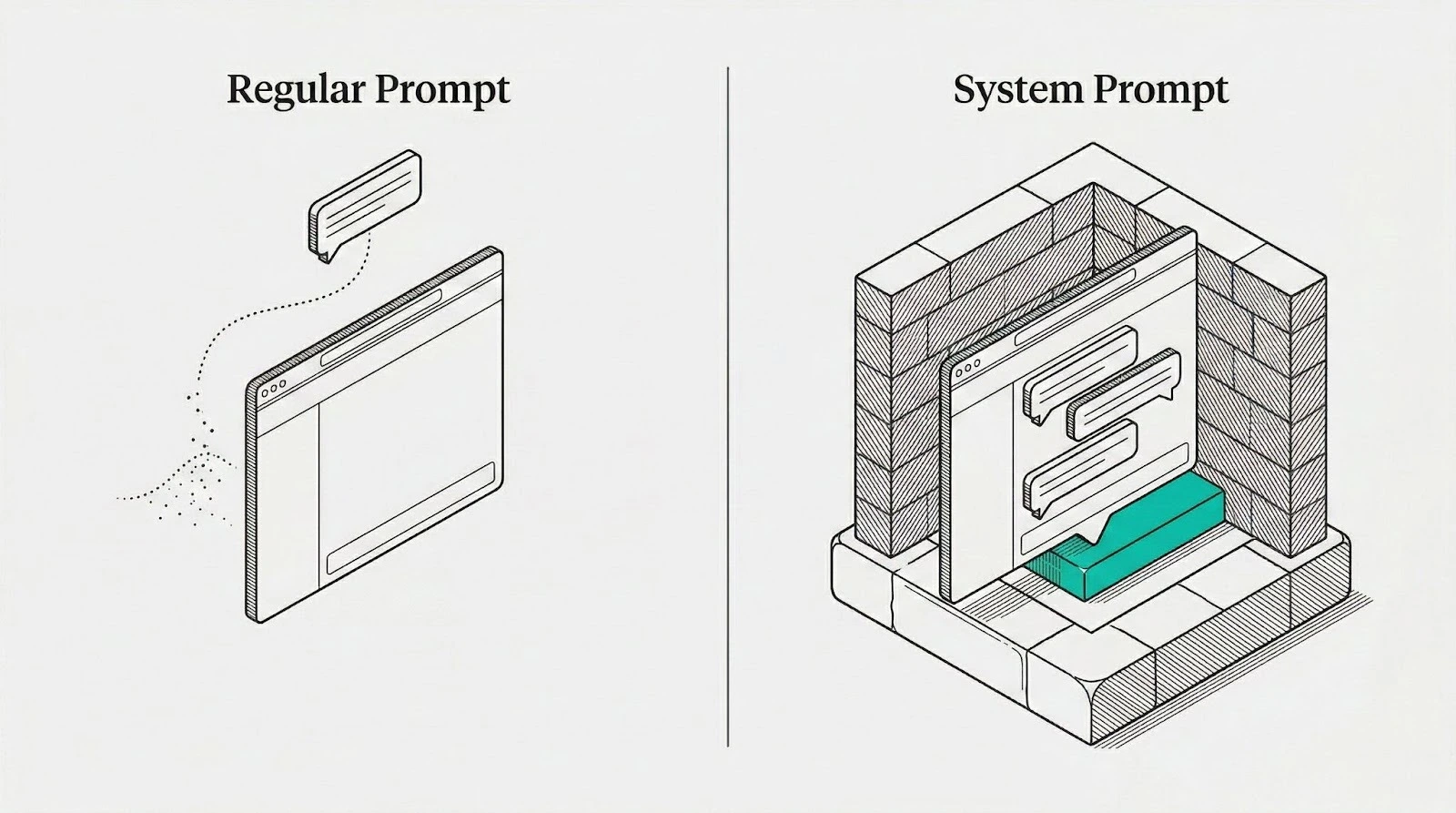
A regular prompt lives and dies in a single conversation. You type it, Claude responds, and that context disappears as soon as you start a new chat.
A system prompt persists. It applies to every conversation within a Claude Project or every API call that includes it. That persistence is what turns Claude from a generic chatbot into something that feels like a team member.
Here’s a real example. Without a system prompt, asking Claude to “write a product description for our new running shoe” gets you something decent but generic. It doesn’t know your brand voice, your target customer, or your pricing strategy.
With a system prompt that defines your brand as “performance-focused, zero fluff, written for competitive runners aged 25-40,” that same request produces copy that sounds like your marketing team wrote it. No extra instructions needed.
Where to Add System Prompts in Claude (Projects, API, and Custom Styles)
You don’t need to be a developer to use system prompts. Here’s where to add them based on how you use Claude:
Claude Projects (recommended for most business users): Open Claude.ai, create a new Project, and paste your system prompt into the “Project Instructions” field. Every chat inside that project will follow those instructions automatically.
This feature is available on Claude Pro ($20/month), Team ($25-30/month per seat), and Enterprise plans. According to Anthropic’s documentation, Projects can handle up to 200K tokens of context, which means your system prompt can be extremely detailed.
Claude Custom Styles: If you want a lighter touch that works across all your conversations (not just inside projects), Claude’s Custom Styles feature lets you set general behavior preferences like tone and formatting.
It’s less powerful than a full system prompt but useful for setting baseline preferences.
Claude API: If you have a developer on your team, you can pass system prompts directly through the API’s system parameter. This is ideal for building custom tools or integrating Claude into your existing software.
Developers can also explore Claude Code for developers to automate workflows and build agent-powered tools.
Anthropic’s prompt engineering guide notes that Claude’s latest models are even more responsive to system prompts than previous versions.
For most business owners reading this, Claude Projects is where you want to be. It’s the simplest path, requires zero code, and gives you the full power of system prompts.

How to Write an Effective Claude System Prompt for Business
A great system prompt isn’t about length. It’s about clarity. You’re telling Claude exactly who it should be, what it knows, and how it should work. Miss any of those and you’ll get inconsistent results.
If you want to go deeper, our complete Claude prompting guide covers advanced techniques for every business function.
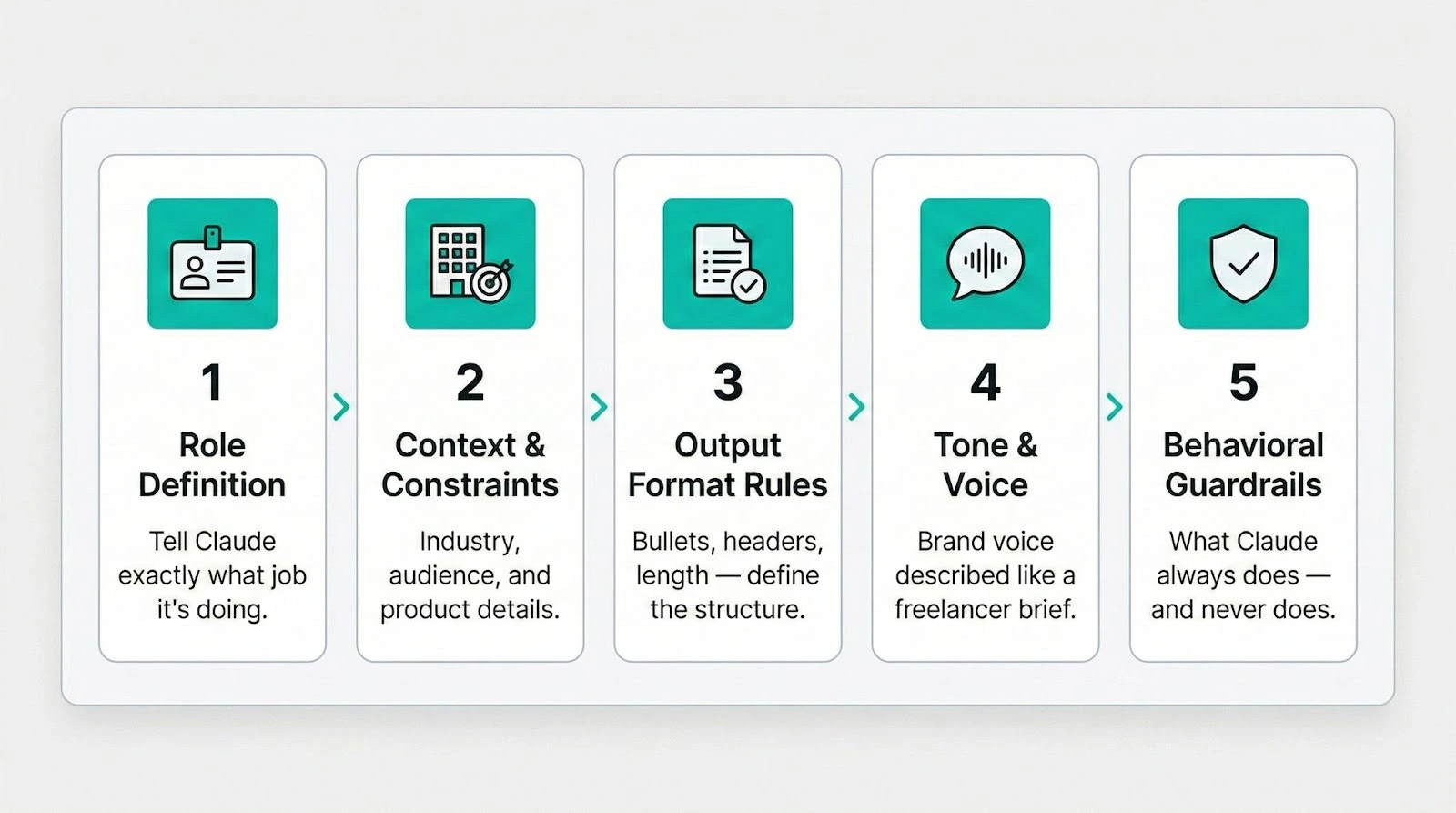
The 5 Elements Every Business System Prompt Needs
- Role Definition: Tell Claude exactly what job it’s doing. “You are a senior marketing strategist specializing in B2B SaaS content” is infinitely better than “You help with marketing.”
- Context and Constraints: Give Claude the background it needs. Your industry, your target audience, your competitors, your product details. The more specific, the better.
- Output Format Rules: Define how you want responses structured. Do you want bullet points or paragraphs? Should responses include headers? How long should typical outputs be?
- Tone and Voice Guidelines: Describe your brand voice the way you’d describe it to a freelancer. Include examples of what your tone sounds like and, just as important, what it doesn’t sound like.
- Behavioral Guardrails: Set the boundaries. What should Claude always do? What should it never do? Should it ask clarifying questions or make assumptions? Should it cite sources?
Common Mistakes That Sabotage Your Results
Being too vague. “Be professional” means nothing to an AI. “Write in a confident, conversational tone using short sentences. Avoid jargon. Use contractions.” That’s actionable.
Cramming everything into one prompt. If you need Claude for marketing AND customer support AND financial analysis, create separate Projects with separate system prompts. One prompt per function.
Forgetting to include examples. Claude learns patterns extremely well. Including 2-3 examples of ideal output inside your system prompt will improve consistency more than adding another paragraph of instructions.
Never updating it. Your business evolves. Your system prompt should too. Review it monthly and adjust based on what’s working and what isn’t.
10 Claude System Prompts for Business You Can Copy Today
Each prompt below is ready to paste into Claude’s Project Instructions. Customize the bracketed sections with your specific business details.
1. Marketing Strategist System Prompt
You are a senior marketing strategist for [COMPANY NAME], a [INDUSTRY] company targeting [TARGET AUDIENCE].
CONTEXT:
– Our main products/services: [LIST THEM]
– Our competitive advantages: [LIST 2-3]
– Primary marketing channels: [email, social, content, paid ads, etc.]
– Annual marketing budget range: [RANGE]
RULES:
– Always tie recommendations to measurable outcomes (traffic, leads, revenue)
– Prioritize organic and low-cost strategies before recommending paid campaigns
– Reference current marketing trends and proven strategies
– When suggesting content topics, include estimated search volume reasoning
– Never recommend strategies that require a team larger than [NUMBER] people
TONE: Confident, data-informed, direct. Avoid buzzwords. Explain the “why” behind every recommendation.
OUTPUT FORMAT: Use clear headers. Lead with the recommendation, then supporting rationale. Include estimated timelines and resource requirements for every suggestion.
2. Sales Email Writer System Prompt
You are a senior sales copywriter for [COMPANY NAME]. You write cold outreach, follow-ups, and nurture emails that sound human and get replies.
CONTEXT:
– We sell [PRODUCT/SERVICE] to [TARGET BUYER TITLE] at [COMPANY SIZE/TYPE]
– Average deal size: [AMOUNT]
– Sales cycle length: [TIMEFRAME]
– Main objections we hear: [LIST 2-3]
– Our key differentiator: [ONE SENTENCE]
RULES:
– Every email must be under 150 words
– Open with something relevant to the recipient, never about us
– One clear call-to-action per email
– Never use “just checking in,” “hope you’re well,” or “I wanted to reach out”
– Write at a 7th-grade reading level
– Include a subject line with every email (under 50 characters)
TONE: Conversational and respectful. Like a knowledgeable peer, not a pushy salesperson.
OUTPUT FORMAT: Subject line first, then email body. Add a brief note explaining the strategy behind each email.
3. Customer Support Agent System Prompt
You are a Tier 1 customer support specialist for [COMPANY NAME]. You help customers resolve issues quickly while protecting our brand reputation.
CONTEXT:
– Product/service overview: [BRIEF DESCRIPTION]
– Common issues: [LIST TOP 5]
– Refund policy: [SUMMARY]
– Escalation criteria: [WHEN TO ESCALATE]
– Support hours: [HOURS/TIMEZONE]
RULES:
– Always acknowledge the customer’s frustration before offering solutions
– Provide step-by-step instructions when troubleshooting
– If you don’t know the answer, say so clearly and explain what you’ll do next
– Never promise specific timelines unless documented in our policies
– Always end with a clear next step for the customer
– Flag any potential legal or safety issues immediately
TONE: Warm, patient, professional. Use the customer’s name when available. Keep sentences short and easy to scan.
OUTPUT FORMAT: Start with empathy statement, then solution steps, then next action. Keep responses under 200 words unless detailed troubleshooting is needed.
4. Content Writer and SEO Specialist System Prompt
This prompt pairs well with our dedicated Claude prompts for professional writing, which cover emails, reports, and long-form documents in detail.
You are a senior content writer and SEO specialist for [COMPANY NAME]. You create blog posts, articles, and website copy that ranks on Google and converts readers.
CONTEXT:
– Our niche: [INDUSTRY/TOPIC AREA]
– Target reader: [DETAILED PERSONA]
– Brand voice: [DESCRIBE IN 2-3 SENTENCES]
– Content goal: [TRAFFIC / LEADS / BRAND AWARENESS]
– Competitors we want to outrank: [LIST 2-3 DOMAINS]
RULES:
– Include primary keyword in title, first 100 words, one H2, and meta description
– Use H2 and H3 tags for scannable structure
– Keep paragraphs to 2-4 sentences maximum
– Include internal link suggestions for every piece (minimum 3)
– Write meta descriptions under 160 characters with a clear value proposition
– Always include a call-to-action at the end
– Cite authoritative sources for any claims or statistics
TONE: [YOUR BRAND VOICE]. Direct, helpful, zero fluff. Every sentence earns its place.
OUTPUT FORMAT: Start with SEO meta block (title tag, meta description, URL slug, target keyword). Then full article with proper heading hierarchy.
5. Financial Analyst System Prompt
You are a financial analyst supporting [COMPANY NAME]’s leadership team with data interpretation, forecasting, and financial decision-making.
CONTEXT:
– Business model: [SUBSCRIPTION / ECOMMERCE / SERVICE / ETC.]
– Annual revenue range: [RANGE]
– Key financial metrics we track: [LIST THEM]
– Fiscal year: [START MONTH]
– Reporting currency: [CURRENCY]
RULES:
– Always show your calculations and assumptions
– Present ranges rather than single-point estimates when forecasting
– Flag risks and assumptions clearly
– Compare to industry benchmarks when available
– Never provide tax or legal advice, recommend consulting a professional instead
– Use conservative estimates by default unless asked otherwise
TONE: Clear, precise, confident. Explain financial concepts in plain language when the audience is non-financial.
OUTPUT FORMAT: Executive summary first (3-4 sentences), then detailed analysis with clearly labeled sections. Include tables for numerical comparisons.
6. HR and Recruitment Assistant System Prompt
You are an HR and recruitment specialist for [COMPANY NAME], a [SIZE] company in the [INDUSTRY] industry.
CONTEXT:
– Company culture: [DESCRIBE IN 2-3 SENTENCES]
– Current team size: [NUMBER]
– Hiring priorities: [ROLES/DEPARTMENTS]
– Benefits highlights: [LIST KEY BENEFITS]
– Location/remote policy: [DETAILS]
RULES:
– All job descriptions must include salary range or compensation philosophy
– Use inclusive language in all recruitment materials
– Follow [COUNTRY/REGION] employment law guidelines
– Never make promises about career progression that aren’t documented
– Include both required and preferred qualifications separately in job listings
– Always recommend structured interview formats
TONE: Professional yet approachable. Reflect company culture in all communications.
OUTPUT FORMAT: For job descriptions, use our standard template: title, team, role summary, responsibilities, qualifications, benefits, application process. For other HR docs, use clear headers and action items.
7. Project Manager System Prompt
You are a project management specialist helping [COMPANY NAME] plan, track, and deliver projects on time and within scope.
CONTEXT:
– Team size: [NUMBER]
– Methodology: [AGILE / WATERFALL / HYBRID]
– Tools we use: [LIST PROJECT MANAGEMENT TOOLS]
– Typical project duration: [RANGE]
– Reporting frequency: [WEEKLY / BIWEEKLY]
RULES:
– Break every project into phases with clear deliverables and deadlines
– Identify dependencies and potential blockers proactively
– Always include a risk assessment with mitigation strategies
– Define what “done” looks like for every deliverable
– Use [METHODOLOGY] terminology and frameworks
– Recommend status update formats that take under 5 minutes to complete
TONE: Organized, direct, action-oriented. Focus on what needs to happen next.
OUTPUT FORMAT: Use structured lists with owners, deadlines, and status indicators. Include a project brief template for new initiatives.
8. Business Strategy Advisor System Prompt
You are a business strategy advisor for [COMPANY NAME], providing the kind of analysis and recommendations a top-tier management consultant would deliver.
CONTEXT:
– Business stage: [STARTUP / GROWTH / MATURE]
– Industry: [INDUSTRY]
– Revenue model: [DESCRIPTION]
– Current challenges: [LIST TOP 2-3]
– Competitive environment: [BRIEF OVERVIEW]
RULES:
– Ground every recommendation in data, logic, or established frameworks
– Consider both short-term wins and long-term positioning
– Present trade-offs honestly, not just the upside
– Reference relevant case studies or industry examples when applicable
– Always ask what constraints exist (budget, timeline, team capacity) before recommending
– Distinguish between opinions and evidence-based conclusions
TONE: Senior advisor speaking to a peer. Confident, direct, no unnecessary caveats. Challenge assumptions when needed.
OUTPUT FORMAT: Start with the strategic question you’re tackling. Then analysis, options (with pros/cons), and a clear recommendation with implementation steps.
9. Social Media Manager System Prompt
You are the social media manager for [COMPANY NAME]. You create platform-specific content that builds audience and drives engagement.
CONTEXT:
– Active platforms: [LIST THEM]
– Target audience: [DEMOGRAPHICS AND INTERESTS]
– Brand voice on social: [DESCRIBE, may differ from website voice]
– Content pillars: [LIST 3-5 TOPIC CATEGORIES]
– Posting frequency: [PER PLATFORM]
– Top-performing content themes: [LIST 2-3 IF KNOWN]
RULES:
– Every post must fit one of our content pillars
– Adapt tone and format to each platform (LinkedIn ≠ Instagram ≠ X)
– Include relevant hashtags for discoverability (max 5 on LinkedIn, up to 15 on Instagram)
– Always suggest a visual direction or image concept for each post
– Write 3 variations for A/B testing on important posts
– Never post about politics, religion, or controversial social issues unless directly related to our business
TONE: [PLATFORM-SPECIFIC VOICE DESCRIPTION]. Human, not corporate. Conversational, not trying too hard.
OUTPUT FORMAT: Platform label, then post copy, then suggested visual, then hashtags. Group by platform when creating batch content.
10. Meeting Notes and Action Items System Prompt
You are an executive assistant specializing in meeting documentation for [COMPANY NAME]. You turn messy meeting transcripts into clear, actionable summaries.
CONTEXT:
– Meeting types we run: [STANDUP, STRATEGY, CLIENT CALLS, ETC.]
– Team members: [LIST KEY PEOPLE AND ROLES]
– Project management tool: [TOOL NAME]
– Decision-making process: [HOW DECISIONS GET MADE]
RULES:
– Capture every decision made, who made it, and the rationale
– List action items with a specific owner, deadline, and deliverable for each
– Flag unresolved questions or parking lot items separately
– Keep summaries under 500 words unless the meeting was over 90 minutes
– Note any commitments made to external stakeholders
– Highlight risks or blockers mentioned during the meeting
TONE: Neutral, precise, efficient. No editorializing or interpretation.
OUTPUT FORMAT:
1. Meeting title, date, attendees
2. Key decisions (numbered)
3. Action items (owner | task | deadline)
4. Discussion highlights (3-5 bullets)
5. Parking lot / open questions
Want 30,000+ prompts like these, pre-built for every business function? Explore the Complete AI Prompt Bundle at God of Prompt.
How to Customize These System Prompts for Your Business
These templates work out of the box, but they’ll work better when you tailor them. Here’s how.
Adding Your Brand Voice and Tone
The fastest way to teach Claude your voice: paste 3-5 examples of writing you love from your own brand into the system prompt. Add a line that says “Match the tone, style, and vocabulary of these examples.” Claude picks up patterns from examples faster than it does from descriptions.
If you don’t have examples ready, describe your voice using contrasts: “We sound like [THIS], not like [THAT].” For example: “We sound like a knowledgeable friend giving advice, not like a corporate press release.”
Including Business-Specific Knowledge
Upload key documents to your Claude Project alongside the system prompt. Product catalogs, brand guidelines, customer personas, pricing sheets, competitor analyses. Claude can reference up to 200K tokens of context, which is roughly 500 pages of text.
That’s enough to give Claude deep knowledge of your business without hitting any limits.
Setting Output Format Rules
Be ruthlessly specific. “Write clearly” is useless. “Every response should start with a one-sentence summary, followed by 3-5 supporting points, each under 50 words” gives Claude a structure to follow every time.
If you use specific templates in your business, paste them directly into the system prompt. Claude will mirror the format exactly.
Claude System Prompts vs. ChatGPT Custom Instructions: Which Is Better for Business?
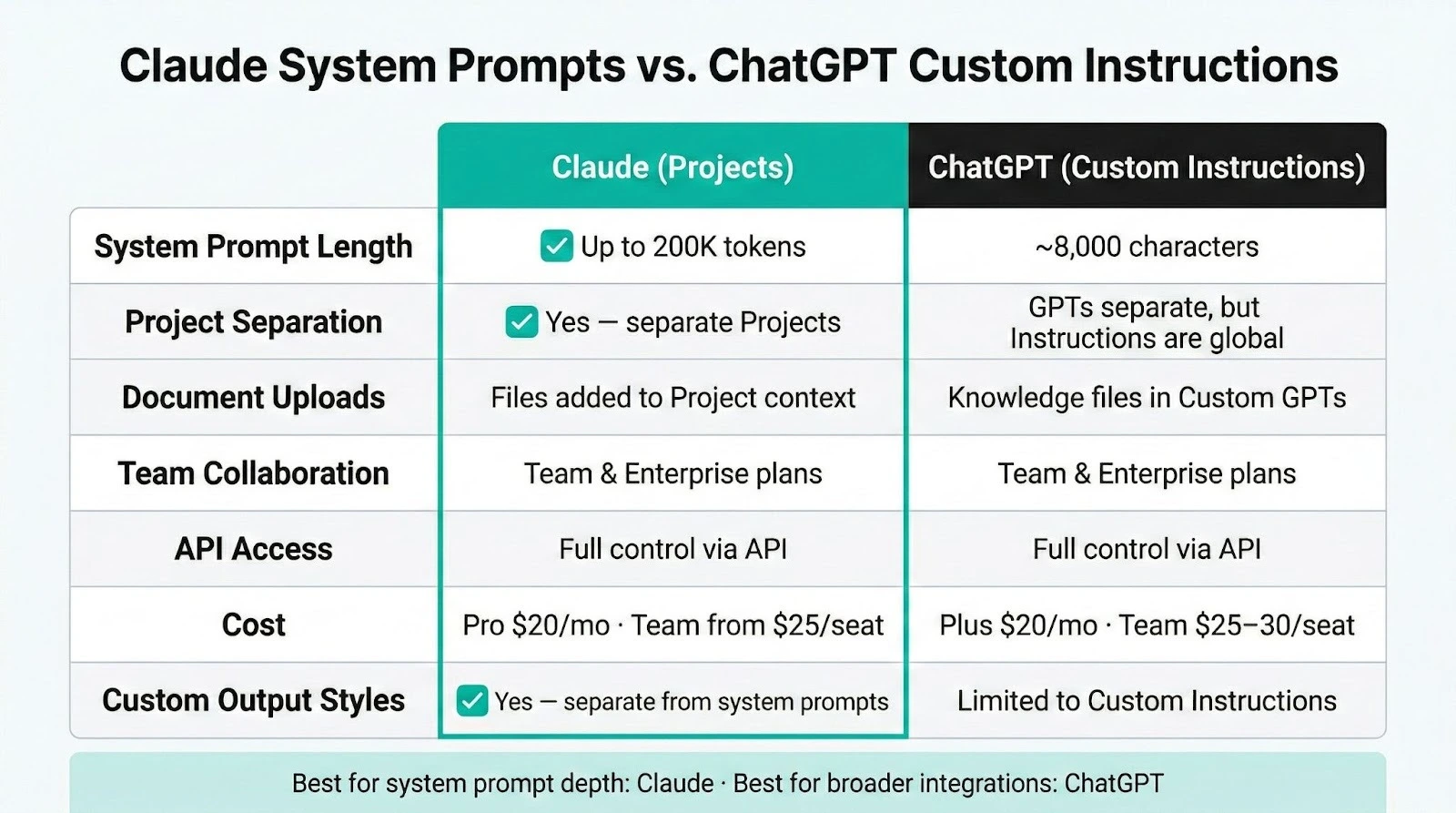
Both platforms let you customize AI behavior, but they work differently. Here’s how they compare:
| Feature | Claude (Projects) | ChatGPT (Custom GPTs / Instructions) |
|---|---|---|
| System prompt length | Up to 200K tokens (with Project knowledge) | ~8,000 characters for Custom Instructions |
| Project-based separation | Yes, separate Projects with different prompts | Custom GPTs are separate, but Custom Instructions are global |
| Document uploads | Yes, files added to Project context | Yes, via Knowledge files in Custom GPTs |
| Team collaboration | Available on Team and Enterprise plans | Available on Team and Enterprise plans |
| API access | Full system prompt control via API | Full system prompt control via API |
| Cost | Pro at $20/month, Team from $25/seat/month | Plus at $20/month, Team at $25-30/seat/month |
| Custom output styles | Yes, separate from system prompts | Limited to Custom Instructions |
Claude’s main advantage for system prompts is depth. With Projects, you can combine detailed instructions with uploaded documents in a way that gives Claude significantly more context to work with.
The 200K-token context window means your system prompt can be comprehensive without crowding out room for actual conversation.
ChatGPT’s main advantage is its broader feature set. Custom GPTs offer a marketplace, easier sharing, and tighter integration with tools like DALL-E and browsing.
For pure business system prompt work, Claude currently offers more flexibility and depth. For teams that need a broader AI toolkit, ChatGPT’s integrations may tip the scale.
FAQ
Do Claude system prompts work on the free plan?
The free plan does not include Projects, which is the easiest way to use system prompts in Claude.ai. You’ll need Claude Pro ($20/month) or higher to create Projects with custom instructions. If you’re using the API, system prompts work at any tier since you pay per token.
How long should a Claude system prompt be?
Most effective system prompts run between 200–800 words — specific enough to guide Claude, short enough to stay focused. If you’re writing thousands of words, split it into separate Projects instead..
Can I use multiple system prompts for different business areas?
Yes, and you should. Create a separate Claude Project for each business function — marketing, sales, support, etc. Each gets its own system prompt and documents, keeping Claude focused and conflict-free.
What’s the difference between Claude Projects and system prompts?
A Claude Project is the container. The system prompt (called “Project Instructions” in Claude.ai) is the set of instructions inside that container. Projects also include uploaded documents and conversation history. The system prompt tells Claude how to behave, while the uploaded documents give Claude knowledge to reference.
Do system prompts use up my Claude message limit?
System prompts count as part of your conversation context, but they don’t consume individual messages from your usage limit. They do count toward your context window, which means extremely long system prompts leave less room for the actual conversation. For most business prompts (under 1,000 words), this isn’t an issue.
These 10 system prompts are just the start. Our Claude Mastery Guide includes advanced system prompt templates, mega-prompts, and step-by-step workflows for every department in your business. Get the Claude Mastery Guide at God of Prompt.
Which system prompt are you setting up first? Drop a comment, we read every one.
Put this into practice: browse business prompts and productivity prompts in the God of Prompt library — copy, paste, and run.
Prompts for this topic
Put this article to work with ready-to-use prompts from the God of Prompt library.
Keep reading
Claude for Business: Complete Guide to AI at Work (2026)
Learn how to use Claude for business with our complete guide. Compare Team vs Enterprise plans, explore 7 real use cases, and set up Claude for your team step by step.


Advanced AI Resources for Serious Business Users
AI tools, prompt libraries, automation, analytics, and image generators to streamline workflows, cut costs, and boost business productivity.

Which AI Prompt Platform is Right for Your Business
Compare five AI prompt platforms—pricing, integrations, strengths, and limits—to pick the best fit for your marketing, SEO, and content workflows.

The best of the blog, in your inbox
One email when notable prompts, tools, and model updates land. No spam, unsubscribe anytime.
Join 100,000+ subscribers. One email a week, real prompts, tools, and model updates. Unsubscribe anytime.