Best Practices for GPT-Database Connections



Want to connect GPTs to your databases securely and efficiently? Here’s what you need to know:
- Why it matters: Integrating GPTs with databases can transform how teams access data. From querying databases in plain English to retrieving live insights, tools like GPT make data accessible without technical barriers.
- Key challenges: Accuracy issues (60-70% NL2SQL success rates), security risks (e.g., prompt injection attacks), and performance bottlenecks (like inefficient SQL queries) need careful handling.
- Solutions: Use secure APIs, enforce read-only permissions, validate queries, and leverage tools like RAG, GPT Actions, or MCP for tailored integrations.
- Performance tips: Cache prompts, optimize queries, and use lightweight models like GPT-3.5 for faster responses.
- Security essentials: Encrypt data, mask sensitive information, and log all interactions to monitor for anomalies.
Quick takeaway: Always treat GPT as an untrusted client. Use APIs, secure access controls, and human review for critical actions. Start small with a pilot project, and scale as you refine your setup.
How to let GPT access Database & 10x powerful | 10 mins tutorial about Langchain Js
sbb-itb-58f115e
Selecting Your Integration Method
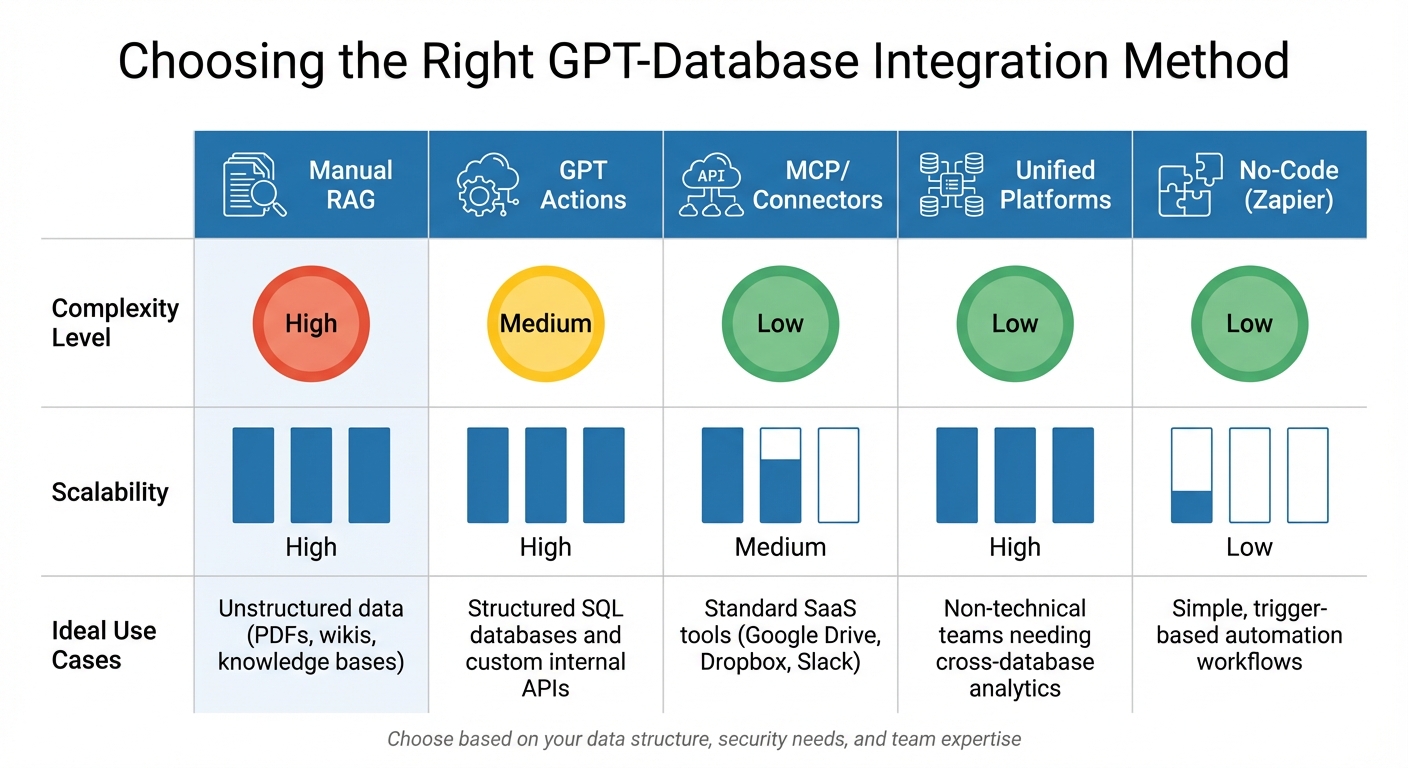
GPT-Database Integration Methods Comparison: Complexity, Scalability and Use Cases
Available Integration Methods
When deciding how to integrate AI into your workflows, here are some key methods to consider:
Retrieval-Augmented Generation (RAG): This method breaks data into chunks, generates embeddings (e.g., with text-embedding-ada-002), and stores them in vector databases for semantic search. It’s particularly effective for unstructured content like PDFs, wikis, and knowledge bases.
GPT Actions with custom API middleware: This approach uses intermediary services, such as AWS Lambda or Azure Functions, to execute SQL queries and return results. The GPT sends queries via REST API to the middleware, which processes them and often delivers results as base64-encoded CSV files. CSVs are a smart choice for handling large datasets, as GPT models process files up to 10 MB more efficiently than plain text.
Model Context Protocol (MCP): MCP is quickly becoming a standard for linking AI models to external data. OpenAI describes it as "an open protocol that's becoming the industry standard for extending AI models with additional tools and knowledge". MCP offers a standardized search and fetch interface for both local and remote servers. OpenAI has streamlined its previous "connectors" into a unified "Apps" experience, which now supports tools like Google Workspace, Microsoft Teams, and SharePoint as of December 2025.
Unified analytics platforms: Tools like BlazeSQL act as intelligent middleware, simplifying tasks like schema context, SQL dialect translation (e.g., T-SQL to BigQuery), and error correction for non-technical users. Additionally, function calling (or tool calling) allows the model to use a JSON schema of available functions, enabling it to generate structured calls with arguments that your application can process for real-time data retrieval.
Comparing Integration Methods
Here’s how these methods stack up in terms of complexity, scalability, and ideal use cases:
| Method | Complexity | Scalability | Ideal Use |
|---|---|---|---|
| Manual RAG | High | High | Unstructured data (PDFs, wikis, knowledge bases) |
| GPT Actions | Medium | High | Structured SQL databases and custom internal APIs |
| MCP/Connectors | Low | Medium | Standard SaaS tools (Google Drive, Dropbox, Slack) |
| Unified Platforms | Low | High | Non-technical teams needing cross-database analytics |
| No-Code (Zapier) | Low | Low | Simple, trigger-based automation workflows |
RAG, while requiring a more complex setup with embedding pipelines and vector databases, offers excellent scalability and reduces hallucinations by grounding responses in retrieved documents. GPT Actions strike a balance between flexibility and technical requirements, making them ideal for structured SQL databases. MCP-based connectors simplify integration for standard SaaS tools but may lack customization for enterprise-specific needs.
Matching Methods to Your Requirements
To choose the right method, consider your data structure, security requirements, GPT model capabilities, and team expertise.
For Microsoft 365 and SaaS platforms, Graph Connectors or MCP Apps are ideal. They respect existing identity and access controls, making them suitable for static content that can be indexed periodically. Many features are accessible through ChatGPT Plus, Pro, Business, or Enterprise/Edu plans.
For custom, unstructured documents, RAG is a strong choice. It minimizes hallucinations and ensures users only access authorized content by applying security filters during retrieval. For high-speed performance, Rockset integration offers real-time retrieval with sub-20 ms speeds, while Pinecone’s serverless clusters in Frankfurt and London deliver 52 ms p50 latency.
For structured SQL databases, GPT Actions with middleware can provide fine control. By enforcing read-only access and integrating OAuth, you can ensure row- or table-level security. Enabling "Strict Mode" during function calling ensures the model adheres to your JSON schema for reliable argument generation.
For teams without SQL expertise, unified platforms are a good fit. These services handle complexities like schema context and SQL dialect translation automatically. If you operate in a regulated industry, look for methods that support strong network isolation. For example, Azure Private Link can ensure AI-database traffic stays off the public internet.
Protecting Data Privacy and Security
Setting Up Secure Access Controls
Never expose your database directly. Instead, use a secure API intermediary that limits access to only the endpoints your GPT requires. As OWASP advises:
"Direct connections should never ever be made from a thick client to the backend database".
Follow the Principle of Least Privilege (PoLP) by granting only SELECT permissions and avoiding the use of administrative or built-in accounts [19, 21]. Assign IAM roles or managed identities to treat your GPT as a distinct machine identity [22, 24].
Replace long-term API keys with temporary tokens, or use Zapier with custom GPTs to manage actions through a secure no-code layer. For instance, AWS STS tokens automatically expire, minimizing the risk window if credentials are compromised [20, 22]. Store sensitive information like API keys in services such as AWS Secrets Manager or Azure Key Vault, and rotate them every 3–6 months [20, 25].
Use conditional controls based on factors like time, location, and device health. Limit database connections to specific IP addresses and isolate your database server in a separate DMZ from the application layer [18, 19].
These measures form a solid foundation for incorporating encryption and auditing practices.
Using Encryption and Data Masking
Encrypt all data, whether it's at rest or in transit, using TLS v1.2+ with AES-GCM or ChaCha20 encryption. Store API keys and database credentials in encrypted storage to safeguard them in case of a system breach.
Mask sensitive data dynamically during queries. Google Cloud's Sensitive Data Protection service, for example, includes over 200 built-in classifiers to identify and redact information like emails and phone numbers. In BigQuery, you can use remote functions to call a Cloud Run service that interacts with the DLP API, returning encrypted data (e.g., via a function like dlp_freetext_encrypt(column)) instead of raw text.
Enable Row-Level Security (RLS) on all tables accessed through APIs to control which rows your GPT can access. Store highly sensitive data in a "private" schema, ensuring it’s only accessible through secure server-side functions. Additionally, redact personally identifiable information (PII) in logs and use correlation IDs for debugging to avoid exposing raw prompt text.
Never hardcode encryption keys or database credentials in your source code. Instead, rely on environment variables or secret management services [19, 26]. Treat all inputs from the model as untrusted, and validate them server-side to guard against prompt injection attacks.
Tracking and Auditing Database Access
Log everything. Record the prompts sent to your GPT, its responses, and all API calls made to the database [30, 31]. Dr. Tal Shapira, Cofounder & CTO at Reco, emphasizes:
"Audit GPT prompts weekly. Review stored prompts for hidden instructions or data exposure patterns".
High-profile incidents have shown the risks of data exposure from GPT inputs, prompting companies like Samsung to temporarily ban generative AI tools and develop in-house alternatives [33, 34].
Set up automated alerts for suspicious activities, such as unexpected outbound traffic to unapproved domains, excessive data extraction, or repeated prompt manipulation attempts [30, 31]. Use allowlists to ensure your GPT only interacts with approved database domains, and log every request to these endpoints. Keep an eye out for unusual GPT behavior or responses that deviate from verified datasets, as these could signal unauthorized configuration changes.
Adopt an AI Bill of Materials (AI-BOM) to track your entire AI stack, including users, data flows, services, and pipelines. Align your audit logs with standards like GDPR, SOC 2, and ISO 27001 to meet legal requirements [30, 33]. Finally, secure all accounts involved in your GPT–database integration with multi-factor authentication [31, 34].
Improving Query Performance
After ensuring secure database interactions, the next priority is optimizing query performance to handle data efficiently.
Creating Efficient Database Queries
It's essential to use an API layer between your GPT and the production database. This layer allows you to inspect, rewrite, or reject queries, minimizing risks. As one expert puts it:
"Hooking an LLM straight up to your production SQL database is one of those ideas that sounds cool in a demo and terrifying in a real company."
A smart approach is to use a two-step process. First, have the model rephrase the user's query into a structured format to identify intent, entities, and the desired output. Then, generate the final SQL query. This method can achieve an accuracy rate of about 60–70% on realistic datasets.
Limit the GPT's exposure to only the relevant parts of your schema, such as specific table names, column types, and relationships, instead of the entire database catalog. Validate the generated queries with tools like EXPLAIN or dry runs to ensure they are safe and efficient. Implement safeguards like requiring a LIMIT clause and restricting queries to single statements to avoid resource-intensive operations. Additionally, direct GPT queries to read-only replicas or analytics databases instead of your primary production system.
Reducing Response Time
Prompt caching is a game-changer for reducing latency. By placing static content - like system instructions, examples, and schemas - at the start of your prompt, you can cut latency by up to 80% and reduce input token costs by as much as 90%. Another strategy, semantic caching, enables the reuse of responses for similar queries. For instance, in May 2024, Microsoft researchers showed that adding semantic caching to a retrieval-augmented generation (RAG) system reduced response times from 17 seconds to just 1 second - a 17x improvement.
Encourage GPT to generate concise responses to decrease token usage and improve speed, as response generation often accounts for most of the execution time. For simpler tasks, opting for GPT-3.5 instead of GPT-4 can provide up to a 4x speed increase.
| Technique | Potential Speedup | Impact on Latency |
|---|---|---|
| Semantic Caching | 14x | 19s → 1.3s |
| Generation Token Compression | 2–3x | 20s → 8s |
| Use GPT-3.5 over GPT-4 | 4x | 17s → 5s |
| Parallelize Requests | 72x+ | 180s → 2.5s |
These techniques ensure lower latency, setting the stage for handling large-scale data more effectively.
Working with Large Databases
To efficiently handle large datasets, push filtering and join operations to the database engine itself. Use a high JDBC fetchSize (around 100,000 rows) to maintain throughput. Apply filters before performing JOIN operations, and leverage parallel execution by partitioning queries based on indexed numeric columns. This allows multiple executors to fetch data simultaneously. In May 2024, Microsoft demonstrated that combining parallelization with token compression and targeted LLM edits (instead of rewriting entire documents) sped up a document processing application from 315 seconds to just 3 seconds - a 105x improvement.
Reordering rows and fields within relational tables can also maximize key-value cache reuse during batch inference. UC Berkeley researchers found that optimized request reordering could save 32% in costs and improve job completion time by up to 3.4x when using Llama 3 models. These techniques not only enhance query performance but also align with secure data practices.
Keep in mind that current LLM inference speeds are limited to roughly 2,000 tokens per second per GPU, which can become a bottleneck for large-scale analytical tasks. Efficient query processing helps mitigate this limitation, ensuring faster and more reliable performance for complex operations.
Deploying and Maintaining Your Integration
Starting with a Pilot Project
Kick things off with a focused pilot project targeting a specific domain or schema - think billing analytics or customer support queries. Limit access during this phase to your internal data teams. They’ll be able to spot errors and provide valuable feedback.
To keep things secure, place your LLM behind an API layer instead of connecting it directly to your database. Set up safeguards like read-only user roles, single-statement query rules, and mandatory LIMIT clauses on all queries. Rakesh Tanwar sums it up perfectly:
"The LLM is not special. It's just another client that can send weird queries."
For high-stakes actions - like pricing updates, payouts, or compliance-related queries - require a human review before executing SQL commands.
Maintaining Your System Over Time
Once your pilot is up and running, keeping the system in check requires consistent monitoring and updates. Log every interaction and track key performance metrics to catch issues before they escalate.
Stay on top of your schema updates. LLMs depend on accurate schema information, so update your cache whenever the database structure changes. Security is another ongoing priority: regularly audit your system by removing access for decommissioned applications, rotating passwords when employees leave, and addressing any suspected security breaches. Set up automated alerts to flag unusual traffic patterns or repeated authentication failures.
Keep an eye on metrics like SQL execution success rates, accuracy of results, latency, and API costs. These will help you identify performance trends and potential regressions in your model. For context, recent studies show NL2SQL execution accuracy for strong models typically falls between 60% and 70% on real-world enterprise datasets.
Using Available Tools and Resources
After setting up your system, take advantage of specialized tools to fine-tune and maintain it. Use the SQL EXPLAIN command to analyze query execution plans and block queries with high cost estimates or full table scans. Tools like the MCP Inspector can help validate definitions and responses. For bolstering security, resources such as the CIS Benchmarks or Microsoft Security Baselines offer guidance on configuring your operating system and database securely.
If you’re looking for additional support, platforms like God of Prompt offer a treasure trove of resources - over 30,000 AI prompts, guides, and toolkits for tools like ChatGPT, Claude, Midjourney, and Gemini AI. These include categorized prompt bundles and ready-made templates for common database query scenarios, saving you time when creating effective prompts.
To manage costs and performance, set API budget thresholds - new organizations often start with a $100/month limit. Implement caching for frequently accessed data to improve response times and cut down on expenses. Finally, restrict MCP tools using allowed_tools to reduce latency and token usage.
Conclusion
Core Practices to Follow
When connecting GPTs to enterprise databases, prioritizing security and performance is non-negotiable. Always treat your language model as untrusted. This means connecting it through an API that can inspect, validate, or reject the SQL it generates. Use read-only database users, enforce single-statement rules, and set strict row limits to minimize the risk of data leaks or system slowdowns.
To improve accuracy and reduce latency, limit the schema exposure to only the essential table names, column types, and key relationships. Avoid overwhelming the model by exposing the entire database catalog - it can lead to confusion and inefficiencies . Given that Natural Language to SQL accuracy for enterprise datasets typically ranges between 60% and 70%, incorporating human oversight for critical actions - such as those tied to pricing, payouts, or compliance - is a must.
To standardize and simplify connections across data sources, consider implementing protocols like the Model Context Protocol (MCP). Also, ensure your integrations meet enterprise-grade encryption standards for data both in transit and at rest. Providers like OpenAI, for instance, follow strict data deletion policies, removing underlying data from disconnected apps within 30 days.
By following these steps, you can establish a strong foundation for secure and efficient GPT-database integrations.
Getting Started with Implementation
Start small with a pilot project in a focused domain. Use read replicas or analytics databases to shield production systems from potential performance impacts, and log every interaction to gather early feedback.
From the outset, create feedback loops by logging everything - user queries, generated SQL, execution plans, and results. Use static validation to scan for risky SQL functions before execution. The EXPLAIN command can also help identify costly queries, such as those involving full table scans, before they cause issues.
For guidance on crafting prompts and refining your processes, platforms like God of Prompt offer an extensive library of over 30,000 AI prompts, guides, and templates. These resources are tailored for tools like ChatGPT and Claude, making it easier to design effective database queries and streamline your implementation.
FAQs
What are the best practices for securely connecting GPTs to databases?
To connect GPTs to databases securely, prioritize data privacy and access control. Start by isolating the database with firewalls and limiting access exclusively to trusted hosts. Encrypt all data in transit using Transport Layer Security (TLS) to block unauthorized interception.
Implement strong authentication, like multifactor authentication (MFA), and enforce strict access controls to regulate who or what can connect to the database. Avoid allowing direct connections from untrusted systems; instead, use secure APIs with carefully managed permissions. When sharing data with AI systems, send only schema details - not the actual data - to reduce potential exposure.
These practices help establish a secure setup for GPT-database interactions while safeguarding sensitive information.
What’s the best way to connect GPT to my database?
The best way to link GPT to your database depends on your specific needs and technical expertise.
If you’re dealing with complex data structures or need a tailored solution, manual integration is the way to go. Using SQL queries and custom code, this method gives developers full control over how data is accessed and managed. It’s perfect for those who need precision and flexibility.
On the other hand, if you’re looking for simplicity, no-code or low-code connectors are a great option. These tools are especially useful for standard databases like PostgreSQL or MySQL, offering features like schema detection and query execution without requiring advanced programming skills.
For those prioritizing scalability and security, middleware platforms or cloud-based solutions, such as Google BigQuery, offer robust options. These setups are designed to adapt to your data environment while maintaining security and performance.
Ultimately, the best choice comes down to balancing ease of use, your data’s complexity, and the security needs of your organization.
What are the best ways to improve query performance when using GPT models with enterprise databases?
To improve query performance when integrating GPT models with enterprise databases, it's crucial to focus on limiting the volume of data being transferred and processed. One way to achieve this is by applying filters and predicates directly within the database engine. This approach ensures that most of the data filtering occurs at the database level, reducing the amount of information sent to the GPT model for further handling.
Structuring queries efficiently also plays a critical role. For instance, using the AND operator to combine multiple conditions allows filters to be applied earlier in the process. In cases where certain operations, like ILIKE, cannot be handled by the database, aim to perform filtering as close to the source as possible. By retrieving only the necessary subset of data, you can enhance response times and cut down on computational overhead, leading to a smoother and more scalable integration.
Related Blog Posts

Loved by Business Owners


Based on 1K reviews
Get smarter on AI every week.
Ready to transform your business?