AI Workflow Monitoring: ROI Case Studies




AI workflow monitoring is transforming business operations by automating repetitive tasks and integrating tools like Gmail, Slack, and ERPs with Large Language Models (LLMs). This approach doesn’t just automate processes; it analyzes unstructured data - emails, documents, social media - and makes real-time decisions. The result? Faster processes, reduced errors, and measurable cost savings.
Key takeaways from the article include:
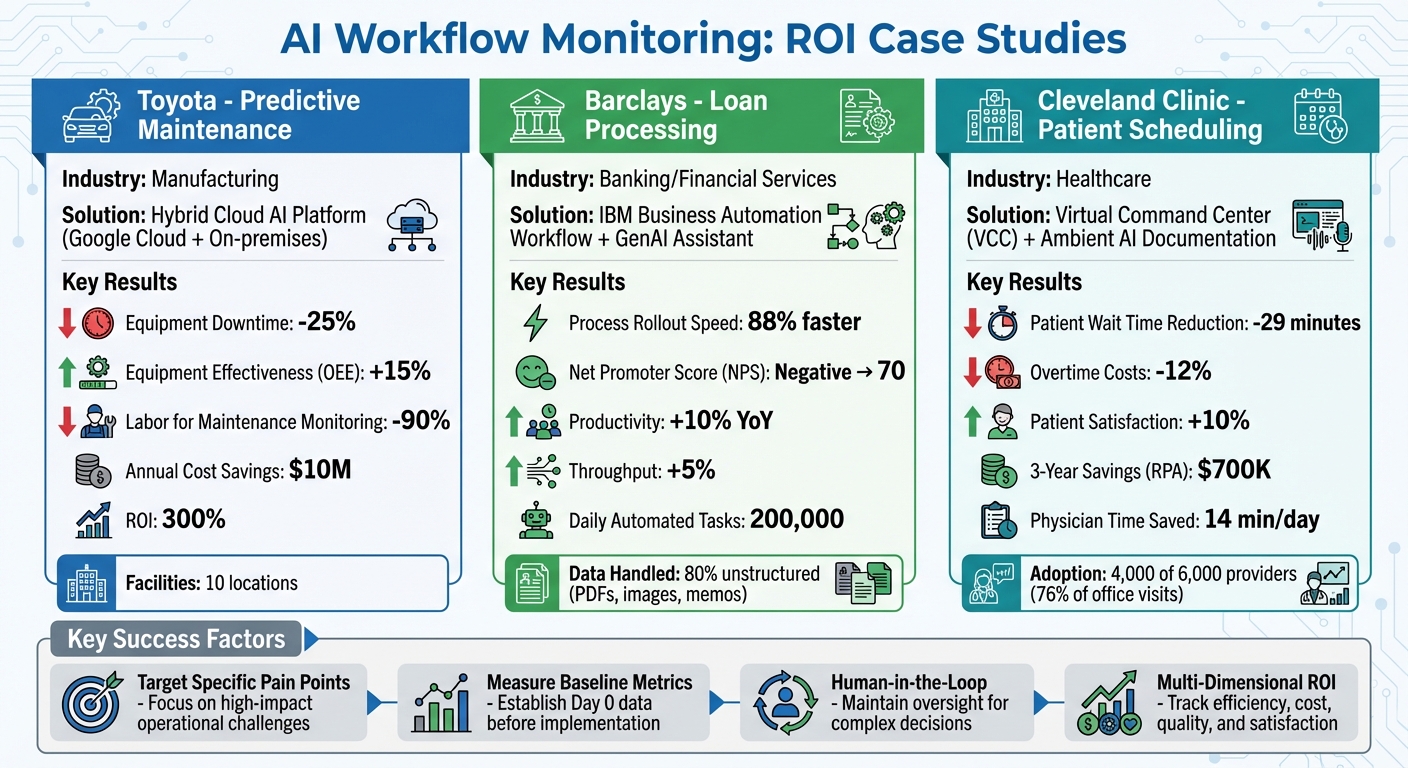
- Toyota: Reduced downtime by 25%, improved equipment effectiveness by 15%, and saved $10M annually through predictive maintenance.
- Barclays: Cut compliance review times by 88%, improved customer satisfaction (NPS to 70), and boosted productivity by 10%.
- Cleveland Clinic: Reduced patient wait times by 29 minutes, saved $700K over three years, and improved patient satisfaction by 10%.
The secret to success lies in focusing on specific challenges, using data-driven insights, and measuring ROI across efficiency, cost, and quality metrics. Companies that reinvest time savings into higher-value tasks see long-term gains. AI workflow monitoring is proving to be a game-changer for businesses aiming to streamline operations and achieve measurable results.
AI Workflow Monitoring ROI: Toyota, Barclays & Cleveland Clinic Case Study Results
How to measure the ROI of AI using Asana’s 4-step framework
Case Study 1: Toyota's Predictive Maintenance Program
Toyota once relied on rigid maintenance schedules and a reactive "break-fix" approach. This method often resulted in unexpected equipment failures and costly production delays. As their machinery became more complex, sensor data - like temperature, vibration, and pressure readings - grew too overwhelming for manual analysis. Without real-time visibility into critical assets, operational teams struggled to stay ahead of issues. This gap highlighted the need for smarter, real-time solutions.
To address these challenges, Toyota developed an in-house AI platform using a hybrid cloud setup. This system combined Google Cloud tools (Vertex AI and GKE) with their existing on-premises infrastructure. By moving away from a centralized, expert-driven model, Toyota empowered teams to deploy custom AI models tailored to their specific needs. The hybrid cloud approach allowed "Just-in-Time" resource scaling, balancing on-premises operations with cloud-based scalability during peak GPU demand, which helped control costs.
Toyota rolled out this hybrid cloud AI platform across 10 facilities. It enabled real-time anomaly detection and automated inspections, covering tasks like monitoring finished parts, adhesive applications for back door glass, and spotting irregularities in injection molding machines used for bumper production. However, the biggest hurdle wasn’t the technology itself - it was the organizational shift. Jason Ballard, IT Executive and General Manager at Toyota Motor North America, explained:
"The challenge was not so much from the technology perspective but from the people perspective: the organizational change management, mindset, education, and awareness that you now have this solution at your fingertips".
This transformation brought both technical advancements and significant operational improvements.
Results and Metrics
The program delivered impressive results. Equipment downtime dropped by 25%, overall equipment effectiveness (OEE) improved by 15%, and labor for maintenance monitoring was cut by up to 90%. These changes translated into $10 million in annual cost savings. Even more striking, the initiative achieved a 300% ROI, far exceeding the typical 10-20% ROI seen in traditional automation efforts.
Toyota also prioritized workforce development alongside automation. Ballard emphasized:
"What we're focused on is how we can up-level, upskill, those team members and move them into higher-value jobs, while at the same time push more automation across the enterprise".
The company took it a step further by linking data insights directly to action. Automated workflows now trigger work orders whenever anomalies are detected, ensuring swift responses.
Case Study 2: Barclays' Loan Processing System
Barclays faced challenges with outdated, manual processes that were fragmented and failed to meet customer expectations. Mike Gamble, Director of Operations at Barclays, acknowledged that without a centralized workflow system, the bank risked compromising both customer experience and regulatory compliance. To address this, Barclays turned to an AI-driven solution. They also utilized a complete AI bundle to accelerate their digital transformation.
The bank implemented the IBM Business Automation Workflow, replacing its disconnected manual processes with a streamlined automated system. Additionally, Barclays launched a GenAI Center of Excellence to encourage rapid experimentation. By July 2025, they introduced a GenAI colleague assistant that provided real-time insights, significantly reducing average call handling times. These steps boosted both operational efficiency and customer satisfaction. Craig Bright, CIO at Barclays, highlighted their approach:
"The opportunity lies in how we use AI alongside everything we know about our customers to improve their experience with us".
AI also transformed Barclays' internal compliance processes. For example, the bank automated its Sales Quality (SQ) compliance review process, which previously required 120 reviewers to manually examine 180 data points per case. This was particularly challenging because 80% of the data was unstructured, coming from sources like PDF letters, memos, and image-based payslips or bank statements. By shifting to AI-driven analysis, staff could redirect their efforts to complex cases that required human expertise.
Processing Speed and Accuracy Improvements
The impact of these changes was dramatic. Barclays achieved an 88% faster rollout of new automated multichannel processes, enabling the bank to adapt quickly to changing market conditions. Customer satisfaction also soared, with the Net Promoter Score (NPS) for automated services rising from a negative value to 70 - a remarkable improvement.
Operationally, the bank’s intelligent automation now handles nearly 200,000 tasks daily, including lending and investment decisions. This led to a 10% year-over-year productivity boost and a 5% increase in throughput, allowing Barclays to manage additional workloads from acquisitions without sacrificing service quality. Gamble summarized the benefits:
"Managing everything within the process management capabilities in IBM Business Automation Workflow solution allows us to do the right thing by our customers and be in control of how we're delivering services to them".
Case Study 3: Cleveland Clinic's Patient Scheduling System
Cleveland Clinic faced challenges in managing patient flow and resource allocation due to outdated manual processes. Staff relied on tools like Excel, phone calls, and sticky notes - methods that struggled to keep up with patient demands. To resolve these inefficiencies, the clinic teamed up with Palantir Technologies to create the Virtual Command Center (VCC). This AI-powered system uses machine learning to predict demand, bed availability, and staffing needs. The VCC is structured around three main modules - Hospital 360, Staffing Matrix, and OR Stewardship - which replace disjointed workflows with a unified, data-driven system. This shift transformed scheduling from a reactive task into a proactive strategy, cutting operational costs and improving patient flow.
In addition to the VCC, Cleveland Clinic introduced an ambient AI system for clinical documentation. This tool reduced the administrative burden on physicians, allowing them to focus more on patient care. Out of 6,000 eligible providers, 4,000 adopted the system, covering 76% of office visits. As a result, physicians saved an average of 14 minutes per day on note-taking. Together, these advancements streamlined both scheduling and documentation processes, boosting overall efficiency.
Cost Savings and Patient Satisfaction Results
The combined impact of these systems led to measurable cost savings and enhanced patient satisfaction. Patient wait times dropped by an average of 29 minutes, while overtime costs decreased by 12%, directly improving the patient experience. Patient satisfaction scores rose by 10%, reflecting the improvements. Additionally, robotic process automation saved $700,000 over three years by automating 750,000 data points across workflows. Another AI tool helped identify missed diagnosis coding opportunities in 15% of inpatient cases reviewed, increasing revenue capture.
sbb-itb-58f115e
How to Measure ROI in Workflow Monitoring
To measure ROI effectively, start by comparing metrics from before and after implementing the system. Use the formula: ROI = (Annual Benefits - Annual Costs) ÷ Annual Costs. The first step is gathering accurate baseline data, such as cost per transaction, error rates, and revenue per completion. These "Day 0" metrics are essential for meaningful analysis. Without them, any ROI measurement becomes guesswork. With this foundation, you can evaluate performance across operational, experiential, and strategic dimensions.
ROI assessment involves three perspectives:
- Operational: Focus on efficiency metrics like task completion rates (targeting 85-95%) and reductions in processing time.
- Experiential: Measure employee and customer satisfaction improvements using metrics like eNPS and CSAT.
- Strategic: Examine how workflow changes enhance agility, such as faster launches or adapting to new demands.
When calculating ROI, apply a 60-80% productivity coefficient to time savings. For example, if 10 hours are saved, the effective gain is 6-8 hours. This adjustment prevents overestimating ROI.
Metrics to Track
To align with these ROI dimensions, focus on tracking specific metrics:
- Time and Speed Metrics: These are central to ROI measurement. Compare task durations before and after AI deployment. For example, AGCO reduced process times by 35% using the Proceedix Connected Worker platform. Set latency benchmarks - under 500ms for simple queries and 2-4 seconds for complex workflows.
- Cost Reduction Metrics: These provide a clear view of ROI. Track the cost per task. For instance, reducing customer inquiry costs from $3.50 to $0.15 per task or achieving 30-50% token savings. One SaaS company saved 8 hours weekly per developer, cut bugs by 15%, and turned a $2.1M AI investment into $16.64M in annual gains within nine months.
- Quality and Accuracy Metrics: These ensure speed improvements don’t compromise output quality. Monitor first-pass approval rates (aiming for over 90%), error rates, and AI reliability indicators like model drift and confidence scores.
| Metric Category | Key Indicators | Target Benchmark |
|---|---|---|
| Operational | Task completion rate, process time reduction, cost per ticket | 85-95% completion, 35% time reduction |
| Quality | Approval rate at first pass, error rate reduction | >90% approval |
| Cost | Token usage savings, cost per task | 30-50% token savings, $0.15/task |
| Speed | P95 latency for complex workflows | <4 seconds |
| Strategic | Headcount avoidance, innovation capacity | Varies by organization |
Lessons from the Case Studies
Looking at the outcomes of various case studies, it's clear that targeted AI implementation can lead to measurable returns. The most effective AI-driven workflow monitoring systems share a few key traits: they focus on solving a specific operational pain point, keep human oversight for complex decisions, and evaluate success across multiple areas - not just cost savings.
One major takeaway is the value of data-driven process discovery. Rajusiva Arunachalam from Omega Healthcare highlighted how Process Mining "has significantly cut down our efforts to one fifth of the time we used to spend. We now focus solely on the data". By analyzing processes upfront, companies like Canon USA and Omega Healthcare were able to zero in on workflows with the highest potential for returns. For instance, Canon USA targeted high-volume tasks like invoice processing, saving 6,000 hours annually, while Omega Healthcare automated accounts receivable, saving 6,700 hours monthly. These results laid the groundwork for systems that adapt and evolve, further streamlining operations.
Another critical shift has been moving from rigid automation to adaptive systems. Canon USA replaced its outdated RegEx-based solution with machine learning models that could handle data variations. By adding an "Action Center" to manage exceptions, they achieved 90% straight-through processing - well above their initial goal of 75%.
Interestingly, companies that reinvested the time saved into higher-value tasks, rather than cutting jobs, saw better long-term benefits. Employees were able to focus on strategic work, improving both efficiency and job satisfaction. This aligns with a growing trend of using AI to remove repetitive tasks rather than eliminating roles entirely.
Practical Takeaways for Businesses
The case studies reveal clear strategies for businesses looking to optimize AI workflow monitoring.
Start with your biggest operational challenge.
For example, Dow's AI system now monitors over 100,000 PDF invoices, flagging anomalies like a $30,000 surcharge instead of the usual $5,000. This saved the company millions in its first year. Melanie Kalmar, Dow's Chief Information and Digital Officer, explained:
"If we had a better way to assess and track invoicing errors - even a 1 percent improvement would mean substantial savings".
Define baseline metrics before deploying AI.
Without "Day 0" data - such as cost per transaction or error rates - measuring ROI becomes guesswork. Set clear KPIs tied to your specific goals, such as reducing support backlogs by 30% or cutting claim-to-cash cycles by 25–30%, as Omega Healthcare achieved.
Take a gradual approach to scaling.
Canon USA, for instance, collaborated with Greenlight Consulting to move from pilot to production in just four months. They started with one department, processing 4,500 invoices monthly, before expanding further. Similarly, AGCO used Google Glass on its shop floor, reducing process time by 35% and cutting the operator learning curve in half.
Don’t aim for 100% automation - focus on exception management.
The final 10% of cases often require human judgment. Systems that incorporate human-in-the-loop processes and Action Centers maintain high accuracy (e.g., 99.5%) while still achieving significant time savings.
Measure success across multiple dimensions.
Look beyond cost savings to track improvements in quality, speed, and strategic outcomes. For instance, BMW’s predictive maintenance system predicted failures with 92% accuracy, reduced downtime by 25%, and paid for itself in just over four months. Other metrics to consider include first-pass approval rates above 90% or latency under four seconds for complex workflows.
These lessons show that thoughtful AI implementation, paired with strategic planning, can drive meaningful results across various industries.
Conclusion: Achieving ROI with AI Workflow Monitoring
Real-world examples highlight how AI workflow monitoring can deliver impressive, measurable returns when applied thoughtfully. Take Swagelok Southeast Texas, for instance - they achieved a staggering 1,544% ROI with a payback period of just 20 days. Across industries, enterprise AI projects often see 3x to 6x ROI in the first year, with long-term returns ranging from $8 to $12 for every dollar invested. These figures point to strategies that consistently drive success.
What sets successful implementations apart? They focus on solving specific operational problems, involve human oversight, and measure ROI across multiple dimensions. For example, Canon USA surpassed their goal, achieving 90% straight-through processing compared to their initial target of 75%.
Start with your organization's biggest operational challenge. Ground your AI initiatives in your own data. As Melanie Kalmar from Dow explained regarding their freight invoice analysis system:
"If I can tie delivering something to substantial cost savings like that, there's no selling. Now the key is delivering that cost savings at the end of the implementation".
To accelerate these results, businesses can turn to tools like God of Prompt (https://godofprompt.ai). With more than 30,000 AI prompts and toolkits tailored for platforms like ChatGPT and Claude, this resource helps streamline workflow automation and implementation.
FAQs
How does AI workflow monitoring boost efficiency and deliver ROI?
AI workflow monitoring enhances efficiency by automating repetitive tasks, offering real-time insights, and refining processes. It eliminates much of the manual effort, speeds up decision-making, and reduces the likelihood of errors. The result? Lower costs and noticeable productivity improvements.
Take a look at some real-world examples of its impact:
- A manufacturing company reported a 1:10 ROI and saved a staggering $1.4 billion by using AI to improve quality control and streamline decision-making.
- In healthcare, AI cut patient wait times by 38% and simplified treatment protocols, significantly improving service delivery.
- A business revamped its order processing system, achieving an extraordinary 1,544% ROI and saving over $1 million annually.
By spotting inefficiencies and providing actionable solutions, AI workflow monitoring empowers organizations to operate more effectively. It helps create systems that are not only agile and precise but also cost-efficient, delivering clear ROI and long-term advantages.
What metrics should I track to measure ROI in AI workflow monitoring?
To evaluate ROI in AI workflow monitoring, focus on metrics that highlight both productivity gains and financial benefits. Start with time savings - look at reductions in manual tasks and quicker project completions. Next, assess cost efficiency, such as decreased operational expenses achieved through automation. Finally, measure performance metrics like system reliability, processing speed, and seamless integrations to confirm the AI solutions are consistently delivering value.
Tracking these metrics helps businesses assess how well AI-driven improvements are working, enabling smarter, data-backed decisions to boost returns.
What strategies can businesses use to successfully implement AI workflow systems?
To get the most out of AI workflow systems, businesses should focus on strategic planning and target areas where AI can make the biggest difference. Starting with small, high-impact projects is a smart move - it allows for quick wins that can build momentum and confidence throughout the organization. For example, some case studies highlight impressive outcomes, like a 1,544% ROI in order processing or a 6.2X ROI in healthcare solutions within just a few months.
It's also critical to align AI systems with your operational goals. Using evaluation frameworks that consider factors such as reliability, cost, and integration can help ensure the technology fits seamlessly into existing processes. Collaboration is key here - when technical teams and business units work together, they can tackle real-world challenges more effectively, making adoption smoother.
To simplify implementation, take advantage of resources like AI prompt libraries and toolkits. These tools can help streamline workflows and reduce complexity, making it easier for teams to adapt and achieve sustainable results over time.
Related Blog Posts

Loved by Business Owners


Based on 1K reviews
Get smarter on AI every week.
Ready to transform your business?