Introducing Gemini 3: Everything You Need To Know
Get a full breakdown of Google’s Gemini 3, including its new capabilities, performance upgrades, multimodal strengths, pricing, and real-world use cases. This guide explains everything you need to know to understand and use Google’s most advanced AI model effectively.


On this page
- What Makes Gemini 3 Different (And Why You Should Care)
- Three Real Improvements You’ll Notice
- Gemini 3 Pro: The Flagship Model Everyone’s Talking About
- What It Actually Does Well
- Where You Can Use It Right Now
- The Benchmarks That Matter
- Deep Think Mode: The Secret Weapon (Coming Soon)
- What Makes It Different
- Why Google’s Holding It Back
- Who Should Wait For It
- AI Mode in Search: Your New Research Assistant
- How It Works Differently Than Regular Search
- Examples That Show the Difference
- Who Should Use AI Mode vs. Regular Search
- Google Antigravity: Where AI Writes Code For You
- What “Vibe Coding” Actually Means
- How It Actually Works
- Real Use Cases Developers Care About
- Benchmark Performance
- Getting Started With Antigravity
- The Gemini API & Developer Tools
- 1. AI Studio (Free Prototyping)
- 2. Gemini API (Production Use)
- 3. Vertex AI (Enterprise Deployment)
- 4. Gemini CLI (Local Testing)
- Gemini 3 vs. The Competition
- Gemini 3 Pro vs. GPT-5.1
- Gemini 3 Pro vs. Claude Sonnet 4.5
- Gemini 3 Pro vs. Grok 4
- Quick Comparison Table
- How To Get Started Today
- For Everyday Users
- For Developers
- For Enterprises
- Three Simple First Steps (Anyone Can Do)
- What This Launch Really Means
- What’s Coming Next From Google
- One Action You Can Take Today
Google just dropped Gemini 3 on November 18, 2025, and for the first time ever, their newest AI model launched directly in Search on day one.
No waiting weeks for integration. No limited beta testing.
Just immediate access across their entire ecosystem.
This isn’t just another model update.
Gemini 3 represents a shift in how AI works — less prompting, smarter context understanding, and tools that actually deliver on the promise of AI assistance.
Here’s what you need to know about Google’s most intelligent model yet, how it stacks up against GPT-5.1 and Claude Sonnet 4.5, and which version you should actually use.
ALSO READ: Introducing ChatGPT 5.1: Here’s Everything You Need to Know
What Makes Gemini 3 Different (And Why You Should Care)
Every AI company claims their latest model is “revolutionary.”
Most of the time, it’s marketing speak.
Gemini 3 is different because Google shipped it everywhere at once.
The Gemini app (650 million monthly users), AI Overviews in Search (2 billion monthly users), developer tools, and enterprise platforms all got access on launch day.
Three Real Improvements You’ll Notice
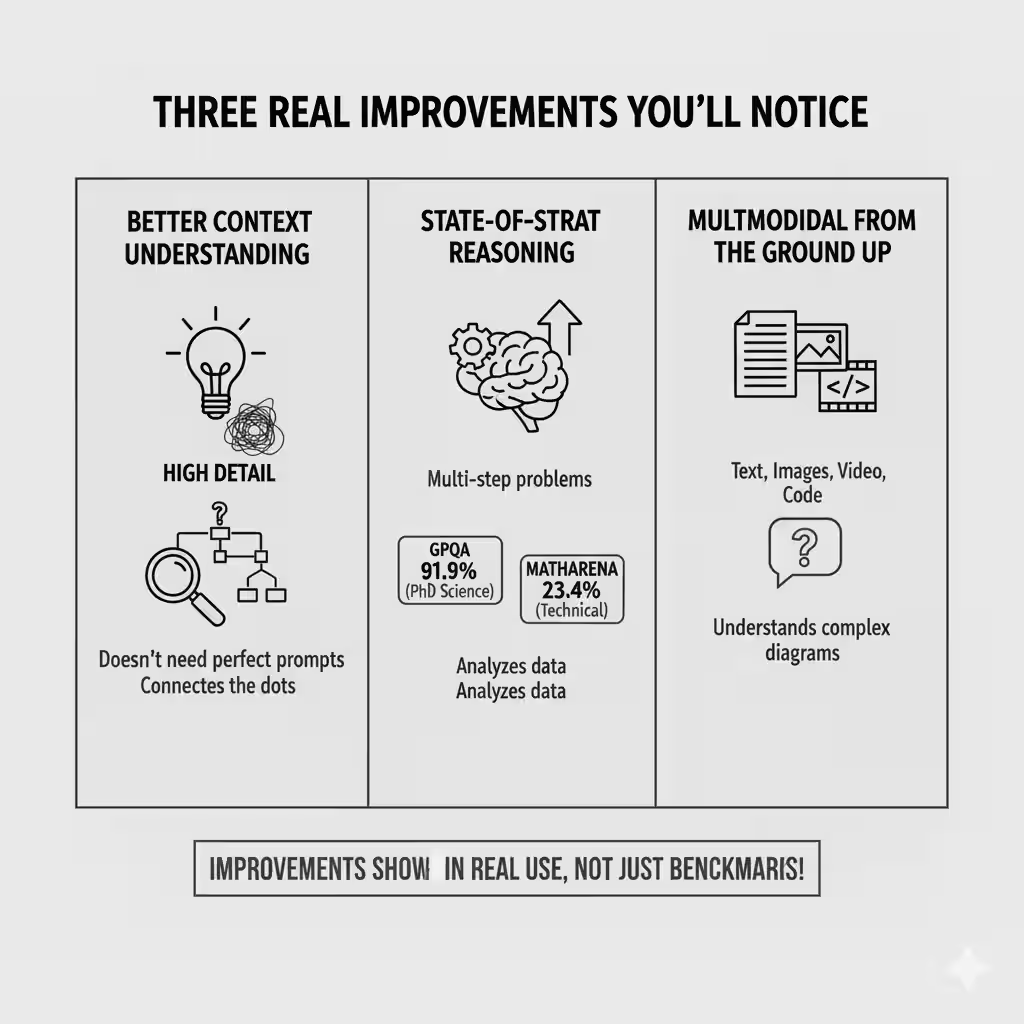
1. Better context understanding
You don’t need to write perfect prompts anymore. Gemini 3 figures out what you mean, not just what you said.
Ask a vague question about a complex topic, and it connects the dots without you spelling everything out.
2. State-of-the-art reasoning
This matters when you’re working through multi-step problems, analyzing data, or trying to understand something technical.
Gemini 3 scored 91.9% on GPQA Diamond (a PhD-level science benchmark) and 23.4% on MathArena Apex.
For context: that’s better than any other publicly available model right now.
3. Multimodal from the ground up
Text, images, video, code — Gemini 3 handles all of it in one go. You can upload a video, ask questions about specific frames, and get accurate answers. Or feed it a complex diagram and have it explain what’s happening.
Most importantly: these improvements show up in real use, not just benchmark tests.
Gemini 3 Pro: The Flagship Model Everyone’s Talking About
Gemini 3 Pro is the main model powering everything from the Gemini app to Search to developer APIs.
What It Actually Does Well
Here’s where Gemini 3 Pro beats the competition:
- Multimodal reasoning: 81% on MMMU-Pro (visual understanding), 87.6% on Video-MMMU
- Code generation: Top performer on WebDev Arena
- Long context: 1 million token input window (that’s roughly 750,000 words)
- Mathematical reasoning: 95% on AIME 2025 with code execution
Where You Can Use It Right Now
1. Gemini App (Free)
Open the app, start chatting. You get Gemini 3 Pro with rate limits. Perfect for everyday questions, research, or brainstorming.
2. AI Mode in Search (Paid)
Available to Google AI Pro and Ultra subscribers. This is where Gemini 3 shines — it creates custom layouts, interactive tools, and visual answers right in Search.
3. Gemini API (Free tier + paid)
Developers get free access in AI Studio with rate limits. Once you hit the limit, pricing kicks in:
- $2 per 1M input tokens (up to 200k input)
- $12 per 1M output tokens
4. Vertex AI (Enterprise)
Full enterprise controls, monitoring, and compliance tools. Usage-based pricing through Google Cloud.
The Benchmarks That Matter
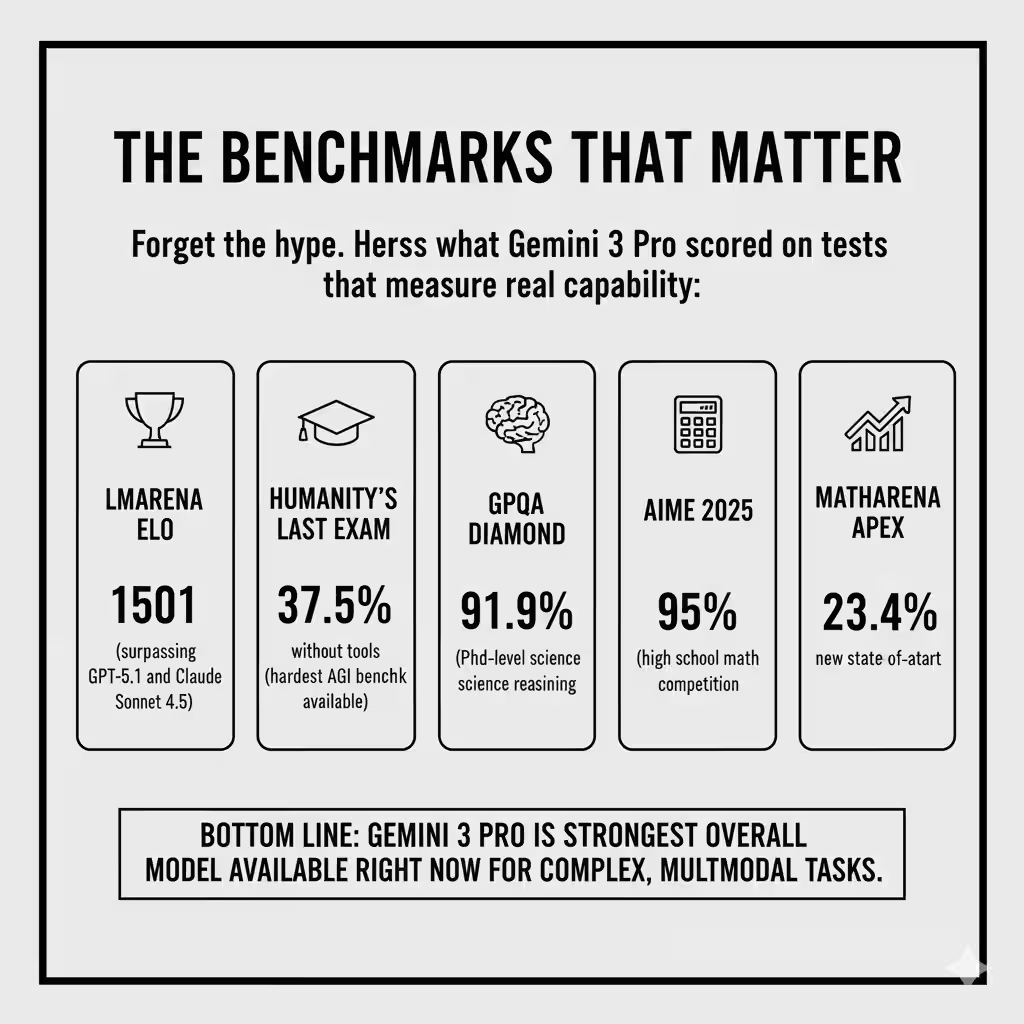
Forget the hype. Here’s what Gemini 3 Pro scored on tests that measure real capability:
- LMArena Elo: 1501 (surpassing GPT-5.1 and Claude Sonnet 4.5)
- Humanity’s Last Exam: 37.5% without tools (hardest AGI benchmark available)
- GPQA Diamond: 91.9% (PhD-level science reasoning)
- AIME 2025: 95% (high school math competition)
- MathArena Apex: 23.4% (new state-of-the-art)
Bottom line: Gemini 3 Pro is the strongest overall model available right now for complex, multimodal tasks.
Deep Think Mode: The Secret Weapon (Coming Soon)
Google announced Deep Think mode alongside Gemini 3 Pro, but you can’t access it yet.
What Makes It Different
Deep Think uses extended reasoning chains to work through harder problems.
Think of it as Gemini 3 taking extra time to think before answering.
Early benchmarks show impressive results:
- Humanity’s Last Exam: 41.0% (vs. 37.5% for standard Gemini 3 Pro)
- GPQA Diamond: 93.8% (vs. 91.9%)
- ARC-AGI: 45.1% with code execution (measures ability to solve novel problems)
Why Google’s Holding It Back
Google is running additional safety testing before public release.
Deep Think’s enhanced reasoning capabilities need more evaluation for potential misuse scenarios.
When it launches (expected within weeks), it’ll be available to Google AI Ultra subscribers first.
Who Should Wait For It
If you’re working on:
- High-stakes research
- Complex analytical problems
- Scientific work requiring deep logical chains
Deep Think will be worth the wait. For most use cases, standard Gemini 3 Pro delivers what you need.
AI Mode in Search: Your New Research Assistant
This is where Gemini 3 gets interesting for everyday users.
AI Mode transforms Google Search from a list of links into an interactive research tool.
Instead of clicking through ten websites, you get a custom-built answer with citations, visuals, and interactive elements.
How It Works Differently Than Regular Search
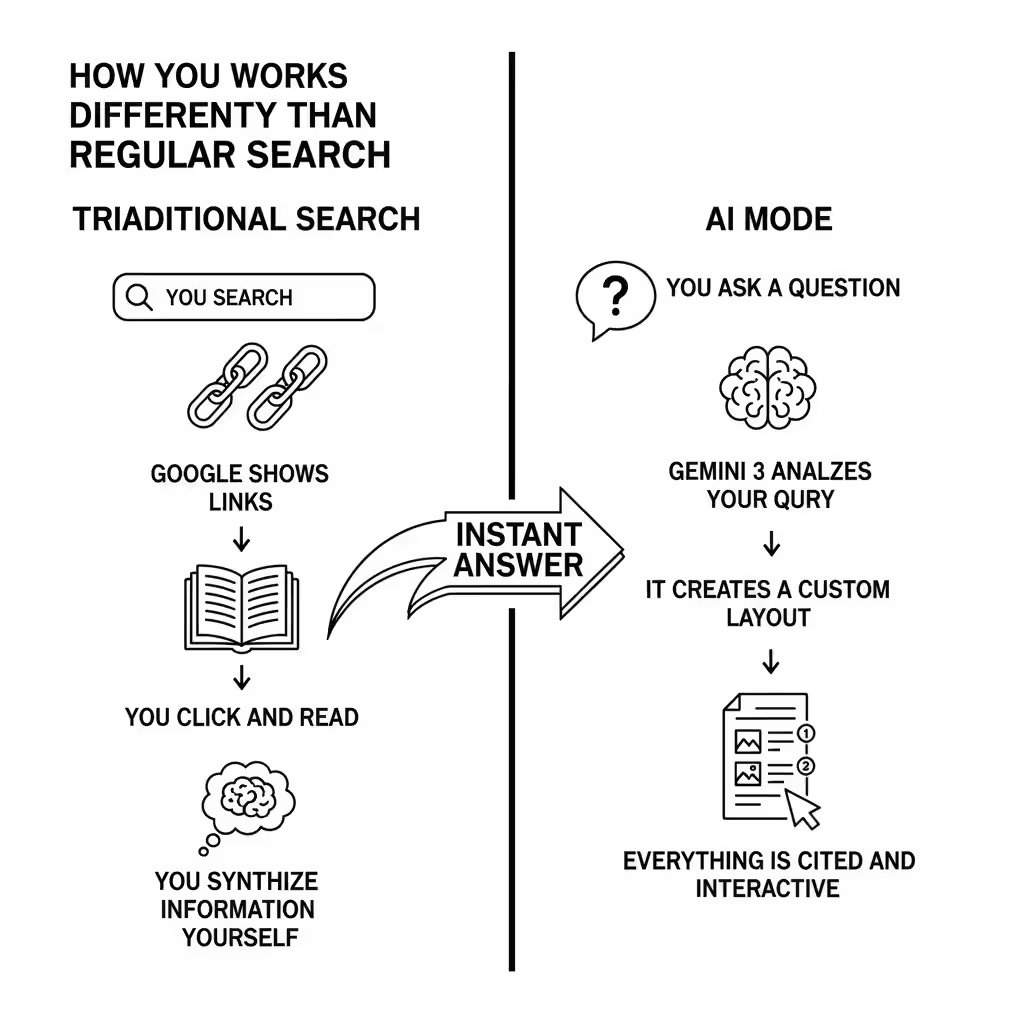
Traditional Search:
- You search
- Google shows links
- You click and read
- You synthesize information yourself
AI Mode:
- You ask a question
- Gemini 3 analyzes your query
- It creates a custom layout with exactly what you need
- Everything is cited and interactive
Examples That Show the Difference
Example 1: “Explain the Van Gogh Gallery with life context for each piece”
AI Mode creates a visual gallery with:
- Images of each painting
- Life context for when Van Gogh created it
- Connections between his personal struggles and artistic choices
- Interactive timeline of his work
Example 2: “Should I refinance my mortgage?”
AI Mode builds:
- Custom mortgage calculator with your rates
- Comparison table showing break-even points
- Visual graph of savings over time
- Citations to current interest rate data
Example 3: “Explain quantum entanglement with a simulation”
AI Mode generates:
- Interactive physics simulation you can manipulate
- Step-by-step explanation that updates as you interact
- Visual representation of entangled particles
- Links to academic sources
Who Should Use AI Mode vs. Regular Search
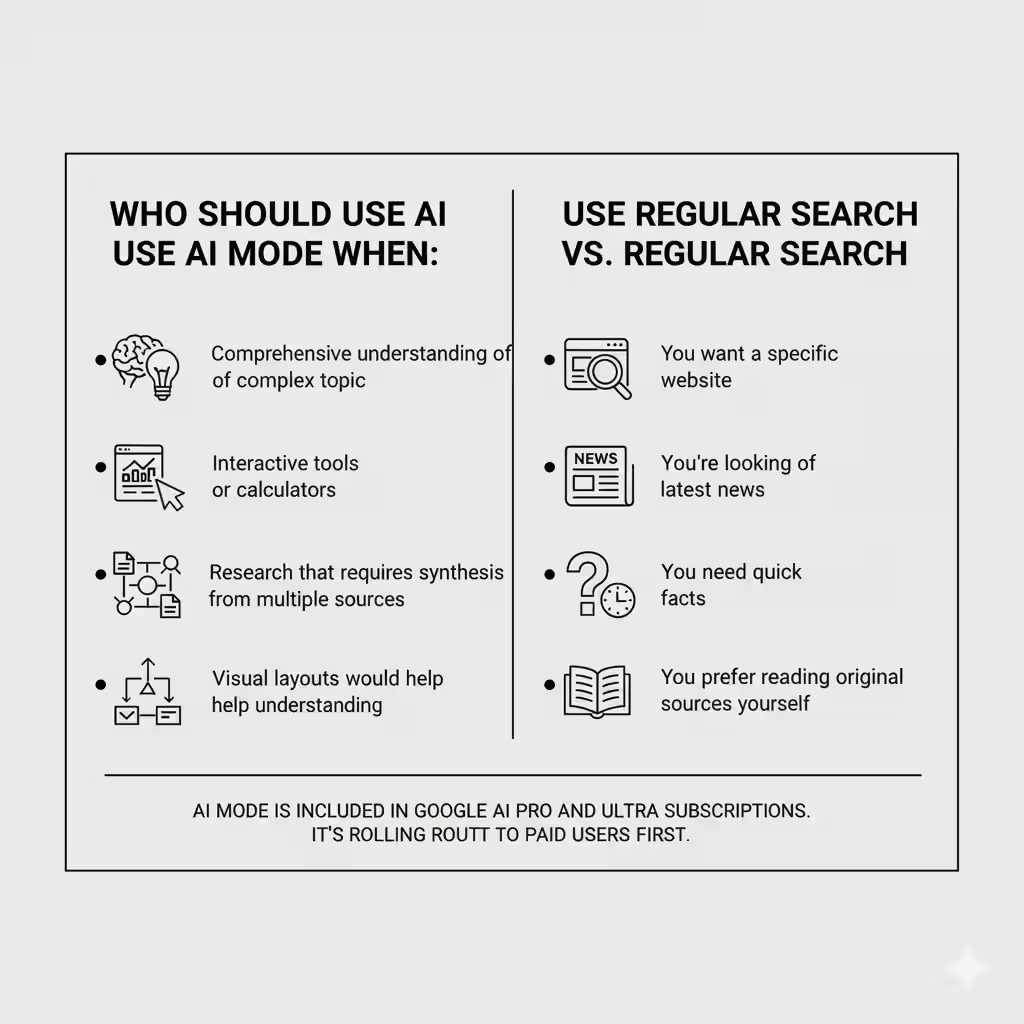
Use AI Mode when:
- You need comprehensive understanding of a complex topic
- You want interactive tools or calculators
- You’re doing research that requires synthesis from multiple sources
- Visual layouts would help understanding
Use Regular Search when:
- You want a specific website
- You’re looking for the latest news
- You need quick facts
- You prefer reading original sources yourself
AI Mode is included in Google AI Pro and Ultra subscriptions. It’s rolling out to paid users first.
Google Antigravity: Where AI Writes Code For You
Google launched Antigravity alongside Gemini 3 — a completely new way to build software.
What “Vibe Coding” Actually Means
Vibe coding is Google’s term for conversational development. You describe what you want to build, and AI agents handle the implementation across your editor, terminal, and browser.
Here’s what makes Antigravity different from tools like Cursor or GitHub Copilot:
Traditional AI coding tools:
- Autocomplete code as you type
- Suggest functions or entire blocks
- You’re still writing most code yourself
Antigravity:
- You describe the feature or app you want
- AI agents plan the entire implementation
- They write code, test it, fix bugs, and validate results
- They work across multiple files and tools simultaneously
How It Actually Works
Antigravity uses three components working together:
1. The Planning Agent
Breaks down your request into actionable steps. If you say “build a weather app,” it plans out:
- API selection
- UI design
- State management
- Error handling
- Testing approach
2. The Execution Agent
Writes code across multiple files, manages dependencies, and handles tool integration. It works in:
- Your code editor
- The terminal (for package installation, builds, tests)
- The browser (to preview and validate)
3. The Validation Agent
Tests the code, catches errors, and fixes issues before you even see them.
Real Use Cases Developers Care About
Building a full feature:
- “Add user authentication with password reset functionality”
- Antigravity handles database setup, email templates, security measures, and UI
Debugging complex issues:
- “The checkout flow fails when users apply discount codes after adding items”
- Antigravity traces the bug across multiple files and fixes it
Refactoring legacy code:
- “Migrate this Express.js API to TypeScript with proper type safety”
- Antigravity rewrites code, maintains functionality, and adds tests
Benchmark Performance
Antigravity running on Gemini 3 scored:
- τ2-bench: 85.4% (measures tool use accuracy)
- Terminal-Bench 2.0: 54.2% (measures command-line task completion)
These scores show Antigravity can handle complex, multi-step development tasks that previously required human oversight at every step.
Getting Started With Antigravity
Available now on:
- Mac
- Windows
- Linux
Included with Gemini developer offerings. Access it through Google AI Studio or directly through the standalone Antigravity application.
The Gemini API & Developer Tools
For developers building with Gemini 3, Google offers three main access points.
1. AI Studio (Free Prototyping)
AI Studio is Google’s web-based playground for testing Gemini models.
What you get:
- Free access to Gemini 3 Pro (rate-limited)
- 1M-token context window
- Prompt testing and iteration tools
- Model comparison features
Best for:
- Testing prompts before production
- Prototyping new features
- Learning how Gemini 3 handles different tasks
How to access:Visit Google AI Studio, sign in with your Google account, and start building.
2. Gemini API (Production Use)
The Gemini API gives you programmatic access to Gemini 3 Pro.
Pricing structure:
For inputs ≤200k tokens:
- $2 per 1M input tokens
- $12 per 1M output tokens
For inputs >200k tokens:
- Higher rates apply (check official pricing page)
Key features:
- 1M-token input / 64k output context window
- Structured output support
- Grounding and retrieval controls for accuracy
- Transparent spend-based rate limits
Best for:
- Production applications
- RAG (Retrieval-Augmented Generation) pipelines
- Multimodal analytics
- Agentic assistants
Getting started:
- Get an API key from Google AI Studio
- Install the Gemini SDK for your language
- Make your first API call
import google.generativeai as genaigenai.configure(api_key="YOUR_API_KEY")
model = genai.GenerativeModel('gemini-3-pro-preview')
response = model.generate_content("Explain quantum computing")
print(response.text)
3. Vertex AI (Enterprise Deployment)
Vertex AI integrates Gemini 3 into Google Cloud with enterprise controls.
Enterprise features:
- Authentication and access management
- Usage monitoring and cost controls
- Data residency and compliance tools
- Integration with existing Google Cloud services
- Centralized billing and procurement
Pricing:
- Usage-based under standard Vertex AI billing
- Contact Google Cloud sales for enterprise volume discounts
Best for:
- Large organizations with compliance requirements
- Teams already using Google Cloud
- Applications needing enterprise-grade monitoring
- Multi-team deployments
4. Gemini CLI (Local Testing)
The command-line interface for quick experiments.
What it does:
- Local model testing without opening a browser
- Fast prompt iteration
- Model version switching
- Integration with CI/CD pipelines
Installation:
npm install -g @google/gemini-cli
gemini auth login
gemini chat -model=gemini-3-pro-preview
Best for:
- Developers who live in the terminal
- Automated testing workflows
- Quick experiments and debugging
Gemini 3 vs. The Competition
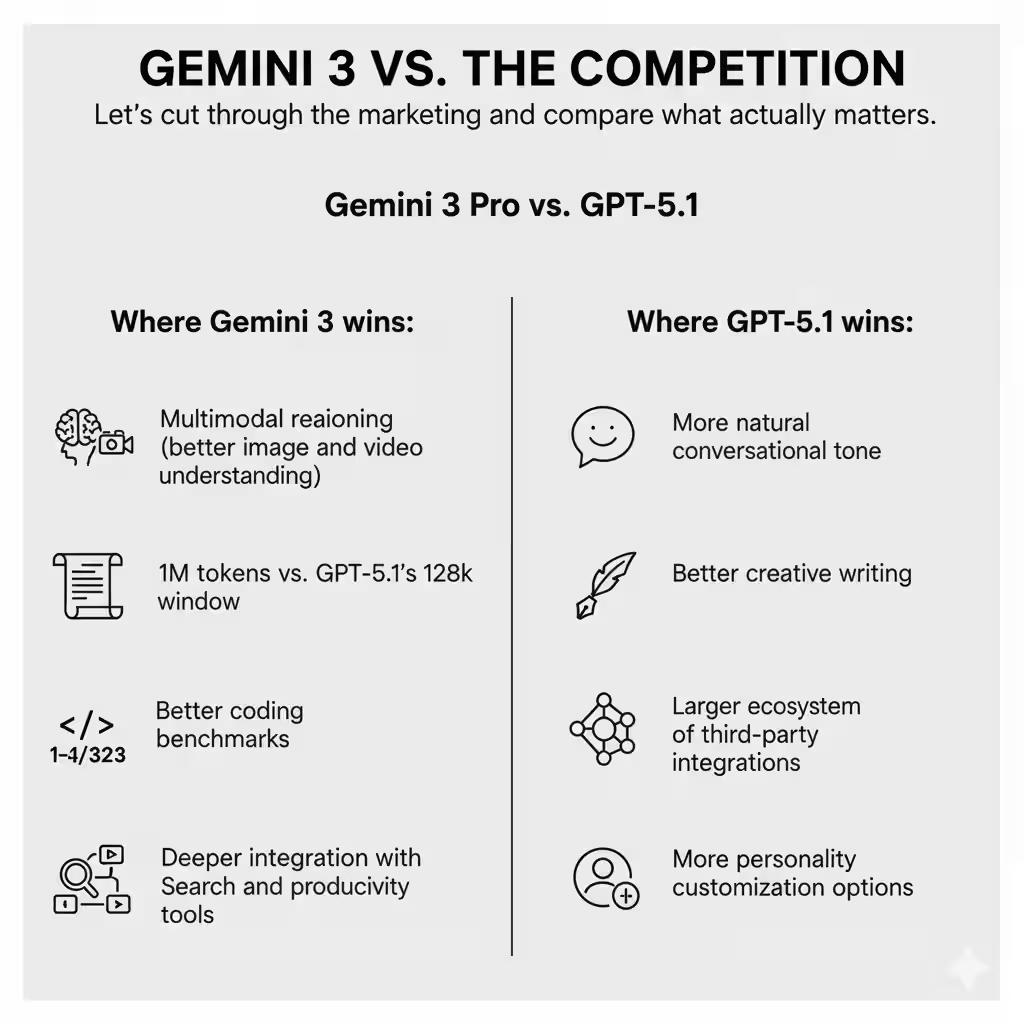
Let’s cut through the marketing and compare what actually matters.
Gemini 3 Pro vs. GPT-5.1
Where Gemini 3 wins:
- Multimodal reasoning (better image and video understanding)
- Longer context window (1M tokens vs. GPT-5.1’s 128k)
- Better coding benchmarks
- Deeper integration with Search and productivity tools
Where GPT-5.1 wins:
- More natural conversational tone
- Better creative writing
- Larger ecosystem of third-party integrations
- More personality customization options
Bottom line: Choose Gemini 3 for technical work, complex reasoning, and multimodal tasks. Choose GPT-5.1 for creative writing and conversational AI.
Gemini 3 Pro vs. Claude Sonnet 4.5
Where Gemini 3 wins:
- Higher benchmark scores across most tests
- Multimodal capabilities (Claude Sonnet 4.5 is primarily text)
- Integrated into Google’s ecosystem
- Longer context window
Where Claude Sonnet 4.5 wins:
- More careful and thoughtful responses
- Better at following complex instructions
- Stronger at analysis and critique
- More consistent quality across varied tasks
Bottom line: Choose Gemini 3 for maximum capability and multimodal work. Choose Claude Sonnet 4.5 for thoughtful analysis and precise instruction-following.
Gemini 3 Pro vs. Grok 4
Where Gemini 3 wins:
- Better benchmark performance overall
- More mature developer tools
- Wider availability and access
- Proven enterprise deployment
Where Grok 4 wins:
- Real-time X (Twitter) integration
- More direct and less filtered responses
- Faster updates with current events
Bottom line: Choose Gemini 3 unless you specifically need X platform integration.
Quick Comparison Table
| Feature | Gemini 3 Pro | GPT-5.1 | Claude Sonnet 4.5 | Grok 4 |
|---|---|---|---|---|
| Context Window | 1M tokens | 128k tokens | 200k tokens | 128k tokens |
| Multimodal | ✓ | ✓ | Limited | ✓ |
| Coding | Excellent | Very Good | Excellent | Good |
| Reasoning | Excellent | Very Good | Excellent | Good |
| Creative Writing | Good | Excellent | Very Good | Good |
| Price (per 1M tokens) | $2 / $12 | $3 / $15 | $3 / $15 | $5 / $15 |
| Best For | Technical + Multimodal | Creative + Conversation | Analysis + Precision | Real-time + X |
How To Get Started Today
You don’t need a PhD or developer experience to start using Gemini 3. Here’s how to begin based on what you want to do.
For Everyday Users
Option 1: Gemini App (Easiest)
- Download the Gemini app or visit gemini.google.com
- Sign in with your Google account
- Start asking questions
Free tier gives you:
- Full access to Gemini 3 Pro
- Rate limits (usually enough for personal use)
- All basic features
When to upgrade to paid:
- You hit rate limits regularly
- You want AI Mode in Search
- You need priority access during high demand
Option 2: AI Mode in Search
- Subscribe to Google AI Pro ($19.99/month) or Ultra
- Open Google Search
- Look for the “AI Mode” option
- Ask complex questions and get interactive answers
Best for:
- Research and learning
- Complex questions needing synthesis
- Anyone who does a lot of Google searching
For Developers
Step 1: Start Free in AI Studio
- Go to aistudio.google.com
- Sign in with your Google account
- Create a new prompt
- Test Gemini 3 Pro with your use case
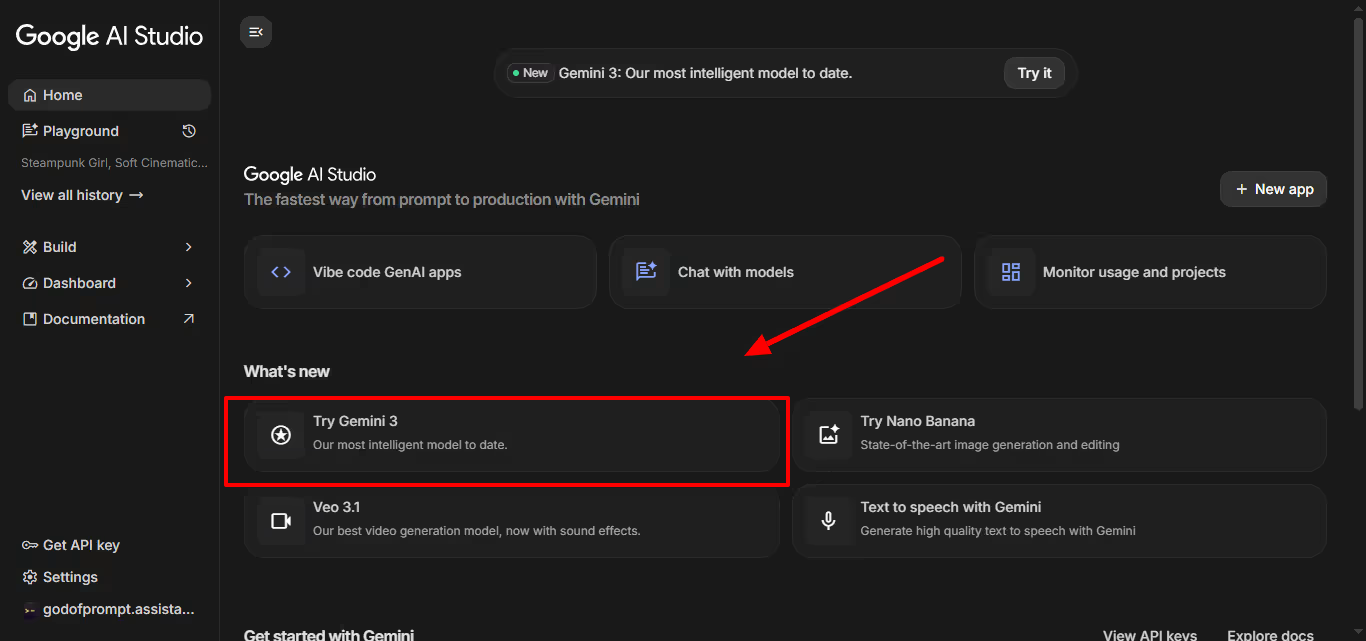
Step 2: Get an API Key
- In AI Studio, click “Get API Key”
- Create a new key or use existing one
- Copy the key and store it securely
Step 3: Build Your First Integration
Pick your language and install the SDK:
Python:
pip install google-generativeai
JavaScript/Node.js:
npm install @google/generative-ai
Step 4: Try Antigravity (For Agentic Coding)
- Download Antigravity for your OS
- Authenticate with your Google account
- Describe what you want to build
- Watch the agents work
For Enterprises
Step 1: Evaluate Through Vertex AI
- Set up a Google Cloud account (or use existing)
- Enable Vertex AI in your project
- Access Gemini 3 Pro through managed models
- Run internal tests with your use cases
Step 2: Plan Your Deployment
Consider:
- Authentication and access controls
- Data residency requirements
- Usage monitoring needs
- Integration with existing systems
Step 3: Start Small
Pick one use case:
- Internal chatbot
- Documentation search
- Code assistance
- Data analysis
Deploy to a small team first, gather feedback, then scale.
Three Simple First Steps (Anyone Can Do)
1. Test it in the Gemini app
Ask it to explain something you’ve always wanted to understand but found too complex. See how it breaks down information.
2. Use AI Mode for your next research task
Instead of opening ten tabs and piecing together information, let AI Mode synthesize it for you with citations.
3. If you’re a developer, prototype one idea in AI Studio
Take something you’ve been meaning to build and see how far you can get with Gemini 3’s help.
What This Launch Really Means
Google releasing Gemini 3 directly into Search on day one signals a major shift.
For years, AI models launched in isolated playgrounds.
You’d try them in ChatGPT or Claude, but they lived in separate apps.
Google is betting that AI works best when it’s integrated everywhere you already work.
For everyday users: AI becomes invisible infrastructure.
You’re not “using AI,” you’re just getting better answers in Search, writing better emails in Gmail, or organizing information more effectively in Docs.
For developers: The barrier to building AI-powered applications drops significantly. With Antigravity and the Gemini API, you’re describing what you want instead of implementing every detail.
For enterprises: AI deployment becomes practical. With Vertex AI, you get the tools large organizations actually need: governance, monitoring, compliance, and controls.
The real competition isn’t about benchmark scores anymore. It’s about who makes AI actually useful in daily workflows.
What’s Coming Next From Google
Google announced Gemini 3 is just the beginning of the “Gemini 3 era.”
Expect:
- More models in the Gemini 3 family (likely a Flash version for speed, a larger model for even better reasoning)
- Deep Think mode release within weeks
- Expanded Antigravity capabilities as developers provide feedback
- Deeper integration across Google Workspace (Docs, Sheets, Gmail getting Gemini 3 features)
The pace of AI development continues to accelerate. Google shipped Gemini 3 just 11 months after Gemini 2.0 and 7 months after Gemini 2.5.
One Action You Can Take Today
Don’t just read about it. Open the Gemini app or AI Studio and ask it something you genuinely want to know.
The difference between reading about AI capabilities and experiencing them firsthand is massive.
Try it with a real problem you’re facing, a topic you’re researching, or a project you’re building.
That’s where you’ll see if Gemini 3 lives up to the hype.
And if you’re a developer, spend 30 minutes in Antigravity.
The experience of describing what you want and watching agents build it will change how you think about software development.
Google has made Gemini 3 the most accessible frontier model yet. The question isn’t whether it’s powerful enough. It’s whether you’ll actually use it.
Next step: turn this article into output with ChatGPT prompts, or go deeper with Claude prompts.
Prompts for this topic
Put this article to work with ready-to-use prompts from the God of Prompt library.
Keep reading

Introducing ChatGPT 5.2: Everything You Need to Know
Discover everything about ChatGPT 5.2: faster reasoning, fewer hallucinations, better coding, and 70% accuracy vs industry professionals. Here’s what changed.


Introducing ChatGPT 5.1: Here’s Everything You Need to Know
ChatGPT 5.1 is here with warmer responses, better instruction following, and new personalization options. Learn what’s new and how to use the upgraded models now.

Introducing ChatGPT Atlas: Everything You Need To Know
Discover ChatGPT Atlas — OpenAI’s newest innovation redefining how we interact with AI. Learn what ChatGPT Atlas is, its key features, capabilities, release details, and how it transforms productivity, creativity, and communication. Get the full breakdown in this complete guide!


The best of the blog, in your inbox
One email when notable prompts, tools, and model updates land. No spam, unsubscribe anytime.
Join 100,000+ subscribers. One email a week, real prompts, tools, and model updates. Unsubscribe anytime.