Vibe Coding with Claude Code: Build Tools Instead of Paying for SaaS (2026)
Learn how to vibe code custom business tools with Claude Code instead of paying for SaaS. Step-by-step guide for non-technical business owners. No coding experience needed.


On this page
- What Is Vibe Coding (And Why Should Business Owners Care)?
- The 30-Second Version
- Why 2026 Changed Everything
- The Real Cost of Your SaaS Stack
- The Subscription Math Most Owners Never Do
- What You Could Build Instead (With Examples)
- How Vibe Coding with Claude Code Actually Works
- You Talk, Claude Builds
- What Makes Claude Code Different from ChatGPT or Other AI Tools
- 5 Business Tools You Can Build This Weekend
- 1. A Client Onboarding Form (Replaces Typeform/Jotform)
- 2. A Simple CRM Dashboard (Replaces Spreadsheet Chaos)
- 3. An Invoice Generator (Replaces FreshBooks for Basic Billing)
- 4. A Content Calendar Tool (Replaces Notion/Trello for Solo Use)
- 5. A Lead Tracker with Email Alerts (Replaces Basic Pipedrive)
- Your First Vibe Coding Session: Step by Step
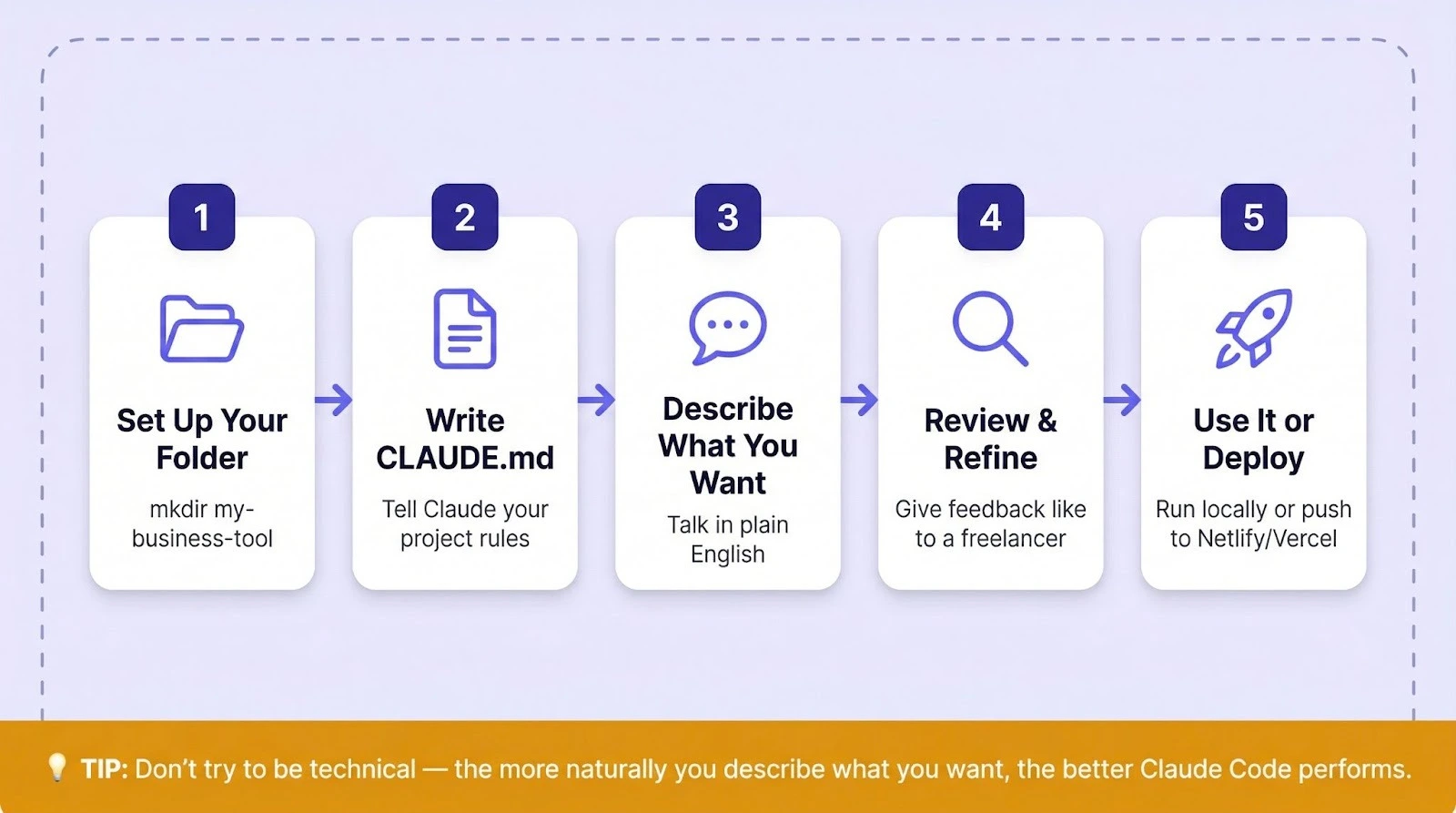
- Step 1: Set Up Your Project Folder
- Step 2: Write Your CLAUDE.md File
- Step 3: Describe What You Want in Plain English
- Step 4: Review, Test, and Refine
- Step 5: Use It (Locally or Deploy It)
- The Prompts That Make It Work
- When NOT to Vibe Code (Keep the SaaS)
- Frequently Asked Questions
- Do I need coding experience to vibe code with Claude Code?
- How much does Claude Code cost?
- Can I vibe code on a phone or tablet?
- What happens if my vibe-coded tool breaks?
- Is vibe coding the same as no-code tools like Bubble or Zapier?
You’re paying for Typeform. You’re paying for FreshBooks. You’re paying for Trello, Pipedrive, and three other apps you forgot to cancel.
Add it up. That’s $150 to $300 every month for tools that each do one thing. And half of them don’t even work the way you need them to.
Here’s what changed: Claude Code lets you describe a tool in plain English and get a working version back in minutes. No coding. No tutorials. No hiring a developer. You talk, it builds.
This guide walks you through exactly how vibe coding with Claude Code works, which SaaS subscriptions you can realistically replace, and how to build your first custom business tool this weekend. Even if you’ve never opened a terminal before.
What Is Vibe Coding (And Why Should Business Owners Care)?
Vibe coding is a way of building software by describing what you want in plain English instead of writing code yourself. An AI tool like Claude Code reads your instructions, writes the code, and builds the tool for you.
AI researcher Andrej Karpathy coined the term in February 2025, and Collins English Dictionary named it their Word of the Year later that same year.
That definition probably sounds too good to be true. A year ago, it mostly was.
The 30-Second Version
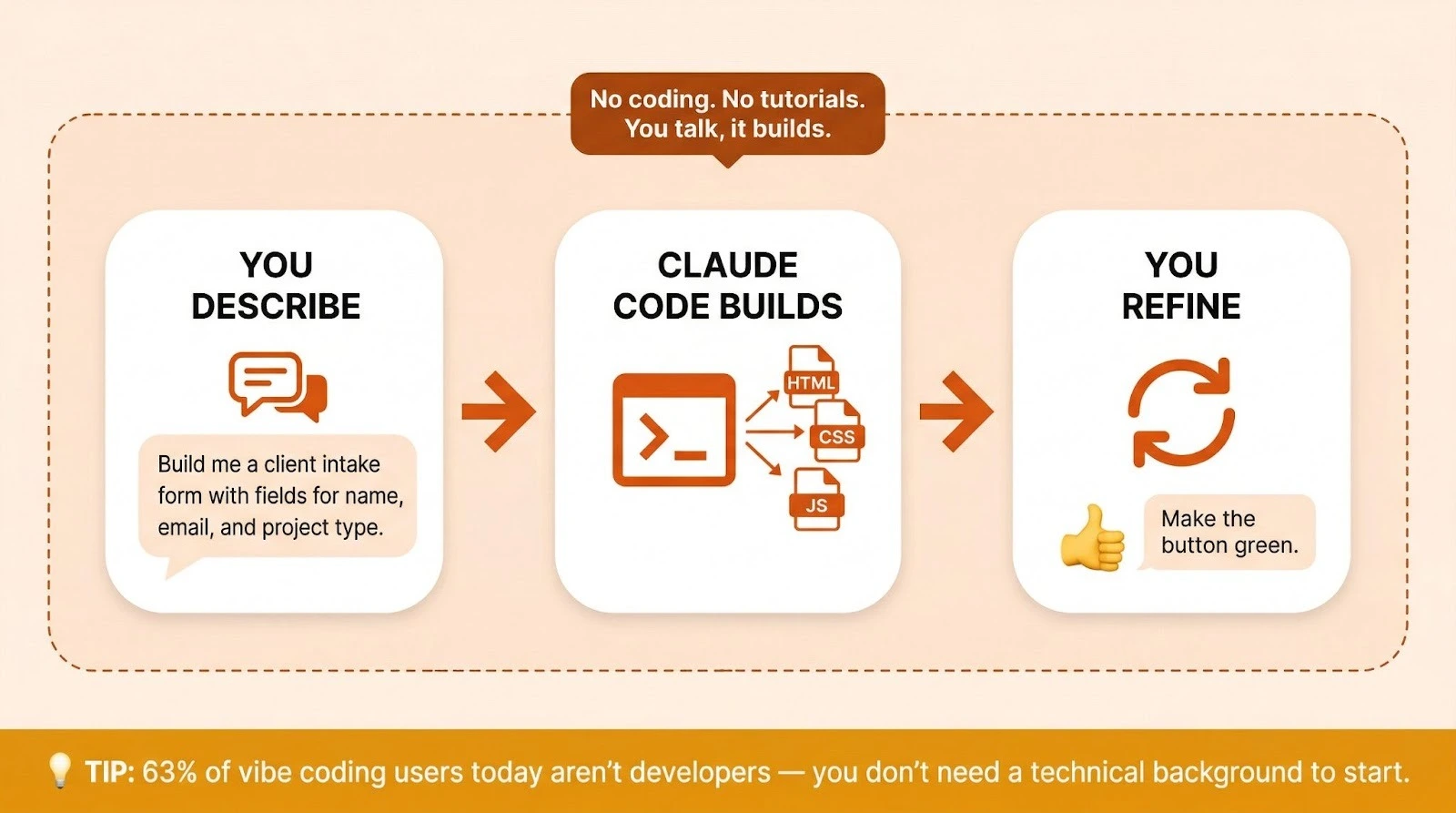
You open a terminal. You type something like “Build me a client intake form with fields for name, email, project type, and budget range. Save submissions to a local database and send me an email notification when someone fills it out.”
Claude Code reads that, writes the code, creates the files, and gives you a working tool. You test it. If something’s off, you tell Claude what to change. In plain English. It fixes it.
That’s the whole process. You describe. Claude builds. You refine. Done.
Why 2026 Changed Everything
When Karpathy first described vibe coding, it was mostly a fun experiment for experienced programmers working on throwaway weekend projects. The AI wasn’t reliable enough for anything serious.
That changed fast. According to industry data, 63% of vibe coding users today aren’t developers. They’re building user interfaces, full-stack apps, and personal tools using nothing but natural language.
Y Combinator reported that 25% of startups in its Winter 2025 batch had codebases that were 95% AI-generated.
The tools caught up to the idea. Claude Code, specifically, became the most capable agentic coding tool for people who don’t write code for a living. It reads your entire project. It writes and edits files directly. It runs commands.
And it takes instructions in conversational English, not programming jargon. You won’t believe how natural it feels.
For business owners, this means something practical: you can build the exact tool you need instead of paying $29/month for the closest approximation someone else built. That’s not a hypothetical. It’s happening right now.
The Real Cost of Your SaaS Stack
The Subscription Math Most Owners Never Do
Pull up your credit card statement. Count the software subscriptions. Most solopreneurs and small business owners are running between 5 and 10 SaaS tools, often without realizing what they’re actually spending.
Here’s what a typical solo business stack looks like:
- Form builder (Typeform, Jotform): $25-50/month
- Invoicing (FreshBooks, QuickBooks Simple): $17-30/month
- Project management (Trello, Notion, Asana): $10-25/month
- CRM (Pipedrive, HubSpot Starter): $15-45/month
- Email marketing (ConvertKit, Mailchimp): $25-50/month
- Scheduling (Calendly): $10-16/month
That’s $102 to $216 every month. For tools you’re using maybe 30% of their features.
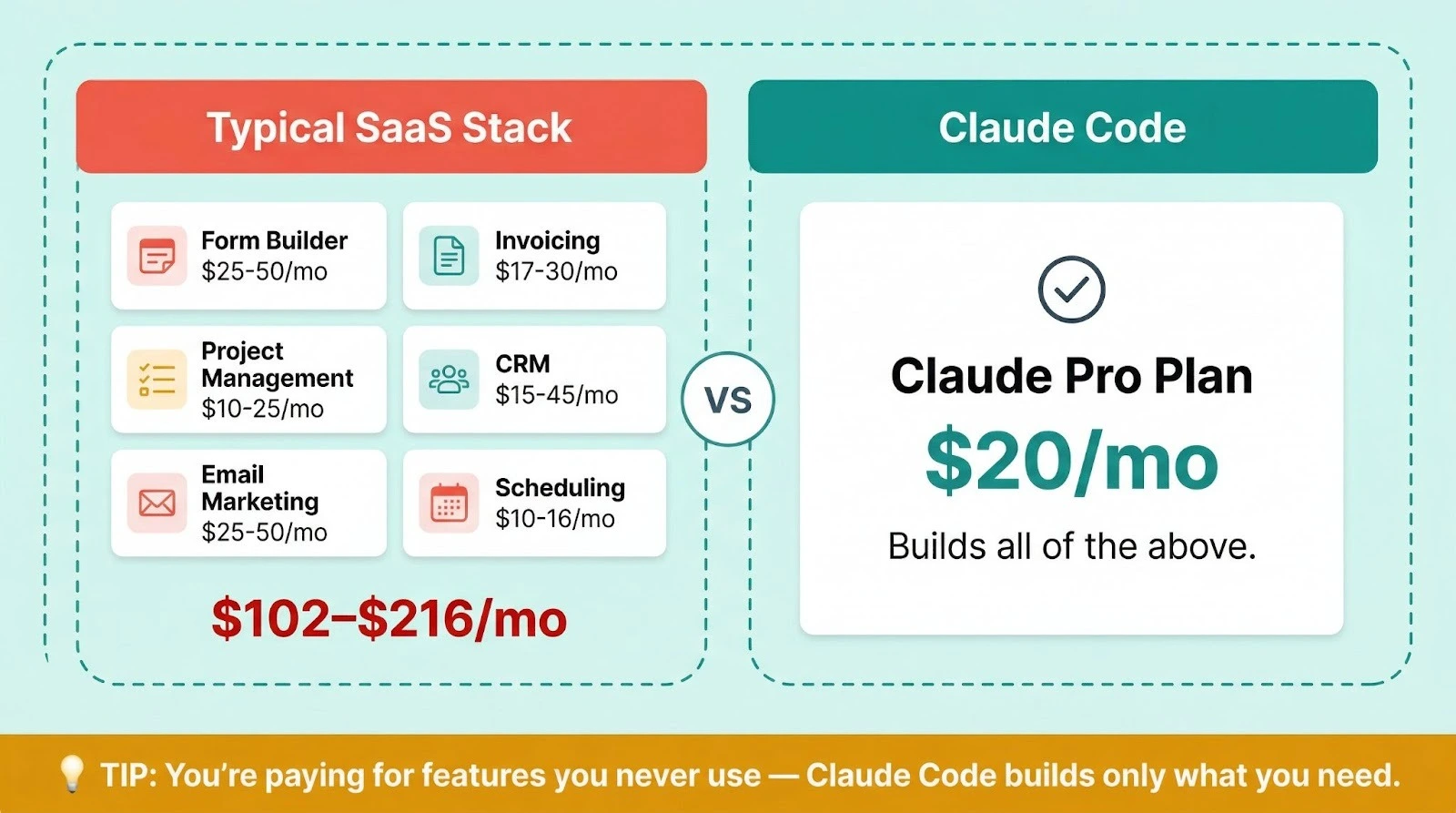
The Claude Pro plan costs $20/month and it includes Claude Code access. One subscription. And it’ll build simple, custom versions of many of those tools tailored to exactly how you work.
What You Could Build Instead (With Examples)
This isn’t theoretical. People are doing this right now.
One growth marketer with zero engineering background built a complete app using an AI coding tool that reached 10,000 users in three months.
Product teams at AppDirect used AI coding tools to build 11 different internal projects without engineering involvement, saving over $120,000 in software costs.
You don’t need to build the next Salesforce. You need a form that works your way. A tracker that shows your data. An invoice template that doesn’t charge you per client.
Those are weekend projects with Claude Code. They’re not complicated. They’re just specific to how you run your business.
How Vibe Coding with Claude Code Actually Works
You Talk, Claude Builds
Claude Code runs in your terminal (that black screen with the blinking cursor). Don’t let that scare you. You type normal sentences, not code.
The workflow is simple:
- You describe what you want
- Claude Code writes the code and creates files
- You see the result and ask for changes
- Claude Code edits and improves
- Repeat until you’re happy
What makes this different from chatting with regular Claude is that Claude Code actually touches your files. It doesn’t just suggest code for you to copy and paste.
It creates the project structure, writes the HTML, CSS, and JavaScript (or Python, or whatever the tool needs), and runs it so you can see it working.
If you haven’t set up Claude Code yet, start with our complete Claude Code beginner’s guide. It’ll walk you through installation and your first session.
And if you prefer a visual interface over the terminal, check out the Claude Cowork guide for non-developers. Cowork gives you a more visual way to work with Claude on files and projects, though Claude Code is more powerful for building from scratch.
What Makes Claude Code Different from ChatGPT or Other AI Tools
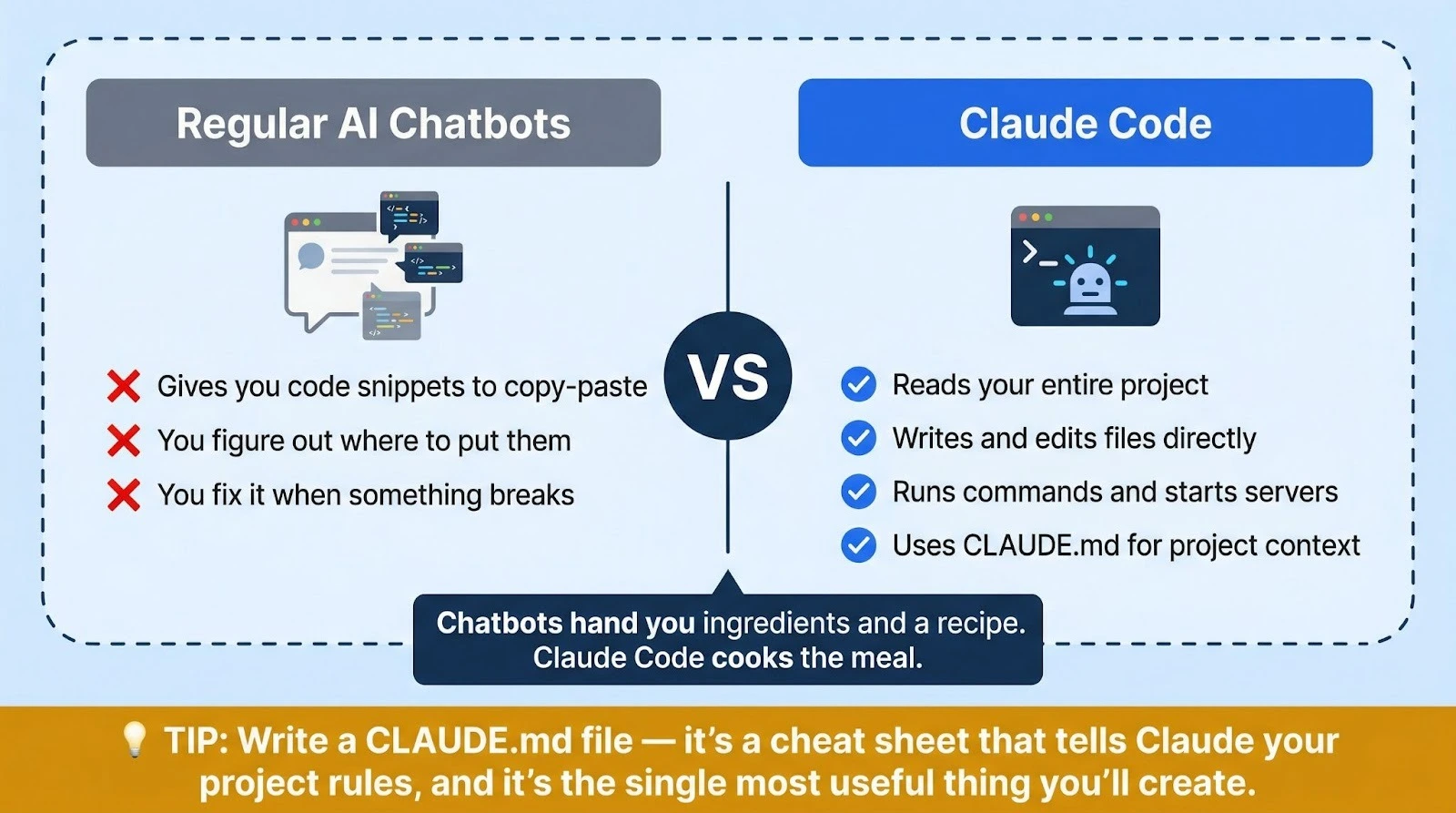
Regular AI chatbots give you code snippets. You’ve got to figure out where to put them, how to connect them, and what to do when something breaks. That’s still coding, just with an AI assistant.
Claude Code is an agent. It doesn’t hand you ingredients and a recipe. It cooks the meal.
Specifically, here’s what it does that chatbots don’t:
Reads your entire project. Claude Code understands all the files in your project folder at once. So when you say “change the button color on the homepage,” it knows which file the button is in.
Writes and edits files directly. No copy-pasting. Claude Code creates, modifies, and deletes files on your computer.
Runs commands. It can install software packages, start servers, and test your tool without you touching anything.
Uses a CLAUDE.md file for context. This is like a cheat sheet you write for Claude that explains your project, your preferences, and your goals. Claude reads it at the start of every session. It’s the single most useful thing you’ll create.
For a deeper look at how Claude Code compares to other AI coding tools, read our Claude Code vs Cursor comparison.
5 Business Tools You Can Build This Weekend
These aren’t fantasy projects. Each one replaces a specific SaaS product, can be built in a few hours with Claude Code, and runs locally on your computer or on a simple hosting service. They’re all real tools that real business owners have built.
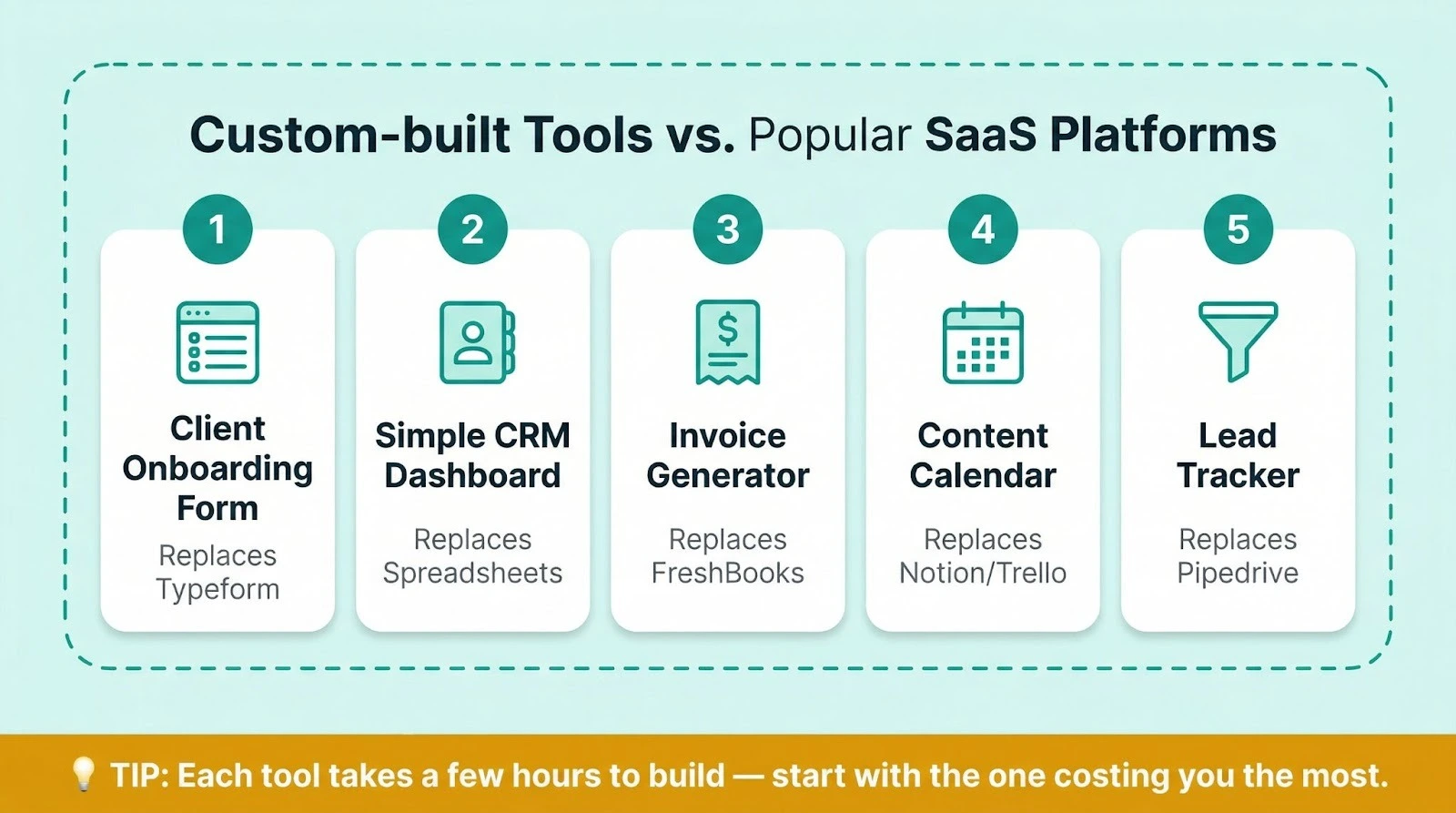
1. A Client Onboarding Form (Replaces Typeform/Jotform)
What it does: A custom form that collects client info, validates inputs, saves everything to a local file or database, and optionally sends you an email when someone submits. It doesn’t require a monthly subscription to do any of that.
Why build it: Typeform charges $25-50/month. Your form probably has 5-10 fields. You don’t need conditional logic across 47 question types. You need a clean form that captures the specific data you actually use.
What to tell Claude Code: “Build me a web form for new client onboarding. Fields: full name, email, phone, company name, project type (dropdown with Web Design, Branding, Consulting, Other), budget range (dropdown), and a text area for project description. Save submissions to a JSON file.”
“Make it look professional and mobile-friendly.”
2. A Simple CRM Dashboard (Replaces Spreadsheet Chaos)
What it does: A local dashboard where you can view, add, edit, and search contacts. It tracks basic info: name, company, last contact date, deal status, and notes. That’s it. And that’s all you need.
Why build it: Pipedrive starts at $14/user/month. HubSpot pushes you toward paid tiers fast. If you’re a solo operator tracking 20-100 contacts, you don’t need a full CRM platform. You need a clean interface on top of your data.
What to tell Claude Code: “Create a simple CRM dashboard as a web app. I want to add contacts with name, email, company, deal status (Lead, Proposal, Active, Closed), deal value, and notes. Show all contacts in a searchable, sortable table. Let me click to edit any contact.”
“Store data in a local SQLite database.”
3. An Invoice Generator (Replaces FreshBooks for Basic Billing)
What it does: A tool that generates clean, professional PDF invoices from a simple form. Enter client details, line items, your business info, and it’ll spit out a downloadable invoice.
Why build it: FreshBooks charges $17-55/month. If you’re sending fewer than 20 invoices a month and don’t need automated payment tracking, a custom generator does the job.
What to tell Claude Code: “Build an invoice generator web app. I enter my business name and details once (saved for reuse), then for each invoice I add: client name, client email, invoice number, date, due date, line items (description, quantity, rate), tax percentage, and notes.”
“Generate a clean PDF invoice I can download.”
4. A Content Calendar Tool (Replaces Notion/Trello for Solo Use)
What it does: A visual calendar where you can plan, schedule, and track content across platforms. Drag, drop, mark as done. It’s exactly the view you’ve been building in spreadsheets, but better.
Why build it: Trello and Notion are great for teams. For one person managing a content schedule, they’re overkill. Your custom version shows exactly what you need without 50 features you’ll never touch.
What to tell Claude Code: “Build a content calendar web app. I want a monthly calendar view where I can add content items with: title, platform (Blog, Instagram, LinkedIn, Email, YouTube), status (Idea, Drafting, Ready, Published), and a notes field. Let me click any day to add content.”
“Color-code by platform. Let me drag items between days.”
5. A Lead Tracker with Email Alerts (Replaces Basic Pipedrive)
What it does: Tracks incoming leads, their source, status, and follow-up dates. Sends you a daily digest email of leads that need attention.
Why build it: Dedicated lead tracking starts at $15-30/month. If your sales process is simple, meaning leads come in, you follow up, they convert or they don’t, you need a tracker, not a platform. You don’t need pipeline automation. You need visibility.
What to tell Claude Code: “Build a lead tracking web app. Fields: name, email, source (Website, Referral, Social, Ad, Other), status (New, Contacted, Following Up, Won, Lost), follow-up date, and notes. Show a dashboard with all leads sorted by follow-up date.”
“Highlight overdue follow-ups in red.”
Your First Vibe Coding Session: Step by Step
Never touched a terminal? That’s fine. Here’s the exact process, start to finish.
Before you begin, make sure you have a Claude Pro subscription ($20/month) or higher, since the Free plan doesn’t include Claude Code access. You’ll also need Claude Code installed on your computer. Our complete Claude Code beginner’s guide covers installation in detail.
Step 1: Set Up Your Project Folder
Open your terminal and create a folder for your project:
mkdir my-business-tool
cd my-business-tool
That’s two commands. mkdir creates a folder. cd moves you into it. You won’t need much more terminal knowledge than this. Seriously, that’s about it.
Step 2: Write Your CLAUDE.md File
A CLAUDE.md file is a plain text file that tells Claude about your project. Think of it as a brief you’d hand to a contractor. Create one in your project folder with something like this:
# My Client Intake Form
## Goal
A professional web form for collecting new client information.
## Tech Preferences
– Simple HTML/CSS/JavaScript (no complex frameworks)
– Mobile-friendly design
– Store data locally in JSON files
– Clean, modern styling
## My Context
I’m a freelance designer. I’m not a developer. Keep the technology simple and explain any decisions.
Claude Code reads this file automatically at the start of every session. It keeps the AI focused on what you actually need.
Step 3: Describe What You Want in Plain English
Start Claude Code by typing claude in your terminal (from inside your project folder). Then describe your tool conversationally:
“I need a client intake form for my freelance design business. Potential clients fill it out on my website. I want fields for their name, email, company, project type, budget range, timeline, and a description of what they need.”
“Make it look professional with a clean, modern design. Save submissions to a JSON file I can open later.”
Don’t try to be technical. The more naturally you describe what you want, the better Claude Code performs.
Step 4: Review, Test, and Refine
Claude Code will create files and possibly start a local server so you can see your tool in a browser. Look at the result. Then give feedback like you’d give a freelancer:
- “The form looks great, but make the submit button bigger and green.”
- “Add a required field for phone number.”
- “The mobile version cuts off the project description field. Fix the layout.”
Each round of feedback takes seconds. You’re iterating toward exactly what you need.
For more tips on communicating effectively with Claude Code, read our list of vibe coding rules every beginner should know.
Step 5: Use It (Locally or Deploy It)
For personal tools (CRM, invoice generator, content calendar), running locally on your computer is fine. Claude Code can set up a local server you’ll access through your browser.
For client-facing tools (intake forms, lead trackers), you’ll need to put them online. Claude Code can help you deploy to free or low-cost hosting services like Netlify, Vercel, or GitHub Pages.
Just ask: “Help me deploy this to Netlify so clients can access the form from my website.” It’ll handle the setup.
The Prompts That Make It Work
Good prompts are the difference between getting something useful on the first try and going back and forth for an hour. Here are prompts you can copy and customize for common business tools. They’ve all been tested.
The Tool Builder Prompt:
Build me a [type of tool] for my [type of business].
It should:
– [Core feature 1]
– [Core feature 2]
– [Core feature 3]
Tech requirements:
– Simple HTML/CSS/JavaScript (no complex frameworks)
– Mobile-friendly
– Store data locally in [JSON/SQLite]
– Clean, professional design
I’m not a developer. Keep the code simple and maintainable.
The SaaS Replacement Prompt:
I currently pay for [SaaS tool name] and I use it for [specific use case].
Build me a simple local alternative that does just the parts I need:
– [Feature you actually use]
– [Feature you actually use]
– [Feature you actually use]
I don’t need [complex feature you never touch]. Keep it simple.
The Fix-It Prompt (when something breaks):
The [specific thing] isn’t working. When I [action],
I expect [expected result] but instead [what actually happens].
Fix this and explain what went wrong in one sentence.
The Make-It-Better Prompt:
This works but I want to improve it:
– [Specific improvement 1]
– [Specific improvement 2]
– [Specific improvement 3]
Don’t change anything else. Just these three things.
For a deeper library of prompts you can use with Claude, browse our collection of Claude system prompts for business.
When NOT to Vibe Code (Keep the SaaS)
Honesty time. Vibe coding can replace a lot of simple SaaS tools. But it can’t replace all of them, and you shouldn’t try.
Keep the SaaS when:
You’re handling payments.
Anything involving credit cards, billing, or financial transactions needs battle-tested security. Use Stripe, Square, or your existing invoicing tool for actual payment processing. Your vibe-coded invoice generator creates the document, but it shouldn’t process the payment.
You’re storing sensitive personal data.
Health records, social security numbers, financial data, anything regulated. These require compliance frameworks (HIPAA, SOC 2, GDPR) that a weekend project won’t cover.
You need 99.9% uptime.
If your tool goes down and it costs you money or clients, pay for managed software. Your vibe-coded content calendar being offline for an hour? That’s annoying. Your client-facing booking system being offline for an hour? That’s a problem.
Multiple people need to collaborate in real time.
Vibe-coded tools work great for one person. Adding real-time multi-user collaboration with permissions, roles, and conflict resolution? That’s a much bigger engineering challenge.
The SaaS has critical integrations you depend on.
If your CRM automatically syncs with your email marketing, your calendar, and your accounting software, and you’re using all of those integrations daily, rebuilding that web of connections isn’t a weekend project.
The rule of thumb: if the tool’s simple, personal, or internal, build it. If it’s client-facing, handles money, or needs enterprise-grade reliability, keep the subscription.
Frequently Asked Questions
Do I need coding experience to vibe code with Claude Code?
No. That’s the entire point. You describe what you want in plain English, and Claude Code writes the code. You don’t need to read, understand, or edit the code yourself. Around 63% of people using vibe coding tools today don’t have any development background.
That said, you’ll get better results faster if you can describe what you want clearly and specifically. Think of it like hiring a contractor. You don’t need to know how to lay tile, but you do need to know that you want subway tile in white, not mosaic in beige.
How much does Claude Code cost?
Claude Code comes with the Claude Pro plan at $20/month (or $17/month if billed annually). There’s also the Max plan at $100/month or $200/month for heavier usage. The Free plan doesn’t include Claude Code access.
For most business owners building simple tools, the Pro plan provides more than enough capacity. You won’t hit the limits unless you’re building all day.
Can I vibe code on a phone or tablet?
Not practically. Claude Code runs in a terminal, which needs a desktop or laptop computer. It works on Mac, Windows, and Linux. You could technically access a terminal from a tablet with a keyboard, but it wouldn’t be comfortable for building tools.
The good news: once your tool’s built and running on a server, you can access and use it from any device, including your phone.
What happens if my vibe-coded tool breaks?
You open Claude Code and describe the problem. “The form stopped saving submissions after I restarted my computer” or “The calendar shows the wrong month when I click forward.” Claude Code can diagnose and fix issues the same way it built the tool, through conversation. It’s really that simple.
For tools you depend on daily, it’s smart to keep a backup of your project folder. Claude Code can also help you set up automatic backups. You’d be surprised how easy that is.
Is vibe coding the same as no-code tools like Bubble or Zapier?
Not the same, but they’re in the same family. No-code tools like Bubble give you a visual builder with drag-and-drop components. You’re limited to what the platform offers, and you’re locked into their pricing and platform.
Vibe coding gives you actual code that you own. You can host it anywhere, modify it completely, and you’re never locked into a platform. The tradeoff is that vibe coding requires more specificity in describing what you want, while no-code tools offer a more guided, visual experience.
For simple, custom business tools, vibe coding often produces a better result, faster, and cheaper. And you’ll own every line of code.
Want 50+ ready-made Claude Code prompts for business automation? Browse the complete prompt library at God of Prompt.
Keep going: the prompt library has AI coding prompts and Claude prompts ready to copy and run.
Prompts for this topic
Put this article to work with ready-to-use prompts from the God of Prompt library.
Keep reading

Claude Code vs Cursor (2026): Which AI Coding Tool Wins?
Claude Code vs Cursor compared for 2026. Features, pricing, and honest verdicts to help you pick the right AI coding tool, even if you’re not a developer.

20 Best Claude Code Prompts You Can Copy and Use Today (2026)
20 copy-paste Claude Code prompts for coding, marketing, business ops, and research. Includes the 5-part prompt formula and CLAUDE.md tips.


10 No-Code AI Tools for Business Efficiency
Compare 10 no-code AI platforms that automate workflows, build apps, and boost productivity with pricing, features, and real-world use cases.

The best of the blog, in your inbox
One email when notable prompts, tools, and model updates land. No spam, unsubscribe anytime.
Join 100,000+ subscribers. One email a week, real prompts, tools, and model updates. Unsubscribe anytime.