
AI payment reconciliation automates the tedious process of matching financial transactions across banks, payment gateways, and ERP systems. Instead of relying on manual comparisons, AI uses machine learning, NLP, and large language models to handle mismatches, incomplete data, and unstructured formats like PDFs or emails. This approach reduces errors by up to 98%, automates over 90% of tasks, and shortens month-end close cycles from 10 days to 3–5 days.
Key Takeaways:
- What It Does: AI matches transactions, identifies discrepancies, and updates ledgers in real time.
- Why It’s Needed: Manual processes are slow, error-prone, and unsustainable as transaction volumes grow.
- Benefits: Saves 70–80% on labor costs, improves accuracy, and provides instant cash flow visibility.
- How It Works: Combines deterministic rules with probabilistic logic to handle complex scenarios, like partial payments or vague descriptions.
- Results: Companies like Beamery and Liberis report saving hundreds of hours annually and achieving faster reconciliation.
AI reconciliation transforms finance teams’ workflows, enabling them to focus on resolving exceptions and analyzing patterns instead of repetitive data entry. This guide explains how it works, compares it to manual methods, and outlines best practices for implementation.
Automating Financial Reconciliation with AI Agents | Finance Automation
sbb-itb-58f115e
Manual vs. AI-Powered Payment Reconciliation
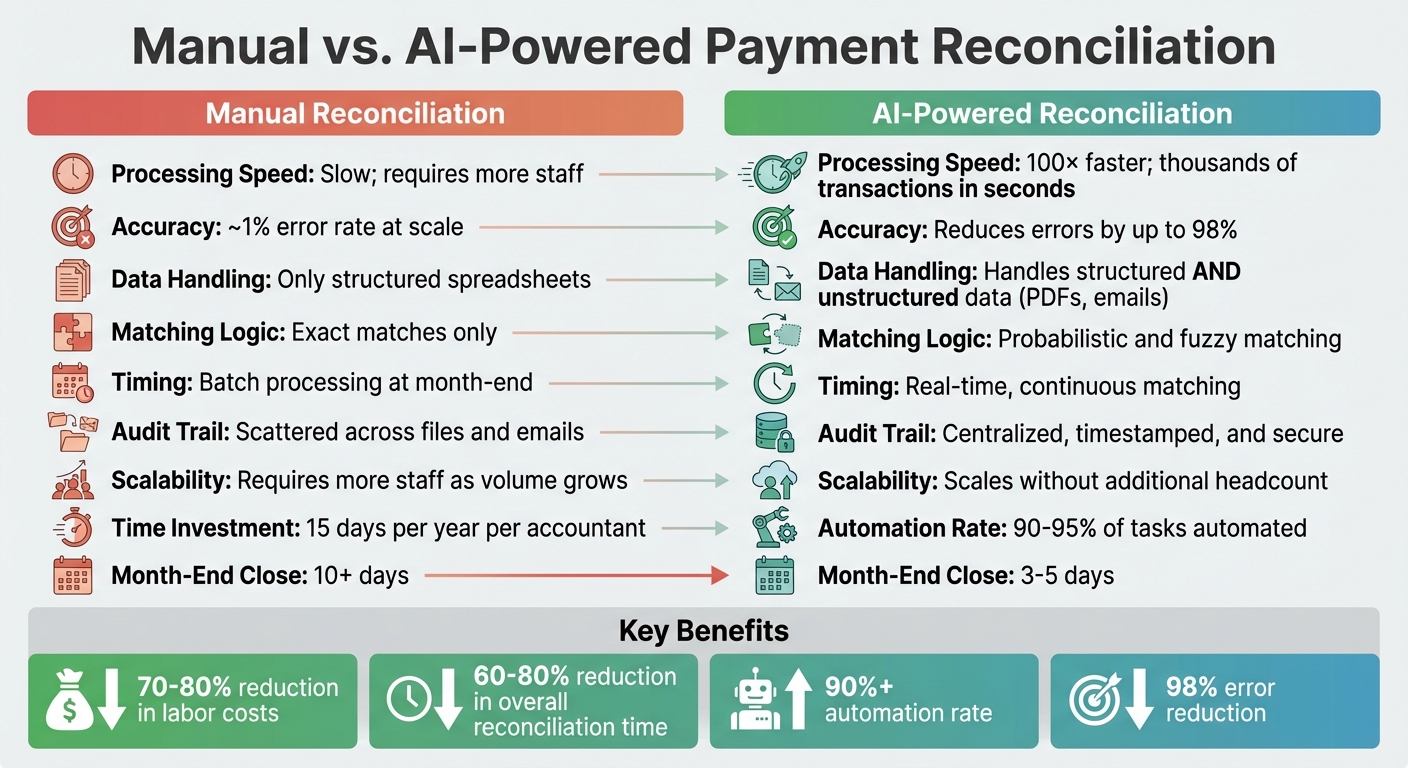
Manual vs AI-Powered Payment Reconciliation Comparison
Taking a closer look at manual versus AI-powered reconciliation reveals why many finance teams are opting to modernize. It’s not just about speed – it’s about rethinking the entire process.
How Manual Reconciliation Works
Manual reconciliation is a time-consuming and repetitive task. Teams typically download bank statements, payment processor reports, and ERP exports – often in CSV files – and spend hours comparing transactions. They look for matches in amounts, dates, and reference numbers, flagging any discrepancies. Resolving these issues often means digging through emails, PDFs, and remittance advice. This process usually peaks at month-end, creating what’s often called a "war room" scenario, with everyone scrambling to close the books. Many teams now look for ChatGPT prompts for business automation to alleviate these manual bottlenecks.
The challenges with manual reconciliation add up quickly, leading many to explore n8n no-code automations to streamline workflows. Accountants dedicate an average of 15 days each year to these tasks. Even with careful efforts, error rates between 0.5% and 2% are common at scale. Manual processes struggle to handle messy, real-world data, such as truncated bank descriptions, partial payments, currency rounding differences, and timezone mismatches. When transaction volumes increase, the only way to keep up is to hire more staff, which creates a scaling issue.
"Manual reconciliation doesn’t scale, it breaks." – NAYA
Another major drawback is the lack of a clear audit trail. Key decisions and evidence often get scattered across emails, spreadsheets, and even sticky notes, making it hard to reconstruct the reasoning behind a match weeks later. This fragmented approach can lead to compliance issues and added stress during audits. These limitations set the stage for AI to transform the process.
How AI Improves Payment Reconciliation
AI-powered reconciliation changes the game by eliminating delays and errors. Instead of relying on manual uploads, AI connects directly to banks and payment gateways via APIs, continuously processing transactions in real time. This allows finance teams to have up-to-date visibility into their cash flow and reconciled balances at any moment.
The matching process is also completely different. Manual methods depend on exact matches for amounts, dates, and reference IDs, but AI uses probabilistic and fuzzy matching to handle real-world complexities. For example, AI can link an invoice to a bank deposit even if the amount is slightly off due to processing fees. It can interpret vague memos like "PYMT REC’D 03/15" and recognize that "ABC Corp", "ABC CO", and "ABC CORPORATION" are the same vendor. Using Natural Language Processing (NLP), AI can even extract relevant details from unstructured sources like PDF invoices or email remittance advice.
The results are impressive. AI-powered systems can cut reconciliation time by up to 90% and are 100× faster than manual methods. They can also eliminate up to 98% of errors and reduce month-end close times from over 10 days to just 3–5 days. Companies that adopt automation often see a 60–80% reduction in overall reconciliation time and save 70–80% on labor costs.
AI doesn’t just speed up matching; it also handles exceptions more effectively. Instead of leaving accountants to sift through emails and spreadsheets, AI groups exceptions by their root causes – like timing differences, fees, or duplicate entries – and provides detailed evidence packets with supporting documentation. This allows finance teams to focus on the 5–10% of cases that genuinely require human judgment, shifting their role from data entry to strategic problem-solving.
To highlight the differences, here’s a quick comparison:
| Feature | Manual Reconciliation | AI-Powered Reconciliation |
|---|---|---|
| Processing Speed | Slow; needs more staff | 100× faster; thousands of transactions in seconds |
| Accuracy | ~1% error rate at scale | Reduces errors by up to 98% |
| Data Handling | Only structured spreadsheets | Handles structured and unstructured data (PDFs, emails) |
| Matching Logic | Exact matches only | Uses probabilistic and fuzzy matching |
| Timing | Batch processing at month-end | Real-time, continuous matching |
| Audit Trail | Scattered across files and emails | Centralized, timestamped, and secure |
| Scalability | Requires more staff as volume grows | Scales without additional headcount |
"The difference between manual and automated reconciliation is not merely a choice of tools; it’s a choice of direction for your finance function." – Kosh.ai
Key Steps in AI Payment Reconciliation
AI plays a critical role in transforming payment reconciliation, shifting it from a tedious manual process to an efficient, automated workflow. By handling data with precision, matching transactions intelligently, resolving discrepancies, and updating ledgers in real time, AI eliminates common bottlenecks and enhances operational efficiency.
Data Collection and Normalization
The process begins with seamless, real-time data ingestion. AI tools directly integrate with ERP systems like SAP, Oracle, and NetSuite, as well as banking feeds (e.g., SWIFT, BAI2) and payment gateways via APIs. This eliminates the need for manual uploads, ensuring that transaction data flows continuously into the system.
AI’s ability to normalize data shines here. It tackles inconsistencies such as truncated vendor names, varying date formats, and unclear bank descriptions. For instance, AI can recognize that "GRABPAY*SG" and "Grab Singapore" refer to the same entity. Using Natural Language Processing (NLP), it extracts and standardizes critical details – like dates, amounts, and invoice numbers – from unstructured sources such as PDF invoices and emails. This ensures data accuracy before matching even begins.
Real-world examples show that real-time ingestion and normalization significantly speed up bank reconciliation while cutting down on manual validation work.
Automated Transaction Matching
After normalization, AI applies a layered matching approach. It starts with deterministic rules for exact matches and then uses advanced techniques for more complex cases. This allows AI to handle scenarios like one payment covering multiple invoices (one-to-many matching), multiple payments for a single invoice (many-to-one matching), and even fuzzy matching based on historical patterns.
Unlike traditional systems that rely on exact matches, AI uses probabilistic scoring to address real-world complexities. For example, it might match a $1,000 invoice to a $997.50 bank credit by factoring in a wire fee or interpret shorthand like "INV1234–6" as referring to invoices 1234, 1235, and 1236. While manual methods often resolve only 60–70% of transactions, AI systems achieve automation rates exceeding 90%.
"Rule-based systems ask: does this transaction match exactly? AI-powered systems ask: given everything we know, what is the most likely match?" – Atlar
Finding and Fixing Discrepancies
When mismatches arise, AI simplifies the resolution process by categorizing discrepancies – whether they stem from timing issues, amount differences, duplicates, or fees. Instead of combing through emails and spreadsheets, accountants receive exceptions automatically routed to them, complete with all supporting documentation.
AI also offers suggested resolutions by proposing adjustments to journal entries or reclassifications based on historical data and accounting logic. Over time, these corrections improve the system’s accuracy, with well-tuned environments achieving over 99% accuracy for matched transactions.
"The goal is: automate routine matching, surface uncertainty early, keep an audit trail, maintain accuracy through exception review." – Oliver Hayes, ccMonet
Ledger Updates and Reporting
Once transactions are matched and approved, the system syncs entries bidirectionally with ERP platforms like NetSuite and SAP in real time. This eliminates the delays of batch processing and turns month-end reconciliation into an ongoing process. AI also generates audit trails and reconciliation certificates automatically, providing complete transparency for every action.
Finance teams benefit from real-time insights into cash flow and reconciled balances, no longer waiting for month-end reports. This shift from reactive processes to continuous reconciliation fundamentally changes how finance teams operate, offering greater efficiency and visibility.
With these steps in place, AI sets the stage for advanced features that further refine the reconciliation process.
Advanced Features of AI Reconciliation Tools
Modern AI reconciliation platforms go far beyond basic matching and ledger updates. These tools tackle the messy, real-world challenges of financial data by processing unstructured information, identifying issues early, and working seamlessly with existing financial systems.
Smart Data Extraction
Advanced tools take data normalization to the next level by refining how information is extracted. Using technologies like natural language processing (NLP) and large language models (LLMs), AI can interpret unstructured data and standardize it for easier use. For example, if a wire transfer memo says "Inv1234–8", AI can decode this shorthand and link it to multiple invoices. As Jason Berwanger from HubiFi puts it, "AI can make your financial predictions 25-30% more accurate, giving you clearer insights to make better strategic decisions".
Real-Time Anomaly Detection
AI doesn’t wait for month-end reviews – it continuously scans transaction streams to catch discrepancies, duplicate payments, or signs of fraud. It doesn’t just flag individual issues; it groups related exceptions, such as timing mismatches or duplicate payments, to help teams uncover larger problems like a misconfigured payment gateway causing widespread errors.
AI also monitors trends, sending alerts if match rates drop or exceptions spike. According to ccMonet, "The goal is: automate routine matching, surface uncertainty early, keep an audit trail, maintain accuracy through exception review". Some platforms even use multi-agent AI systems, where different agents specialize in tasks like matching, exception classification, and anomaly detection. This approach has helped companies automate over 90% of their reconciliation processes. These insights integrate smoothly into broader financial systems, ensuring teams stay ahead of potential issues.
Integration with ERP Systems and Payment Gateways
AI reconciliation tools connect directly with major ERP systems like NetSuite, SAP, and Oracle, as well as payment gateways such as Stripe and Adyen. This integration eliminates the need for manual data entry by automatically syncing ledger information in real time. Instead of waiting for month-end batch processing, reconciliation becomes a continuous workflow.
With this setup, finance teams get real-time visibility into cash flow, funds in transit, and possible delays – key information for managing liquidity and forecasting accurately. By speeding up reconciliation cycles and reducing the need for manual input, these integrations emphasize the importance of precision and efficiency in modern financial operations.
Best Practices for Implementing AI Payment Reconciliation
To make the most of AI payment reconciliation, it’s crucial to follow a structured approach. Successful companies start by organizing their data and setting clear objectives. Begin by defining your scope – determine which types of reconciliation you need (such as bank, intercompany, or general ledger), and document your current manual workflows and pain points. It’s also essential to have 6–12 months of historical data ready to train the AI effectively.
A phased migration strategy is highly effective. Run the AI tool alongside your existing manual processes for 4–12 weeks to test its accuracy before fully transitioning.
Setting Up AI Matching Logic
A robust matching strategy is key to success. Combine deterministic rules for exact matches with AI-driven probabilistic logic for handling fuzzy matches, such as shorthand memos or name variations. Set specific tolerance thresholds for minor discrepancies – for instance, allowing matches if dates are within ±3 days or if small currency conversion differences are present.
To handle complex scenarios, configure your system to manage one-to-many (batch payments), many-to-one (consolidated items), and many-to-many (splits) scenarios that traditional rules often overlook. Incorporate a human-in-the-loop interface where the AI highlights discrepancies and suggests resolutions for human review and approval.
Continuous improvement is where AI shines. Use human feedback from rejected matches to retrain your AI models and fine-tune matching thresholds over time. This creates a feedback loop, enabling the system to adapt to your business’s unique patterns and become more efficient with each correction.
Tracking Performance Metrics
To measure the success of AI reconciliation, focus on tracking key metrics. The most critical ones include:
- Automatic Match Rate: Aim for 90% or higher.
- Exception Rate: Keep it below 5%.
- False Positive Rate: Target less than 1%.
- Time to Match: Strive for under 24 hours for 95% of transactions.
| Metric | Target Benchmark |
|---|---|
| Automatic Match Rate | 90% or higher |
| Exception Rate | Less than 5% |
| False Positive Rate | Less than 1% |
| Time to Match | Under 24 hours for 95% |
These metrics should be monitored daily, not just monthly. Pay close attention to the false positive rate to ensure the AI isn’t introducing hidden errors. Additionally, identify which data sources or payment gateways have lower automation rates to refine your AI’s matching rules.
Companies that integrate AI reconciliation often see impressive outcomes: a 60% boost in financial results, 25–30% improvements in financial forecasting accuracy, and a reduction in month-end close timelines from over 10 days to just 3–5 days. For example, Beamery saved 480 hours annually across payment and reconciliation workflows after adopting automated tools.
With these performance metrics in place, the next step is preparing your team to fully leverage these AI tools.
Training Teams on AI Tools
AI reconciliation reshapes finance roles, shifting focus from manual data entry to strategic analysis. Teams transition to managing exceptions and interpreting AI suggestions, allowing them to focus on higher-value tasks.
"The goal is AI handling 100% of matching, with humans reviewing rather than performing the work" – Atlar
Training should emphasize exception resolution workflows and providing feedback to improve the AI’s accuracy. Address exceptions weekly while the context is fresh to avoid backlogs and ensure the AI learns from recent patterns. Human oversight remains critical for defining initial rules, validating financial statements, and maintaining audit trails.
"AI reconciliation is a game-changer for scaling finance team capacity without adding headcount" – Ira Fridman, Head of Customer Success at Ledge
Organizations that embrace AI reconciliation often see a 70–80% reduction in reconciliation labor costs, freeing up teams to focus on strategic initiatives that drive business growth.
AI Tools and Resources for Payment Reconciliation
Having the right tools can make or break your AI-powered reconciliation process. Whether you’re dealing with high transaction volumes, complex datasets, or specific workflow requirements, there’s a solution out there for you. From enterprise platforms with deep ERP integrations to flexible tools for building custom workflows, the choice depends on your needs – be it a ready-made solution or something tailored to your logic.
God of Prompt: AI Prompts for Custom Reconciliation
God of Prompt provides access to over 30,000 AI prompts and guides, enabling finance teams to build cost-effective, customized reconciliation workflows. Its prompts use adaptable placeholders – like account type, time period, and discrepancy thresholds – allowing you to tweak them for specific scenarios such as intercompany transactions or bank statement matching. These prompts are designed to help professionals analyze reconciliation data, spot patterns in discrepancies, and produce compliance-ready reports. For instance, you can set up prompts to flag discrepancies above a certain threshold (e.g., $500 or 1% of a transaction’s value) and even suggest likely root causes. The platform also includes no-code automation templates that integrate with leading LLMs, making it possible to create OCR and matching workflows without coding expertise.
"The key to success lies in prompt customisation. By adjusting the placeholders to match your specific systems, thresholds, and reporting requirements, you create a reusable tool." – AI Awareness
God of Prompt is particularly useful for handling unstructured data. It can parse vague payment memos (e.g., "Inv1234–8") or extract missing details from remittance emails and PDFs. By incorporating AI-assisted analysis through custom prompts, finance teams can cut initial analysis time by 60–70%. Additionally, the platform offers a 7-day free trial of its Premium plan, which includes full access to its prompt library, no-code automation tools, and unlimited prompt generation.
With its range of features, God of Prompt stands out as an excellent choice for finance teams looking for scalable, customized AI reconciliation solutions – without the hefty price tag of enterprise software.
Conclusion
AI-driven payment reconciliation is changing the game for finance teams by taking over tedious manual tasks and enabling sharper, more strategic analysis. By automating repetitive processes, AI not only slashes reconciliation errors but also speeds up transaction processing – sometimes by as much as 100× compared to manual methods. This lets your team shift focus from chasing spreadsheet discrepancies to uncovering insights that can fuel business growth.
Companies adopting AI reconciliation report impressive results: labor costs drop by 70–80%, month-end close cycles shrink from over 10 days to just 3–5 days, and 90–95% of reconciliation tasks become automated. AI also excels at handling messy, real-world payment data challenges like truncated bank descriptions, timezone differences, and inconsistent reference numbers – areas where traditional rules-based systems often fall short.
"AI acts as a powerful assistant… freeing up your people to focus on what they do best: thinking critically and guiding the business forward." – Jason Berwanger, Former Root EVP of Finance
To unlock these benefits, start with a controlled pilot program in a high-volume area, such as bank reconciliation. This approach allows you to validate the system’s impact before scaling up. Measure success by tracking metrics like automatic match rates, reductions in manual work, and faster close times. Choose tools that integrate smoothly with your existing ERP and payment systems to ensure data flows seamlessly without creating silos.
For tailored, scalable solutions, platforms like God of Prompt offer over 30,000 AI prompts and no-code automation templates. A 7-day free trial of their Premium plan provides an opportunity to see how AI can streamline your reconciliation process while giving you full control over matching logic and thresholds.
The future of payment reconciliation is smarter, faster, and more adaptable – powered by tools that seamlessly integrate and elevate finance teams to focus on what matters most.
FAQs
How do I know AI matched the right transactions?
AI-powered reconciliation tools bring a blend of rules-based automation and machine learning to streamline transaction matching. These tools use techniques like exact matches, fuzzy matching, and amount tolerances to ensure precision while also identifying patterns and anomalies. When transactions can’t be matched, they’re flagged for human review, adding an extra layer of accuracy.
Some advanced capabilities, such as semantic mapping and structured data analysis, make these tools especially effective for handling complex scenarios like cross-border or multi-currency transactions. By reducing errors and improving consistency, they help build trust in the reconciliation process.
What data do I need before starting AI reconciliation?
To kick off AI-driven reconciliation, the first step is collecting essential data from key financial sources. This might include information from ERP systems, banks, or payment gateways. Next, determine which types of reconciliation you want to automate – whether it’s bank reconciliation, intercompany reconciliation, or ledger reconciliation.
Once you’ve identified these elements, document your workflows and set clear business rules, such as matching criteria for transactions. It’s also important to define success metrics upfront, like tracking error reduction rates, to measure the effectiveness of the process.
To ensure smooth operations and better accuracy, make sure your data formats comply with established standards like ISO 20022. This alignment can help streamline the entire process, minimizing errors and improving efficiency.
How do I handle exceptions AI can’t match?
To handle exceptions that AI struggles to resolve during payment reconciliation, it’s a good idea to implement a system where the AI flags issues such as partial payments, duplicate entries, or missing transactions for manual review. Set clear rules for identifying these exceptions and create structured workflows to address and correct them. By consistently monitoring performance and fine-tuning the AI system, you can minimize unmatched transactions over time, leading to a smoother reconciliation process and fewer mistakes.