
AI systems improve when users provide feedback. Without it, AI can misunderstand requests, miss tone, or deliver unhelpful answers. Feedback helps refine prompts, saving time and boosting quality. For example, a 2024 study showed structured feedback reduced manual prompt engineering time by 40–60% and improved response quality by 15–25%.
Key insights from the article:
- Feedback reduces errors: Users flag issues like vague answers or skipped details, guiding developers to fix them.
- Customization by industry: Feedback ensures prompts meet specific needs, like accuracy for healthcare or creativity for marketing.
- Efficient updates: Tools like thumbs up/down and automated scoring help refine prompts in real-time.
- Proven results: Companies using feedback loops often see faster problem resolution, better AI responses, and cost savings.
Meta-Prompting: The Hack That’s Changing Production AI
sbb-itb-58f115e
Why User Feedback Matters in AI Prompt Design
User feedback turns AI prompts from static instructions into adaptable tools that evolve with real-world demands. Without it, developers are left guessing, testing variables with no clear direction, and missing key insights into user needs. This makes it tough to pinpoint what actually improves performance. Feedback is the key to bridging this gap, as seen in some standout examples.
Take OpenAI’s development of InstructGPT in March 2022. By using user rankings and prompts written by labelers, they fine-tuned GPT-3 into a smaller 1.3B model that outperformed the much larger 175B standard model. How? By aligning more closely with user intent. As OpenAI researchers explained:
"Making language models bigger does not inherently make them better at following a user’s intent".
This example shows how feedback doesn’t just improve AI – it makes it more practical and user-friendly.
How Feedback Improves AI Usability
Feedback helps uncover the gap between what developers think users want and what users actually experience. Real-world use often exposes hidden issues, like silent regressions – where prompts that used to work suddenly fail in new, unexpected scenarios.
For instance, in an AI legal assistant, users noticed that verbose contract clauses were leaving out critical compliance phrases. By analyzing thumbs-down feedback in LangSmith, developers found that the model was skipping instructions buried at the end of long contexts. To fix this, they repeated constraints at the end, cutting flagged issues by 40%. These kinds of insights are only possible through consistent feedback, revealing problems that internal testing might never catch.
Meeting Different User Needs
Feedback is also essential for customizing prompts across various industries like healthcare, education, marketing, and sales. Each sector has its own priorities: a doctor might need accuracy and compliance, while a marketer might prioritize creativity and persuasion. Without feedback loops that capture these unique demands, developers can’t effectively tailor AI responses.
And the benefits are clear. Automating prompt optimization with user feedback can slash manual engineering time by 40–60% while boosting response quality by 15–25%. This iterative process makes prompts more adaptable and better equipped to handle complex, nuanced requests that a generic approach would fail to address. As Travis Kroon aptly puts it:
"Feedback loops are your compass. They show you what users actually experience, not what you hope they see".
Platforms like God of Prompt exemplify this approach by continuously integrating user insights to refine their extensive prompt library. This ensures that their prompts stay effective and aligned with the ever-changing needs of users. Feedback isn’t just helpful – it’s the backbone of making AI tools work better for everyone.
How to Collect and Analyze User Feedback
To improve AI prompt performance, it’s crucial to gather and interpret user feedback effectively. Combining direct user input, behavioral data, and automated evaluation creates a well-rounded approach to understanding how prompts perform.
Ways to Collect Feedback
Start with methods that let users provide explicit feedback. Simple tools like thumbs up/down buttons encourage quick responses, while star ratings (on a 1–5 scale) offer more detailed insights. For deeper understanding, include text boxes where users can explain what worked or didn’t. Timing matters – ask for feedback right after the interaction when the experience is still fresh.
Implicit feedback, on the other hand, focuses on user behavior rather than direct input. Metrics like retry rates, task abandonment, "copy to clipboard" events, or time spent reading a response can reveal valuable insights. While these signals are plentiful, interpreting them requires careful analysis. Together, these behavioral clues provide a scalable way to evaluate performance.
Automated scoring systems, such as GPT-4 or Claude, can also play a role by evaluating prompt outputs for clarity, logic, and sentiment. These systems offer consistent feedback across large volumes of interactions, though their assessments must align with user preferences to be effective. For instance, in May 2025, Journalist AI used Helicone‘s Custom Properties to analyze satisfaction by subscription plan. By comparing free and paid user experiences, they boosted their premium conversion rate by 22% in just three months.
Finding Patterns in Feedback
Once feedback is collected, analyzing it systematically is key. Start by labeling individual responses with descriptive tags like "verbose output", "missed constraint", or "hallucination." Group these tags into broader categories to create a clear taxonomy of common issues.
Natural language processing can also help by running sentiment analysis on open-ended responses, uncovering recurring pain points. To dig deeper, track metadata like prompt version, model version, user type, or subscription tier. This segmentation can reveal which groups face the most challenges or which features users appreciate most. Additionally, set thresholds – such as a sudden rise in thumbs-down ratings – to flag potential problems that need immediate attention.
As Travis Kroon puts it:
"Prompt engineering isn’t static. It’s evolutionary… The only way to keep prompts sharp is to learn from reality – at scale".
The Feedback-to-Refinement Process
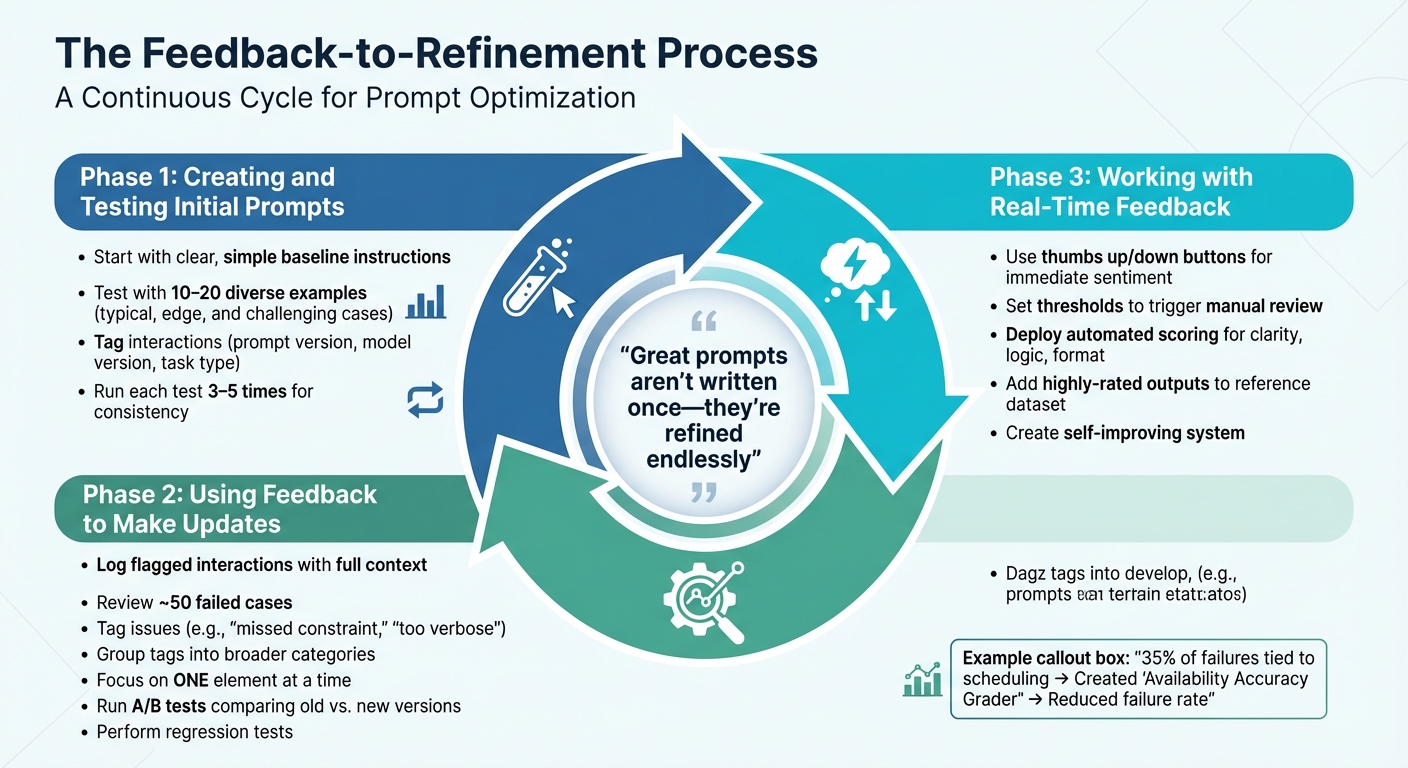
The Feedback-to-Refinement Process for AI Prompts
Improving prompts based on feedback isn’t something you do once and forget about – it’s a continuous cycle. The process involves three key phases: crafting initial prompts, refining them based on feedback, and making real-time adjustments. Each phase builds on the one before, creating an ongoing loop that ensures prompts stay effective as user needs shift. This approach naturally leads to structured updates and quick, real-time tweaks.
Creating and Testing Initial Prompts
Start with a straightforward, baseline prompt that uses clear, simple instructions. Test this prompt with a diverse set of 10–20 examples, including typical cases, edge cases, and even challenging inputs to evaluate its performance and consistency. To track results effectively, tag interactions with details like the prompt version, model version, and task type. Since AI models can produce varying outputs for the same input, run each test input 3–5 times to check for consistent results.
Using Feedback to Make Updates
When feedback starts rolling in, refine your prompts systematically. Begin by logging flagged interactions along with their full context. Review around 50 cases where the prompt failed, tagging each with descriptors like "missed constraint" or "too verbose" to spot recurring issues. Group these tags into broader categories to identify patterns.
For example, in October 2025, developers working on an apartment leasing assistant noticed that 35% of failures were tied to scheduling. To address this, they created an "Availability Accuracy Grader" to compare the model’s outputs with actual availability data. By iterating on the prompts, they reduced the failure rate to acceptable levels.
When making changes, focus on one element at a time. This could mean adding a few-shot example, tweaking the persona, or adjusting output format instructions. After each update, run A/B tests using the same inputs to compare the new version against the old one. Additionally, run regression tests to ensure the updates haven’t disrupted previously successful functionality.
Working with Real-Time Feedback
Real-time feedback offers the chance to make quicker adjustments. Use tools like thumbs up/down buttons to immediately capture user sentiment. Set specific thresholds, such as a sudden increase in negative ratings, to trigger a manual review.
"Great prompts aren’t written once – they’re refined endlessly".
Automated scoring systems can also help by evaluating outputs for clarity, logic, and format compliance. These systems provide consistent assessments across large volumes of interactions. Real-time feedback can even fuel prompt improvements directly. For instance, when users rate an output highly, you can add it to a dataset that serves as a reference for future prompt iterations. This creates a self-improving system where the best outputs shape how the model performs in the future. This ongoing feedback cycle lays the groundwork for effective prompt design.
Best Practices for Using Feedback in Prompt Design
When refining prompts based on feedback, avoid making random adjustments. Instead, follow a structured process. Random changes can blur the impact of individual tweaks, making it hard to identify what works. A systematic approach isolates variables, measures results, and produces consistent, reliable improvements. This method lays the groundwork for well-tested, effective prompt designs.
Write Clear and Specific Prompts
Vague instructions lead to unpredictable results. If feedback highlights confusion or inconsistencies, replace broad terms with specific guidelines. For example, instead of saying "keep it fairly short", specify "limit responses to 3 to 5 sentences". Use clear delimiters like ### or """ to separate instructions from context, which helps the model distinguish between the two. Place the primary directive at the start of the prompt to ensure better compliance, rather than hiding it at the end. If users note that the tone feels off, assign the model a role, such as "career coach" or "senior support manager", to guide its tone and reasoning. Focus on telling the model what to do, rather than listing what to avoid, as this approach provides a clear direction for improvement. Clear, concise instructions naturally enhance the overall output quality.
Balance Detail and Brevity
Overloading a prompt with too much detail can confuse the model or cause it to merge unrelated instructions. William Bakst of Mirascope suggests:
"It’s usually cleaner to split a complex instruction into a few smaller ones, each doing one clear thing. That way, the model isn’t left guessing, and you can see exactly where things go off track".
For intricate workflows, consider using prompt chaining – breaking down a task into smaller steps where the output of one prompt feeds into the next. This method preserves clarity and focus. Adjust one element at a time to measure its specific impact. If feedback indicates responses are too lengthy, set explicit limits like "Responses must not exceed 200 words". Additionally, lowering the model’s temperature setting can help generate more concise and focused outputs.
Test Prompts in Different Situations
To ensure your prompts are reliable across various scenarios, test them systematically. A prompt that works well in one context might fail in another. To cover all bases, test your prompts against four categories: typical cases (60% of tests), edge cases (20%), adversarial cases (10%), and error cases (10%). Testing should aim to uncover weaknesses rather than confirm success. For consistency, run each test input 3–5 times since AI models can produce varied outputs from the same input. After implementing changes based on feedback, perform regression tests to ensure new updates haven’t disrupted previously successful results. Following a structured cycle – Design, Test, Analyze, Evaluate, Iterate, and Document – ensures your prompts remain effective across diverse use cases.
Measuring the Results of Prompt Improvements
Evaluating prompt adjustments requires tracking specific metrics to confirm progress and uncover potential issues.
Key Metrics for Prompt Performance
Start by focusing on quality metrics to gauge the effectiveness of your AI’s responses. These include relevance (how well the response matches the task), accuracy (factual correctness), coherence (logical flow), and fluency (natural language use). For instance, teams that consistently monitor relevance have reduced irrelevant outputs by 20% to 40%.
In addition to quality, pay attention to behavioral signals from users. Metrics like thumbs up/down ratings, retry rates, task abandonment, and regeneration events provide insight into user satisfaction, even in the absence of direct feedback. Take ShopEasy as an example: the company tracked its AI’s first-contact resolution rate, which initially stood at 67%. By refining prompts to include real-time promotions and sale policies, they tested the updates with 200 common questions. The changes boosted the resolution rate to 78%, improved customer satisfaction scores by 12 points, and cut human escalations by 23%. Despite a 14% rise in token costs, overall operational costs dropped by 8%.
Operational efficiency is another critical area. Measure token usage (cost), latency (response speed), and the "Token Efficiency Ratio" – useful words generated per token consumed. For example, one developer reduced token usage by 40%, only to find the hallucination rate spiked by 15%. Calculate the cost per effective response by dividing total API costs by the number of successful answers.
Reliability metrics are equally important. Track the "Hallucination Index" (frequency of fabricated information), instruction-following scores, and consistency (how similar the responses are to similar questions). Tools like GPT-4 align with human evaluations over 80% of the time, offering reliable grading.
"All of prompt engineering is built around answering the question: Do my prompts work well? A/B tests are the only reliable way to determine this".
Use A/B testing to compare prompt versions. Collect 500–2,000+ interactions per version and roll out tests to 5–10% of your audience. Create a diverse "golden set" of test cases – spanning typical, edge, and adversarial scenarios – to evaluate every new prompt iteration. While automated metrics like ROUGE and BLEU are helpful, calibrate them with expert reviews for precision.
Once your metrics confirm improved performance, adjust your prompts to stay aligned with changing needs.
Updating Prompts as Needs Change
Prompts aren’t static – they need regular updates.
"Prompt quality decays over time due to: Model updates, Input distribution shifts, [and] Prompt edits".
When AI models are updated, even well-crafted prompts may yield different results. Additionally, user language evolves, making ongoing adjustments necessary.
Establish a continuous feedback loop with these five stages: Capture (log inputs and outputs), Label (categorize failures), Analyze (identify trends), Refactor (revise instructions), and Re-evaluate (test fixes). During rapid iteration phases, review user feedback and performance clusters weekly; for stable products, monthly reviews should suffice. Treat prompts like software by using environment tiers: Dev (drafts), Staging (A/B testing and metric gates), and Prod (stable versions with rollback policies). This approach minimizes risks while ensuring updates meet performance standards.
Use semantic versioning (MAJOR.MINOR.PATCH) to track changes and their impact on performance metrics. For example, a major version might involve a full rewrite, a minor version could add examples, and a patch might fix small errors. This system simplifies identifying performance shifts. Automated "graders" (LLM-as-a-judge) can evaluate performance at scale and flag when failure rates exceed acceptable thresholds. Always validate new prompts with side-by-side comparisons or A/B tests in a staging environment before deploying them.
"Treat prompts like products: version them, test them, and attach numbers to every change. That rhythm turns guesswork into measurable improvement".
Conclusion
User feedback is the driving force behind maintaining and improving prompt effectiveness over time. Without it, even the most carefully designed prompts lose their edge as models evolve, user behavior changes, and unexpected scenarios arise. Feedback loops help identify these subtle regressions and refine vague instructions into detailed, context-aware responses that better meet user needs.
The numbers back this up: iterative refinement can boost response quality by 15–25% while cutting manual engineering time by 40–60%. Tools like PromptWizard leverage feedback-driven processes to achieve these results with fewer resources. In fact, 40% of early adopters report saving 30–60 minutes daily using these methods.
"Great prompts aren’t written once – they’re refined endlessly." – Travis Kroon
To make this work, a structured process is key. Gather feedback, tag interactions, set clear review thresholds, and adjust prompts accordingly. Balance human insight with LLM evaluations to scale improvements effectively. During rapid development phases, review feedback weekly; for more stable products, monthly reviews may suffice. This systematic approach not only enhances prompt performance but also ensures adaptability over time.
As highlighted in this article, versioning, testing, and measuring every change transforms guesswork into measurable progress. This strategy keeps your AI in step with evolving user needs. At God of Prompt (https://godofprompt.ai), we apply these principles to our extensive library of AI prompts, ensuring they remain effective in a constantly shifting landscape.
FAQs
What kind of user feedback is most useful for improving prompts?
The best kind of user feedback for refining prompts comes in the form of task-specific and qualitative input. This includes things like textual comments, selecting preferred responses, or providing ratings on how clear or useful a response is. Beyond direct input, behavioral signals such as retry rates, flagged outputs, and input-output logs can also reveal areas that need improvement. Feedback that points out user preferences, specific problems, or where a prompt fails is especially helpful for making iterative improvements.
How can I tell if a prompt update actually improved results?
To figure out if a prompt update has actually improved results, follow a clear evaluation process. Start by using A/B testing to compare outputs from before and after the update. Then, measure the quality of those outputs with evaluation metrics like relevance or clarity. For a deeper understanding, keep testing and analyzing over time. Tools like an evaluation flywheel can help you identify whether the updates lead to better and more consistent results.
How often should prompts be reviewed and updated over time?
Prompts should be reviewed on a regular basis, with many experts suggesting a six-month review cycle to keep them effective. Beyond this, continuous evaluation and updates – guided by user feedback and performance trends – are crucial. These efforts help ensure prompts stay relevant and continue to meet user expectations.