Top 20 AI Prompts for Employee Onboarding



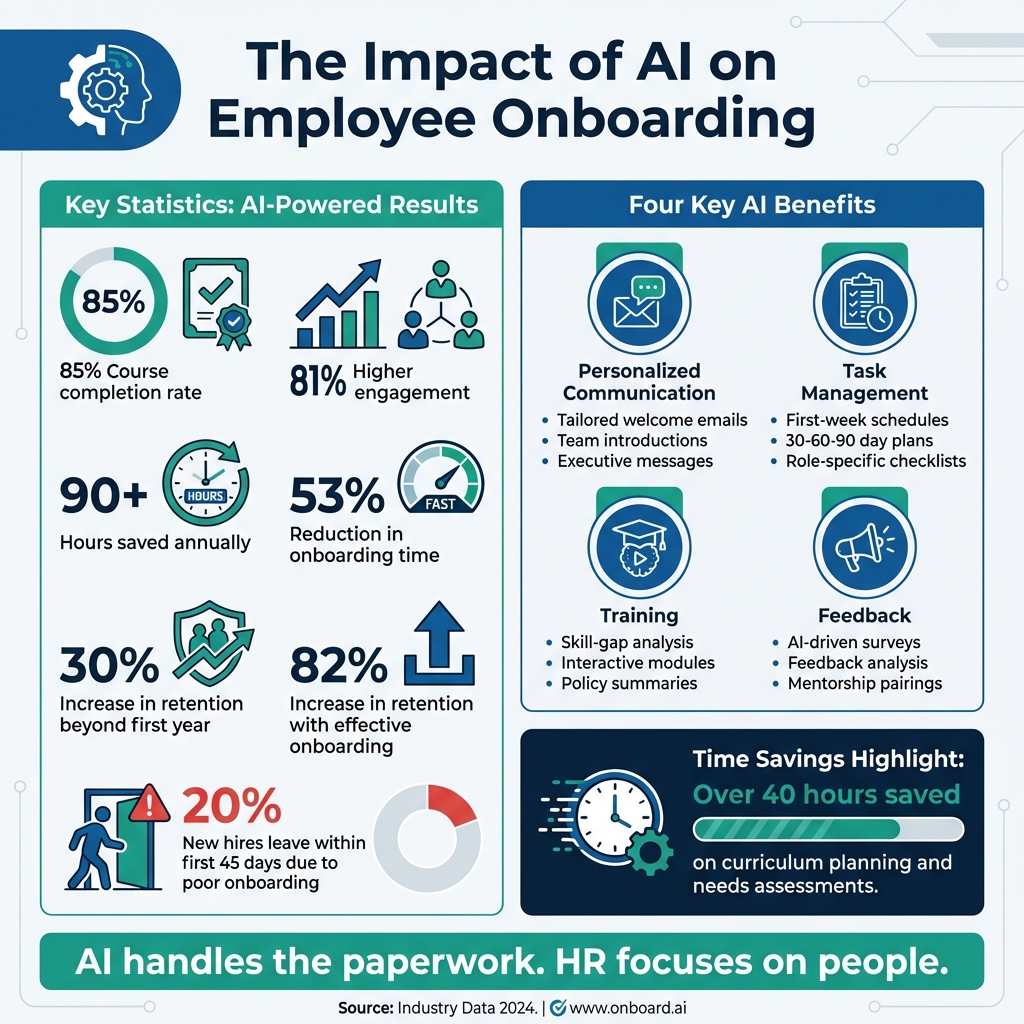
AI is transforming employee onboarding by automating repetitive tasks, saving HR teams time, and improving the experience for new hires. Companies using AI for onboarding report an 85% course completion rate, 81% higher engagement, and over 90 hours saved annually.
Here’s how AI helps:
- Personalized Communication: Tailored welcome emails, team introductions, and executive messages.
- Task Management: First-week schedules, 30-60-90 day plans, and role-specific checklists.
- Training: Custom skill-gap analysis, interactive modules, and policy summaries.
- Feedback: AI-driven surveys, feedback analysis, and mentorship pairings.
AI ensures clear, consistent communication and frees HR to focus on building connections, not paperwork. Whether it’s drafting schedules or summarizing policies, these 20 prompts simplify onboarding while keeping it engaging.
For actionable AI prompts, check out resources like God of Prompt starting at $10/month.
AI-Powered Employee Onboarding: Key Statistics and Benefits
Build an AI Agent to Automate Employee Onboarding | Agentic AI Workshop
sbb-itb-58f115e
1. Personalized Communication
Tailored communication can set the tone for a welcoming and effective onboarding experience.
The Multi-Stage Welcome Sequence
Design a series of three emails to guide new hires through the onboarding process. Start with a warm welcome email sent immediately after acceptance, followed by a logistics-focused email a week before their start date, and finish with a detailed "Day 1" email sent the day prior. This staggered approach ensures clarity without overwhelming the recipient.
The Culture-First Welcome Message
Craft a welcome email that introduces new employees to your company's mission and core values. To align the tone with your organization, provide the AI with your Culture Handbook or Tone Guide. Use placeholders like [Company Name], [Manager Name], and [Specific Details] to make the email adaptable across departments. This method combines a personal touch with operational ease, helping new hires feel connected from the start.
The Team Introduction Bio
Turn a new hire's resume and personal highlights into an engaging introduction email for their team. Specify the tone - professional, casual, or startup-friendly - to reflect your workplace culture. This email not only helps the team get to know their new colleague but also outlines their role and upcoming projects.
The Practical First-Day Guide
Provide a straightforward guide covering IT setup, office navigation, parking details, and key contacts. As Chris Varner from TeamAI explains, "AI chatbots enable you to streamline your everyday team management tasks, leaving you more time to focus on the part of your job that matters - the people". By addressing common logistical questions upfront, this guide can significantly reduce back-and-forth emails and keep the onboarding process smooth.
The Executive Welcome Letter
Develop a personalized message from the CEO or department head, incorporating details like {Job Title} and {Department}. This thoughtful gesture demonstrates leadership's appreciation for the new hire’s role and contributions, setting a positive tone from day one.
2. Task and Schedule Management
Organizing tasks and schedules is crucial to keeping new hires on track during their first few weeks. A well-structured system can make all the difference in creating a smooth onboarding experience.
The First-Week Itinerary Creator
This tool helps design a clear Day 1–5 schedule, covering orientation sessions, one-on-one meetings with managers, team introductions, and time for paperwork. It separates responsibilities between HR and the hiring manager to clarify who oversees which tasks. By setting realistic time blocks, the schedule ensures new hires can manage their days without feeling overwhelmed.
The 30-60-90 Day Roadmap Generator
This prompt creates a three-month plan, breaking it into phases: learning in the first 30 days, contributing with guidance in the next 60, and working independently by day 90. AI tools from a comprehensive prompt library can check for missing documents, like I-9 forms, and automatically route tasks to IT for system setup. This prevents delays in access, keeping the new hire’s schedule on track.
The Meeting-to-Action Item Converter
AI can summarize notes from orientation sessions and pull out follow-up tasks, assigning them to the right people. For example, ClickUp Brain demonstrated how AI could analyze a "Marketing Team Onboarding" document, extract role-specific steps, and prioritize tasks automatically.
The Role-Specific Setup Checklist
This prompt reviews internal IT procedures to generate a tailored checklist for setting up equipment and software accounts. It includes details like hardware requirements, software licenses, and access levels based on the new hire’s department. Using placeholders for sensitive information, such as login credentials, keeps the checklist reusable and secure.
The Shadowing and Observation Planner
This tool schedules shadowing sessions with team members, outlining workflows and including time estimates for each observation. By combining structured peer learning with real-world process exposure, new hires gain practical insights that go beyond formal training, helping them transition to independent work more effectively.
3. Training and Development
AI is transforming how training programs are designed, cutting down over 40 hours typically spent on curriculum planning and needs assessments. By building on its strengths in communication and scheduling, AI-driven prompts can significantly improve the efficiency and quality of training initiatives.
The Skill-Gap Mega-Prompt
This prompt identifies skill gaps and creates a customized, multi-format curriculum to address them. For example, one company that adopted this approach reported a 35% boost in team productivity within just two months. The AI acts as a Learning and Development (L&D) Specialist, using context about the role, current skills, and organizational goals to develop tailored outputs. These can include workshops, e-learning modules, and hands-on exercises, all designed to close specific skill gaps.
The Interactive Module Creator
Need to train your team on software tools or technical skills? This prompt generates interactive training modules that include role-playing scenarios, practice tasks using anonymized data, and reflection questions to reinforce learning. You can even customize the output by asking the AI to "avoid jargon" or "include options for quieter participants", ensuring the modules suit a variety of learning styles.
The Policy "Plain English" Summarizer
Overwhelmed by dense compliance manuals or lengthy company handbooks? This prompt condenses complex policies into one-page summaries written in conversational language. It highlights essential details - like dress codes, PTO policies, and expense reporting - in an easy-to-read format that new hires can absorb in minutes.
The Mentorship Framework Generator
This prompt helps pair new employees with experienced team members, using the 70-20-10 learning model as a foundation. It includes templates for weekly check-ins and conversation starters to encourage meaningful mentorship. Stephanie Smith, Chief People Officer at Tagboard, explains it best:
"AI isn't here to replace our instincts. It's here to cut through the noise so we can spend less time digging through that data and more time being human with our people."
The 60-Minute Session Planner
Pressed for time? This prompt creates a complete 60-minute facilitator guide for managers, including scripts, activities, handouts, and timing. The plan is structured to fit everything into a single hour: an engaging icebreaker, core content delivery, hands-on practice, and a brief evaluation survey. It’s a practical solution that respects everyone's busy schedules.
4. Feedback and Engagement
Effective onboarding isn't just about checking off tasks - it’s about creating a welcoming and engaging experience. Gathering feedback early can help spot potential challenges before they lead to turnover. Did you know that 20% of new hires leave within their first 45 days because of poor onboarding experiences?. Using tools that facilitate communication and engagement can make a huge difference. AI-driven prompts, in particular, can help identify issues early and enable quick action. These tools are essential components of AI business automation strategies that improve HR efficiency.
The Pulse Survey Generator
This AI-powered prompt designs quick, targeted surveys at the 30-, 60-, and 90-day milestones to gauge employee sentiment and uncover potential hurdles. Unlike generic surveys, these are customized based on the employee's role, department, and onboarding stage. They cover topics like pre-boarding experiences, first impressions, training quality, and manager support - all through concise, tailored questions. Once the data is in, AI prompts for reporting help make sense of it all.
The Feedback Theme Synthesizer
Sorting through a mountain of survey responses can be overwhelming. That’s where this tool shines. It analyzes feedback and organizes it into 3–5 recurring themes, each supported by a representative quote. This makes it easier to identify patterns and focus on actionable insights. Plus, it can compare current feedback trends with past data, helping you track progress and spot areas that need attention.
The Blind Spot Detector
Even the best onboarding plans can have weak spots. This AI prompt reviews onboarding communications from the perspective of a skeptical or high-performing employee. It flags any confusing or discouraging wording, ensuring your messaging is clear and motivating. As Stephanie Shuler, Chief People Officer at LifeLabs Learning, puts it:
"AI is going to be like a blind spot detector for HR. It's going to help catch what you might miss on your own".
The 30-Day Check-In Drafter
Keeping the conversation going is key to maintaining engagement. This prompt drafts a friendly, personalized email from HR to new hires at the 30-day mark. It checks in on their progress, highlights available resources, and encourages open-ended responses to surface any concerns. You can tweak the tone - whether supportive, casual, or formal - to match your company’s culture.
The Mentorship Pairing Assistant
Strong connections can make all the difference for a new hire. This prompt analyzes profiles to match new employees with mentors who share similar skills, interests, or career paths. It even suggests icebreaker questions and conversation starters to help build rapport. Mentorship programs are more than just nice-to-have - companies with effective onboarding see a 82% increase in retention, and meaningful mentor relationships play a big role in that success.
Conclusion
AI prompts are reshaping how HR teams approach employee onboarding, making it quicker, more tailored, and less overwhelming. Companies leveraging AI for onboarding have seen impressive results, including a 53% reduction in onboarding time and a 30% increase in new hires staying beyond their first year. These aren't just time-savers - they set the tone for a positive and engaging start for new employees.
By taking over repetitive tasks, AI allows HR teams to focus on what truly matters: fostering connections, supporting managers, and cultivating a welcoming environment. As Andrea Towe from AIHR explains:
"The goal isn't to 'automate HR.' It's to clear space for the work that needs human judgment: making fair decisions, supporting managers, and caring for the employee experience".
Kick things off with straightforward tasks like drafting welcome emails or creating role-specific checklists. Once you're comfortable, you can expand to more complex workflows.
For those looking to dive in, resources like God of Prompt offer a treasure trove of over 30,000 pre-built AI prompts tailored to HR and business needs. With categorized bundles, step-by-step guides, and tools compatible with ChatGPT, Claude, and Gemini AI, you can skip the guesswork and start using effective prompts right away. Plans start at $10 per month (billed annually), and the Premium plan includes a 7-day free trial for you to test the waters.
FAQs
Which onboarding tasks should I automate first with AI?
Start by using automation to handle repetitive and time-intensive tasks, making the onboarding process more efficient. For example, you can automate the creation of onboarding documents, checklists, and department-specific guides. AI tools can also draft personalized welcome emails, summarize company policies, and generate custom training materials. These efforts not only make the onboarding experience smoother for new hires but also allow HR teams to dedicate more time to building meaningful connections with employees.
How do I keep onboarding prompts secure and compliant?
To keep onboarding prompts secure and compliant, never include sensitive information or personally identifiable information (PII) unless the AI system is specifically designed to handle such data securely. It's essential to set clear policies that outline acceptable data usage in prompts. Work closely with legal, security, and governance teams to ensure adherence to regulations such as GDPR or HIPAA. Implement safeguards like encryption, strict access controls, and routine audits to maintain data integrity and protection.
How can I measure if AI onboarding is working?
To evaluate how well AI-driven onboarding works, focus on metrics like employee engagement, retention rates, and time-to-productivity. Collect feedback through surveys to understand the onboarding experience and analyze key performance indicators (KPIs) such as satisfaction scores and task completion rates. AI tools can simplify this process by automating repetitive tasks, ensuring a consistent experience, and shortening onboarding timelines. This automation not only streamlines the process but also provides clearer data to identify what's working and where adjustments are needed.
Related Blog Posts

Loved by Business Owners


Based on 1K reviews
Get smarter on AI every week.
Ready to transform your business?