Few-Shot Prompting Explained (With Easy Examples)




So here’s the deal…
Sometimes, when you ask ChatGPT a question, the answer feels off.
Not wrong — just… meh.
That’s because you’re giving it one-shot and hoping for magic.
But few-shot prompting? Different game.
You show it a few examples first, and boom — it starts acting like it knows exactly what you want.
It’s like giving it a small cheat sheet before the real task.
In this guide, I’ll break it down, show how it works, and give you examples that actually make sense.
ALSO READ: How To Combine Prompts For Better Results

What Is Few-Shot Prompting? (And Why It Matters)
Few-shot prompting is when you give ChatGPT a few examples inside your prompt, so it knows how to respond.
It’s like showing it a pattern first — then asking it to follow that same style.
Let’s say you’re teaching it how to label reviews as Positive or Negative.
Here’s what that might look like:
This is awesome! // Positive
This is terrible! // Negative
What a fun time we had! // Positive
This show was so boring. //
Now, it knows what to do next:
→ Negative
You didn’t train the model. You just gave it a few examples to copy. That’s the magic.
Great — here’s Section 2, written in the tone you love:
How It’s Different from Zero-Shot Prompting
Zero-shot is when you just ask ChatGPT to do something — no examples, no context.
You expect it to figure things out on its own.
Few-shot is smarter. You show it how the task should be done first.
Zero-shot example:
Label this review: “The food was great, but the service was slow.”
ChatGPT might get it right… or not.
Few-shot version:
Amazing food! // Positive
Terrible service. // Negative
Loved the vibe. // Positive
The food was great, but the service was slow. //

With just a few samples, the model has something to base its answer on — and the output gets more accurate.
Why Few-Shot Prompting Works So Well
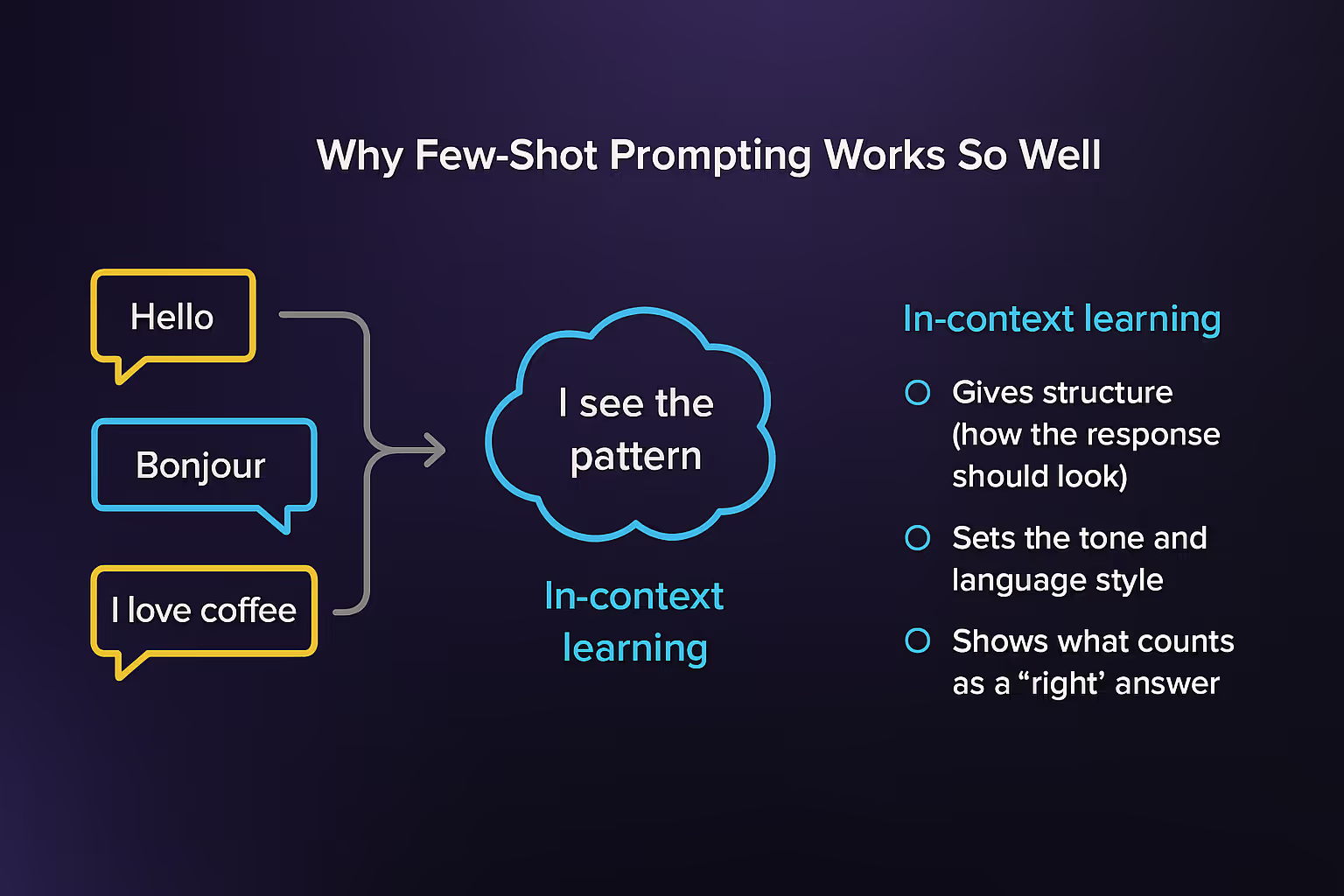
Few-shot works because you’re not starting from zero. You’re giving ChatGPT a pattern to follow — almost like training wheels.
Here’s what happens under the hood (in simple terms):
• Context matters: The examples act like a mini lesson.
• The model copies the style: If your samples are clear and consistent, the answers will be too.
• It learns what you want: You steer it without coding anything.
Let’s say you’re summarizing emails. You give this:
Email: Can we move our call to 3PM?
Summary: Request to reschedule call to 3PM.
Email: I’m attaching the final report for review.
Summary: Sent final report for review.
Email: Hey, just checking if you saw my last message.
Summary: Follow-up on previous message.
Email: Please confirm receipt of the contract.
Summary:
Boom. It finishes the last one perfectly:
Summary: Request to confirm contract receipt.
All because you showed it what “good” looks like.
Few-Shot vs. Zero-Shot vs. One-Shot (What’s the Real Difference?)

Let’s keep it simple — it’s all about how many examples you give ChatGPT before asking it to do the task.
• Zero-shot = You ask a question with no examples.
Example: “Translate this to French: I love coffee.”
• One-shot = You give one example first, then ask.
Example:
English: Hello
French: Bonjour
English: I love coffee
French:
• Few-shot = You give a few examples before asking.
Example:
English: Hello → French: Bonjour
English: Thank you → French: Merci
English: I love coffee → French:
The more examples, the more the model “gets it.” Especially when the task is tricky — like formatting data, analyzing tone, or writing in a brand’s voice.
How Many Shots Should You Use?
This is where most people mess up.
One example (1-shot) might work.
But some tasks need more context.
That’s where 3-shot, 5-shot, or even 10-shot prompting comes in.
Here’s the sweet spot I’ve found after testing:
• 1–2 shots for casual or creative tasks (e.g., writing a tweet)
• 3–5 shots for tricky things (e.g., summarizing legal text, analyzing tone)
• 6+ shots only if you’ve got a really complex task
The key:
Don’t overload it. ChatGPT works better when each shot is short and clear.
Sure! Here are the next four sections, written in the tone and format you love:
Formatting Matters (Even When It Shouldn’t)
Weirdly, the way you write your examples affects the output.
If you switch formats mid-prompt, ChatGPT can get confused.
But if you keep it consistent—same spacing, same punctuation, same layout—it does way better.
So, pick a format and stick with it.
Even if you use fake labels like “Yes” or “No,” consistency boosts accuracy.
Order Doesn’t Always Matter (But Sometimes It Does)
You’d think the first example would carry the most weight.
Sometimes, yes. Other times? Not really.
Some tasks get better results when the harder examples go first.
Others do better with easier ones upfront.
Try switching up the order if you’re getting weird results. It can change everything.
Few-Shot vs Chain-of-Thought

Few-shot works well when the task is straightforward.
But if you need the model to “think out loud” or walk through steps (like solving a math problem or logic puzzle), then you’ll want to combine few-shot with chain-of-thought prompting.
That means you give it examples and you show it how to explain its thinking.
Few-shot = copy the format
Chain-of-thought = copy the process
Together? Magic.
When Few-Shot Doesn’t Work
Let’s be real—few-shot prompting isn’t perfect.
Here’s when it usually fails:
• The task needs multi-step reasoning
• Your examples are too long or inconsistent
• The model just hasn’t seen enough examples during training
When that happens, don’t stress. You might just need to switch to chain-of-thought… or give it simpler chunks to work with.
Prompt Engineering Still Matters
Few-shot isn’t “set it and forget it.”
You’ve still gotta:
• Choose smart examples
• Match your formatting
• Phrase the task clearly
If your prompt is messy, few-shot won’t save it. Clean input = better output. Always.
Final Thoughts: Few-Shot Prompting Is Worth Mastering
If you’ve ever felt like ChatGPT “just doesn’t get it,” few-shot prompting might be what you’re missing.
It’s one of the easiest ways to level up your prompts without coding, fine-tuning, or getting technical.
Just remember:
• Show clear examples.
• Stay consistent.
• Adjust how many you give based on the task.
It’s simple, powerful, and works way better than most people expect — especially when you do it right.

Loved by Business Owners


Based on 1K reviews
Get smarter on AI every week.
Ready to transform your business?