AI agents are changing the way we manage workflows. Unlike rigid automation tools, these systems use advanced language models to handle tasks with context and decision-making abilities. This means they don’t just follow rules – they adapt to unexpected changes, handle complex processes, and even learn from past interactions.
Here’s what you need to know:
- Time Savings: Managers recover 10–15 hours weekly, while employees save 5.4% of their workweek.
- Efficiency Boost: AI agents process tasks faster, reduce errors, and operate 24/7 without interruptions.
- Cost Reduction: Companies save up to 30% on operating costs, with ROI often achieved within 60–90 days.
- Flexibility: They handle unstructured data, adjust workflows in real-time, and integrate with tools like CRMs and project management platforms.
AI agents are particularly useful in marketing, customer support, and IT operations. They automate repetitive tasks, free up teams for higher-value work, and simplify complex processes like lead routing and data entry. Businesses using AI agents report fewer errors, faster decision-making, and significant cost savings.
To implement AI agents effectively, start small. Identify repetitive tasks, build autonomous AI workflows with clear instructions, and integrate them with existing tools. Monitor performance regularly, track metrics like task completion rates, and refine workflows as needed. AI agents are reshaping how work gets done, making processes faster, smarter, and more efficient.
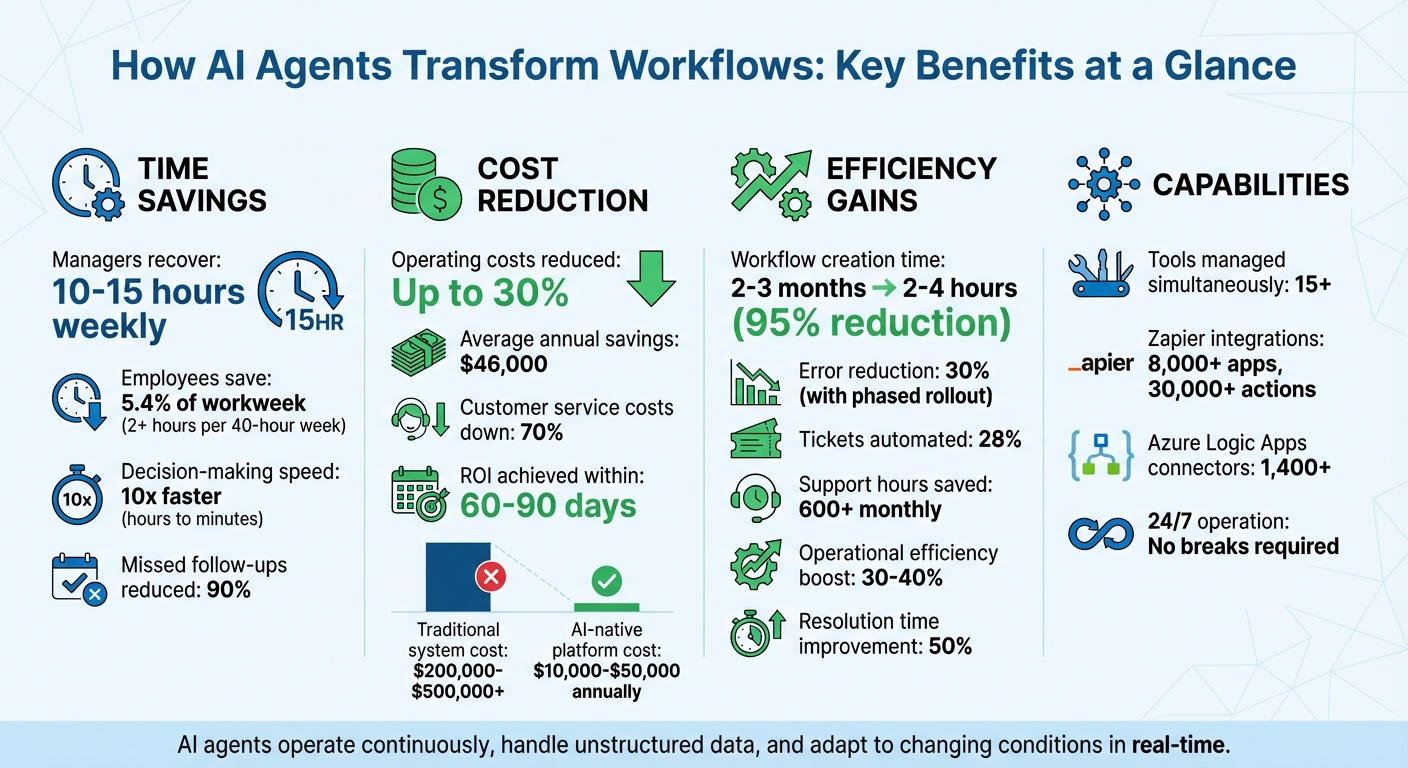
Key Benefits of AI Agents: Time Savings, Cost Reduction, and Efficiency Gains
AI Agents & Automations Explained in 19 Minutes
sbb-itb-58f115e
What Are AI Agents and How Do They Work?
AI agents are intelligent systems that rely on Large Language Models (LLMs) as their "brain" to figure out tasks and how to accomplish them. These agents operate by continuously processing inputs, reasoning through data, and taking action using external tools. What sets them apart is their autonomy – you can assign a high-level goal (like "research this lead and add qualified prospects to our CRM"), and they’ll independently break it down into actionable steps. They can tap into APIs, browse the internet, update databases, or send messages, choosing the right tools based on the situation.
AI agents also come equipped with memory. They retain short-term context from recent interactions and long-term historical data, enabling them to learn from previous experiences and make better decisions over time. If something goes wrong or unexpected changes arise, advanced agents can adapt – either by tweaking their approach or pausing to seek human guidance. These capabilities lay the groundwork for the advanced features outlined below.
Core Features of AI Agents
AI agents bring together several advanced abilities that go beyond what traditional software can do. For starters, they use natural language processing to make sense of unstructured data – like emails, documents, or customer inquiries – without needing a rigid format. Their reasoning and planning skills allow them to tackle complex goals by breaking them into manageable steps, much like how a skilled team member would approach a new project.
One standout capability is tool integration. AI agents can connect with platforms like Zapier and Azure Logic Apps, unlocking access to thousands of actions and connectors – Zapier alone offers over 8,000 apps and 30,000 actions, while Azure Logic Apps provides more than 1,400 connectors. Impressively, they can manage more than 15 tools at once, provided each tool serves a clear purpose. They also support multimodal processing, which means they can handle text, voice, video, and even code simultaneously.
These features highlight how AI agents go beyond traditional automation tools.
How AI Agents Differ from Traditional Automation Tools
AI agents stand apart from traditional automation tools in key ways. Traditional tools rely on fixed "if-then" rules – for example, "if a form is submitted, then send an email." In contrast, AI agents are goal-driven and adaptable, using real-time predictions to navigate tasks. As Relevance AI puts it:
"Workflow automations decide based on predefined conditions, powered by code. Agentic automations decide based on real time predictions, powered by a model".
| Feature | Traditional Automation | AI Agents |
|---|---|---|
| Logic | Rigid, rule-based sequences | Adaptive, reasoning-based |
| Data Handling | Structured data only | Unstructured data (natural language, documents) |
| Adaptability | Breaks when conditions change | Self-healing; adjusts to unexpected changes |
| Maintenance | Requires manual rule updates | Learns and refines independently |
Traditional automation tools tend to fail when APIs change or unexpected inputs arise – they simply stop working. AI agents, on the other hand, are resilient and self-healing. They can find alternative solutions when they hit roadblocks. This makes them perfect for handling ambiguous, open-ended tasks where the steps aren’t predefined. Meanwhile, traditional workflows are best suited for repetitive, predictable tasks where precision is key.
Key Benefits of AI Agents in Workflow Simplification
AI agents aren’t just another step in automation – they represent a shift in how work gets done. By transitioning from human-driven to human-supervised workflows, these systems bring measurable improvements in efficiency, adaptability, and cost-effectiveness. Let’s break down how they make this possible.
Improved Efficiency and Productivity
AI agents are game-changers when it comes to saving time and boosting productivity. Managers can reclaim 10–15 hours weekly, while staff recover 5.4% of their workweek – equivalent to over two hours in a standard 40-hour schedule.
Speed is another area where AI agents shine. They can increase decision-making speed by a factor of 10, reducing response times from hours to mere minutes. Organizations deploying AI agents report a 90% drop in missed follow-ups and forgotten tasks. Unlike human workers, who need breaks, AI agents operate around the clock, ensuring workflows continue seamlessly – even after hours.
One standout feature is their ability to handle unstructured data. Traditional automation often stumbles when encountering messy inputs like unclear PDFs or chaotic email threads. AI agents, however, interpret this data and make decisions accordingly. For instance, if OCR technology fails to read a document, an AI agent could email the sender for clarification instead of halting the process entirely. This capability keeps workflows moving, even in complex or ambiguous scenarios.
And it’s not just about speed – AI agents adapt and evolve, making them a dynamic solution for ongoing challenges.
Flexibility to Meet Changing Business Needs
AI agents excel at adapting to shifting priorities and environments. They adjust workflows in real-time as new data, regulations, or market conditions arise. This adaptability ensures businesses maintain smooth operations, even in unpredictable circumstances.
What makes AI agents even more powerful is their ability to learn and improve over time. Through feedback loops, they become more accurate and effective as they encounter new situations. Some agents can even self-assess, identifying errors in their work and refining their strategies without human involvement. By 2028, Gartner predicts that 33% of enterprise applications will incorporate agentic AI, a significant leap from under 1% in 2024.
The flexibility of AI agents also extends to multi-agent systems. Businesses can deploy multiple specialized agents, coordinating them to handle different tasks or domains. This modular approach allows companies to scale and adapt as their needs evolve, with many organizations reporting a 30–40% boost in operational efficiency after implementing these solutions.
This level of adaptability not only improves day-to-day operations but also delivers substantial financial benefits.
Cost Savings Through Automation
AI agents don’t just save time – they save money. Companies using workflow automation report average annual savings of $46,000. Automating routine processes can slash overall operating costs by up to 30%. Customer service operations, in particular, have seen costs drop by 70%, with resolution times improving by 50%.
The time savings AI agents deliver also lead to cost efficiencies. For example, creating workflows traditionally takes 2–3 months, but with AI agents, this can shrink to just 2–4 hours – a staggering 95% reduction. The financial difference is just as striking: traditional systems cost between $200,000 and $500,000+ to build from scratch, while AI-native platforms range from AI-native platforms range from $10,000 to $50,000 annually0,000 to $50,000 annually.
AI agents also reduce errors, cutting down on costs tied to rework, compliance issues, and missed opportunities. By automating repetitive tasks – which can consume up to 30% of an employee’s time – businesses free up their teams to focus on higher-value, strategic work.
In short, AI agents are reshaping workflows, offering businesses a smarter, faster, and more cost-effective way to operate. Their ability to streamline processes, adapt to change, and reduce expenses makes them a powerful tool for modern organizations.
How to Implement AI Agents in Your Workflows
Bringing AI agents into your workflows takes a step-by-step approach. Here’s how to go from planning to execution effectively.
Step 1: Review Current Processes and Identify Automation Opportunities
Before jumping into automation, you need a clear picture of what your team does daily. Start by listing the top 10 manual tasks your team handles regularly. These repetitive activities are often the best starting points for automation.
However, frequency isn’t the only factor. Focus on tasks that require judgment, exceptions, or context-based decisions – things that traditional rule-based automation struggles with. AI agents excel at interpreting natural language, analyzing diverse documents, and making nuanced decisions.
"AI can’t do anything useful if it doesn’t understand the structure, steps, and concept of what you are trying to solve." – John Griffin, CEO and co-founder of Spiral Scout
To get a complete view, observe team members in action and document workflows, including key steps and exceptions. Use this as your starting point for building automation.
Next, map the workflow logic. Break it into three parts: triggers (what starts the process), actions (what gets done), and decisions (where the process branches). Look for bottlenecks – steps where time is wasted searching for information, waiting on approvals, or doing repetitive data entry. These are prime areas for automation.
Finally, set clear goals to measure success. For example, aim to cut response times from hours to minutes or reduce error rates by a set percentage. Companies that roll out automation in phases often see a 30% drop in errors compared to launching everything at once.
Once you’ve identified these opportunities, you’re ready to choose and configure your AI agent.
Step 2: Choose and Configure the Right AI Agent
With your automation goals in mind, it’s time to pick and set up your AI agent. Start by defining a specific, measurable objective – like summarizing meeting notes and assigning tasks within minutes.
Begin with high-capacity models (e.g., GPT-4 or Claude 3.5) to establish a baseline for performance. Then, for simpler tasks like categorization, switch to smaller, faster models to save on costs.
Configuration is all about instruction engineering. Think of your agent’s system message as a job description. Use your team’s existing SOPs or policies to craft clear instructions that the AI can follow. Assign the agent a persona, such as a “RevOps strategist with 20 years of experience,” to make its responses more relevant and context-aware.
Break down complex tasks into step-by-step instructions to avoid confusion. Add safeguards, like filters for sensitive data, and set up approval steps for high-stakes actions, such as processing refunds.
"Think of your agent as a capable colleague, not an infallible system." – Steph Spector, Executive Writing Coach, Zapier
Start small by automating a low-risk task, like document summarization, to build confidence before moving on to more complex workflows. Also, use version control to track updates to your agent’s instructions, so you can revert to earlier configurations if needed.
Once your agent is ready, the next step is integrating it with your existing tools.
Step 3: Connect AI Agents With Existing Tools
Integration is where your AI agent becomes a seamless part of your workflow. By linking it to tools like CRMs, project management platforms, and databases, you create an end-to-end automated process.
To start, provide clear descriptions of each tool the agent will use. Include details like the tool’s purpose, required inputs, and expected outputs. Use Input Config to pre-fill static values like API keys or workspace IDs, reducing the chance of errors and making the agent’s decisions more straightforward.
Set appropriate timeouts based on task complexity. For example, quick lookups should finish in 15–30 seconds, while generating detailed reports might take up to 300 seconds. For high-risk actions – like sending external emails or deleting data – add a “pause and ask” step to ensure human oversight.
"Agents are only as good as the data they can access… Garbage in, garbage out applies even more with AI." – Nicole Replogle, Staff Writer, Zapier
Test integrations using real-world scenarios, including incomplete records and edge cases. This helps you understand how the agent will perform in unpredictable situations. You can also use slash commands to direct the agent to specific actions or data sources, ensuring it knows exactly what to do.
For tasks that require absolute accuracy, stick with traditional automation tools like Zaps. Use AI agents for workflows where speed is more critical than perfection and 80% accuracy is acceptable. Always log every action the agent takes in external systems. This builds trust and simplifies troubleshooting when something goes wrong.
Common Workflow Automation Use Cases for AI Agents
AI agents simplify complex workflows by adapting dynamically to various contexts, transforming tasks that once took hours into mere minutes. Here’s a closer look at how these agents are making an impact across different industries – from marketing to IT – by driving efficiency and cutting down on manual work.
Marketing and Content Creation Workflows
Marketing teams often find themselves bogged down with operational tasks, spending as much as 80% of their time on routine activities and only 20% on strategic initiatives. AI agents help flip this dynamic by taking over tasks like content creation and distribution.
For instance, in October 2025, JBGoodwin REALTORS deployed AI agents to support over 900 real estate agents. These agents researched local news and automatically generated blog posts and social media content tailored to each agent’s market. The result? A 37% boost in recruiting efforts and the ability to scale marketing operations without increasing team size.
"Agents are like having a highly skilled team working behind the scenes – creating, refining, and enriching everything from our content to the data we already have." – Edward Tull, VP of Technology, JBGoodwin REALTORS
Similarly, Slate, a digital publishing platform, used AI agents to supercharge its lead-generation efforts. By pulling data from multiple sources and enriching it with web research, the platform generated over 2,000 high-quality leads in just one month – completely eliminating manual input. Other marketing applications include daily SEO audits, brand consistency checks, repurposing content for social media, and creating ad variations targeted to specific audiences.
Customer Support and Service Operations
High-volume, repetitive queries can overwhelm customer support teams, but AI agents are well-equipped to handle these challenges. They can triage incoming tickets, automatically respond to FAQs via Slack or email, analyze customer sentiment, and even manage Google Business reviews. Unlike traditional chatbots, these agents understand user intent and can pause for human oversight when dealing with critical actions.
Support teams using AI agents report automating about 28% of all tickets, saving over 600 hours each month. This allows human agents to focus on complex issues that require empathy and creative thinking, improving both efficiency and customer satisfaction.
IT and Administrative Tasks
IT and administrative workflows often involve repetitive, standardized tasks, making them perfect candidates for AI automation. Common applications include email management to achieve "Inbox Zero", scheduling meetings, conducting compliance reviews, and updating internal knowledge bases from chat discussions.
For example, Popl saved $20,000 annually by automating its administrative and sales processes. AI agents efficiently triaged hundreds of daily form submissions, filtered out spam, and routed leads to the right teams based on region and company size. ActiveCampaign also saw impressive results, achieving a 440% increase in webinar attendance and a 15% drop in early churn by using AI-driven onboarding workflows to guide new hires through setup tasks and answer common questions automatically.
Measuring Success and Improving AI Agent Performance
Once your AI agents are deployed, the work doesn’t stop there. You need to monitor their performance and refine their workflows to ensure they’re delivering measurable value. Interestingly, while 88% of companies report using AI, only about one-third have managed to scale beyond initial pilot projects.
Key Metrics for Evaluating Workflow Impact
To gauge how well your AI agents are performing, focus on three core metrics:
- System efficiency: This includes factors like latency, token usage, and the frequency of tool calls.
- Session outcomes: Measure whether the agent is achieving its goals, such as task or query completion.
- Node-level precision: Assess how well individual steps in the workflow are executed.
These metrics should guide your adjustments to agent configurations and integrations. For example, aim for a goal accuracy rate of over 85%. In customer-facing workflows, strive to keep hallucination rates below 2% and ensure task adherence is at least 95%.
Take Apollo.io as an example. In early 2026, their AI agent managed to deflect 40% of support tickets, significantly reducing the workload for human agents and speeding up resolution times. They also monitored the cost per successful resolution, comparing token expenses to the cost of human labor.
"Evals are essentially the new performance review system for autonomous work. And it will be even more important for agents than people given the blast radius of a good vs. bad agentic workflow." – Aaron Levie, CEO, Box
But technical metrics alone aren’t enough. Business impact matters too. Metrics like ticket deflection rates, time saved, and the Agent Value Multiple (AVM) – which calculates the total business value generated divided by the agent’s total cost – can help you decide which workflows to prioritize. Additionally, keep an eye on human override rates, escalation frequency, and instances of "self-aware failures", where agents acknowledge their own limitations.
These metrics form the bedrock for identifying areas that need improvement and making rapid adjustments.
Strategies for Continuous Improvement
Measuring performance is just the beginning. To keep your AI agents effective, you need a plan for continuous improvement. Top-performing teams typically:
- Daily reviews: Examine a sample of agent sessions to catch issues early.
- Weekly assessments: Track accuracy and escalation rates.
- Monthly trend analysis: Compare results against human baselines to identify long-term patterns.
When workflows fail, use distributed tracing to dissect the problem step by step. This helps you pinpoint where things went wrong – whether it’s an API call or a retrieval step – and address the root cause. Turn these failures into new test cases to prevent similar errors in the future. For experiments with different configurations, tag each version (e.g., "architecture=reflexion") to track how changes affect performance.
Another critical practice is monitoring for drift detection – statistical shifts in inputs or outputs that signal the need for retraining. For instance, in 2025, the St. Louis Fed discovered that disciplined AI workflows saved workers 5.4% of their weekly hours. Regularly analyzing 30-, 60-, and 90-day performance trends can reveal whether your agents are improving or need further tweaks.
Finally, align automated evaluations with human judgment for subjective traits like tone and helpfulness. Advanced models like GPT-4 or Claude can act as evaluators, using structured rubrics to provide consistent feedback. This creates a strong feedback loop: monitor for issues, diagnose problems with detailed tracing, implement fixes based on metrics, and deploy updates while continuously checking for regressions.
Conclusion
AI agents are transforming how businesses handle workflow automation. Unlike traditional rule-based systems, these agents rely on context and reasoning to tackle complex, multi-step tasks. Whether it’s managing customer support tickets or orchestrating marketing campaigns across platforms, AI agents bring a new level of efficiency and intelligence to the table.
The results speak for themselves. Businesses are seeing measurable benefits, such as cutting errors by 90%, saving valuable managerial hours, and achieving ROI within 60-90 days. As Basil AI aptly states:
"The future of management isn’t about working harder – it’s about building intelligent systems that work for you".
To make the most of these tools, a strategic and gradual rollout is key. Start with a single, clearly defined workflow – like generating meeting summaries or handling routine updates – before scaling up to more complex processes. If you’re new to this, following a beginner’s guide to building your first AI agent can help you navigate the initial setup. Consider piloting agents in shadow mode, setting clear guardrails for critical decisions, and monitoring their performance closely. This step-by-step approach ensures your automation evolves alongside your business. After all, only 1% of companies believe they have fully matured in their AI capabilities, despite significant investments. Success comes from ongoing refinement, not instant perfection.
Additionally, no-code platforms have made it easier than ever to build and deploy AI agents. With natural language prompts and intuitive visual tools, teams can create powerful automation solutions without needing advanced technical skills. From customer support to administrative tasks, the entry barriers are lower than ever.
As businesses shift from human-driven to human-supervised workflows, AI agents are becoming indispensable. By taking over repetitive tasks, they empower teams to focus on strategic initiatives and innovation, redefining what’s possible in the workplace.
FAQs
What tasks should I automate first with AI agents?
Automation works best when it tackles repetitive, time-consuming tasks that are often prone to human error. Think of areas like customer communication, data management, or routine decision-making. For instance, automating tasks such as sales lead follow-ups, sorting through email inboxes, or organizing documents can make a big difference. These kinds of workflows not only boost efficiency and reduce mistakes but also free up valuable time for more strategic activities. It’s a great way to achieve quick productivity gains while setting the stage for expanding automation efforts down the road.
How do I keep AI agents accurate and safe in critical workflows?
To keep AI agents reliable and secure in critical workflows, it’s essential to put strong safeguards in place. This includes prompt-injection defenses to block harmful inputs, tool-permissioning systems to limit unauthorized actions, and safe fallback mechanisms to ensure smooth operation even when problems arise. Building agents with safety as a priority and constantly monitoring their behavior further reduces risks and ensures they perform dependably in high-pressure scenarios.
What metrics show an AI agent delivers ROI?
Key metrics that reveal the return on investment (ROI) from using an AI agent include:
- Time savings: How much time the AI agent frees up for other tasks.
- Increased output: The boost in productivity or volume of work completed.
- Cost reduction: Direct savings achieved by automating processes or reducing errors.
- Improved efficiency: The ability to streamline operations and optimize workflows.
- Better team utilization: How well the AI allows teams to focus on higher-value tasks.
- Revenue growth potential: Opportunities for increased income through enhanced performance.
These metrics provide a clear picture of how an AI agent can improve business operations and overall performance.