


Why Claude Forgets You Every Time (And What to Do About It)




You spent 45 minutes yesterday building the perfect prompt. You told Claude about your business, your writing style, your target audience. It nailed the output. You felt seen.
Today you come back, type "hey, can we keep working on that blog post?" and Claude responds like you've never met. No memory of your brand. No clue about your project. Just a polite, blank stare.
It's not a glitch. It's not broken. And no, Claude isn't gaslighting you.
But it sure feels that way.
If you've used Claude for more than a week, you've hit this wall. And you probably asked yourself: why does Claude forget everything I told it? The answer is simpler than you'd think, and fixing it takes about two minutes.
ALSO READ: 15 NotebookLM Prompts That Actually Work (Copy, Paste, Done)

What "Memory" Actually Means for an AI Like Claude
Claude's context window is the total amount of text it can hold during a single conversation. Think of it as short-term memory. Claude's window holds about 200,000 tokens (roughly 150,000 words), but once a conversation exceeds that limit, older messages get compressed or lost.
That definition covers the technical part. But it doesn't explain why forgetting feels so personal. So let's use some analogies that actually make sense.
The Whiteboard Analogy (How Context Windows Work)
Picture a giant whiteboard in a meeting room. Every time you chat with Claude, you're both writing on that whiteboard. Your messages, Claude's replies, any files you uploaded, all of it goes on the board.
The whiteboard's big. Really big. 200,000 tokens means you can fit roughly the equivalent of a 500-page book on it. That's plenty for most conversations.
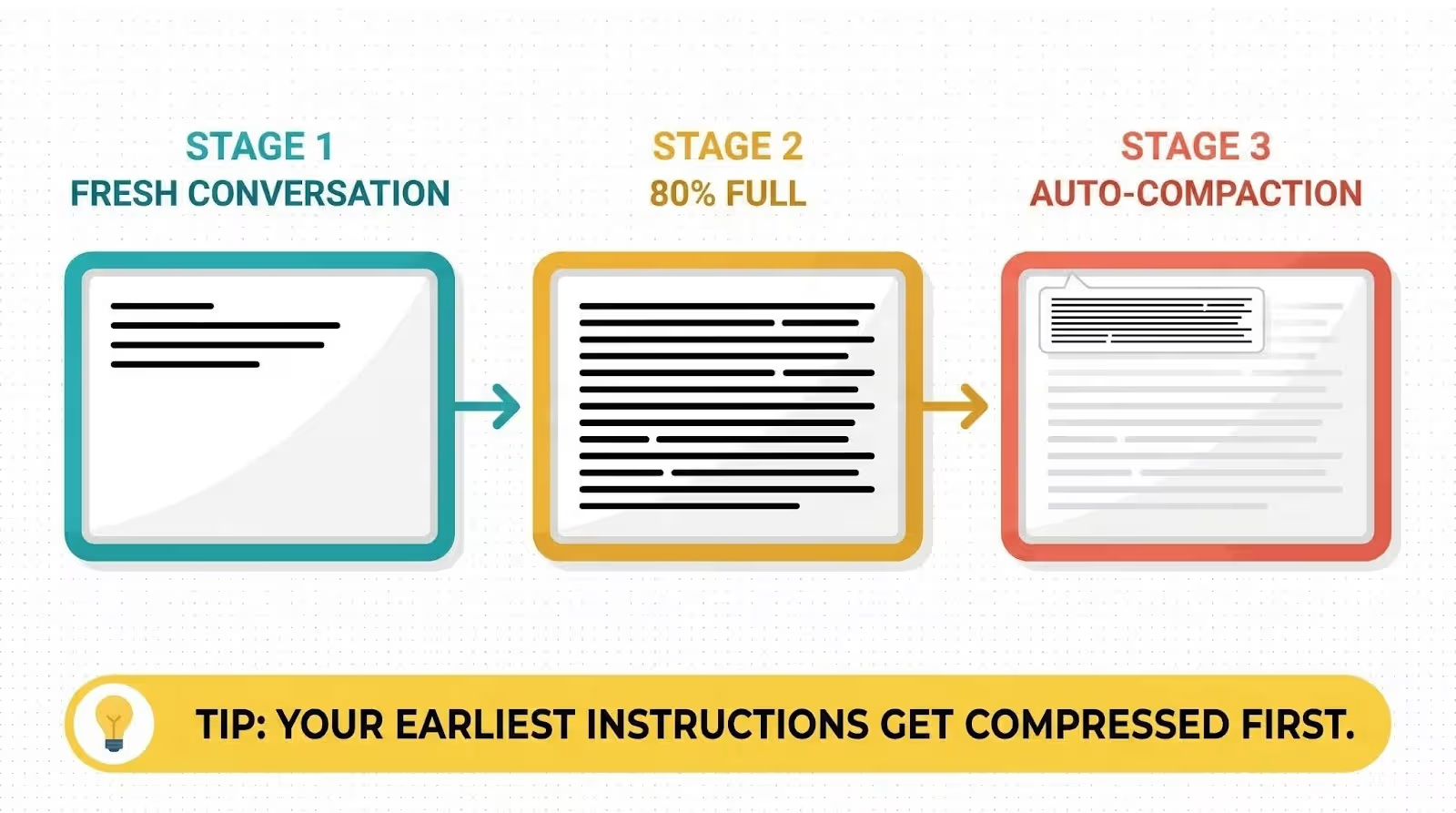
But here's the catch. When the whiteboard fills up, Claude doesn't just stop writing. It starts erasing from the top. The earliest parts of your conversation, including your original instructions, get summarized into shorter notes. Think CliffsNotes instead of the full chapter.
Developers call this process auto-compaction, and it kicks in when the context window hits about 95% capacity. Claude compresses older messages to make room for new ones. The problem? That compression's lossy.
Details get dropped. Nuance disappears. Your carefully crafted instructions from the beginning of the conversation might get reduced to a vague summary.
That's why Claude seems to "forget" things mid-conversation. It didn't forget. It summarized, and the summary lost the details you cared about most.
Why Every Conversation Starts from Zero
Here's the part that trips people up the most.
Every single Claude conversation starts fresh. New chat, new whiteboard, completely blank. Claude doesn't carry anything forward automatically between conversations. You're not continuing a relationship. You're meeting a stranger every time.
Developers call this stateless architecture. Claude doesn't have a persistent brain that accumulates knowledge about you over time (at least not by default, more on the memory feature in a minute).
Each conversation's an isolated session. When you close that chat window, the whiteboard gets wiped clean.
It's the same reason a hotel concierge doesn't remember your breakfast preferences from your stay three months ago. Different visit, different context, no record.
The Psychology Behind Why This Feels Personal
Here's what nobody talks about in the tech blogs.
When Claude writes something that sounds thoughtful, empathetic, or perfectly tailored to your situation, your brain does something automatic. It assigns personality. It assumes continuity. It builds a mental model of Claude as a "someone" who knows you.
Psychologists call this the ELIZA effect, named after a 1960s chatbot that fooled people into thinking it understood them. The effect's simple: when a computer responds in ways that feel human, we treat it like a human. We expect it to remember us. We feel slighted when it doesn't.
Don't blame yourself for that reaction. Brains are wired to detect patterns and build relationships, even with things that aren't alive. So when Claude asks "what does your business do?" for the fifth time, that tiny sting of frustration is real. You're not being dramatic.
But knowing WHY it happens makes it a lot easier to work around.
3 Reasons Claude "Forgets" Mid-Conversation
Sometimes Claude doesn't just forget between conversations. It forgets in the middle of one. Here's why that happens.
1. Your Context Window Filled Up
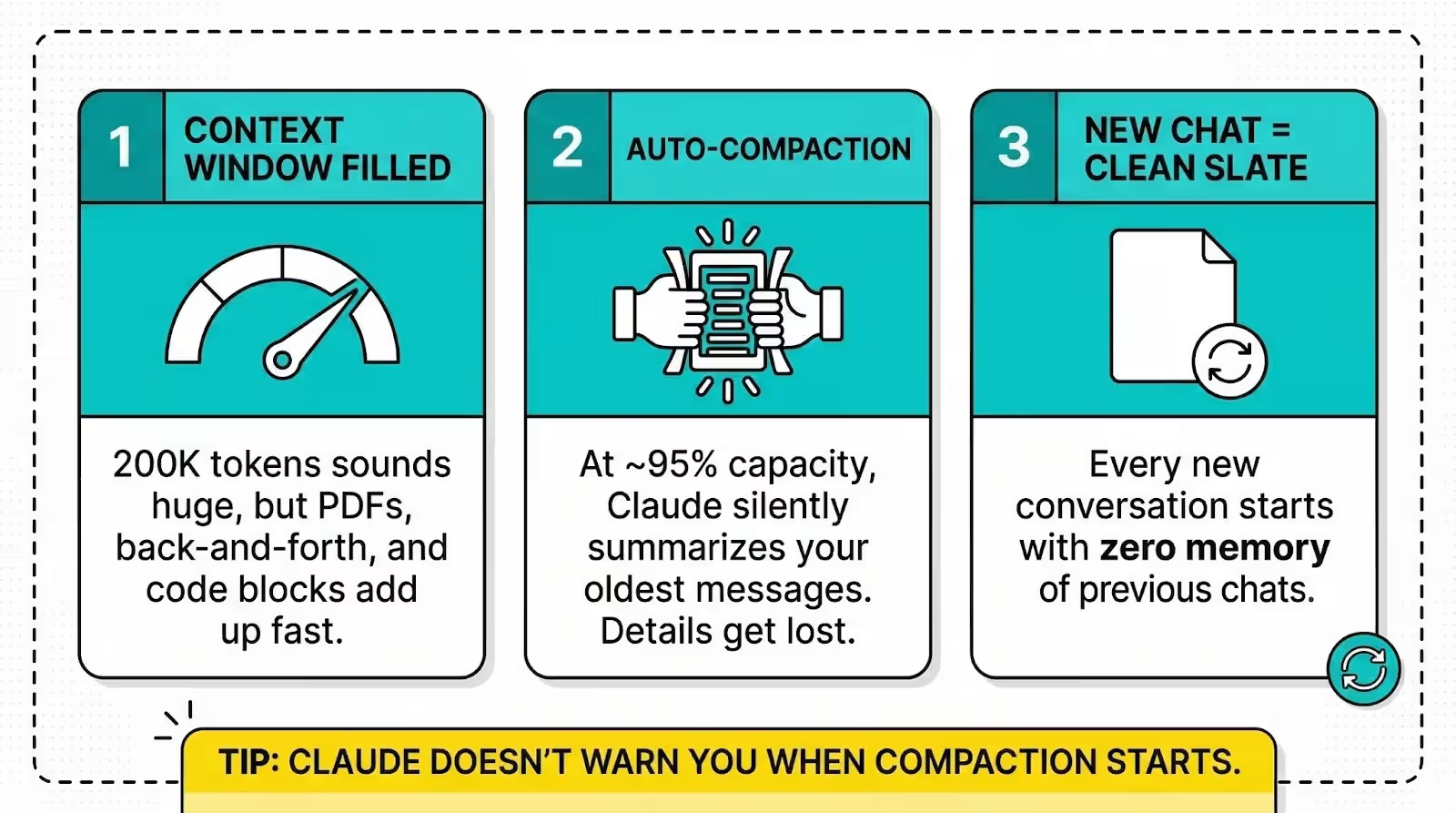
200,000 tokens sounds enormous. And it's true, for plain text conversations. But tokens add up faster than you'd expect.
That PDF you uploaded? Hundreds or thousands of tokens. The back-and-forth where you refined a prompt six times? Each revision and response eats into the budget. Long system prompts, code blocks, pasted documents, they all stack up.
Most people don't realize their context window is 80% full after 30 minutes of intensive work. Once you cross the threshold, auto-compaction starts silently trimming your earlier messages. You won't see a warning. Claude just quietly loses the plot.
2. Auto-Compaction Summarized Away Your Instructions
This one's the sneaky one.
When auto-compaction triggers (around 95% capacity), Claude compresses the oldest parts of your conversation into a summary.
The problem is that your original instructions, the ones where you said "always write in first person" or "my brand voice is casual and direct," those sit at the very top of the conversation. They get summarized first.
So Claude keeps the recent back-and-forth but loses the foundational context that shaped everything. It's like an employee who remembers the last email you sent but forgot the job description you gave them on day one.
3. You Started a New Chat (Clean Slate by Design)
The simplest explanation. You clicked "new conversation" and expected Claude to remember what you discussed yesterday. It doesn't. Each chat is a separate instance with zero knowledge of previous chats, unless you've turned on the memory feature.
This one's by design. Claude's stateless architecture means there's no hidden database of your conversations that it references behind the scenes. Fresh chat, blank slate, every time.
Claude's Memory Feature: What It Actually Does Now
Good news. Claude isn't stuck in permanent amnesia anymore. Anthropic launched a memory feature in late 2025, and it actually works. But it doesn't work the way most people assume. Let's clear that up.
How Memory Works (The 30-Second Version)
When you turn on memory, Claude does two things:
It searches your past chats. Claude can look back through your previous conversations to find relevant context. If you mentioned your business name three weeks ago, Claude can pull that up when you ask about it today.
It builds a memory summary. Claude automatically summarizes your conversations and creates a synthesis of key insights across your chat history. This synthesis updates every 24 hours and feeds into every new standalone conversation you start.
Think of it like this: without memory, every conversation is a first date. With memory turned on, it's more like working with a colleague who reviewed their notes from your last few meetings before the current one.
Each project also gets its own separate memory space. Your product launch planning stays separate from your client work. Confidential discussions don't bleed into general operations. That's a real feature, not a bullet point.
What Claude Remembers vs. What It Doesn't
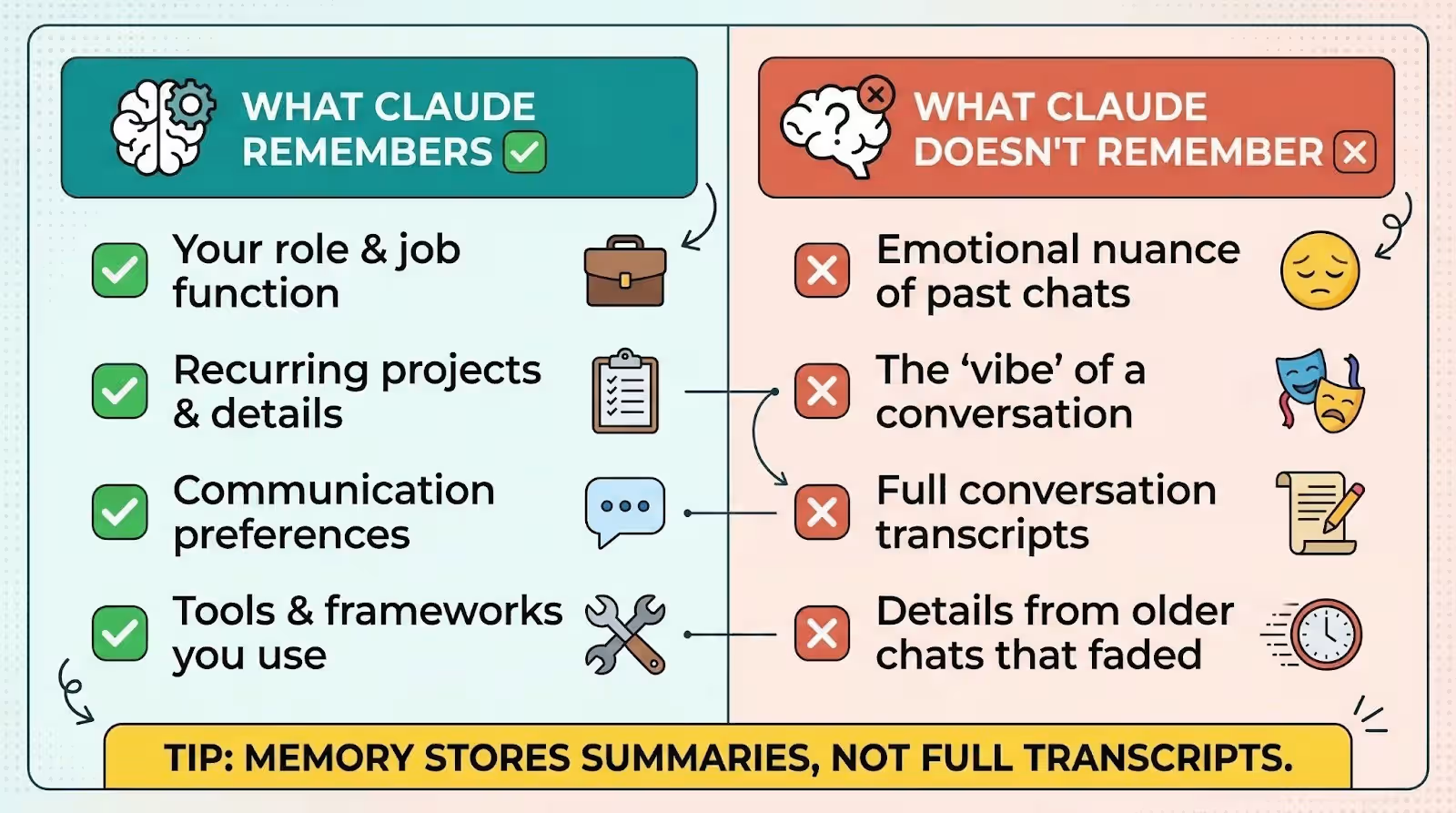
Claude's memory focuses on practical, work-related context. It'll remember things like:
Your role and what you do. Your recurring projects and their details. Your preferences for communication style. Technical tools and frameworks you use.
What it doesn't remember: emotional nuance, the "vibe" of a conversation, or that you had a bad day last Tuesday. Memory captures facts and patterns, not feelings.
Also important: Claude stores synthesized summaries, not full transcripts of your conversations. It's reading the highlight reel, not replaying the entire movie. That means some details from older conversations will naturally fall off.
How to Turn Memory On (Step-by-Step)
Here's how to enable it:
- Open Claude (web, desktop, or mobile app).
- Go to Settings in the bottom left.
- Click Capabilities.
- Toggle on "Generate memory from chat history" and "Search and reference past chats."
That's it. Two toggles. Takes about 10 seconds.
Important note on plans: Memory is available on paid plans (Pro at $20/month, Max at $100 or $200/month, Team, and Enterprise). Free-tier users don't get persistent memory, but they can still manually paste context into individual chats to get similar results for a single session.
Once enabled, give it 24 hours for the initial memory synthesis to build. After that, Claude will reference your past conversations automatically when it's relevant.
Related: If you want Claude to perform at its best every time, the Claude Mastery Guide walks you through prompt engineering principles and ready-to-use mega-prompts.
5 Ways to Stop Claude from Forgetting You
Here's the practical part. Five fixes, all non-technical, all work today.
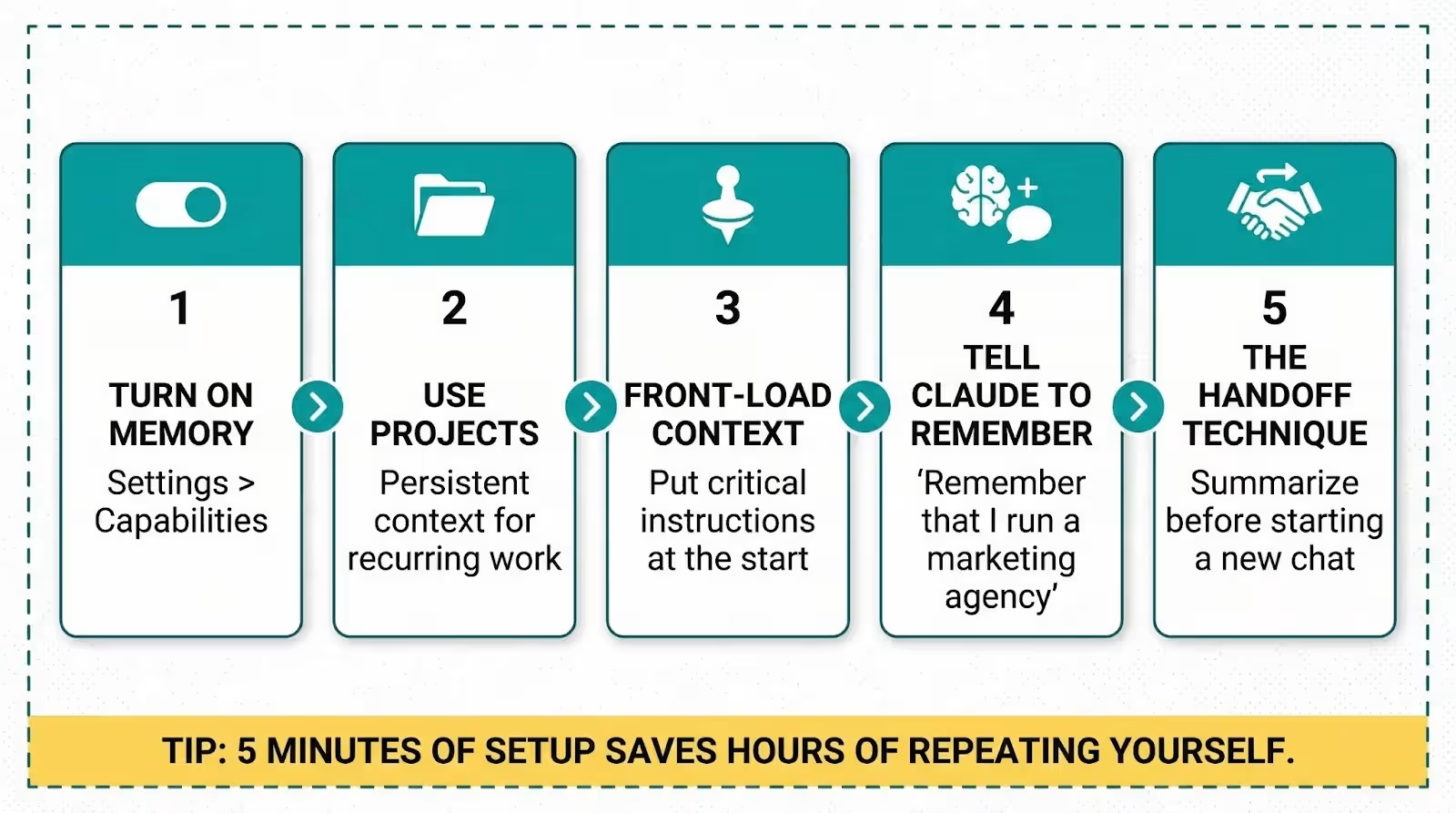
1. Turn On Memory in Settings
Start here. If you haven't enabled memory yet (Settings > Capabilities), you're forcing Claude to start from scratch every single conversation. This one toggle is the single biggest improvement you can make.
Once it's on, Claude will gradually learn your work context, preferences, and recurring projects across conversations. You'll notice the difference within a week.
2. Use Projects for Recurring Work
Claude Projects are the closest thing to giving Claude a permanent brain for a specific topic.
A Project lets you set custom instructions that'll load into every conversation within that Project. You can tell Claude your brand voice, your audience, your formatting preferences, even upload reference documents. All of it persists across every chat inside that Project.
If you're doing the same type of work repeatedly (writing blog posts, drafting emails, analyzing reports), create a Project for it. You'll stop repeating yourself overnight.
3. Front-Load Your Most Important Context
Remember the whiteboard analogy? Claude compresses the oldest messages first. That means your opening message is the most vulnerable part of any long conversation.
So make it count. Put your most critical instructions right at the top of every conversation. Be specific. Instead of "write in a casual tone," say "write like a friend explaining something over coffee, use contractions, keep sentences short, no corporate buzzwords."
The more precise your opening instructions are, the more likely they'll survive compression intact.
4. Tell Claude What to Remember (It Listens)
This one surprises people. You can literally tell Claude to remember things, and it will save them to your memory.
Try typing: "Remember that I run a digital marketing agency specializing in e-commerce brands." Claude will store that as a memory edit that persists across conversations.
You can also say "forget" to remove things: "Forget that I mentioned working at my previous company." Claude will update its memory accordingly.
It's not magic. It's a feature. And most people don't know it's there.
5. Start Fresh Strategically (The Handoff Technique)
Sometimes you need to start a new conversation because the current one is getting bloated. But you don't want to lose everything.
Here's the trick: before closing a long chat, ask Claude to write a handoff summary. Something like this:
"Summarize everything we've discussed and decided in this conversation, including my preferences, the project details, and any outstanding tasks. Format it so I can paste it into a new conversation and pick up exactly where we left off."
Claude'll generate a compact summary you can copy and paste into a fresh chat. It's manual, but it'll take 30 seconds, and it works.
Why Claude Forgetting Might Actually Be a Feature
Before you write off Claude's memory limitations as pure downside, consider the upside.
Privacy by default:
Claude doesn't build a permanent dossier on you unless you explicitly ask it to. If that idea makes you uneasy (and it should make everyone at least a little thoughtful), Claude's blank-slate default is a feature, not a bug.
You can even use Incognito Mode for conversations you don't want saved to your history or memory at all.
Clean slates prevent bad context from carrying over:
Ever had a conversation with Claude go sideways? Bad instructions, wrong direction, compounding errors? With a stateless system, you can start fresh and leave all that baggage behind. A new chat means a new chance to get it right.
No nudging based on your history:
Claude doesn't use your past conversations to steer you toward specific products or behaviors. It's not tracking your patterns to serve you ads or recommendations. Your conversation history is yours to use or ignore.
You control what sticks:
With memory features, you choose what Claude remembers. You can view, edit, and delete any stored memory at any time through Settings > Capabilities > Memory. That level of transparency is rare in AI products right now.
The forgetting isn't carelessness. It's a design choice that trades convenience for control. And for a lot of business owners handling sensitive client information, that tradeoff's worth making.
Frequently Asked Questions
Does Claude remember me between conversations?
Not by default. Each conversation starts fresh with no knowledge of previous chats. But if you turn on Claude's memory feature (Settings > Capabilities), Claude will automatically search your past conversations and build a running summary of key context. This memory updates every 24 hours and carries across new chats. Memory is available on paid plans (Pro, Max, Team, and Enterprise).
What is Claude's context window?
The context window's how much text Claude can hold in a single conversation. It's 200,000 tokens across all paid plans, which translates to roughly 150,000 words or about 500 pages. Enterprise plan users get a 500,000-token window with certain models. Once a conversation exceeds the window, Claude starts compressing older messages to make room for new ones.
How do I make Claude remember my preferences?
Three ways. First, turn on memory in Settings > Capabilities. Second, directly tell Claude to remember specific things ("remember that my brand voice is conversational and direct"). Third, use Claude Projects with custom instructions that load automatically into every conversation within that Project.
Is Claude's memory feature free?
No. Persistent memory (the automatic synthesis from past conversations) requires a paid plan. Claude Pro's $20/month, and Max plans start at $100/month. Free-tier users can still manually paste context into each conversation, but there's no automatic memory between sessions.
Can Claude search my past conversations?
Yes, if you've enabled the "Search and reference past chats" toggle in Settings > Capabilities. Once enabled, you can ask Claude things like "what did we discuss about my Q3 launch plan?" and it will search your conversation history to find relevant context. This feature is available on paid plans (Pro, Max, Team, and Enterprise) across web, desktop, and mobile.
Start Making Claude Remember You
Claude's forgetting problem isn't really a problem once you understand why it happens and how to work around it.
Turn on memory. Set up a Project for your recurring work. Front-load your instructions. Tell Claude what matters.
Five minutes of setup saves you hours of repeating yourself. That's the kind of trade most business owners take without thinking twice.
Want Claude to remember your business context every time you open a chat? The God of Prompt Claude Prompt Pack includes pre-built project instructions that give Claude instant memory of your brand, tone, and workflows. Drop them into a Project and stop introducing yourself.

Loved by Business Owners


Based on 1K reviews
Get smarter on AI every week.
Ready to transform your business?


