Managing tasks and deadlines can be overwhelming, but AI offers solutions to streamline the process. By automating prioritization, scheduling, and workload distribution, AI tools save time and reduce stress. Key benefits include:
- Task Prioritization: AI ranks tasks based on urgency, dependencies, and effort, ensuring focus on what matters most.
- Dynamic Scheduling: Automatically adjusts calendars when plans change, preserving time for deep work.
- Workload Balancing: Identifies and redistributes tasks to avoid overloading team members.
Popular tools like Motion, Reclaim.ai, Clockwise, and SkedPal integrate with calendars and task apps, offering features like automated scheduling, real-time updates, and intelligent time allocation. For those seeking more customization, platforms like God of Prompt provide tailored AI workflows and over 30,000 prompts to optimize productivity.
AI doesn’t just manage tasks – it transforms how you work, helping you stay organized and meet deadlines effortlessly.
7 NEW AI Tools Every Project Manager Needs in 2025
Key AI Features for Task and Deadline Management
AI is transforming how we manage tasks and deadlines by tackling inefficiencies in prioritization, scheduling, and workload distribution. These features work together to keep projects on track, reducing the need for constant manual oversight.
AI-Driven Task Prioritization
AI takes the guesswork out of organizing your to-do list by analyzing factors like urgency, importance, deadlines, and task dependencies. This automated ranking ensures you focus on what matters most. As Avoma explains:
AI prioritization blends a few signals: deadlines, dependencies, effort, who is asking, what similar tasks led to in the past, and what’s blocking other work.
What’s impressive is how this prioritization adjusts in real time. Whether it’s a sudden client request, new meeting action items, or a shifted deadline, AI adapts to keep priorities aligned. Over time, it learns your habits, identifying tasks you often delay and suggesting ways to break them into smaller, more manageable steps.
AI also uses predictive algorithms to assess how long tasks typically take, helping create realistic schedules and achievable deadlines. This dynamic prioritization lays the groundwork for AI’s ability to seamlessly adjust your schedule when needed.
Dynamic Scheduling and Rescheduling
AI doesn’t just prioritize tasks – it actively manages your schedule. It adapts on the fly, automatically updating plans when priorities shift. By analyzing your productivity patterns, AI assigns tasks to the most suitable time slots. For example, if you’re most creative in the morning, AI will reserve that time for complex work, leaving routine tasks for later in the day.
Dependency management is another area where AI shines. It ensures that when one task is completed, the next one is queued up automatically, so nothing gets overlooked. This eliminates the mental load of figuring out what comes next.
AI also monitors for potential delays or cost overruns, identifying risks early so adjustments can be made before deadlines are missed. With 92% of knowledge workers struggling to keep track of decisions scattered across emails, chats, and spreadsheets, having a centralized system and optimized AI workflows to manage schedules is a game-changer. This adaptability ensures smooth workload distribution across teams.
Intelligent Workload Balancing
AI excels at spotting workload imbalances by analyzing work patterns and deadlines. When one team member is overloaded, the system can suggest or even automate task redistribution, ensuring that work is spread out more evenly.
Unlike traditional tracking methods that focus on clicks or keystrokes, AI shifts the focus to outcomes and the quality of work. This approach reduces the stress of constant surveillance while maintaining accountability.
AI Tools for Task and Deadline Management
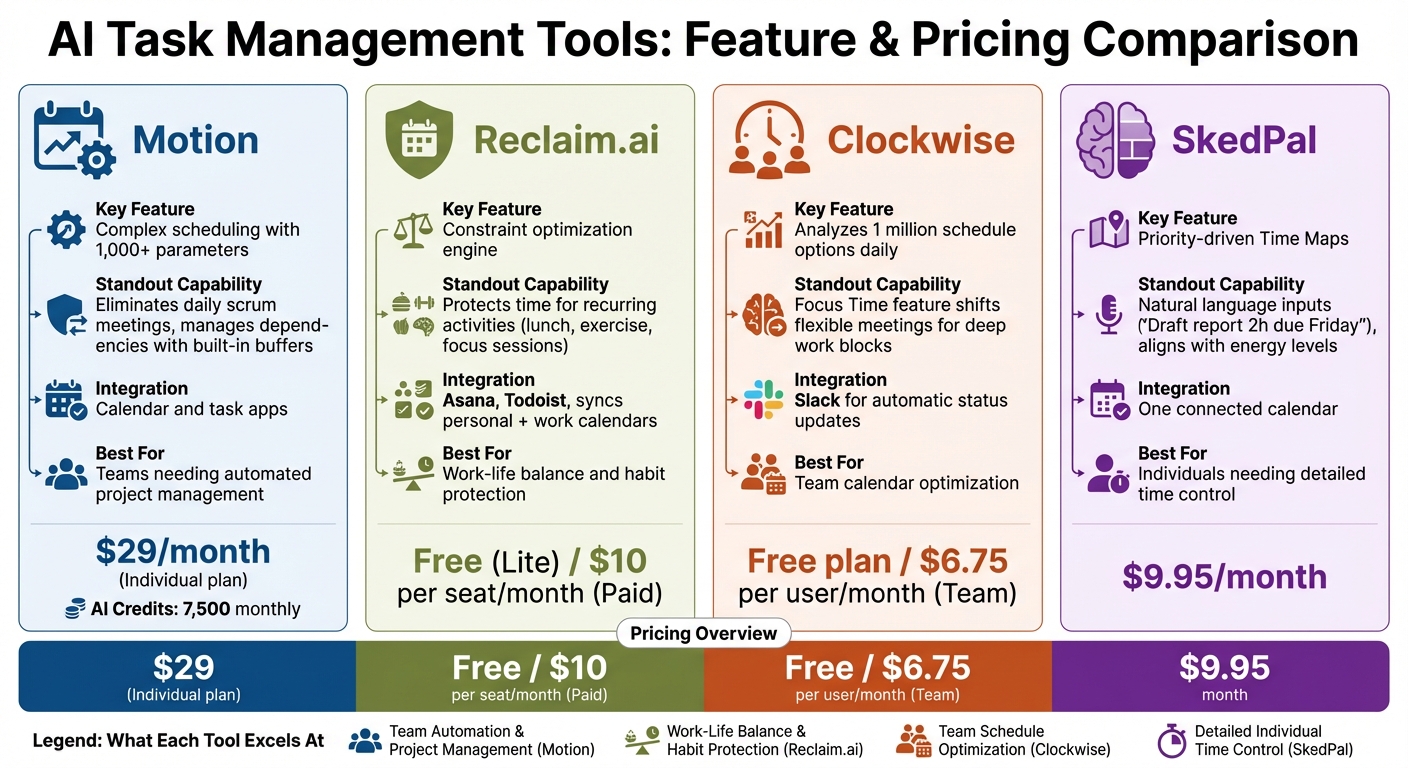
Top 4 AI Task Management Tools Comparison: Features and Pricing
AI-powered tools are transforming how we manage tasks and deadlines, taking the hassle out of manual scheduling and tracking. By leveraging advanced algorithms, these tools help streamline workflows and tackle everyday productivity challenges. Here’s a closer look at four standout options:
Motion is designed to handle complex scheduling by analyzing over 1,000 parameters. It automatically builds your calendar, adjusts timelines, and manages task dependencies with features like built-in buffers and timeline alerts. In 2024, MP Cloud adopted Motion under the leadership of VP of Technology Daean Chase, completely eliminating the need for daily scrum meetings. Chase shared:
Motion freed technology company MP Cloud from daily scrum meetings and managers having to spend hours a week ‘babysitting’ Jira and Monday.
The Individual plan for Motion starts at $29/month and includes 7,500 monthly AI credits.
Reclaim.ai focuses on protecting your time by using a constraint optimization engine that processes thousands of scheduling possibilities. It ensures you have time for recurring activities like lunch, exercise, or focused work sessions. Reclaim.ai also syncs personal and work calendars seamlessly, integrating with tools like Asana and Todoist . The Lite version is free, while paid plans start at $10 per seat/month.
Clockwise specializes in team calendar management, analyzing up to 1 million schedule options daily to find the best meeting times. It integrates with Slack for automatic status updates and uses a "Focus Time" feature to shift flexible meetings, creating uninterrupted blocks for deep work . Clockwise offers a free plan, with team plans starting at $6.75 per user/month .
SkedPal takes a different approach by using priority-driven "Time Maps" to auto-schedule tasks based on natural language inputs like "Draft report 2h due Friday." It optimizes your schedule by aligning tasks with energy levels and cognitive demands, reserving specific times for focused work. Plans start at $9.95/month and include one connected calendar, making it a great choice for individuals who need detailed control over their time.
sbb-itb-58f115e
How to Add AI to Your Task Management Workflow
Setting Up AI Tools
Integrating AI into your task management system starts with connecting your calendars and task apps into a single, unified setup. Link platforms like Google Calendar, Outlook, and task management tools such as Asana, Todoist, or Trello. This ensures you avoid double-booking and keep all tasks and appointments organized in one place. By centralizing these tools, you streamline decision-making and minimize the risk of missed tasks.
For example, tools like Microsoft Copilot make setup easy. Simply log into your Microsoft 365 account, and you’ll find the AI assistant ready to use in apps like Outlook, Teams, or Excel. Start small – use AI for simple tasks like setting reminders or summarizing emails. Once you’re comfortable, you can expand its role to automate more complex workflows, such as capturing action items during sales calls. Many professionals report seeing noticeable improvements within just two weeks of testing a single workflow.
After integrating your systems, take the time to define task details clearly to maximize the AI’s effectiveness.
Defining Priorities and Deadlines
Once your tools are connected, input detailed information for each task, including names, deadlines, estimated durations, and priority levels. AI tools can use this data to analyze patterns, predict how long tasks might take based on past performance, and suggest adjustments to your schedule. To get the best results, provide specific prompts like, “Organize tasks by urgency and time required.” You can also use ChatGPT prompts for business automation to further refine these instructions.
Time blocking is another powerful strategy. Reserve dedicated periods for activities like deep work, meetings, or personal routines, and let the AI fit lower-priority tasks around these blocks. You can also set task dependencies – for instance, specifying that Task B should only start after Task A is complete. The AI will then automatically trigger the next step in your workflow. Nancy Colter, an instructor at Emory University, highlights the benefits of this approach:
Scheduling specific tasks helps with focus and accountability, reducing the risk of procrastination.
To keep everything running smoothly, make sure to update your progress regularly so the AI can adjust workflows as needed.
Monitoring and Adjusting Workflows
Keeping your AI-driven system efficient requires regular updates. Frequently revise task statuses and deadlines to allow the AI to dynamically reschedule tasks as priorities shift. Make it a habit to review AI-generated schedules daily and adjust them weekly, using productivity insights to guide your changes.
A good approach is to let the AI propose priorities while you retain the final say. This “AI proposes, humans approve” model ensures that important nuances aren’t overlooked. Some tools even archive tasks that remain untouched for several days, marking them as low-priority. Still, as Marc Zao-Sanders, author of Timeboxing, points out:
Choosing what to do and when to do it manually fosters and affirms agency.
While AI can handle much of the heavy lifting, it’s crucial to maintain a balance. Manual scheduling ensures you stay focused on strategic goals, using AI as a helpful assistant rather than a total replacement.
Using God of Prompt for Better AI Task Management
Custom Prompts for Task Planning
God of Prompt offers access to over 30,000 prompts designed to simplify task planning by utilizing productivity frameworks like the Eisenhower Matrix, Most Important Task (MIT), and the 80/20 principle. These prompts help break down complex projects into manageable steps while aligning tasks with your natural energy cycles. For example, prompts like the "1-Minute Task Breakdown" or the "10-Day Day-by-Day Plan" make it easier to organize your workload. These tools not only simplify planning but also lay the groundwork for smoother workflow automation.
Workflow Optimization with AI Prompts
Once task planning is in place, God of Prompt takes things further by optimizing your workflow with AI-driven prompts. These resources automate transitions between tasks, minimize administrative work, and standardize planning processes with tailored AI responses. The Custom Instructions feature allows you to adapt AI outputs to meet your specific business needs, while the Custom GPT Toolkit – featuring over 100 pre-built instructions – enables the creation of specialized AI assistants that maintain consistency in tone and execution.
Some standout features include prompts that transform meeting transcripts into actionable to-do lists with assigned owners and deadlines. Others apply the 2-Minute Rule to quickly resolve minor blockers or design batching schedules to reduce inefficiencies caused by frequent context-switching. For instance, AI-driven automation can cut down the time required to draft project briefs from 45 minutes to just 15. Many users have highlighted the substantial time savings achieved through these prompts.
Complete AI Bundle for Maximum Productivity
The Complete AI Bundle is a comprehensive package designed to maximize productivity. For a one-time payment of $150, it provides access to over 30,000 prompts, no-code automations via n8n, unlimited custom prompt generation, and regular updates to ensure compatibility with the latest AI models. The bundle includes several key components: the Text AI Prompt Bundle, n8n Automations Bundle, Custom GPTs Toolkit, and Claude Mastery Guide. With an impressive 4.8/5 rating from 743 reviews, it has received widespread praise for its impact on productivity.
Lucas Kendall, a satisfied customer, shared:
My team’s output has drastically increased. Highly recommended.
Currently serving over 17,060 customers, God of Prompt has helped many professionals save an average of 20 hours per week by integrating these AI resources into their workflows. The bundle also includes unlimited updates and a 7-day money-back guarantee, making it a risk-free investment for anyone looking to streamline task management and meet deadlines more efficiently.
Conclusion
AI is transforming the way we manage tasks and deadlines. By taking over routine updates, it frees professionals to concentrate on more strategic goals. These tools can evaluate workloads, anticipate potential bottlenecks, and automatically adjust plans when priorities change. In fact, over 80% of surveyed AI users reported increased productivity, while about 33% of desk workers regularly face work-related stress – a challenge AI helps tackle by reducing decision fatigue and cutting down on administrative burdens.
The evolution from reactive to proactive task management is well underway. AI now recommends the best times to tackle tasks, safeguards time for focused work, and identifies at-risk projects before deadlines are missed. Instead of spending hours managing schedules, AI takes care of calendar organization, stakeholder updates, and optimizing time slots.
To maximize these advantages, custom AI prompts can fine-tune your task management approach. The effectiveness of AI tools largely depends on the quality of the prompts and frameworks guiding them. This is where platforms like God of Prompt come into play. Offering over 30,000 prompts designed for productivity, task planning, and workflow optimization, this resource enables you to unlock AI’s full potential. Whether it’s breaking down complex projects into manageable steps or automating routine follow-ups, tools like the Complete AI Bundle – priced at $150 – provide everything you need to enhance your workflow.
Whether you’re leading a team or managing projects solo, incorporating AI into your workflow is no longer just an option – it’s a necessity. The tools are available, the frameworks are tested, and the results are clear. The real question isn’t whether AI can improve your task management, but how soon you’ll start using it to stay ahead.
FAQs
How can AI help adjust schedules in real-time?
AI has the ability to fine-tune your schedule on the fly by evaluating things like your workload, task priorities, and even your energy levels. Using predictive algorithms, it can shuffle tasks around, cluster similar activities, and reschedule meetings – all with the aim of keeping your day running smoothly.
When priorities shift or unexpected delays pop up, AI steps in to keep your schedule on track. This way, you can stay focused on the tasks that truly matter without getting bogged down or feeling stretched too thin.
What features should I look for in AI tools to manage tasks and deadlines effectively?
When picking AI tools for managing tasks and deadlines, focus on those that automatically prioritize and schedule tasks based on what’s needed in real time. This not only cuts down on manual effort but also ensures your attention stays on the most critical work. Tools that can adjust priorities on the fly, identify potential roadblocks, and offer intelligent scheduling are especially helpful for keeping everything on track.
Also, look for features like smart reminders, progress tracking, and actionable insights into your work habits. These tools help you stay organized, hit deadlines, and make better decisions. The most effective options will integrate smoothly with your current workflows, handle repetitive tasks automatically, and adapt to your specific needs to maximize productivity.
How does AI help teams manage workloads more effectively?
AI supports teams in handling workloads more efficiently by evaluating tasks and deadlines to ensure work is distributed evenly. It helps prioritize tasks based on their urgency and importance, avoiding situations where some team members are overloaded while others have little to do. By automating repetitive tasks, AI frees up valuable time, allowing teams to focus on more impactful work, which helps streamline processes and eliminates delays.
AI-driven tools also keep an eye on team capacity, making real-time adjustments to task assignments as needed. This ensures resources are used effectively, promotes a balanced workload, and enhances overall productivity. Plus, it helps maintain team morale by reducing the risk of burnout and encouraging better collaboration.