Managing resources manually wastes time and money. Companies lose up to 52% of IT resources due to outdated methods. AI offers a solution by improving resource utilization by 15-30%, cutting costs, and ensuring tasks are completed faster. It analyzes multiple variables, automates adjustments, and provides real-time insights to streamline operations.
Here’s what AI does for resource allocation:
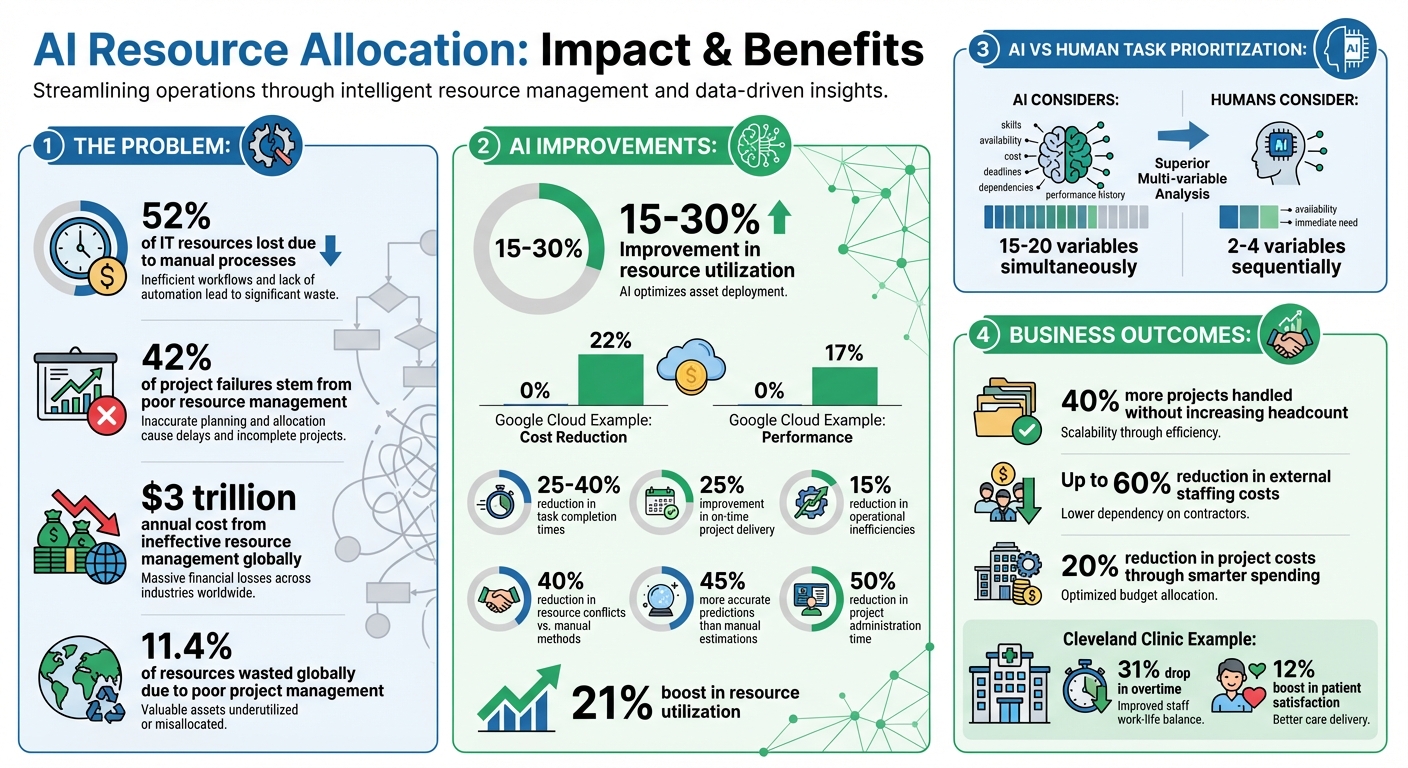
- Task Prioritization: AI considers 15-20 variables (e.g., urgency, impact) vs. 2-4 for humans.
- Skill Matching: Assigns tasks based on expertise and availability.
- Workload Balancing: Prevents burnout by redistributing tasks dynamically.
- Cost Control: Tracks budgets, forecasts demand, and reduces waste.
- Performance Monitoring: Provides real-time updates and automated adjustments.
For example, Google Cloud users saw a 22% cost reduction and 17% better performance using AI tools. Start by cleaning your data, setting priorities, and integrating AI with platforms like Jira or Salesforce. AI transforms resource management from reactive to proactive, saving time and money while boosting efficiency.
AI Resource Allocation Benefits: Key Statistics and Performance Improvements
5 AI Tools for Resource Planning, Scheduling & Team Capacity Management | ClickUp
sbb-itb-58f115e
Step 1: Review Your Current Resources and Set Priorities
Getting your data right is the first step toward effective AI-driven resource allocation. Start by auditing your current systems – like Jira, Asana, or Wrike – to ensure they contain accurate, up-to-date information about resource availability, time tracking, and skills. Outdated or duplicate entries can derail even the best AI models, so this step is critical.
The idea isn’t to replace your existing ERP or financial systems. Instead, think of building an operational layer that pulls together data from finance (budgets), HR (staffing and skills), and facilities (space utilization). A great example is Wake Forest University, which improved efficiency by unifying its data across departments.
Collect Resource Data
Start by standardizing your datasets. Define clear categories for skills, roles, and workload types – this ensures AI models receive structured, reliable inputs. For instance, you might create custom fields to track budget categories, cost centers, and utilization rates. Organizations that set clear AI metrics early on often implement solutions 1.8 times faster.
Next, automate data aggregation and set alerts for key thresholds. For example, flag budget line items when they hit 90% of their allocation or notify teams when revenue projections fall short. Test this process in one department first to refine the rules before scaling it across the organization . This ties directly to proactive resource management, helping you stay ahead of potential issues.
Once your data is clean, organized, and automated, it’s time to focus on setting your business priorities.
Set Your Business Priorities
AI tools excel at ranking tasks by analyzing factors like urgency, impact, ROI, deadlines, strategic alignment, dependencies, and resource availability . Unlike static methods like the Eisenhower Matrix, AI-powered priority lists adjust dynamically as new tasks come in or deadlines shift . This helps teams avoid "task completion bias", where easy tasks get done first while critical ones are delayed .
To make this work, integrate your AI tool with platforms like Salesforce, HubSpot, and your project management or financial software. This creates a centralized view of workloads and budgets . When planning resources, leave a 10–20% buffer for critical needs – this accounts for unexpected changes or scope creep. Also, document constraints like vacation schedules, skill shortages, or tight budgets early on. This allows the AI to plan around these limitations effectively.
Step 2: Use AI for Task Prioritization and Skill Matching
Once you’ve established your priorities, AI steps in to assess task attributes like urgency, complexity, dependencies, and overall strategic importance. By analyzing these factors, it dynamically ranks tasks based on criteria such as urgency, impact, effort, risk, and dependencies. This method helps you avoid bottlenecks by pinpointing the "critical path" – those tasks that need to be completed before others can begin. At the same time, AI evaluates your team’s current workload, ensuring tasks are sequenced efficiently and setting the stage for smart skill alignment.
AI-Powered Task Sequencing
Tools like Asana and Epicflow simplify task prioritization by examining deadlines, dependencies, and their impact on your business. For instance, Asana’s intelligent workload balancing highlights when team members are overextended, while Epicflow’s "Resource Allocation Advisor" uses historical performance data to prioritize tasks with the highest impact.
To make the most of these tools, train AI systems with historical project data to establish productivity benchmarks. Incorporate feedback loops that allow the AI to learn from your adjustments – if you override its recommendations, the system refines its future rankings. During sprint planning, let AI automatically organize backlogs based on business priorities and available resources. However, always combine AI-generated insights with human judgment to account for any unique circumstances. Once tasks are prioritized, the next step is assigning them to the right people for seamless execution.
Match Tasks to Skills
After sequencing tasks, AI helps match them to the best-suited team members by analyzing factors like skills, availability, and current workload. For example, Epicflow’s "User Cards" document employee expertise and availability, while "Task Cards" outline the specific requirements of each task. The system then pairs tasks and team members using suitability scores. Tools like Mosaic take this process further by scanning your entire organization to form teams within minutes, even accounting for potential scheduling conflicts like PTO or double-bookings.
Organizations leveraging AI for resource allocation have reported handling 40% more projects without increasing headcount and, in some cases, cutting external staffing costs by up to 60%. To achieve similar results, start by mapping your team’s proficiencies within the AI system so it knows who excels in specific areas. Use real-time monitoring to track progress and send automatic reminders as deadlines approach. Integrate AI with tools like Taskade or Asana to access up-to-date schedules and commitments. This is a key step in building autonomous AI workflows that reduce manual oversight. Finally, take advantage of effort estimation features to measure task complexity, ensuring no team member is overwhelmed with high-difficulty assignments all at once.
Step 3: Balance Workloads with AI Scheduling
After matching tasks precisely, the next step is ensuring workloads are balanced to prevent burnout. AI scheduling tools achieve this by redistributing tasks in real time. These tools calculate a "real effort" score, factoring in task duration, complexity, and even drive time. This approach helps avoid uneven task loads, ensuring a fairer distribution across team members.
Real-Time Schedule Updates
AI tools like Float provide instant insights into team capacity. For instance, Leah Zeis, Senior Director of Production Operations at BuzzFeed, uses Float to oversee post-production editing for 100 to 200 projects at a time. Similarly, Lauren O’Halloran, Director of Production at Toaster, relies on it to identify overburdened team members and adjust workloads before burnout becomes a problem.
These systems often feature color-coded dashboards with "red capacity indicators" that flag over-allocation. This allows managers to step in quickly. When priorities shift or emergencies arise, AI can instantly rebalance thousands of tasks, aligning availability with the right skills. Teams using AI for resource management have reported cutting project administration time by 50% and boosting resource utilization by 21%.
This real-time visibility not only streamlines operations but also ensures tasks are distributed more evenly.
Distribute Work Evenly
AI doesn’t just count tasks; it uses "Fair Distribution Algorithms" to balance workloads based on factors like effort, complexity, and capacity. It even considers job difficulty and geographic details to maintain fairness. Managers can switch between modes like "Strict Fairness Mode", which equalizes workloads even if routes are longer, and "Efficiency Mode", which focuses on saving time and fuel during busy seasons.
A helpful strategy is following the 80% capacity rule, leaving room for unexpected tasks. Resource smoothing is another approach, where noncritical tasks are shifted to less busy periods to avoid workload spikes . For optimal results, managers should aim for a job count variance under 15% and keep total work hours within 10–12% of the team average. While occasional heavy days may occur due to emergencies, AI ensures that these are balanced with lighter days over time, maintaining fairness across weeks rather than just days.
Step 4: Predict Resource Needs and Control Costs
After balancing workloads and optimizing task allocation, the next step is to anticipate future demands and manage expenses effectively. Predictive analytics plays a key role here, offering insights that surpass manual estimations by 45% in accuracy. This capability helps avoid costly mistakes tied to reactive staffing and resource decisions.
Forecast Future Demand
AI-powered tools like Runn and Kantata use data from sales pipelines, project plans, resource calendars, and timesheets to predict future resource needs. A proactive approach starts by collaborating with sales teams to review pipeline projects. When a project reaches a 60–70% probability of closing, it’s time to begin recruiting and onboarding.
These tools also support scenario planning, enabling managers to simulate different outcomes – whether best-case, worst-case, or most likely situations. For instance, Runn allows users to toggle tentative projects and immediately see how they affect team capacity. A real-world example: In 2025, Marcus, a Project Manager at Apex Energy, used AI to forecast labor needs for a solar farm project. The tool identified a 20% labor surge due to an upcoming heatwave, allowing Marcus to pre-book crews and stagger deliveries. This foresight prevented a $500,000 budget overrun and helped the project finish three weeks early.
However, the accuracy of these forecasts relies heavily on clean and reliable data. Lyssa Parisella, VP of Customer Success at Runn, emphasizes:
"When you don’t have clean data or good data hygiene in resource and project management, you’re acting blind. You actually have no idea what the consequences are of moving people around."
To ensure reliable forecasts, focus on maintaining essential data points like schedules, actual hours worked, and team skills. Assign a dedicated person to oversee data quality and utilize team management prompts to streamline oversight. Quarterly retrospectives comparing AI predictions to actual outcomes can further refine the forecasting process.
These accurate forecasts set the stage for better cost management.
Reduce Costs with AI
Using forecast insights, AI can pinpoint areas where costs can be trimmed. Poor project management wastes 11.4% of resources globally, and around 42% of project failures stem from ineffective resource management, costing companies an estimated $3 trillion each year. AI addresses these challenges by tracking budgets and flagging inefficiencies.
To stay ahead, set automated budget alerts for when daily spending exceeds certain thresholds or when monthly spending hits 50%, 75%, or 90% of the budget. Focus on key metrics such as total daily spend (to spot sudden cost spikes), spend by model (to identify high-cost tools), and cost per user or request (to link expenses to outcomes). Companies fully embracing AI capabilities can achieve cost savings of over 30%. Additionally, AI can improve resource utilization by 15–30% and reduce task completion times by 25–40%.
Standardized forecasting and cost control can prevent costly mistakes. For example, Better.com reportedly lost $200 million due to overhiring caused by flawed projections. By combining predictive analytics with cost monitoring, AI ensures resources are used efficiently, minimizing waste and maximizing value.
Step 5: Monitor Performance and Integrate AI Tools
This step ensures that AI-driven adjustments remain effective as project demands evolve. Once forecasts and cost controls are set, it’s crucial to keep a close watch on performance and integrate essential AI tools into your operations. Companies using AI for resource management have reported a 25% improvement in on-time project delivery and a 15% reduction in operational inefficiencies. This approach moves resource allocation from static planning to a dynamic, proactive strategy.
Track and Adjust in Real-Time
Real-time dashboards are key to identifying issues before they escalate. These dashboards monitor critical metrics like resource utilization, system uptime, expenses, and SLA compliance. AI-powered scheduling can reduce resource conflicts by up to 40% compared to manual methods like spreadsheets.
Automated triggers can reassign resources when usage deviates from set thresholds. This keeps productivity high while avoiding burnout. Monitoring forecast variance helps evaluate the accuracy of AI predictions. If predictions start to stray from actual patterns, it may indicate model drift, signaling the need for recalibration with updated data.
Defining AI metrics early on leads to faster implementation success – up to 1.8 times faster. Focus on metrics like task-to-skill accuracy to ensure the right assignments and track project overrun reductions to measure financial savings. It’s worth noting that enterprises lose up to 52% of IT resources due to manual processes and limited visibility, which real-time monitoring can significantly improve.
Add AI Tools to Your Workflow
To make the most of AI, integrate it seamlessly into your daily workflow. The effectiveness of AI insights depends on how well they’re acted upon. Use API-based, two-way integration to sync AI data with platforms such as Jira, Monday.com, or Smartsheet.
AI-driven alerts can also be embedded in tools like Slack or Microsoft Teams, providing real-time notifications. For example, if the AI detects a scheduling conflict or an underutilized resource, it can send instant recommendations for adjustments. A phased migration strategy helps minimize disruptions when integrating with existing systems.
Consider forming an AI Resource Allocation Committee to oversee ethical use and schedule regular model retraining. Additionally, a well-structured data dictionary can help define skill levels and roles, ensuring the AI works with clean, organized data. Build feedback loops using performance data and usage logs to continuously improve AI models as business needs or staffing levels shift. This approach turns AI into a system that evolves alongside your organization, delivering ongoing value over time.
Advanced Techniques: Custom AI Prompts for Better Results
After nailing down task prioritization and workload balancing, the next step is customizing AI prompts to tackle your specific resource allocation challenges. Generic prompts often fall short when it comes to addressing the finer details of your team setup, budget limitations, or industry-specific needs. By creating custom prompts, you can tailor AI-driven solutions that align perfectly with your goals – whether that’s spotting overworked team members or generating detailed visual resource maps.
One of the most important aspects of crafting effective AI prompts is ensuring they align with your workflows. Did you know that project managers spend 60–70% of their time on administrative tasks? Custom prompts can take over tasks like effort analysis, flagging over-allocations, and suggesting resource adjustments, saving you hours of effort. This kind of customization is also what makes tools like God of Prompt so effective for personalized solutions.
Use God of Prompt for Custom Solutions
God of Prompt simplifies the process of creating tailored AI prompts. Its Custom Prompt Generator takes plain-language descriptions of your resource challenges and turns them into detailed, ready-to-use prompts. For example, you could input something like, “I need to assign tasks to a team of five developers with varying skills and stay within a $50,000 budget,” and the tool will generate a comprehensive prompt along with a PDF guide.
The platform also offers a Custom GPTs Toolkit with over 100 pre-built mega-instructions designed for business management and automation. These tools let you create a specialized version of ChatGPT, such as a "Resource Manager" AI that remembers your team’s specific metrics, like story point calibration or historical velocity. This eliminates the need to repeatedly explain your team’s structure or priorities.
When designing effective prompts, be sure to:
- Clearly define the role and context.
- Specify deliverables and constraints (e.g., budget, team size).
- Include details about resource availability, like "John Doe – 40h/week, Sarah Smith – 30h/week."
- Request outputs in specific formats, such as visual charts or tables.
Here’s a quick breakdown of God of Prompt’s tools and their applications:
| God of Prompt Resource | Best Use for Resource Allocation | Key Feature |
|---|---|---|
| Custom Prompt Generator | Handling complex team structures | Converts plain language to mega-prompts |
| Custom GPTs Toolkit | Creating a "Resource Manager" AI | 100+ ready-to-use mega-instructions |
| Text AI Prompt Bundle | Task prioritization and scheduling | Includes 10,000+ premium business prompts |
| Prompt Engineering Guide | Refining cost-management prompts | 25 core principles for better prompts |
Build Custom GPTs for Resource Allocation
You can take things a step further by building custom GPTs tailored specifically to your resource allocation needs. Start by feeding the AI detailed data about your personnel, budgets, and assets. The AI will then engage in an interactive process to understand your organization’s unique constraints and requirements.
For example, if you need a visual representation of workload distribution, you can ask the AI to generate Mermaid.js code for Gantt charts or timelines. You can even request it to include risk buffers – say, 15–20% for high-risk tasks – to ensure realistic planning. For more intricate issues like dependency management or risk assessment, models like Claude 4 Opus are excellent options.
God of Prompt’s tools are compatible with ChatGPT (GPT-5), Claude 4, and Gemini 3. By following the Prompt Engineering Guide, which outlines 25 key principles, users have reported doubling or even tripling the value of their AI-generated outputs.
"The simple framework has taught me how to create my own prompts and GPTs and think like an AI expert. I am a better AI user because of God of Prompts."
– Alison Martin Simmons
One example of success comes from a user at adaptCONTENT, who modified an advanced prompt from God of Prompt’s library to fit client-specific needs. This led to the launch of a four-week content strategy that boosted LinkedIn profile visits by 26%. By starting with a strong mega-prompt and customizing it to your team’s skills and costs, you can let the AI handle the heavy lifting.
These advanced techniques allow you to seamlessly integrate customized prompts and GPTs into your AI-driven resource strategy, turning them into powerful tools for smarter, more efficient decision-making across your organization.
Conclusion: Main Points on AI-Driven Resource Allocation
AI has reshaped resource allocation, turning it from a manual, time-consuming task into a system powered by data and real-time insights. By using algorithms to align skills, priorities, and deadlines with available resources, businesses can avoid the inefficiencies that lead to 42% of project failures. This dynamic approach doesn’t just fix problems after the fact – it helps prevent them before they even arise.
The financial benefits are undeniable. Companies using AI-driven tools report improvements in resource utilization ranging from 15% to 30%, while also slashing project costs by about 20% through smarter spending practices. Take GreenBuild Construction as an example: Project Manager Elena used AI to streamline a $25M eco-hotel project, cutting resource overlap by 25%. The result? The hotel opened two weeks ahead of schedule, earning a $1.2M bonus. These kinds of results showcase the operational and financial efficiencies AI can deliver.
By focusing on key strategies like auditing resources, using AI for task matching, and balancing workloads dynamically, businesses can create a management system that continuously improves itself. Each step – whether it’s comparing AI forecasting tools, scheduling intelligently, or monitoring performance – feeds into the next, forming a feedback loop that gets smarter over time. For instance, Cleveland Clinic adopted an advanced allocation system and saw a 31% drop in nurse overtime alongside a 12% boost in patient satisfaction.
The path forward is clear: start with reliable data and well-defined goals. Focus on small, targeted AI pilots before scaling up. For example, Google Cloud’s resource intelligence system not only cut customer cloud costs by 22% but also improved application performance by 17%. The takeaway is simple: businesses that pair AI’s computational power with human judgment consistently outperform those using manual methods.
To explore how custom AI solutions can work for your business, visit God of Prompt (https://godofprompt.ai). Their tailored prompts can help you unlock the full potential of AI in resource allocation.
FAQs
What data do I need before using AI for resource allocation?
To make the most of AI in resource allocation, start by collecting essential data. This includes details on current resource usage like workload, asset utilization, and team capacity. Map out existing workflows to spot any bottlenecks, and gather historical or project data that can provide valuable insights.
It’s also crucial to ensure the data you have is accurate and reliable. Evaluate your team’s skill sets to understand their capabilities and identify gaps. Finally, take a close look at your tech infrastructure to confirm it can handle AI integration effectively. By laying this groundwork, AI can help streamline task prioritization, balance workloads, and manage costs more efficiently.
How can AI balance workloads without overloading my best people?
AI simplifies workload management by automating task assignments based on factors like skills, priorities, and team capacity. It also monitors workloads in real time, allowing for quick adjustments to keep things running smoothly. By identifying bottlenecks early and assigning tasks to the most suitable team members, AI helps prevent burnout and keeps productivity on track.
To make this work, start by setting clear workload thresholds. Next, choose AI tools that seamlessly integrate with your existing systems. Finally, ensure your team is trained to take full advantage of AI-driven workload management for the best results.
How do I measure ROI after adopting AI resource allocation tools?
To assess ROI after implementing AI resource allocation tools, focus on comparing key metrics from before and after deployment. Look at areas like cost savings, revenue impact, productivity improvements, and risk reduction. A simple formula to calculate ROI is:
ROI = (Financial Gains – Total AI Costs) ÷ Total AI Costs
Track specific metrics that reflect the tool’s impact. Examples include support ticket volume, conversion rates, and time saved per employee. Be sure to establish baseline data before deployment – this ensures you have a clear point of comparison for accurate ROI evaluation.