Top 7 AI Tools for Abstract Art Prompts



Creating abstract art with AI has become easier and more efficient thanks to advanced tools that transform text into stunning visuals. Whether you're an artist, designer, or hobbyist, these tools offer features like style customization, negative prompts, and real-time adjustments to help you achieve your artistic vision. Here’s a quick rundown of the top options:
- God of Prompt: Offers 30,000+ pre-made prompts, including a Midjourney Bundle, with flexible pricing.
- Midjourney: Known for parameters like Chaos (
--c) and Stylize (--s) to fine-tune abstract art. Subscription-based pricing. - DALL·E 3: Integrates with ChatGPT for conversational prompt creation, with commercial rights included.
- Stable Diffusion: Open-source with high customization options and community-driven prompt libraries.
- NightCafe: Features multiple AI models and a strong community focus, with a credit-based system.
- Ideogram: Excels at turning simple ideas into detailed prompts, offering free and paid plans.
- Dream by Wombo: User-friendly, mobile-first platform with over 90 styles and affordable premium plans.
Each tool caters to different needs, from pre-made prompts to advanced customization. Below is a comparison to help you decide.
Quick Comparison
| Tool | Key Features | Pricing | Accessibility |
|---|---|---|---|
| God of Prompt | Pre-made prompts, Notion integration | $3.99–$150 (one-time/month) | Web-based |
| Midjourney | Chaos/Style parameters, Discord-based | $10–$120/month | Discord, Web |
| DALL·E 3 | ChatGPT integration, spatial instructions | Free–$0.12/image | API, Microsoft Copilot |
| Stable Diffusion | Open-source, local/cloud options | Free–$20/month | Hugging Face, API, Local |
| NightCafe | Community challenges, prompt recipes | Free–$49.99/month | Web, Mobile |
| Ideogram | Magic Prompt, style references | Free–$60/month | Web, iOS App |
| Dream by Wombo | 90+ styles, mobile-first | Free–$14.98/month | Web, Mobile |
Choose the tool that fits your budget and workflow. These platforms simplify abstract art creation, letting you focus on your artistic goals.
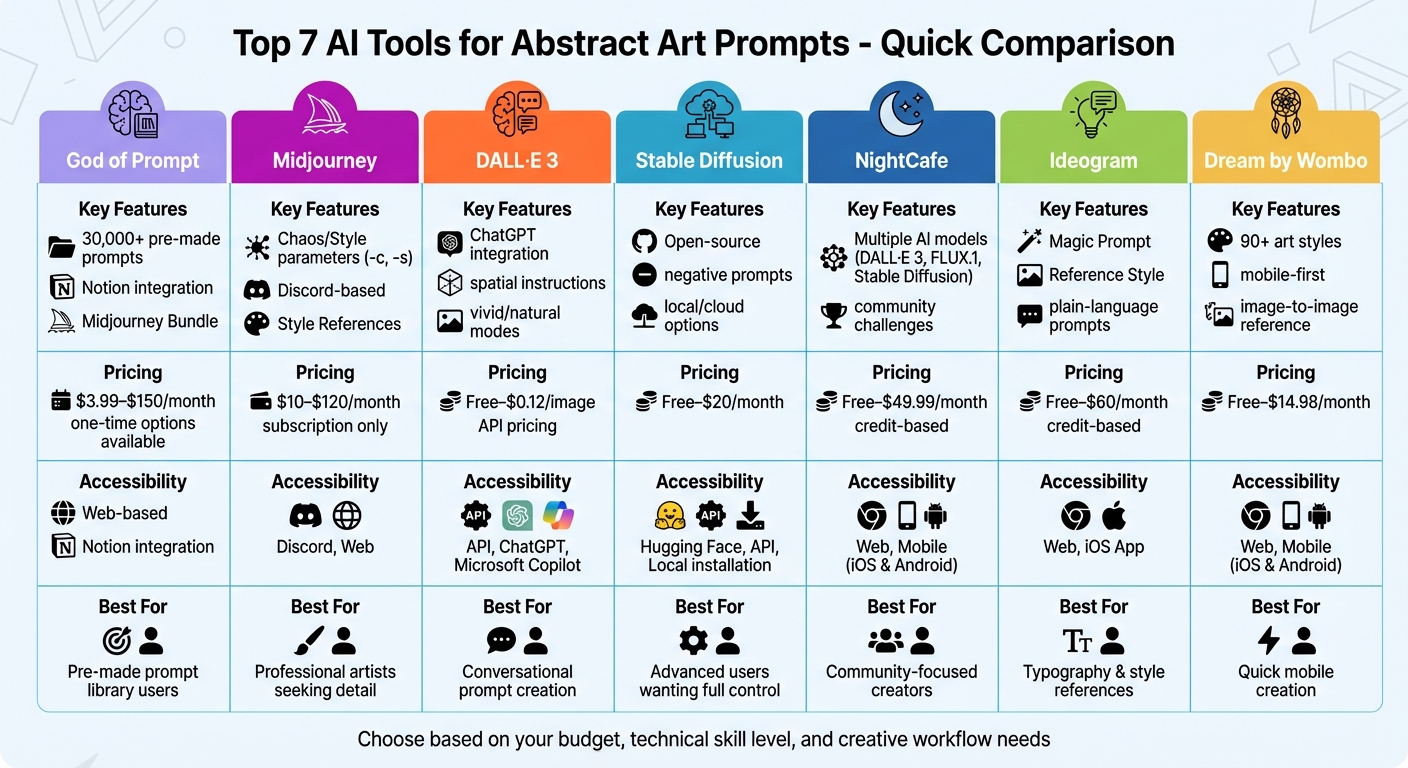
AI Abstract Art Tools Comparison: Features, Pricing & Accessibility
1. God of Prompt
Abstract Art Prompt Customization
God of Prompt specializes in creating tailored prompts that deliver intricate, multi-layered results. This setup allows abstract art creators to mold prompts according to their specific artistic goals. Users can also mix and match prompts to craft more complex and dynamic compositions, offering a flexible tool for creative exploration.
Prompt Library Size and Variety
With over 30,000 AI prompts, God of Prompt boasts one of the largest libraries available. For visual artists, it features a dedicated "Art & Design" section, alongside categories for Architecture and Photography. The Midjourney Bundle alone includes more than 10,000 prompts optimized for visual content creation, with regular monthly updates to ensure the collection stays fresh. This extensive library integrates seamlessly into workflows for abstract art, offering creators an expansive toolkit.
Pricing and Accessibility
God of Prompt provides a range of pricing options to accommodate different needs. Individual category packs are available for $37 (one-time) or $3.99/month. The Midjourney Bundle costs $67 (one-time), while the Complete AI Bundle - offering access to all 30,000+ prompts along with future updates - costs $150 (one-time) or $15/month. All plans include a 7-day money-back guarantee, and one-time purchases come with lifetime updates. With over 17,060 customers and a 4.8/5 rating from 743 reviews, users frequently mention saving up to 20 hours per week thanks to the platform's efficiency .
Ease of Integration with Abstract Art Generators
The prompts are accessible through a web-based library and Notion integration, making it easy to sort and search for styles tailored to abstract art. They are optimized for use with tools like Midjourney, ChatGPT, Claude, and Gemini AI. Beginners can benefit from resources such as "Midjourney Mastery" and "Prompt Engineering" guides, which help refine their creative process. Additionally, the Custom Prompt Generator simplifies the process by turning plain-language ideas into detailed, structured prompts.
"These prompts are absolutely amazing! I have wasted so much time and money on other prompts that I was about to give up hope. My search is over!" – Ken Porter
2. Midjourney
Abstract Art Prompt Customization
Midjourney offers several parameters to fine-tune the unpredictability, style, and originality of its outputs, making it an excellent tool for abstract art creation. The Chaos parameter (--chaos or --c) introduces more variety in the initial four-image grid, allowing for a broader exploration of abstract ideas. The Stylize parameter (--stylize or --s) determines how much of Midjourney's artistic flair is applied to your images, while the Weird parameter (--weird or --w) pushes the boundaries by adding unconventional elements.
Another standout feature is Style References (--sref), where you can use a URL of an existing image to influence the color scheme and composition, without altering the core content. Additionally, the Image-to-Image Prompting feature lets you upload your own moodboards to guide the AI's creative direction. Once the images are generated, tools like 'Vary Region,' 'Zoom Out,' and 'Pan' provide options for precise refinements. These customization options pair well with prompt libraries, such as those provided by God of Prompt or by turning ChatGPT into a Midjourney prompt generator.
Pricing and Accessibility
Midjourney operates exclusively on a subscription model with four pricing tiers, offering a 20% discount for annual subscriptions.
- Basic Plan: $10/month ($8/month annually) includes 3.3 hours of Fast GPU time.
- Standard Plan: $30/month ($24/month annually) provides 15 hours of Fast GPU time and unlimited "Relax Mode" generations.
- Pro Plan: $60/month ($48/month annually) offers 30 hours of Fast GPU time and includes "Stealth Mode" for private creations.
- Mega Plan: $120/month ($96/month annually) comes with 60 hours of Fast GPU time.
All plans grant general commercial usage rights, and users can earn free GPU time by rating images on the platform. However, companies with over $1,000,000 USD in annual revenue are required to subscribe to either the Pro or Mega plans.
Ease of Integration with Abstract Art Generators
Midjourney's accessibility and integration make it a versatile tool for abstract art projects. The platform is primarily accessed via Discord, which works on both mobile and desktop devices. It also offers a "Create Page" on its website for web-based generation. For inspiration, the Explore Page provides a searchable gallery of subscriber creations, while the Daily Theme Room encourages collaboration by allowing users to experiment with specific abstract themes alongside others. This combination of features ensures a smooth workflow for creators seeking to produce and refine abstract art.
3. DALL·E 3
Abstract Art Prompt Customization
DALL·E 3 offers a unique way to create abstract art by working hand-in-hand with ChatGPT for prompt development. For instance, if you start with something simple like "colorful abstract flow", ChatGPT can turn that into a detailed prompt that DALL·E 3 executes with precision. This collaboration makes it stand out, especially when it comes to crafting intricate abstract designs.
The tool excels at following spatial instructions like "left side" or "foreground", which is particularly handy for abstract compositions. You can also make real-time adjustments - ask for changes in color, add geometric patterns, or tweak the perspective as needed. Want brighter, bolder colors? Choose the "vivid" setting. Prefer a softer, more muted look? Go with "natural". The Select tool adds another layer of control, letting you paint over specific areas and apply text prompts to refine textures or shapes.
Pricing and Accessibility
DALL·E 3 is widely accessible through platforms like ChatGPT (on both web and mobile), OpenAI's API, Microsoft Copilot, and Shutterstock. For those using the API, pricing depends on the image resolution and quality:
| Quality | Resolution | Price per Image |
|---|---|---|
| Standard | 1024 x 1024 | $0.04 |
| Standard | 1024 x 1536 / 1536 x 1024 | $0.08 |
| HD | 1024 x 1024 | $0.08 |
| HD | 1024 x 1536 / 1536 x 1024 | $0.12 |
If you're a ChatGPT Plus subscriber, you can access DALL·E 3 as part of your plan, though there’s a limit of 40 messages every three hours for combined use of GPT-4 and DALL·E 3. The best part? You retain full ownership of all images you generate, including commercial rights to sell, reprint, or merchandise them.
Ease of Integration with Abstract Art Generators
DALL·E 3 integrates smoothly into various creative workflows. It supports three aspect ratios - square (1024x1024), widescreen (1792x1024), and vertical (1024x1792) - giving you flexibility for different types of abstract projects. Its API is scalable, catering to both solo artists and large-scale operations.
For maintaining consistency in a series of abstract works, you can ask ChatGPT for the "Gen_ID" or "Seed" number of a specific image. This lets you use it as a reference for future creations, ensuring a cohesive style across your project.
4. Stable Diffusion
Abstract Art Prompt Customization
Stable Diffusion 3.5 (SD3.5) shines in its ability to interpret natural language prompts, making it easier to describe abstract concepts in detail. You can specify aesthetic styles like surrealism, expressionism, watercolor, or oil painting to direct the artistic outcome. With its negative prompting feature, you can fine-tune results by filtering out unwanted elements - such as muddy colors or undesirable textures. Additionally, cinematic terms like dynamic shadows, backlighting, fish-eye lens, or bird's eye view can help refine the composition. For best results, structure your prompts by listing style, composition, lighting, and technical details, enclosing specific terms in double quotes. These features, combined with a vast community-driven library, make SD3.5 a powerful tool for abstract art creation.
"Stable Diffusion 3.5 excels in customizability, efficient performance, diverse outputs, and versatile styles, making it ideal for beginners and experts alike." - IT Admin, Stability AI
Prompt Library Size and Variety
Thanks to its open-source nature, Stable Diffusion taps into a massive, community-built library of extensions, plug-ins, and custom models. Platforms like PromptBase offer over 3,800 Stable Diffusion prompts tailored for art and design. This marketplace, used by more than 400,000 individuals, features 240,000 quality-tested prompts. Examples of specialized abstract styles include "Gold Leaf and Lapis Lazuli", "Exploring Dualities Through Watercolors", and "Paper Cutouts Art." While many prompts are free, premium options typically cost between $2.99 and $5.99. PromptBase itself boasts a 4.9/5 rating from over 33,000 reviews.
Pricing and Accessibility
Stable Diffusion caters to a range of users with both free and paid plans. The free tier provides 10 credits per day and allows for generating two images at a time. Paid plans start at $10 per month, offering 2,000 credits and the ability to create four images simultaneously. For $20 per month, users receive 5,000 credits and additional perks like commercial licenses, private generation, and watermark removal. Stable Diffusion is also accessible through the Stability AI API and "Stable Assistant" for cloud-based image generation.
| Feature | Free | Pro | Max |
|---|---|---|---|
| Monthly Cost (Billed Yearly) | $0 | $10 | $20 |
| Credits | 10 per day | 2,000/month | 5,000/month |
| Simultaneous Images | 2 | 4 | 4 |
| Commercial License | Included | Included | Included |
Ease of Integration with Abstract Art Generators
Stable Diffusion 3.5 integrates effortlessly into various workflows. Platforms like Hugging Face, the Stability AI API, and ComfyUI make it easy to incorporate into your creative process. For those seeking more control, SD3.5 can be run locally, although a high-quality GPU is recommended for generating intricate abstract art. The open-source ecosystem also supports numerous extensions and custom models, allowing users to create one-of-a-kind abstract styles.
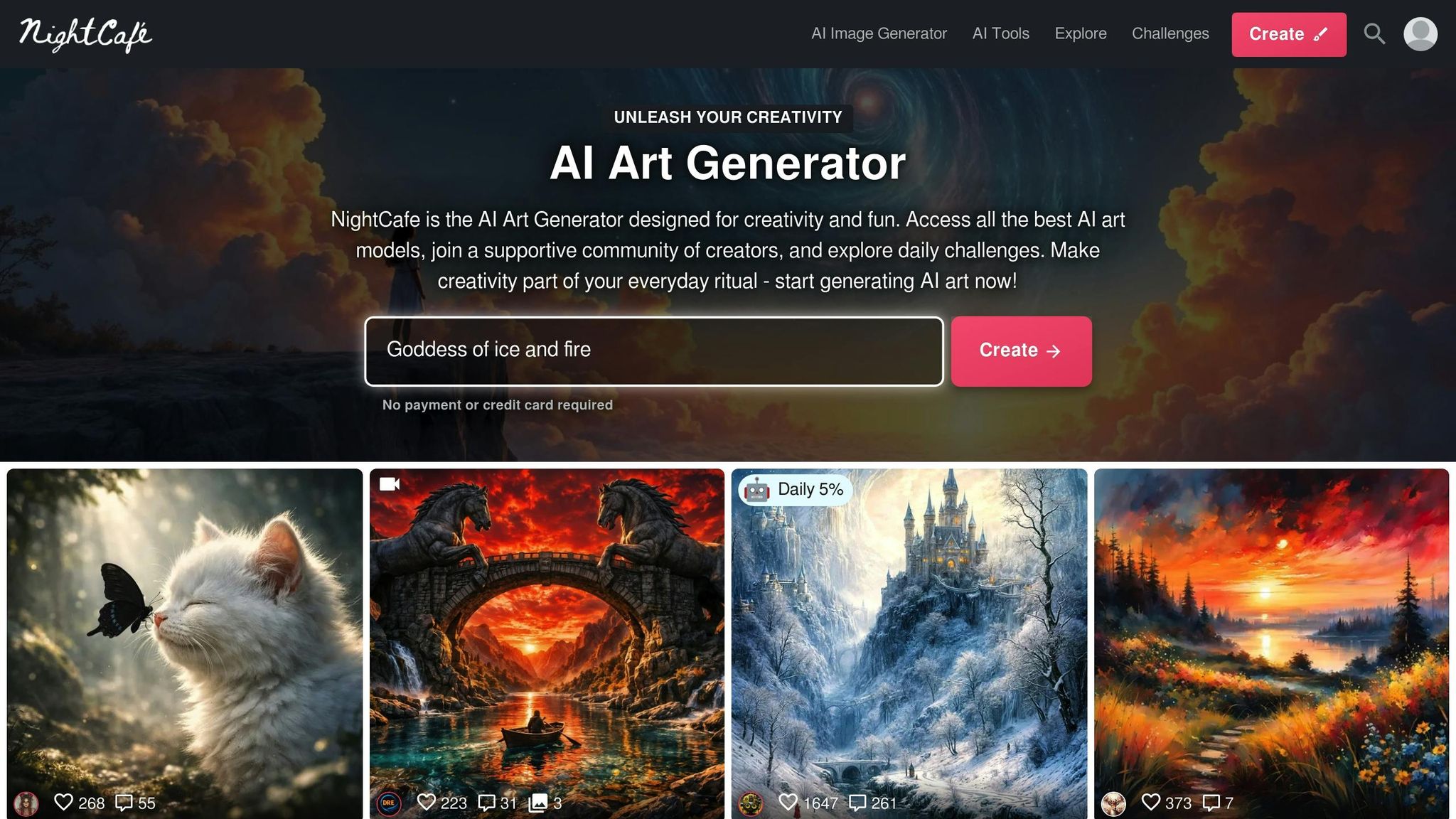
5. NightCafe
Abstract Art Prompt Customization
NightCafe gives you the reins when it comes to abstract art creation, offering a multi-algorithm setup that includes tools like Stable Diffusion, DALL·E 3, FLUX.1, Imagen 3, and VQGAN+CLIP. The platform’s Advanced Options let you tweak variables such as seed numbers, sampling methods (like K_LMS), and runtime. If you have a specific vision, the Start Image feature lets you upload sketches or gradients to serve as the base for your creation.
You can refine your results further with tools like Prompt Weight, which determines how strictly the AI sticks to your text description, and Noise Weight, which adjusts the randomness applied to your starting image. For those just getting started, NightCafe offers over 25 pre-made "prompt recipes" to help you develop consistent artistic styles. These tools make it easier to craft intricate abstract prompts, while also tying into their expansive Midjourney prompts for art and design.
"While other popular generators beef up the prompts behind the scenes, NightCafe really puts you, the creator, in the driver's seat." - Cassandra Hood, NightCafe Studio
Prompt Library Size and Variety
Since its debut in November 2019, NightCafe has facilitated the creation of more than 35 million AI-generated artworks. The platform features curated prompt lists and presets tailored for abstract styles like minimalist and geometric designs. Users can take advantage of a daily top-up of 5 free credits and earn additional credits by joining community challenges. These challenges are highly popular, drawing over 6,500 entries and 300,000 votes per session.
The community aspect is a standout feature, with over 8,800 users maintaining creation streaks of at least 100 days - some extending beyond three years. Public galleries allow you to browse thousands of community-shared images and prompts, and the "random" prompt button is perfect for sparking fresh ideas. For abstract art enthusiasts, the library includes references to iconic artists like Jackson Pollock, Mark Rothko, Willem de Kooning, and Georgia O’Keeffe.
Pricing and Accessibility
NightCafe operates on a credit-based freemium model, offering a range of options for both casual users and dedicated creators. The free tier provides daily credits and opportunities to earn more through community participation. Paid plans start at $5.99 per month for the AI Beginner tier, with higher tiers offering additional credits, faster processing, and commercial rights.
| Plan | Monthly Price | Key Features |
|---|---|---|
| Free | $0 | 5 daily credits, community rewards, access to most models |
| AI Beginner | $5.99 | Entry-level paid access |
| AI Hobbyist | $9.99 | More credits, faster speeds |
| AI Enthusiast | $19.99 | Higher resolution, priority access |
| AI Artist/Pro | $49.99 | Bulk credits, commercial rights, advanced tools |
The cost per image varies by resolution: 512×512px images require 1 credit, 640×640px need 2 credits, and 896×896px cost 6 credits. NightCafe has earned a 4.7/5 rating on Software Advice from 83 reviews, with users highlighting its ease of use (4.6/5) and value for money (4.3/5).
"NightCafe is easier to use and more reliable. And cheaper!" - James P., Verified User
Ease of Integration with Abstract Art Generators
NightCafe’s no-code interface ensures accessibility across various devices, including laptops, tablets, and smartphones (both iPhone and Android). With approximately 8.7 million monthly visitors, it’s clear the platform has a broad user base. Social features like chat rooms and daily challenges make it easy to collaborate with other creators and share prompt recipes. Plus, NightCafe transfers copyright ownership to the creator, even for free-tier users, allowing for commercial use of your art.
sbb-itb-58f115e
6. Ideogram
Abstract Art Prompt Customization
Ideogram turns simple concepts into detailed abstract art prompts with ease. Its Magic Prompt feature uses an on-device language model to take your brief ideas and expand them into rich, descriptive prompts. These include stylistic hints, lighting details, and vivid adjectives to bring your vision to life. If you're feeling adventurous, the Random Style option adds unexpected style cues, pushing your creations into uncharted territory. Additionally, the Reference Style feature lets you upload or select an image to guide the colors, textures, and composition of your new artwork.
For those who enjoy refining their work, the Remix Tool allows you to tweak an existing image by adjusting the prompt, enabling iterative improvements. Meanwhile, the Describe feature transforms uploaded images into detailed text prompts, capturing the nuances of works you admire. Unlike many tools that demand complex syntax, Ideogram keeps it simple by accepting plain-language prompts. These features are bolstered by a vibrant community library, offering endless opportunities for creative inspiration. For even more variety, you can explore a list of best ChatGPT prompts to spark new ideas.
"Abstract/Poetic: Vague or symbolic prompts lead to creative, surprising images (e.g., 'The feeling of summer captured in a moment')." - Ideogram Prompting Guide
Prompt Library Size and Variety
Ideogram's community library is a treasure trove of inspiration, showcasing top creations by hour, day, week, or month [46,48]. The platform supports "Abstract/Poetic" prompts, encouraging users to experiment with symbolic or open-ended descriptions that result in striking and unexpected visuals. You can also apply the style of an existing image when browsing community creations using the Style Reference feature [45,46].
The platform offers a free tier with 10 weekly credits (reset every Saturday at 00:00 UTC), allowing users to generate up to 40 images [47,48]. For those who need more, paid plans significantly increase creative capacity. The Plus plan provides 1,000 priority credits monthly (up to 8,000 images), while the Pro plan includes 3,500 priority credits (up to 28,000 images). Prompts work best when kept under 150 words (around 200 tokens), with paid plans offering up to 32 concurrent generations for faster results [45,47].
Pricing and Accessibility
Ideogram uses a flexible credit-based system to cater to different creative needs. The free plan offers 10 credits per week, while paid plans provide unlimited slow credits and additional priority credits to reduce wait times.
| Plan | Monthly Price | Annual Price | Priority Credits | Key Features |
|---|---|---|---|---|
| Free | $0 | $0 | 0 | 10 credits/week, public generations, 2 canvases |
| Plus | $20/month | $15/month (billed annually) | 1,000/month | Unlimited slow credits, private generation, image uploads |
| Pro | $60/month | $42/month (billed annually) | 3,500/month | Batch generation (CSV), API access, priority support |
| Team | $30/member | $20/member (billed annually) | 1,500/member | Minimum 2 members, collaboration features |
For added flexibility, you can purchase priority credit top-ups: $4 gets you 150 extra credits for Plus users or 250 for Pro/Team users [47,48]. Importantly, Ideogram does not claim ownership of your generated images, granting you full commercial rights over your creations [47,48]. The platform’s plain-language interface and efficient credit system make abstract art creation straightforward and accessible. You can access Ideogram through its web platform at ideogram.ai or via its official iOS app [43,46].
7. Dream by Wombo
Abstract Art Prompt Customization
Dream by Wombo makes creating abstract art incredibly approachable with its text-to-image functionality. You simply type in a prompt - up to 305 characters - and the AI generates an original piece of art based on your input. With over 90 art styles to choose from, including options like "Abstract", "Psychic", "Synthwave", "Flora v2", and "Dali", the platform gives you plenty of creative freedom without requiring technical know-how. These styles help you shape the look and feel of your art instantly.
The image-to-image reference feature adds another layer of customization, allowing you to upload an image to guide the AI's output. If you want to tweak the result, the beta "Edit with Text" feature lets you give simple instructions like "make it more vibrant" or "add snow." Plus, a prompt history log makes it easy to revisit ideas that worked well. You can also generate variations of your creations or remix elements from other users' work. For beginners, pre-made suggestions are available to get you started. These tools, combined with flexible pricing, make Dream by Wombo a versatile option for abstract art enthusiasts.
"The AI tool 'Dream By Wombo' generates abstract art from written words by analyzing the input and creating unique artwork each time." - Travis Davids, 3D Artist
Pricing and Accessibility
Dream by Wombo works across web browsers and major desktop and mobile platforms, making it widely accessible. You can dive in right away as a guest - no account required. The free tier lets you generate one image at a time, though it includes ads and watermarks. However, you can remove watermarks by saving the image as a background.
For more features, premium plans range from $9.99 to $14.98 per month or $89.99 to $134.98 annually. There’s also a lifetime subscription option for $169.99. Premium users can create up to four images at once, enjoy faster processing times, and get access to all 90+ styles without ads or watermarks. With over 100 million users worldwide and a 3.7/5 star rating on Google Play from more than 526,000 reviews, Dream by Wombo has built a solid user base.
Ease of Integration with Abstract Art Generators
Dream by Wombo works well as a standalone tool but also integrates seamlessly into broader creative workflows. Many users export their Wombo-generated art into tools like Adobe Photoshop for further editing or Topaz Gigapixel AI for upscaling the resolution. For 3D artists, these outputs can be used as textures in Cinema 4D or animated in Adobe After Effects with effects like "CC Collider" to create kaleidoscopic animations. The platform supports exporting artwork as high-quality JPGs or MP4 videos, making it versatile for various projects. With generation times measured in seconds, it’s a time-saver for iterative workflows. Dream by Wombo simplifies abstract art creation while fitting effortlessly into diverse creative processes.
Dream By Wombo - Generate Abstract Art Using Artificial Intelligence
Conclusion
Each tool brings something special to the world of abstract art. God of Prompt offers an impressive library of over 30,000 pre-made prompts for platforms like Midjourney, DALL·E, and ChatGPT prompts - perfect for sparking creativity. As founder Alex puts it, "My goal is to empower everyone, no matter the technical skill, to harness the full power of AI and achieve their dreams".
Midjourney is unmatched for its artistic detail, while DALL·E 3 shines with its ability to interpret conversational prompts effortlessly - plus, it’s free through Bing Image Creator. Stable Diffusion gives advanced users total control and the flexibility to run locally for free. On the other hand, NightCafe is ideal for community-focused creators who value feedback and access to multiple AI engines in one platform. Ideogram specializes in precise typography, and Dream by Wombo is perfect for quick, mobile-first creations.
Together, these tools cater to a wide range of needs - from quick prompt generation to detailed image refinement - streamlining your creative workflow.
When deciding, think about your budget and technical comfort. Beginners might gravitate toward DALL·E 3 or Dream by Wombo for their simplicity, while professionals can explore Midjourney’s subscription plans, ranging from $10 to $120 per month, for added creative depth. With over 34 million AI-generated images created daily across platforms, now is the perfect time to explore abstract art. Choose the tool that fits your style and start creating!
FAQs
What sets these AI tools apart for creating abstract art?
These AI tools stand out in areas like image quality, customization options, ease of use, and their unique strengths. Some are designed for speed and simplicity, perfect for quick and playful creative projects. Others focus on precision and control, catering to users aiming for professional-level results.
For those who prefer easy-to-use platforms, tools like NightCafe and ArtBreeder are excellent choices for beginners or casual creators. Meanwhile, tools such as Stable Diffusion and Leonardo.AI offer more advanced customization, making them ideal for professionals or users with specific artistic visions. The best tool for you depends on what matters most - whether that's speed, creative flexibility, or highly detailed results.
What’s the best way for beginners to use AI tools to create abstract art?
Beginners interested in creating abstract art with AI can kick things off by using clear and descriptive prompts. These prompts help guide the AI toward generating specific styles or artistic elements. Platforms like God of Prompt are a fantastic resource, offering thousands of prompts and step-by-step guides to help users fine-tune their inputs for various AI tools. This makes experimenting with abstract art styles much more approachable.
For inspiration, beginners might explore styles such as geometric, organic, or expressionistic. Drawing ideas from iconic artists like Mondrian or Kandinsky can also spark creativity. Many AI tools simplify the process further by including built-in tips and example prompts, making it even easier to get started. With guided prompts and a bit of experimentation, creating captivating abstract art becomes an enjoyable and accessible experience.
What are the pricing details for the AI tools listed in the article?
The pricing for the AI tools mentioned in the article depends on the platform and the features included. Here’s a breakdown:
- OpenArt: Offers a free plan with 40 trial credits. Paid plans start at $14 per month for the Essential plan, which includes 4,000 credits. For more features and credits, there’s the Advanced plan at $29/month and the Infinite plan at $56/month.
- BromeAI: Provides a free trial with no credit card required. Subscription plans start at just $0.99 for the first month of the Beta-Basic plan. For expanded access, the Beta-Plus plan costs $4.99/month, and the Beta-Pro plan is $24.99/month, offering additional AI models and features.
- God of Prompt: Features subscription-based plans available monthly or annually. Pricing is designed around its extensive library of AI prompts, guides, and toolkits.
Most platforms include free trials or free plans, with paid subscriptions typically ranging from $7 to $56 per month, depending on the credits and features provided.
Related Blog Posts

Loved by Business Owners


Based on 1K reviews
Get smarter on AI every week.
Ready to transform your business?