
In 2026, managing support tickets is faster and more efficient when you automate customer service using AI. These tools use advanced natural language processing (NLP) to analyze customer intent, sentiment, and urgency, helping support teams reduce response times and costs. Companies adopting AI report up to 50% faster resolutions and 30% lower support costs, making these tools essential for scaling support operations.
Here are 12 top-rated AI ticket routing tools for 2026:
- Zendesk AI: Automates triage with intent and sentiment detection, saving agents time and improving customer satisfaction.
- Freshdesk Freddy AI: Handles ticket categorization and auto-responses while integrating with popular platforms like Shopify and Slack.
- Forethought: Offers accurate ticket predictions and seamless integration with existing systems.
- Loris: Limited public information; requires a demo for evaluation.
- Kalix: Similar to Loris, with minimal details available.
- Stylo: Designed for Zendesk, it enhances ticket categorization and routing directly within the platform.
- Unwrap: Uses large language models to tag tickets and identify patterns in customer feedback.
- Risotto: Slack-based tool focusing on IT and HR ticket management with integrations like Jira and ServiceNow.
- eesel AI: Enhances existing help desk tools with features like Simulation Mode and quick setup.
- Capacity: Uses machine learning for precise ticket routing and integrates with various systems.
- NOEM.AI: A no-code solution for automating repetitive tasks and routing complex tickets effectively.
- Pylon: Combines ticket routing with customer health insights, ideal for B2B and SaaS teams.
Each tool caters to different team sizes and needs, from small businesses to large enterprises. Pricing varies, with some tools offering per-agent models, while others use interaction-based or custom quotes.
Quick Comparison
| Tool | Best For | Key Features | Pricing |
|---|---|---|---|
| Zendesk AI | Mid-to-large teams | Intent detection, multilingual routing | $155–$209/agent/month |
| Freshdesk Freddy | Small to mid-sized teams | Auto Triage, skill-based routing | $49–$79/agent/month + add-ons |
| Forethought | Enterprises | High accuracy, spam filtering | Custom pricing |
| Loris | Unknown | Limited information | Custom pricing |
| Kalix | Unknown | Limited information | Custom pricing |
| Stylo | Zendesk users | Plug-and-play Zendesk integration | Custom pricing |
| Unwrap | Product-focused teams | Real-time issue clustering | Custom pricing |
| Risotto | IT/HR ticketing in Slack | Slack-first, multi-department routing | $1,250/month or custom for enterprise |
| eesel AI | Small-to-mid teams | Simulation Mode, fast setup | $299–$799/month |
| Capacity | Lean teams | Advanced NLP, multilingual support | Scalable, usage-based pricing |
| NOEM.AI | Lean teams | No-code setup, knowledge consolidation | Scalable, usage-based pricing |
| Pylon | B2B & SaaS enterprises | Account health insights, omnichannel routing | Custom pricing |
AI ticket routing tools are transforming customer support by automating repetitive tasks, improving accuracy, and enabling faster resolutions. Choose the tool that aligns with your team’s size, budget, and integration needs.
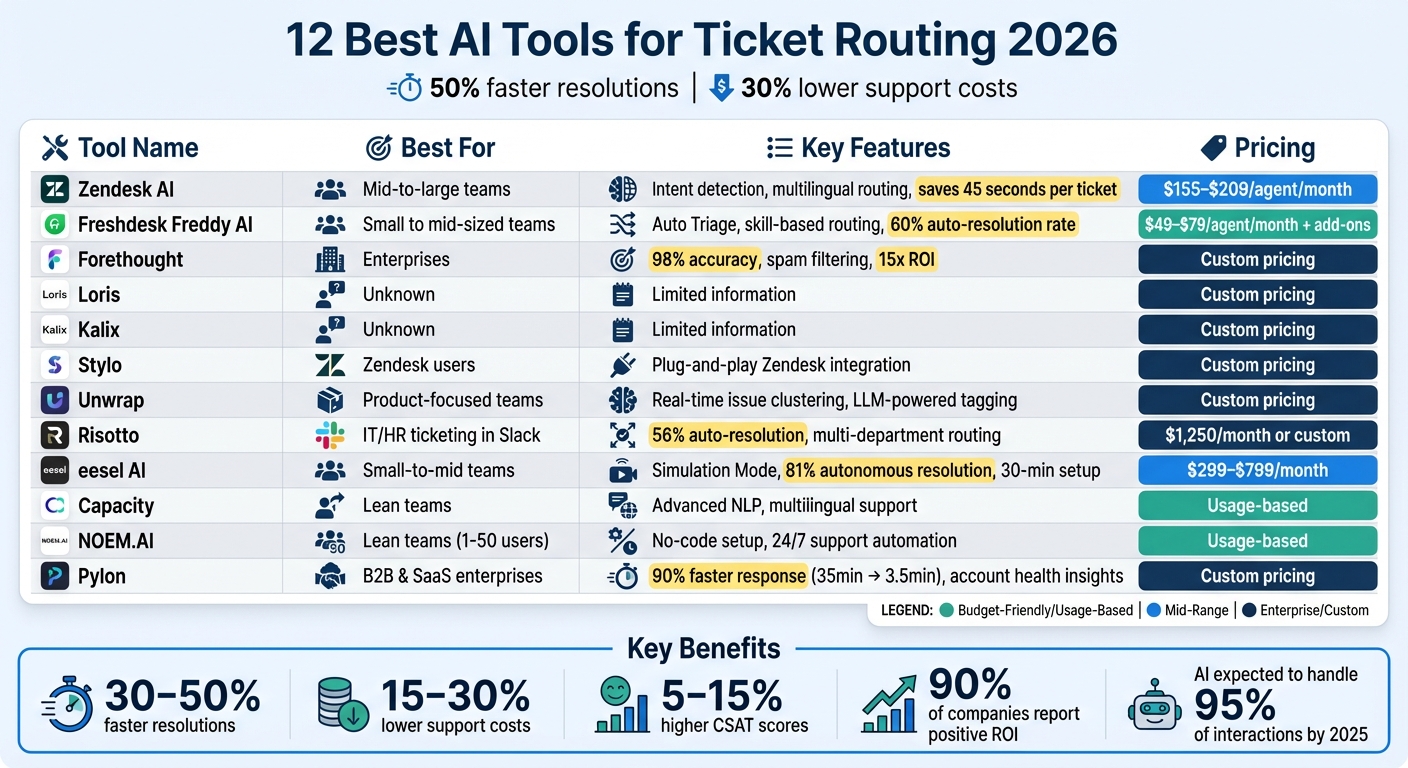
AI Ticket Routing Tools Comparison: Features, Pricing and Best Use Cases 2026
Ticketing Triage: Let AI Sort and Route Your Tickets
sbb-itb-58f115e
1. Zendesk AI
Zendesk AI simplifies ticket management with Intelligent Triage, a feature that scans the first message of every ticket to predict intent, sentiment, and language automatically. This is powered by machine learning models trained on billions of interactions, allowing it to classify tickets right from the start – no need for historical data or manual training.
On average, this system saves agents 45 seconds per ticket compared to manual triage. It uses a three-tier intent hierarchy that works seamlessly with Zendesk’s trigger system. For instance, negative-sentiment cancellation requests can be routed directly to a retention team, while multilingual inquiries are sent to agents fluent in the detected language. This creates a streamlined and automated ticket routing process.
Companies like Grove Collaborative, a retail and e-commerce brand, use Zendesk AI to eliminate manual ticket assignments by using no-code automations to automatically capture request types and assigning tickets accordingly. Medline, a medical product distributor that handles over 800,000 tickets annually, leverages Zendesk AI to boost productivity and provide agents with actionable insights for better problem-solving.
"The insights coming in through AI give us the chance to be better customer service agents and provide a better customer experience." – Billy Abrams, Executive Vice President of Distribution, Medline
Zendesk AI showcases how advanced triage can improve efficiency, making ticket routing smarter and more effective.
Pricing (USD/month)
Zendesk AI requires the Copilot add-on, which is available with specific plans:
- Suite Professional + Copilot: $155 per agent/month, including features like intelligent triage, ticket summaries, and auto-assist.
- Suite Enterprise + Copilot: $209 per agent/month, offering advanced workflows and sandbox testing.
- Lower-tier plans, such as Suite Team ($55/month), do not include intelligent triage capabilities.
Best use cases
Zendesk AI is a great fit for mid-market to enterprise teams with complex support requirements and high ticket volumes. It’s especially valuable for organizations needing sophisticated routing, like escalating high-risk churn cases to senior agents. For example, Khan Academy used automated triage to prioritize support requests effectively, achieving a 92% CSAT score.
2. Freshdesk Freddy AI
Freshdesk Freddy AI has carved a niche in AI-driven ticket routing by offering a robust automation suite. Its Auto Triage feature takes the hassle out of categorizing incoming tickets. By analyzing messages with natural language processing, it can automatically assign values to key fields like priority, group, and status. It even gauges sentiment, flagging tickets with negative tones as "Urgent" to ensure critical issues get immediate attention.
But Freddy AI doesn’t stop at ticket categorization. Its Email AI Agent steps in to handle routine inquiries by pulling relevant responses directly from the knowledge base, reducing the workload on human agents. This is especially useful for teams handling over 100 tickets weekly, where manual triage can slow things down. For those on the Enterprise plan, skill-based routing ensures tickets are matched with the most qualified agents, factoring in expertise, language skills, and proficiency rankings.
Freddy AI integrates seamlessly with Freshdesk’s Omniroute feature, which balances agent workloads by distributing tickets based on real-time capacity. Plus, it connects with platforms like Shopify, WordPress, Slack, Microsoft Teams, and major CRMs, consolidating all support channels into one inbox.
These features make Freddy AI a practical solution for teams of all sizes.
Pricing (USD/month)
Freddy AI’s core features are available with the Pro plan, priced at $49 per agent per month (billed annually). This includes Auto Triage and sentiment analysis. For $79 per agent per month, the Enterprise plan adds skill-based routing. Teams can also enhance capabilities by adding the Freddy AI Copilot for $29 per agent per month or opt for session-based access at $100 per 100 sessions.
Best Use Cases
Freddy AI is a great fit for solo entrepreneurs, small-to-mid-sized teams, and growing businesses across industries like SaaS, e-commerce, healthcare, legal, real estate, and consulting. It’s particularly effective when ticket volumes exceed 100 per week, where manual triage becomes a bottleneck. With the help of its macro library for common issues, teams can achieve an impressive 60% auto-resolution rate for routine tickets.
3. Forethought
Forethought takes ticket routing to the next level with its AI-powered Triage system. This feature analyzes incoming tickets for intent, sentiment, and urgency, then automatically tags and prioritizes them using historical support data. The result? Tickets are sent to the right agent at the right time. With a 98% ticket prediction accuracy and highly effective spam filtering, Forethought ensures support teams can focus on what matters most without getting bogged down by irrelevant noise.
Integration with Existing Ticketing Systems
Forethought integrates smoothly with your helpdesk, CRM, knowledge base, and API management platforms. Setup is straightforward, as it begins learning from your historical data right away to understand your business policies and customer needs. When a ticket is handed off to a human agent, the Assist feature provides all the necessary context directly within your helpdesk, ensuring a seamless transition.
"It’s great that we’ve created something our agents love. They’re not worried about their jobs going away; they see Forethought as their teammate so they can focus on enhancing the experience for our members."
- Emily Pearce, Senior Director of Global Customer Care
This integration highlights Forethought’s ability to adapt to existing workflows, making it a valuable tool in AI-driven ticket routing.
Pricing (USD/month)
Forethought uses a tailored pricing model designed for enterprise teams managing high ticket volumes. While standard pricing isn’t listed on their website, you can contact their sales team for a quote that fits your specific needs and scale.
Best Use Cases
Forethought is a great fit for global enterprises handling support across multiple regions and multi-product organizations needing custom routing by product line. It’s particularly effective for high-volume teams aiming to eliminate manual triage and focus on solving complex customer issues. Companies using Forethought have reported impressive results, including a 93% first contact resolution rate, a 70% deflection rate, and up to a 15x return on investment.
4. Loris
Next up is Loris, a tool with minimal publicly available information.
The documentation for Loris doesn’t provide much clarity on its AI-driven ticket categorization, how it’s implemented, or any performance benchmarks.
Pricing (USD/month)
Loris does not disclose its pricing. You’ll need to reach out to their sales team for a custom quote.
Best Use Cases
Given the lack of detailed information, it’s crucial to request a demo to determine if Loris fits your customer service teams‘ needs. Pay close attention to how it integrates with your current system and manages ticket volume. For teams requiring in-depth product details, exploring other tools in this guide might be a better option.
5. Kalix
Kalix stands out for its lack of publicly available information, making it tough to evaluate its AI ticket routing capabilities, pricing structure, or overall performance. Unlike other tools mentioned in this guide, Kalix doesn’t offer much in terms of detailed documentation about its machine learning models or natural language processing (NLP) functionalities. Key details like case studies, feature lists, or integration options are also notably absent.
Pricing (USD/month)
Kalix doesn’t disclose its pricing openly. To get specific details, you’ll need to reach out to their sales team for a custom quote. This lack of transparency around costs mirrors the limited documentation available, making it harder to understand how it fits into different use cases.
Best Use Cases
With minimal information about its categorization techniques, integration capabilities, or team compatibility, making a solid recommendation for Kalix is challenging. If you’re considering it, requesting a thorough demo is essential to see how it handles ticket volumes and integrates with your existing systems. For teams that prioritize detailed documentation and proven performance, other tools in this guide or prompt bundles for support workflows may offer more clarity and reliability.
6. Stylo
Stylo is an AI tool designed specifically for Zendesk, offering seamless integration without the need for complicated API setups or switching between tools. It brings advanced AI capabilities directly into the Zendesk platform.
AI-Driven Ticket Categorization and Routing
Using natural language processing (NLP) and machine learning, Stylo can classify tickets based on factors like intent, sentiment, urgency, and customer context (such as lifetime value). It automatically organizes tickets – whether they come from email, chat, or forms – into categories like billing, technical issues, or feature requests.
Integration with Existing Ticketing Systems
Stylo connects effortlessly through the Zendesk Marketplace as a plug-and-play application. Its "Intelligence in Context" approach ensures that all AI-powered assistance happens right within the Zendesk workspace.
Pricing (USD/month)
Stylo’s pricing details aren’t publicly available. For a custom quote tailored to your team size and Zendesk setup, you’ll need to reach out to their sales team.
Best Use Cases
Stylo is a great fit for B2B teams, SaaS companies, and enterprise organizations that already rely on Zendesk. It’s particularly useful for those looking to enhance their support workflows with AI-powered ticket categorization and routing. By automating repetitive tasks, Stylo helps Zendesk users improve efficiency and streamline their support processes.
7. Unwrap
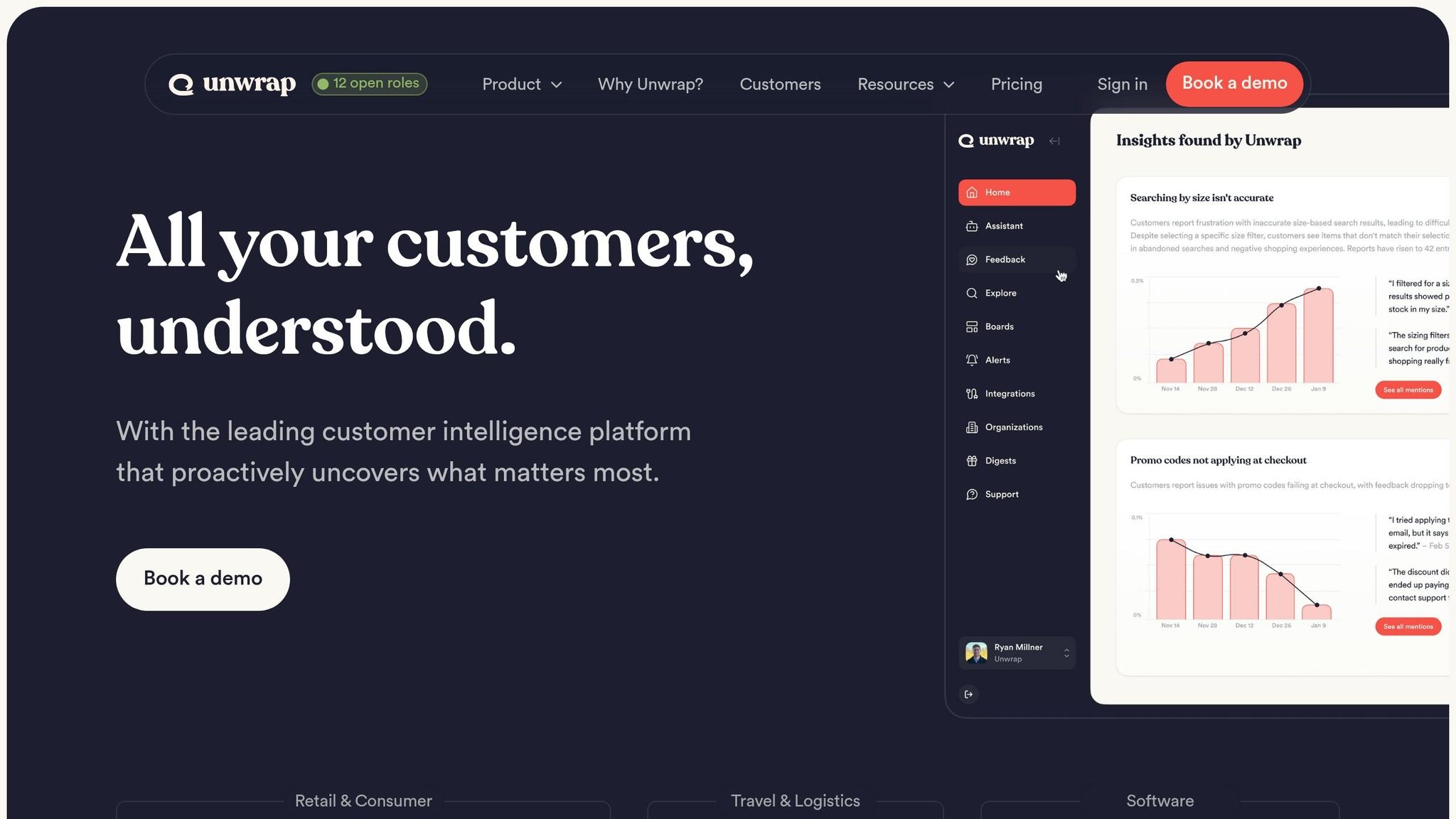
Unwrap acts as an intelligence layer that enhances your existing support systems. Instead of replacing your ticketing system, it leverages Large Language Models (LLMs) to categorize and tag tickets with impressive accuracy.
This approach simplifies dynamic categorization and ensures tickets are routed proactively.
AI-Powered Ticket Categorization and Routing
What sets Unwrap apart is its ability to spot emerging issues by clustering similar tickets in real time. This allows teams to address potential widespread problems early on. It automates tasks like labeling tickets for sentiment, urgency, and product themes, cutting down on manual effort. These AI-generated tags also activate routing workflows within your connected systems, ensuring smoother operations.
Seamless Integration with Existing Systems
Unwrap doesn’t work in isolation – it integrates seamlessly with leading CRM platforms like Salesforce and HubSpot. It also syncs effortlessly with widely-used help desk systems, making it a flexible addition to your support infrastructure.
Ideal Use Cases
Unwrap is particularly suited for product-focused teams aiming to uncover patterns in customer feedback and support tickets. It’s especially helpful for SaaS companies and product teams looking to align support tickets with product development goals. By automating ticket tagging and offering deeper insights into customer concerns, Unwrap helps teams reduce manual work and make more informed decisions. It complements traditional AI routing tools by providing a richer understanding of customer issues, ultimately improving support automation efficiency.
8. Risotto
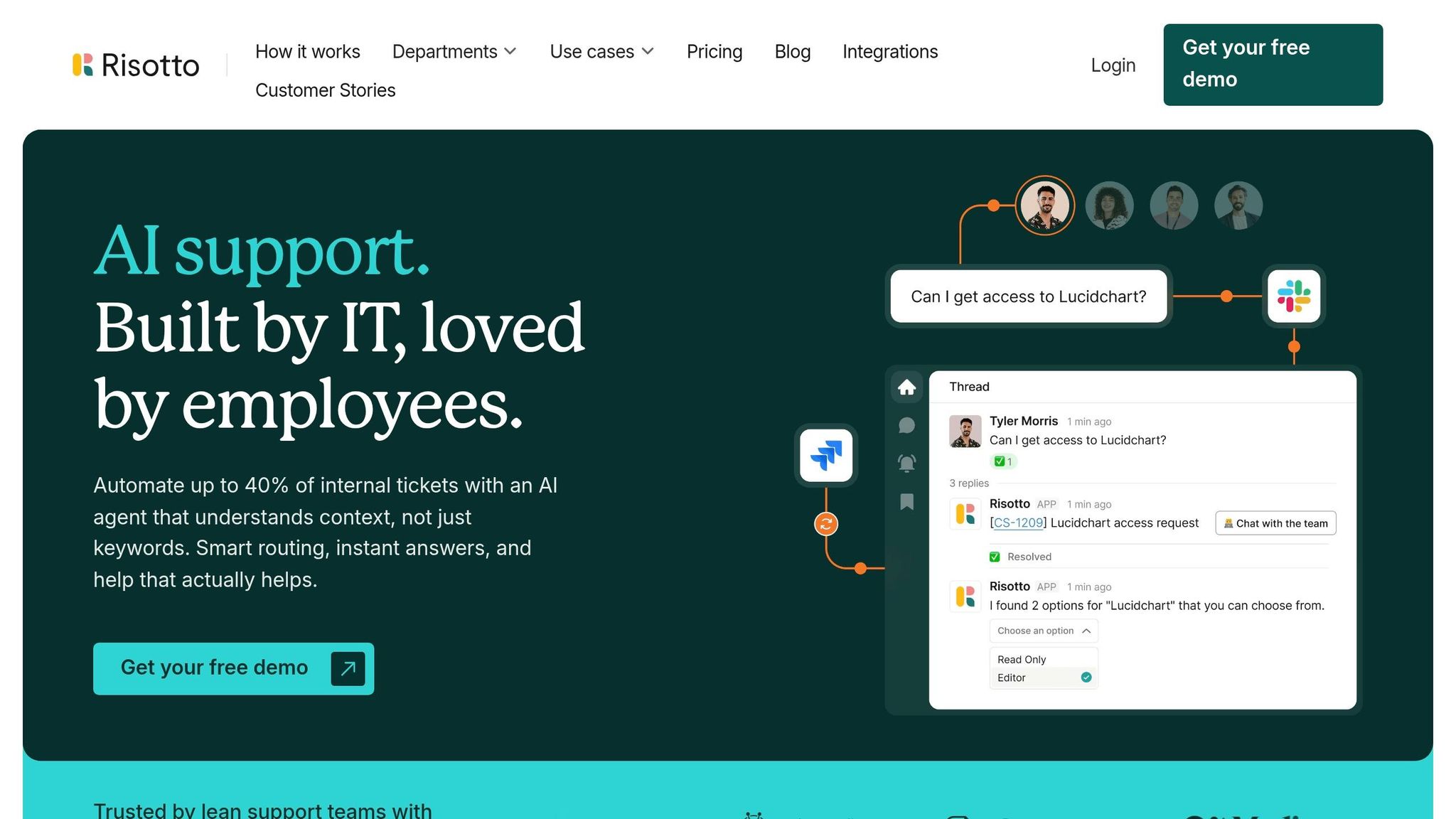
Risotto stands out in 2026 as a workplace platform designed to streamline support processes directly within Slack. By keeping employees in their primary workspace, it handles everything from IT issues to HR inquiries, ensuring workflows remain uninterrupted. This is achieved by building autonomous AI workflows that handle repetitive tasks without manual intervention.
AI-Driven Ticket Categorization and Routing
Risotto uses intent-based triage to interpret and manage employee requests effectively. It directs these requests to departments like IT, HR, Legal, or Finance. The platform also supports step-by-step troubleshooting and improves over time by learning from previous agent responses. For instance, IT Manager Vergil Smith from Vidyard reported that Risotto automatically resolved or triaged 56% of support tickets in 2026. Similarly, Charles Verrey, IT Manager at Retool, highlighted a reduction in their average SLA for resolving tickets – from 2 days to under 1 day.
"Risotto intelligently understands the intent behind the request. It confirms existing permissions, coordinates necessary approvals proactively, and automatically provisions access upon approval." – Phillip Rickett, Head of IT, Retool
This Slack-first approach ties seamlessly into its ability to categorize and route tickets intelligently.
Integration with Existing Ticketing Systems
Risotto doesn’t just stop at triage – it integrates smoothly with leading ticketing platforms. It connects with Jira, Freshservice, Zendesk, and ServiceNow via bi-directional sync. Additionally, it links to knowledge bases like Notion, Confluence, and Google Drive. These integrations are included in the base subscription, with no extra charges for standard connections.
Pricing (USD/month)
| Plan | Price | Target Audience | Key Features |
|---|---|---|---|
| Startup Plan | $1,250/month (billed annually) | <200 employees | Slack workflows, multi-department routing, category auto-tagging |
| Enterprise | Custom pricing | Large organizations | Custom branding, HIPAA compliance, dedicated CSM, white-glove onboarding |
Best Use Cases
Risotto works particularly well for IT teams looking to scale efficiently and enterprises with over 1,000 employees. The platform typically automates between 20% and 60% of IT support tickets. For example, Fundrise automated nearly 60% of IT support requests, while Hazel Health improved ticket deflection rates from 3–5% to over 20%. It’s especially effective for organizations that rely heavily on Slack and require cross-departmental support across IT, HR, Sales, and Legal teams.
9. eesel AI
eesel AI adds a layer of intelligence to your existing help desk tools, eliminating the hassle of switching platforms. This is similar to how no-code automation bundles allow businesses to connect disparate tools without technical overhead. It integrates directly with popular systems like Zendesk, Freshdesk, Intercom, and Gorgias, enhancing them with advanced AI-driven automations. The setup process is quick, taking just minutes, ensuring a smooth transition without disrupting your current workflows.
AI-Driven Ticket Categorization and Routing
eesel AI uses natural language processing to understand ticket intent, automatically tagging them by topic and sentiment. One of its standout features is the Simulation Mode, which allows teams to test the AI’s performance on historical data before going live. This helps estimate ticket deflection rates and potential ROI.
The AI starts with drafting replies and progresses to fully automating ticket handling as accuracy improves. Teams can define escalation rules in plain English, simplifying the process. In some cases, eesel AI has achieved up to an 81% autonomous resolution rate. The Simulation Mode is particularly useful for validating performance before full deployment, giving it a competitive edge.
"Our aim is not to replace your team, but to eliminate routine sorting so they can focus on high-impact issues." – Stevia Putri, Marketing Generalist, eesel AI
Integration with Existing Ticketing Systems
eesel AI doesn’t stop at help desk platforms. It also connects with knowledge bases like Confluence, Google Docs, and Shopify. By learning from past interactions and documentation, it becomes more effective over time. The AI can even perform tasks in real-time, such as checking order statuses in Shopify or creating Jira tickets. With a setup time of under 30 minutes, it’s a quick and efficient solution. Pricing is based on interactions, making it an affordable option for teams with fewer than 10 agents.
Pricing (USD/month)
| Plan | Monthly Price | Annual Price | Key Features |
|---|---|---|---|
| Team | $299 | $239/month | 3 bots, 1,000 interactions |
| Business | $799 | $639/month | Unlimited bots, 3,000 interactions, past ticket training |
| Custom | Contact sales | Contact sales | Unlimited interactions, multi-agent orchestration |
These pricing options cater to teams of different sizes and needs.
Best Use Cases
eesel AI is ideal for teams wanting to add AI to their help desk without switching platforms. It’s especially helpful for organizations using multiple help desk systems or smaller teams where per-seat pricing doesn’t make sense. If your team needs to unify information from sources like Confluence, Google Docs, or historical tickets, eesel AI can be a powerful solution. Its Simulation Mode also makes it a great choice for companies that want to test AI performance before fully committing.
10. Capacity
Capacity is a support automation platform powered by AI, designed to use natural language processing (NLP) to understand ticket intent and streamline support workflows.
AI-Driven Ticket Categorization and Routing
This platform takes ticket management to the next level by using intelligent routing. It examines factors like message content, urgency, and even sentiment to ensure tickets land with the right agent or team. By leveraging machine learning models, Capacity goes beyond basic keyword detection. It dives into the context of each message, incorporating entity recognition and historical data, to make routing decisions that traditional rule-based systems just can’t match. This level of precision highlights how AI tools are evolving to provide smarter, more context-aware solutions, complementing the other tools mentioned in this guide.
Next, we’ll look at how NOEM.AI delivers specialized AI solutions for enterprise support environments.
11. NOEM.AI
NOEM.AI takes the concept of AI-enhanced triage to the next level by focusing on cutting down repetitive tasks and simplifying support operations. It’s a no-code AI overlay that integrates seamlessly with popular help desk platforms like Zendesk, Freshdesk, Jira Service Management, HubSpot, and ServiceNow. By consolidating knowledge from various sources – files, URLs, and apps – it creates a unified resource to deliver consistent answers across multiple channels, including web chat, WhatsApp, SMS, and Facebook Messenger.
AI-Driven Ticket Categorization and Routing
NOEM.AI is designed to handle repetitive inquiries automatically, freeing up human agents to focus on more complex issues. For those complex cases, the system routes tickets to agents with full context, including the specific knowledge sources it referenced, so customers don’t have to repeat themselves. The platform also includes missed-question alerts and one-click retraining, enabling teams to quickly identify gaps in the AI’s knowledge base and update it as needed.
"You keep your current help desk, but you stop leaking money on repetitive tickets and after-hours backlogs." – Erick Quiel
Pricing (USD/month)
NOEM.AI operates on a scalable, usage-based pricing model. Teams can try it out with a free trial and a "60-second builder" to see how it fits their needs. The automation features can bring support costs down to just a few dollars per conversation, making it an affordable option for businesses.
Best Use Cases
This platform is perfect for lean teams of 1–50 users looking to provide round-the-clock support without adding more staff. It’s especially useful for:
- eCommerce businesses handling product questions and order tracking.
- Real estate companies automating lead capture.
- Global operations requiring multilingual support.
- Education providers and health and wellness businesses managing after-hours bookings.
Next, we’ll dive into how Pylon uses AI to revolutionize ticket routing.
12. Pylon
Pylon is a platform designed to bring together support, customer success, product, and engineering teams in a single workspace. Unlike older email-based help desks, it caters to modern business needs by integrating directly with tools like Slack, Microsoft Teams, and Discord.
AI-Driven Ticket Management
Pylon uses AI to analyze factors like message intent, customer sentiment, urgency, and account tier. This allows it to tag, categorize, and route tickets effectively. Its "Account Intelligence" feature combines data from support interactions and live calls to calculate customer health scores and identify churn risks. By flagging critical issues, it ensures urgent matters are handled promptly. This system has been shown to reduce first response times by 90% – from 35 minutes to under 3.5 minutes – and automates resolutions for half of all eligible inquiries. The result? A faster, more efficient support experience, similar to how other AI tools for small business operations transform productivity.
Integration with Existing Tools
Pylon integrates seamlessly with CRMs like Salesforce, HubSpot, and Pipedrive, as well as project management tools such as Jira, Linear, and Shortcut. It can function as a standalone support workspace or enhance existing systems like Zendesk and Freshdesk with AI capabilities. This bidirectional syncing ensures smooth communication and context sharing across teams.
Pricing (USD/month)
Pylon doesn’t list its pricing publicly. Instead, it offers custom quotes tailored to each team’s size and specific needs. Interested users must book a demo to explore pricing options. This approach reflects its focus on providing tailored solutions for B2B requirements.
Best Use Cases
Pylon is a great fit for mid-sized companies (10–50 users) and larger enterprises (50+ users) in the B2B and SaaS sectors. It’s particularly beneficial for teams in highly regulated industries like healthcare and finance, where compliance with standards such as SOC 2 Type II, GDPR, ISO 27001, and HIPAA is essential. Companies using Pylon have reported resolution times that are eight times faster, even when ticket volumes increased by 76%.
Feature and Pricing Comparison
Picking the right tool comes down to factors like team size, budget, and how much automation you need. The 12 tools we examined cover a range of automation levels, from simple rule-based systems to platforms capable of running autonomous agentic workflows.
Pricing varies significantly. For example, Freshdesk starts at $15 per agent per month, with the Freddy AI add-on costing $100 for every 100 AI sessions. Zendesk begins at $19 per agent per month, but its advanced Intelligent Triage feature requires the Suite Professional plan, priced at $115 per agent. Larger teams looking into tools like Pylon and Forethought will typically need to request custom pricing. These differences highlight the distinct value each tool offers.
Integration options are another major factor. Both Zendesk and Pylon boast extensive integration capabilities, connecting with major CRMs like Salesforce and HubSpot, project management tools such as Jira and Linear, and communication platforms like Slack and Microsoft Teams. Pylon stands out in B2B omnichannel routing, offering seamless support across Slack, Discord, and Teams. Meanwhile, eesel AI integrates directly with help desk platforms like Zendesk, Freshdesk, Intercom, and Gorgias, eliminating the need to switch platforms.
When it comes to automation capabilities, the tools vary widely. Zendesk’s Intelligent Triage uses a three-tier intent hierarchy with confidence scores for precise ticket routing. Freshdesk’s Auto Triage predicts ticket fields using historical data and includes collision detection to prevent duplicate responses. Eesel AI offers a Simulation Mode that tests performance on historical data, helping teams estimate deflection rates and ROI before full deployment. Capacity takes intelligent routing a step further by analyzing message content, urgency, and sentiment using advanced machine learning, going beyond simple keyword detection.
Beyond features, overall performance plays a critical role. On average, manual ticket routing results in 15–25% of tickets being misrouted. In contrast, AI systems can cut resolution times by 30–50% and reduce support costs by 15–30% within the first year. Notably, 90% of companies that fully implement AI report a positive ROI.
For small businesses (1–10 users), Freshdesk and eesel AI offer strong value, with eesel AI priced at $299 per month for 1,000 interactions. Mid-sized teams (10–50 users) can benefit from scalable solutions like Pylon, Zendesk, and Forethought. For large enterprises (50+ users), platforms like Pylon and Salesforce Service Cloud are ideal, offering advanced security, compliance, and customization options.
Conclusion
AI-driven ticket routing taps into context, sentiment, and urgency to achieve 30%-50% faster resolutions, 15%-30% lower support costs, and 5%-15% higher CSAT scores. These outcomes make it clear that choosing the right tool is crucial for maximizing results.
Your choice should align with your team’s size and needs. Small teams often prioritize simplicity and affordability, with options like Freshdesk or eesel AI. Mid-sized companies benefit from scalable, integrated platforms such as Pylon or Zendesk, while enterprises demand advanced security and customization.
To get started, map out your data architecture and ensure your ticket schema is consistent across all channels. Utilizing a collection of AI prompts for business can help standardize these workflows. Begin with automating high-volume, low-risk tasks like password resets in a shadow mode setup. This allows agents to review AI recommendations before fully automating processes.
The future of customer service is moving toward autonomous resolution, with AI expected to manage up to 95% of customer interactions by 2025. Anna Kim from Kayako highlights this shift perfectly:
"The winners will be those who reframe customer service not as a contact channel, but as a self-driving engine"
Success lies in balancing AI’s efficiency with human expertise for more complex, empathy-driven scenarios. With 90% of companies reporting positive ROI after adopting AI, the real question isn’t whether to implement AI routing – it’s how soon you can make it happen.
FAQs
How do I choose the right AI ticket routing tool for my team size?
To pick the best AI ticket routing tool for your team, think about factors like team size, setup time, and cost.
- For smaller teams, look for tools that are easy to set up and offer pricing based on usage. These options are often simpler to implement and won’t strain your budget.
- For larger teams, focus on tools that allow for customizable workflows, even if they require more time to configure. These features can handle complex processes and better support scalability.
The key is to choose a tool that effectively automates tasks, cutting down on manual work while aligning with your team’s specific operational needs. This will help streamline processes and boost overall efficiency.
What data is needed before enabling AI-based ticket routing?
To make AI-powered ticket routing work effectively, it’s crucial to give the AI access to essential data sources. These include CRM systems, ticketing platforms, chat logs, and product usage data. With this information, the AI can make well-informed and efficient decisions when routing tickets.
How do I measure ROI after switching to AI ticket routing?
When evaluating ROI, focus on key metrics such as time saved, cost savings, error reduction, and customer satisfaction. Start by calculating the number of hours saved and converting that into a monetary value. Then, monitor improvements in accuracy and SLA compliance to gauge operational efficiency.
You should also consider the revenue impact that comes from improved workflows and efficiency. By comparing these metrics before and after implementation, you can clearly see how your investment stacks up against the costs.