Top 5 AI Prompts for Remote Onboarding Tasks



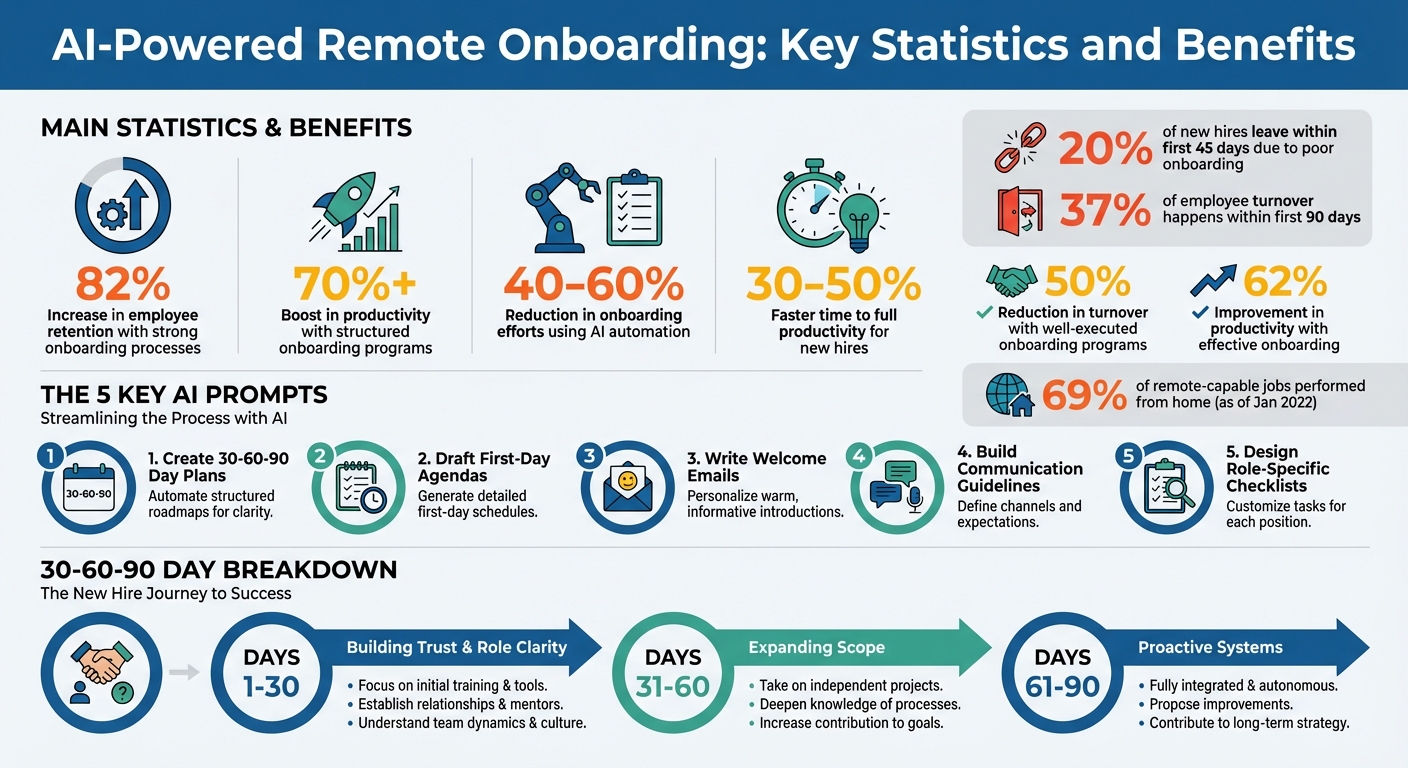
Remote onboarding can be challenging, but AI-driven prompts make it easier by automating repetitive tasks, improving efficiency, and delivering personalized experiences. Companies using AI for onboarding report faster employee ramp-up times and reduced HR workloads. Here are five key ways AI prompts can optimize remote onboarding:
- Create 30-60-90 Day Plans: AI generates role-specific onboarding roadmaps, breaking tasks into manageable phases for clarity and progress tracking.
- Draft First-Day Agendas: AI ensures new hires have schedules tailored to their roles, covering tool setup, team intros, and compliance training.
- Write Welcome Emails: Personalized emails help remote hires feel informed and connected from day one.
- Build Communication Guidelines: AI simplifies FAQs and sets clear expectations for remote workflows and team collaboration.
- Design Role-Specific Checklists: AI creates detailed onboarding checklists and buddy program guides to support new hires.
AI-Powered Remote Onboarding: Key Statistics and Benefits
Build an AI Agent to Automate Employee Onboarding | Agentic AI Workshop
sbb-itb-58f115e
1. Generate Personalized 30-60-90 Day Remote Onboarding Plan
A 30-60-90 day plan breaks remote onboarding into three clear phases, guiding new hires from initial learning to taking full ownership of their role. AI-powered prompts can create these plans by outlining specific goals for each phase, tailored to the employee’s role, location, and responsibilities. For example, measurable outcomes like "first code commit" or "first customer ticket resolved" can be included to track progress effectively. This approach provides a roadmap to align tasks with the unique demands of each position.
Efficiency in Onboarding Workflows
Structured onboarding programs can boost productivity by over 70%. AI simplifies this process by generating team management resources like tool provisioning lists, stakeholder directories, and escalation guidelines. For instance, a sales hire might receive CRM access and pipeline training, while an engineer would be set up with repository access and deployment instructions. By automating and organizing these workflow optimization tasks, AI ensures onboarding is both efficient and customized.
Personalization and Flexibility
AI takes personalization to the next level by applying detailed rules based on the employee’s role, location, and level. For instance, a marketing manager in California might receive different compliance training than a hire in the EU, who would need GDPR-focused briefings. Additionally, AI can assign "lane ownership" during the first 30 days, allowing new employees to focus on a single core responsibility - like managing an inbox or handling calendar tasks. This method builds trust while avoiding overwhelm.
"If your onboarding remote employees requires you to 'be available all day,' it's not onboarding. It's a dependency".
| Phase | Focus Area | AI Deliverable |
|---|---|---|
| Days 1–30 | Building Trust & Role Clarity | "Lane ownership" plan and "How I work" documentation |
| Days 31–60 | Expanding Scope | Escalation rubric and workflow integration |
| Days 61–90 | Proactive Systems | Conflict flagging and updated SOPs |
To get the most out of AI prompts, include specific details like the employee’s name, job title, department, start date, and key responsibilities. Clearly define what "done" looks like for each 30-day phase so remote employees can gauge their success without needing constant guidance. This clarity ensures a smoother onboarding process for everyone involved.
2. Draft First-Day Remote Agenda and Schedule
A well-planned first-day agenda can make a big difference in remote onboarding. By using AI-driven scheduling tools, companies can eliminate the hassle of manual coordination, ensuring new hires have immediate access to the tools and people they need. The goal is to blend technical setup, personal interaction, and clear expectations, creating a smooth start before the employee even logs in.
Remote-Specific Applicability
Remote onboarding comes with its own set of challenges, especially when it comes to ensuring everything is ready to go on day one. AI tools can confirm that critical systems like SSO credentials (via platforms such as Okta, Azure AD, or Google Workspace) are set up in advance. These tools also verify email access, SaaS accounts, and hardware logistics - whether that's confirming a laptop has shipped or is ready for pickup. This preparation allows new hires to hit the ground running without delays.
"In a distributed model, every missing account, unshipped laptop, or unbooked intro call compounds into a poor first-90-days experience."
– Ameya Deshmukh, Everworker
Efficiency in Onboarding Workflows
Beyond technical readiness, AI can simplify onboarding workflows right from the start. By automating tasks like first-week checklists, quick-start guides, and structured agendas, AI reduces friction for new employees. For example, a sales hire might have CRM training and territory briefings on their schedule, while a software engineer focuses on accessing GitHub repositories and deployment walkthroughs. This role-specific approach avoids one-size-fits-all schedules, enabling new hires to dive into meaningful work immediately.
Support for Virtual Team Integration
Remote employees often face a unique challenge: isolation. AI can help bridge this gap by arranging pre-scheduled introductory calls with key team members, organizing shadow sessions to observe workflows, and setting up manager touchpoints, which might even include personalized welcome videos. AI can also draft team-wide welcome messages, introducing the new hire and fostering a sense of belonging from the start. Tools like Slack or Teams can send automated reminders to managers to record these videos and schedule check-ins, ensuring no step is overlooked.
Personalization and Adaptability
AI shines when it comes to tailoring first-day agendas to specific roles and regional needs. For instance, a marketing manager in California might receive compliance training specific to state regulations, while a new hire in the EU gets a GDPR briefing. AI can also adjust schedules to align with local time zones, ensuring sessions are convenient and relevant. By inputting details like job title, department, and required software, companies can create highly customized agendas that turn the first day into a productive and engaging experience.
3. Write Remote Team Welcome Email and Introduction Message
Remote-Specific Applicability
Welcome emails for remote teams serve as the digital equivalent of in-person greetings, laying the foundation for a positive first impression. These emails should be concise yet informative, covering essential technical details like VPN access, password management tools, and two-factor authentication setup. Updates on equipment delivery should also be included. With 69% of jobs that can be done remotely being performed from home most of the time as of January 2022, these initial interactions play a key role in setting the tone for a smooth start. They also align with earlier discussions on efficiency and personalization, which are crucial for fostering retention and boosting productivity.
Efficiency in Onboarding Workflows
AI tools simplify the process of crafting welcome emails by using email automation and sequencing to include pre-boarding essentials, ensuring everything is prepared before the new hire's first day. This automation frees up HR teams to focus on making the message feel personal and engaging. Considering that one-third of new hires leave within their first six months - often due to inadequate onboarding - well-executed programs can cut turnover by up to 50% and improve productivity by 62%. By streamlining repetitive tasks, AI helps create a more effective onboarding experience.
Support for Virtual Team Integration
For remote employees, a well-crafted welcome email is more than just a message - it’s a way to combat feelings of isolation and foster early connections. AI can assist in drafting team-wide introduction messages that not only announce the new hire but also encourage collaboration with key team members and leaders. Assigning an onboarding buddy to guide the new hire through their first weeks can further ease the transition.
"At DigitalOcean we are big on transparency and connectivity and giving new hires the chance to meet with [the CEO] is a huge part of this mission" - Lucy Kahn, DigitalOcean
Research also highlights the importance of onboarding satisfaction: new hires who are happy with their onboarding experience at 90 days are twice as likely to stay with the company for at least 18 months.
Personalization and Adaptability
AI adds a personal touch to welcome emails by tailoring them to the recipient’s role, location, and experience level. Instead of starting from scratch, these tools can customize details like job title, department, and geographic location. The tone can also be adjusted - whether professional, friendly, or casual - to suit the company culture and the new hire’s preferences. For instance, a software engineer might receive guidance on accessing development tools, while a salesperson could get client-focused training materials. Including the company’s mission and values in the email helps align new hires with the organization’s goals, easing first-day nerves and clarifying expectations. This approach ties back to the earlier focus on creating a seamless and effective onboarding process.
4. Build Remote Communication Guidelines and FAQs
Remote-Specific Applicability
For remote teams, it's crucial to establish clear communication channels tailored to specific roles. For instance, instant messaging can handle quick questions, while email is better suited for formal documentation. Setting expectations for response times and availability helps maintain efficiency and clarity across the board. Regular meeting schedules - like one-on-ones, team check-ins, and feedback loops - give new hires a sense of how the team operates. A "Meet the Team" directory, complete with photos and brief bios, can help new hires put faces to names and understand the management structure in a virtual setting. This kind of clarity makes it easier for remote employees to integrate quickly and effectively.
Efficiency in Onboarding Workflows
AI can be a game-changer for streamlining remote onboarding. By summarizing remote work policies and highlighting key expectations, AI tools can save HR teams a significant amount of time. They can also automate answers to common questions about benefits, company policies, and daily routines. Additionally, AI-generated step-by-step guides for setting up remote work tools and accessing internal systems can reduce the need for IT support. Strong onboarding processes have a big payoff: they can boost employee retention by 82% and increase productivity by over 70%. This is especially important given that 20.5% of organizations report losing half of their new hires within the first 90 days.
Support for Virtual Team Integration
Creating guidelines is essential, but building personal connections within remote teams is just as important. Personalized onboarding materials can help new hires understand team dynamics and foster trust, which is vital in a virtual environment where face-to-face interactions are limited. For example, AI can condense long employee handbooks into quick-start guides tailored to specific tools like payroll or time-tracking software. Clear boundaries for work-life balance - such as designated off-hours and regular breaks - also support team well-being. Encouraging new hires to schedule virtual "coffee chats" with at least 10 colleagues from various departments during their first month can further strengthen their sense of connection.
Personalization and Adaptability
Tailored onboarding plans, such as 30-60-90 day strategies, can be enhanced with AI to meet the unique needs of each role. AI can customize onboarding guides to align with the specific tasks and tools relevant to a new hire’s position. For example, a software engineer might receive instructions on GitHub and Slack, while a customer service representative gets clear protocols for handling escalations via email or chat. This role-specific approach ensures that new hires receive information that’s directly applicable to their daily responsibilities, avoiding generic overviews that may feel disconnected from their actual work.
5. Create Role-Specific Remote Onboarding Checklist and Buddy Program Guide
Remote-Specific Applicability
Remote work comes with its own set of challenges, especially for new hires who miss out on those casual, in-office learning moments - like quick desk-side chats, observing workflows, or impromptu hallway conversations. A role-specific onboarding checklist bridges this gap by clearly outlining what each new hire needs to learn. For instance, a developer might get guidance on setting up tools like GitHub and Jira during their first week, while a customer service representative might focus on mastering escalation protocols through designated communication channels. These checklists should also include steps to foster social connections, such as introducing the new hire in Slack channels, announcing their arrival to the team, and scheduling virtual coffee chats.
Efficiency in Onboarding Workflows
AI can streamline onboarding by generating structured checklists that break down the first 90 days into manageable phases. Here’s a possible flow:
- Week 1: Orientation and company overview
- Weeks 2–4: Job-specific training and virtual shadowing
- Weeks 5–8: Regular check-ins and performance feedback
- Weeks 9–12: Increased autonomy and career development discussions
This phased approach is critical, especially considering that 37% of employee turnover happens within the first 90 days, often due to weak onboarding experiences. Advanced business prompt libraries can also automate the creation of buddy program guides, outlining roles, responsibilities, selection criteria, and a schedule of virtual check-ins for the first month. These guides, paired with tailored onboarding materials, ensure that the process is both efficient and relevant to each role.
Support for Virtual Team Integration
Buddy programs play a key role in helping remote employees feel connected. AI can craft detailed guides for buddies, including suggestions for virtual social activities like video coffee chats or team icebreakers. The buddy acts as a go-to person for informal questions, reducing the need for constant managerial oversight. AI can even automate Slack reminders for buddies to check in with new hires on Day 1, at the end of Week 1, and monthly thereafter.
"When AI gets the opportunity to handle all the busy work of employee onboarding you free up the time and the energy for what really matters" - Sarika Lamont, VP of People and Culture at Vidyard
This approach ensures that new remote employees feel supported and connected during their critical early weeks.
Personalization and Adaptability
AI doesn’t just stop at creating general checklists - it can personalize them for each new hire. By using information like the employee’s resume highlights, unique skills, and team dynamics, AI can create onboarding materials that align directly with their role. For example, you could ask AI to draft a buddy guide for a remote Senior Developer in under 200 words, using Slack-friendly language. Junior hires might need more detailed process instructions, while senior hires benefit from guidance that focuses on team culture and strategic goals. By feeding AI specifics like job title, responsibilities, and key performance indicators, you can generate onboarding resources that are perfectly aligned with the new hire’s daily tasks.
God of Prompt: A Resource for Remote Onboarding
Creating remote onboarding materials - from crafting welcome emails to designing checklists and training schedules - can take up a lot of time. God of Prompt simplifies this process with its extensive library of over 30,000 AI prompts tailored for HR tasks, remote onboarding, and productivity workflows. The platform organizes these prompts into collections compatible with tools like ChatGPT, Claude, and Gemini AI, helping HR teams automate repetitive tasks. This allows them to focus on more impactful goals, such as fostering team culture and enhancing employee engagement. It aligns seamlessly with the remote onboarding strategies mentioned earlier.
The platform's remote onboarding prompts are divided into three key categories:
- Onboarding Roadmaps: Generate personalized 30-60-90 day plans to guide new employees through learning, contributing, and eventually taking on leadership roles.
- Communication and Messaging: Draft welcome emails, team introductions, and orientation agendas with ease.
- Operational Documentation: Create role-specific checklists, training schedules, and compliance materials tailored to individual needs.
This structured approach not only makes processes smoother but also tackles common onboarding challenges head-on.
The results speak for themselves. HR professionals utilizing these categorized prompts report significant improvements: reducing time spent on onboarding tasks while boosting employee retention rates by 82% and increasing productivity by over 70%.
In addition to streamlining workflows, God of Prompt offers flexible pricing plans to suit different needs. The Premium plan, priced at $25/month (or $17/month annually), includes access to the full AI bundle, no-code automations, unlimited prompt generation, and weekly updates via Notion. For teams that want to explore the tool first, a 7-day free trial is available.
But God of Prompt goes beyond basic templates. HR teams can use it to create detailed "First Day Overview" documents, complete with schedules and tech setup instructions. It can also draft Quick-Start Guides for company-specific tools, like payroll systems, and generate SMART goals for employees' first 90 days. Whether it's Day 1 learning materials or mastery plans for Days 61-90, finding the right prompt for any onboarding phase is quick and effortless.
Conclusion
AI can transform remote onboarding, turning hours of manual work into just minutes. By automating repetitive tasks, it reduces onboarding efforts by 40–60%, giving HR teams more time to focus on fostering relationships and cultivating a welcoming work culture.
This streamlined process doesn’t just save time - it significantly improves the experience for new hires. A well-organized, personalized onboarding approach helps employees reach full productivity 30–50% faster. Features like instant FAQs, clear role guidance, and structured success plans eliminate confusion and create a sense of direction. This clarity is crucial, considering up to 20% of new hires leave within the first 45 days, often because they feel unsupported or lost during onboarding.
"AI removes the repetitive logistics so HR can spend more time welcoming, coaching, and building community; done well, automation creates more human touch, not less." - EverWorker
By using AI-driven prompts for HR, companies can deliver a seamless onboarding experience tailored to the demands of remote work. From personalized roadmaps to buddy program guides, these tools ensure every remote hire receives consistent and high-quality onboarding. Whether onboarding one person or fifty, AI ensures no one is overlooked. Every new hire gets equal access to resources and a warm welcome, regardless of time zones or the manager’s workload.
With effective onboarding boosting retention by 82% and productivity by over 70%, investing in AI-powered workflows is a smart move. It ensures your new hires feel connected, supported, and ready to make an impact from day one - no matter where they’re located. For a complete library of tailored AI prompts that simplify every aspect of remote onboarding, check out our prompt bundles for every business function.
FAQs
What details should I include in an AI prompt for onboarding?
To craft a strong AI prompt for onboarding, make sure to include essential details that help the AI generate content tailored to new employees. Here are the key elements to cover:
- Company Overview: Provide a snapshot of the company's history, mission, vision, and core values to give new hires a sense of purpose and direction.
- Role-Specific Details: Outline the responsibilities tied to the new hire's position and introduce them to their immediate team members.
- Administrative Essentials: Include guidance on completing HR paperwork, understanding benefits, and gaining access to necessary tools and systems.
- Policies and Procedures: Share the company's code of conduct, along with key policies and procedures, to set clear expectations.
- Resources and Training: Offer relevant materials and a schedule for any training sessions to help them get up to speed.
Incorporating these elements ensures the onboarding process feels thorough and tailored to each new employee.
How do I personalize onboarding across roles and time zones with AI?
AI simplifies the onboarding process by handling tasks like provisioning, compliance, training, and communication, all customized to fit the specific needs of each role and region. This means new employees receive training tailored to their job responsibilities and location-specific compliance details, no matter the time zone.
By automating these processes, AI not only speeds up the time it takes for new hires to become productive but also helps lower turnover rates. It creates a more efficient and engaging onboarding experience, ensuring employees in various roles and locations feel supported from day one.
How can AI support a remote buddy program?
AI has the potential to transform remote buddy programs by automating essential onboarding processes. For instance, it can send personalized welcome messages and provide tailored resources to new employees, making the experience feel more engaging. AI can also simplify the process of scheduling virtual meetups, helping new hires connect with their assigned buddies more easily.
Beyond that, AI tools can monitor engagement through surveys, giving program coordinators valuable insights to address any concerns early on. This not only lightens the workload for HR teams but also ensures that new employees feel supported and seamlessly integrated into a remote work environment.
Related Blog Posts

Loved by Business Owners


Based on 1K reviews
Get smarter on AI every week.
Ready to transform your business?