Chatbot flow design is the process of creating structured, automated conversations that guide users to solutions without human involvement. For customer support, this means reducing wait times, lowering costs, and improving user satisfaction. A well-designed chatbot can handle repetitive tasks like order tracking or password resets while ensuring complex issues are escalated to human agents.
Key Points:
- What is it? A structured sequence of chatbot interactions that connect user intents (e.g., "Where’s my order?") to bot actions.
- Why it matters: 70% of customers will stop using a brand after two bad experiences, but chatbots can resolve over 70% of queries while cutting service costs by 30%.
- Core principles: Identify user intents, keep conversations simple, and escalate to humans when needed.
- How to build it: Map common customer questions, create clear conversation paths, integrate APIs and knowledge bases, and test with real users.
- Improvement tips: Use data to refine flows, track metrics like resolution and containment rates, and ensure the bot feels natural with personalization and NLP.
A chatbot isn’t just a tool – it’s a direct reflection of your brand. Start small, keep refining, and prioritize customer needs to build trust and loyalty.
Conversational Design: Designing your FLOWS
sbb-itb-58f115e
Core Principles of Chatbot Flow Design
Creating a chatbot that earns customer trust takes more than just linking questions to answers. It requires a solid foundation built on three key ideas: understanding what users need, keeping interactions straightforward, and knowing when to involve a human.
Identifying User Intents
Every customer interaction starts with a purpose – whether it’s tracking an order, resetting a password, or clarifying a billing charge. The chatbot’s job is to identify these intents and guide users to the right solution. This process isn’t about making educated guesses; it’s about analyzing real-world customer inquiries. Reviewing 50–100 actual questions from your inbox, chat logs, or search history can help uncover patterns.
Once you’ve gathered this data, sort it into four categories:
- Understanding (e.g., "What is this?")
- How-to (step-by-step instructions)
- Comparison/Risk (addressing trust-related concerns)
- Shortcuts (quick actions like "view pricing").
Modern chatbots rely on a mix of Natural Language Understanding (NLU) for flexible interpretation and rule-based logic for critical tasks like payment confirmations. Context matters too. The bot should remember details like the user’s current page, past questions, or account history, so every message doesn’t feel like starting over.
"A user’s intent is not only based on the questions and conversation but also on the context that chatbot is embedded in" – Marc Dupuis, CEO of Fabi.ai
Handling multiple intents in one query is also essential. For example, if a user asks to update their address and check their order status in the same message, the bot should handle both smoothly. Combining these intent-recognition tactics with clear, step-by-step interactions lays the groundwork for effective chatbot design for business. Next, it’s all about simplifying the conversation flow.
Keeping Conversations Clear and Simple
When it comes to chatbot conversations, clarity always wins over complexity. Instead of overwhelming users with a long list of questions, break things down. For instance, rather than asking, "What’s your order number, email, and the issue you’re experiencing?" all at once, start with, "What’s your order number?" and confirm that before moving on.
Use conversational cues like "Got it", "Checking on that now", or "Sure" to reassure users that their input has been received. Adding slight delays between replies can mimic natural speech patterns and give users time to read. On mobile devices, limit quick reply options to 2–4 choices to keep the interface clean and easy to navigate.
Make sure users always have a way out. Whether it’s a “talk to a human” button or a return-to-menu option, customers should never feel stuck. Be upfront about what the bot can and can’t do in its greeting. For example: "I can help with billing questions and order updates." This sets the right expectations from the start.
When the bot doesn’t understand something, avoid generic error messages. Instead, try responses like, "Did you mean A or B?" or "I’m having trouble with that. Would you like to rephrase or speak with an agent?" These small adjustments keep the conversation moving. And when automation fails, clear escalation procedures are key to ensuring users don’t feel abandoned.
Transferring to Human Agents When Needed
Knowing when to escalate to a human is critical. Triggers for escalation include direct requests (like when a user types “agent” or “representative”), complex multi-part issues, repeated misunderstandings, or signs of frustration detected through sentiment analysis.
Certain situations demand human involvement – billing disputes, refunds, fraud alerts, account locks, or personal data updates. For high-value customers, such as VIPs or platinum-tier users, direct them to agents immediately for a premium experience. Escalations should also happen automatically when the bot’s confidence score drops below a set threshold, such as 50%.
The handoff process must feel effortless. When transferring to an agent, send over the chat history and any collected details (like the user’s name, order number, or issue) so the customer doesn’t have to repeat themselves. Let the user know about the transition with details like estimated wait times or their position in the queue. Skill-based routing ensures queries go to the right department – billing questions to finance, technical issues to IT, and so on.
If no agents are available, offer alternatives like creating a support ticket or scheduling a callback. This approach is crucial, as 80% of customers are more likely to use chatbots if they know they can easily reach a human when needed.
"The winning formula: Chatbots handle speed, scale, and 24/7 availability. Humans bring empathy and complex problem-solving" – Rohan Rajpal of SpurNow
How to Design Chatbot Flows Step by Step
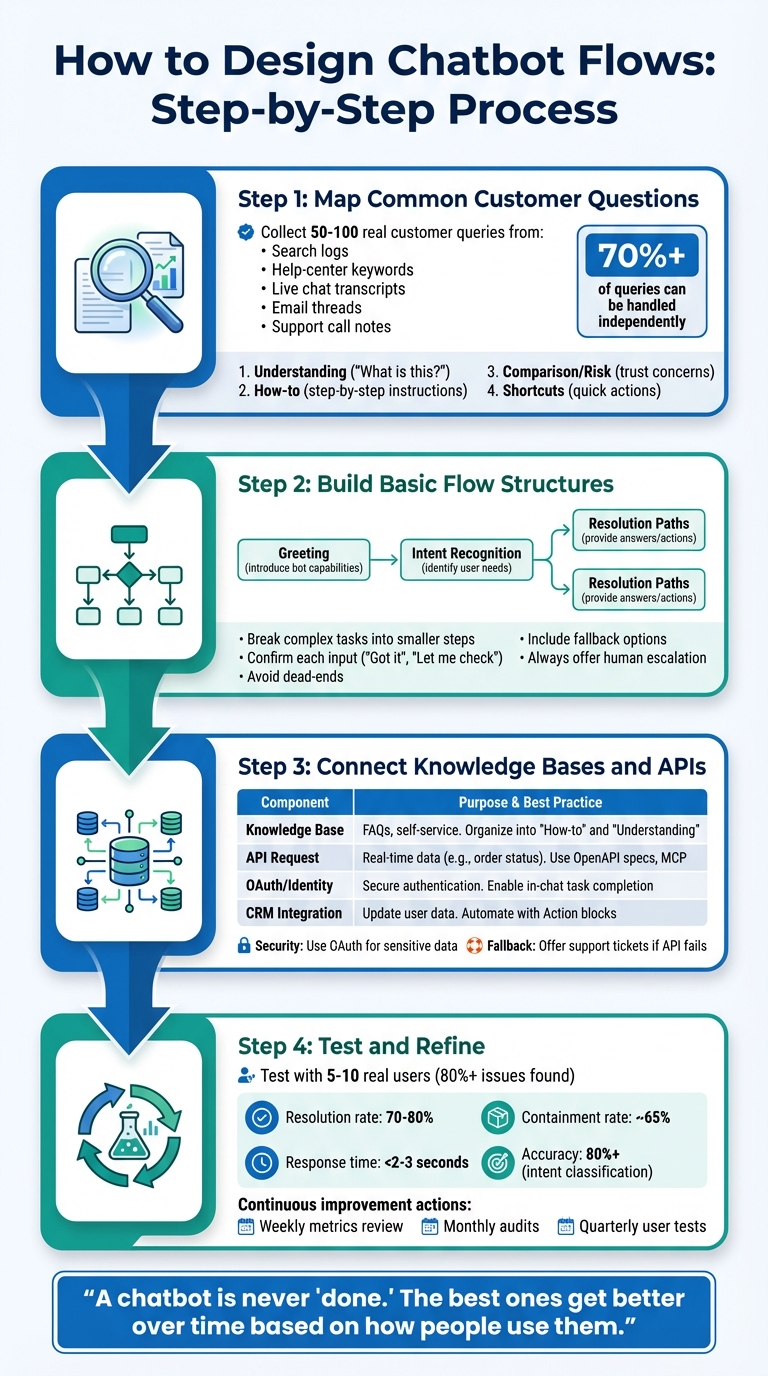
4-Step Chatbot Flow Design Process for Customer Support
Designing chatbot flows involves a structured approach that uses real customer data to create efficient and user-friendly interactions. The process starts by analyzing customer behavior, planning the flow, and integrating essential tools to make the chatbot functional and responsive. Here’s how you can do it.
Mapping Common Customer Questions
Start by gathering real customer questions – this could mean analyzing search logs, help-center keywords, live chat transcripts, email threads, or support call notes. Aim to collect 50–100 real customer queries.
Organize these questions into four key categories: Understanding, How-to, Comparison/Risk, and Shortcuts. This structure helps transform a chaotic list of inquiries into a clear framework.
For each category, draft concise, easy-to-understand answers – just like a top-notch support agent would. Avoid technical jargon and keep the responses straightforward. Use the most common questions as part of your bot’s welcome message to establish clear expectations right from the start. This method is effective, as well-built chatbots can independently handle over 70% of customer service queries.
Once you’ve mapped out the frequent questions, you’re ready to move on to designing the flow.
Building Basic Flow Structures
Begin by sketching out your chatbot’s flow, either on paper or a whiteboard. Map the journey from the initial greeting to the resolution for each major user intent. A typical flow includes:
- Greeting: Introduce the bot and explain its capabilities.
- Intent Recognition: Identify the user’s needs.
- Resolution Paths: Provide answers or trigger specific actions.
Keep the design simple and user-friendly. Break down complex tasks into smaller, sequential steps, confirming each input along the way with responses like “Got it” or “Let me check that for you”. This keeps users engaged and reassured.
Every branch in your flow should lead somewhere meaningful – whether it’s a solution, a previous step, or escalation to a human agent. Avoid dead-ends, as they can frustrate users and erode trust. When the bot doesn’t understand a query, offer fallback options like “Did you mean X or Y?” and always include a clear option to speak to a human.
Connecting Knowledge Bases and APIs
With your flow structure in place, it’s time to integrate data sources to enable real-time responses. Without this, your chatbot risks becoming a static FAQ. Focus on two key layers: knowledge bases for static information and APIs for dynamic data.
Your knowledge base should include resources like help articles, product guides, and policy details. For example, if a user asks, “What’s your return policy?” the bot can pull the relevant section from its repository.
Dynamic requests, such as “Where’s my package?”, require API integration. The bot should identify the user’s intent, extract necessary details (like an order number), and convert the query into an API request. Tools like the Model Context Protocol (MCP) can simplify these integrations.
Security is critical. Use OAuth to verify user identity before granting access to sensitive information. This allows users to check balances, update profiles, or track orders directly within the chat. If an API call fails, have a fallback plan – such as creating a support ticket or offering a callback. Additionally, save retrieved data into variables to personalize future interactions without requiring users to repeat themselves.
| Integration Component | Purpose | Best Practice |
|---|---|---|
| Knowledge Base | Provide answers to FAQs and enable self-service. | Organize content into "How-to" and "Understanding" categories. |
| API Request | Fetch real-time data (e.g., order status). | Use OpenAPI specs and MCP for consistency. |
| OAuth/Identity | Securely authenticate users for account access. | Allow users to complete tasks without leaving the chat. |
| CRM Integration | Update user data like tags and contact info. | Automate updates using "Action" blocks. |
Improving User Experience in Chatbot Flows
Once your chatbot’s basic features are up and running, the next challenge is to make interactions feel natural and user-friendly. A bot that remembers details, understands context, and can switch between languages not only reduces user frustration but also builds trust. Here’s how NLP and personalization can take your chatbot to the next level.
Using Natural Language Processing (NLP)
NLP helps chatbots understand different ways of asking the same question. For example, whether a user types "Where’s my order?" or "Can you check my package status?", the bot should identify the same intent. It can even handle slang, regional dialects, and typos without derailing the conversation.
With advanced NLP, chatbots can incorporate contextual memory. This means users don’t need to repeat themselves. For instance, if someone says, "Update my address and check my order status", the bot should handle both tasks seamlessly. It can also pick up on emotions like frustration or urgency and adjust its tone using custom instructions, or escalate the issue to a human agent when necessary.
Setting confidence thresholds is another critical step. If the bot isn’t sure about a query, it should clarify by asking something like, "Did you mean A or B?" instead of making an incorrect guess. Training your NLP model with real-world examples – like abbreviations, casual language, and misspellings – makes it more resilient to inconsistent input.
Adding Personalization to Responses
Personalization makes conversations feel relevant and efficient. Simple touches, like addressing users by their name or referencing past interactions, create a sense of familiarity. For example, if a customer asks about their order, the bot should pull specific details from your CRM or API, rather than providing generic instructions.
Using slots to store key details – such as account numbers or delivery addresses – allows the bot to recall this information throughout the conversation. For instance, if a user says, "Yes, use the same one", the bot should understand they’re referring to a previously mentioned address. This keeps the interaction smooth and hassle-free.
However, personalization must always be balanced with privacy. Validate sensitive details like email addresses or phone numbers during the chat, and ensure all data is handled securely, especially in industries like banking or healthcare. Always provide an option to connect with a human agent when users are discussing personal information.
Supporting Multiple Languages and Accessibility
Language and accessibility support are essential for broadening your chatbot’s appeal. Research shows that 76% of consumers prefer product information in their native language, and 75% are more likely to buy again when customer support is offered in their language. To achieve this, you can use multilingual models, translation middleware, or even locale-specific bots for regions requiring precise adaptations.
Enable automatic language detection based on device or browser settings, but confirm with a quick prompt like "¿Prefieres continuar en español?". And don’t forget: the "talk to a human" option should be available in every supported language from day one.
For accessibility, design your chatbot to work seamlessly with screen readers by using proper labels and ensuring high-contrast color schemes. Support Right-to-Left (RTL) scripts like Arabic and Hebrew by setting text direction attributes and testing layouts. Use simple, clear language to aid users with cognitive disabilities, and avoid idioms that might confuse non-native speakers. Add message delays to give users enough time to read responses, and use bold or italics for emphasis rather than all-caps, which can be harder for screen readers and individuals with dyslexia to process.
Testing and Improving Chatbot Flows
Once your chatbot flows are designed, the next step is to ensure they perform effectively. Testing and measuring performance are critical to meeting customer support expectations. This process helps uncover usability problems that might otherwise slip through the cracks.
Testing Flows with Real Users
Testing with a small group of 5–10 users who represent your target audience can uncover over 80% of usability issues. It’s important to recruit testers who aren’t part of the team that built the bot. As Zendesk explains:
"Ideally, you don’t want the same people that built the flows [to test them], as they will be biased based on knowing how the flows are built, and may not be able to see issues such as typos or formatting".
Provide testers with specific tasks, such as tracking an order or updating an account. Observe how they interact with the bot using tools like screen recordings or live observation. Afterward, ask open-ended questions like, "What challenges did you face?" or "What would you change about this experience?". Always conduct these tests in a staging environment connected to your CRM system. This setup ensures the experience feels authentic while protecting live customer data.
Encourage testers to phrase questions in different ways, like "Where’s my order?" versus "Can you check my package status?" This approach tests the chatbot’s flexibility and highlights areas where it may struggle. Reviewing fallback logs can also help identify areas where additional training is needed.
These early tests lay the groundwork for tracking performance metrics once the bot goes live.
Tracking Performance Metrics
After launching your chatbot, monitoring key metrics is essential. One critical measure is the resolution rate – the percentage of issues the bot resolves successfully – which should typically fall between 70–80% for most businesses. Similarly, the containment rate, or how often the bot resolves inquiries without human assistance, should hover around 65%, as some cases will always require human intervention. Quick response times are also crucial, with users expecting replies in under 2–3 seconds.
Context matters when interpreting these metrics. For instance, in September 2025, a B2B SaaS company with a 4.8 CSAT score noticed demo sign-ups were slowing. After analyzing over 20,000 monthly interactions, they found that 31% of qualified chats ended without capturing an email address. By tweaking follow-ups and refining chatbot flows, they achieved a 26% increase in email capture, a 39% drop in ghosted chats, and an 18% boost in sales calls booked.
Mark Kilens, VP of Content and Community at Drift, emphasizes the importance of accuracy:
"Accuracy is the baseline requirement of your AI-powered chatbot. Without it, hopes of reducing customer friction and accelerating revenue aren’t realistic".
To meet user expectations, aim for 80% or higher accuracy in intent classification.
These metrics provide the insights you need to make targeted improvements and keep your chatbot performing at its best.
Using Data to Refine Flows
Data is your best guide for improving chatbot flows. Start by analyzing free-text inputs, as these often highlight recurring topics that should be formalized into flows. Pay attention to sentiment trends – if users start a conversation curious but leave frustrated, that flow needs urgent attention.
Begin by establishing a 2–4 week baseline for metrics like session count, containment rates, and handoff rates. Then, make targeted adjustments. For example, in 2026, Calendly used conversation analysis to cut their Average Handle Time by over three minutes and reduce their cost per case by 23%.
Use tools like confusion matrices to identify intents that are frequently misclassified, and update your training data accordingly. Periodically, have linguists manually review low-confidence classifications to fine-tune your NLU model. As Ciaran Doyle from Loris.ai puts it:
"The goal isn’t 100% automation; it’s the right automation, where AI excels and humans handle the rest".
This ongoing refinement process not only improves your chatbot’s performance but also boosts customer satisfaction and operational efficiency.
Conclusion
This guide has highlighted how combining user intent mapping, clear communication, and seamless human escalation creates chatbot flows that genuinely support customers. Building effective chatbot flows isn’t a one-and-done task – it requires constant refinement to keep up with customer expectations. The strategies discussed here – from mapping user intents to designing graceful error-handling – are the building blocks of chatbots that people will actually enjoy using.
Chatbots are powerful tools, resolving over 70% of support queries and boosting sales by 67%. But these impressive stats only happen when flows are thoughtfully crafted around real customer needs, not assumptions. Consider this: 58% of U.S. customers value excellent customer service over price, and 70% will abandon a brand after just two bad experiences. Your chatbot isn’t just a cost-cutting measure – it’s a key touchpoint that affects how customers see your brand and must evolve to maintain their trust.
Start with small wins, ensure easy access to human support, and keep interactions straightforward. Regular improvements and data-driven tweaks are essential for success. Commit to consistent reviews – weekly metrics, monthly audits, and quarterly user tests – to ensure your chatbot continues to improve. Pay attention to where users drop off, identify misclassified intents, and refine flows based on real-world data. As Social Intents aptly puts it:
"A chatbot is never ‘done.’ The best ones get better over time based on how people use them".
FAQs
How do I choose which support issues the bot should handle first?
Prioritize support issues by assessing their urgency and impact. For example, service outages or security threats should take top priority, while non-urgent matters, like general policy questions, can be handled later. Implement a triage system to sort requests based on their priority levels. You can also use AI tools to automatically classify tickets, allowing the chatbot to address high-priority concerns quickly and effectively.
What’s a good confidence threshold for switching to a human?
A solid confidence threshold generally sits in the 70-80% range, striking a balance between allowing the AI to manage most queries and reducing unnecessary escalations. The ideal threshold, however, hinges on your chatbot’s training quality and performance data. Fine-tune it based on the specific context and user expectations to maintain effective and efficient support.
What metrics should I track to prove the chatbot is effective?
To gauge how well a chatbot is performing, focus on tracking vital metrics like:
- Containment rate: This shows the percentage of issues resolved without needing human intervention, with a target of 80% or higher.
- Customer satisfaction scores (CSAT): A reflection of how happy users are with the chatbot experience.
- Response time: Ideally, this should be under 3 seconds to ensure quick and efficient interactions.
Other metrics to keep an eye on include conversion rate, first contact resolution, error rate, and user engagement rate. Together, these indicators provide valuable insights into the chatbot’s effectiveness, helping refine its performance and highlight its role in meeting business objectives.
Related Blog Posts
- How To Create An AI Agent With Relevance.ai (Quick & Easy Guide)
- Shifting From AI Agents to Agentic Workflows
- Ultimate Guide to Team-Specific AI Workflows
- Best Tools For AI Chatbot Development 2026
Keep going: the prompt library has AI design prompts and Midjourney prompts ready to copy and run.