Claude Code vs Cursor (2026): Which AI Coding Tool Wins?




You've heard about AI tools that write code for you. Maybe a friend built an app over the weekend, or you saw someone on X turn a napkin idea into a working product in an afternoon. Now you're stuck between two names that keep coming up: Claude Code and Cursor.
Here's what most comparison articles won't tell you: they're written by software engineers, for software engineers. If you're a business owner, solopreneur, or someone who's never opened a terminal in your life, those reviews aren't for you.
This one is.
I tested both tools across real projects, from building simple booking pages to refactoring codebases with thousands of files. I'll tell you exactly which tool fits your situation, what each one costs, and give you copy-paste prompts so you can try them yourself today.
Full disclosure: God of Prompt is a Claude-focused site. But I'm not here to sell you on Claude Code if Cursor is the better pick for your needs. I'll call it straight.
ALSO READ: 15 NotebookLM Prompts That Actually Work (Copy, Paste, Done)

Quick Verdict — Who Should Use What
Claude Code is Anthropic's terminal-based AI coding agent that reads, writes, and executes code autonomously across your entire project. Cursor is an AI-powered IDE built on VS Code that gives you inline code suggestions, an agent mode, and visual diff review.
Claude Code prioritizes autonomy and deep reasoning. Cursor prioritizes visual control and multi-model flexibility.
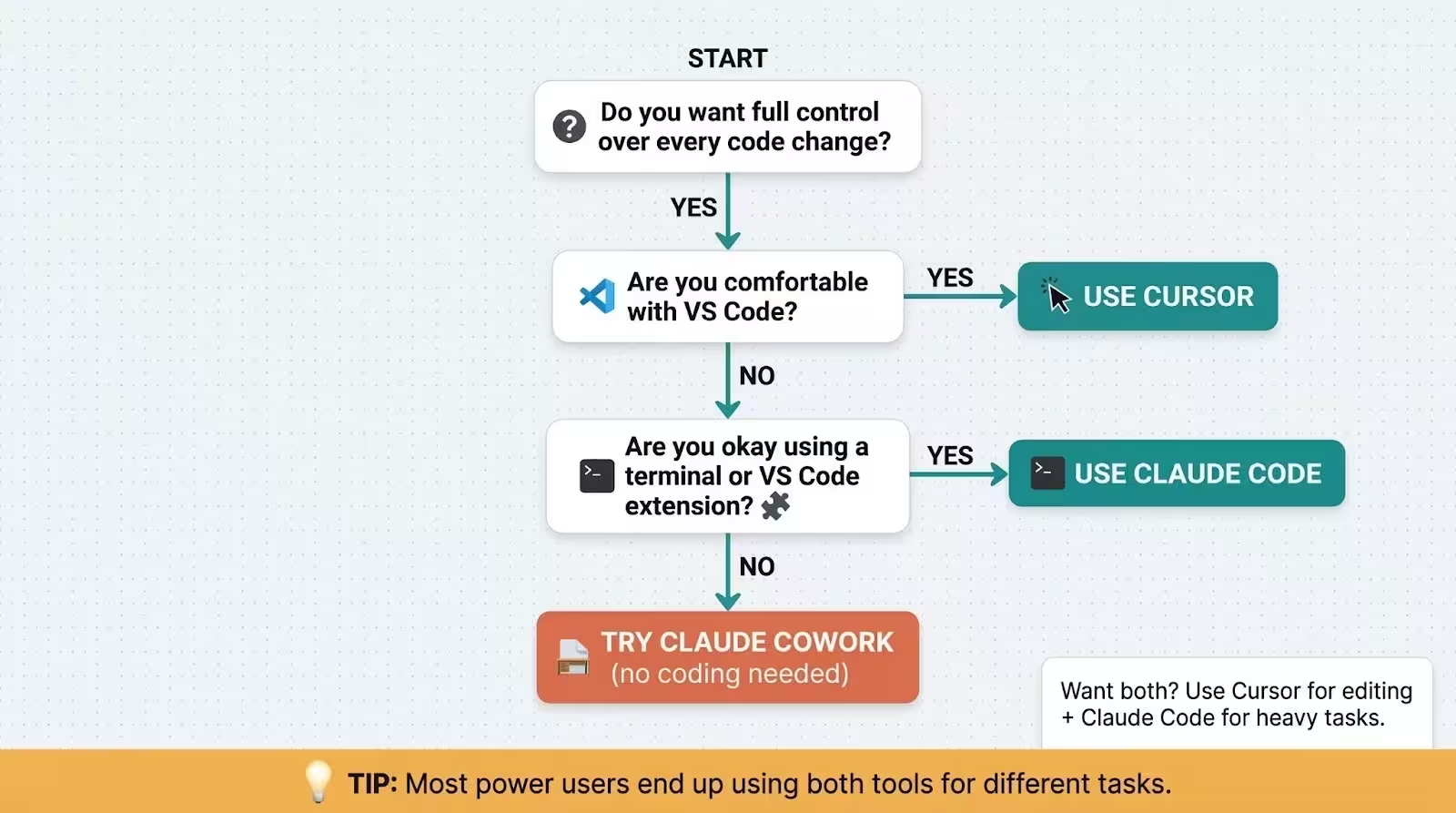
If you want AI to do the work while you grab coffee, pick Claude Code. If you want to see every change and stay in the driver's seat, pick Cursor. If you can't decide, keep reading. There's a "use both" option that might be the best play.
What Is Claude Code?
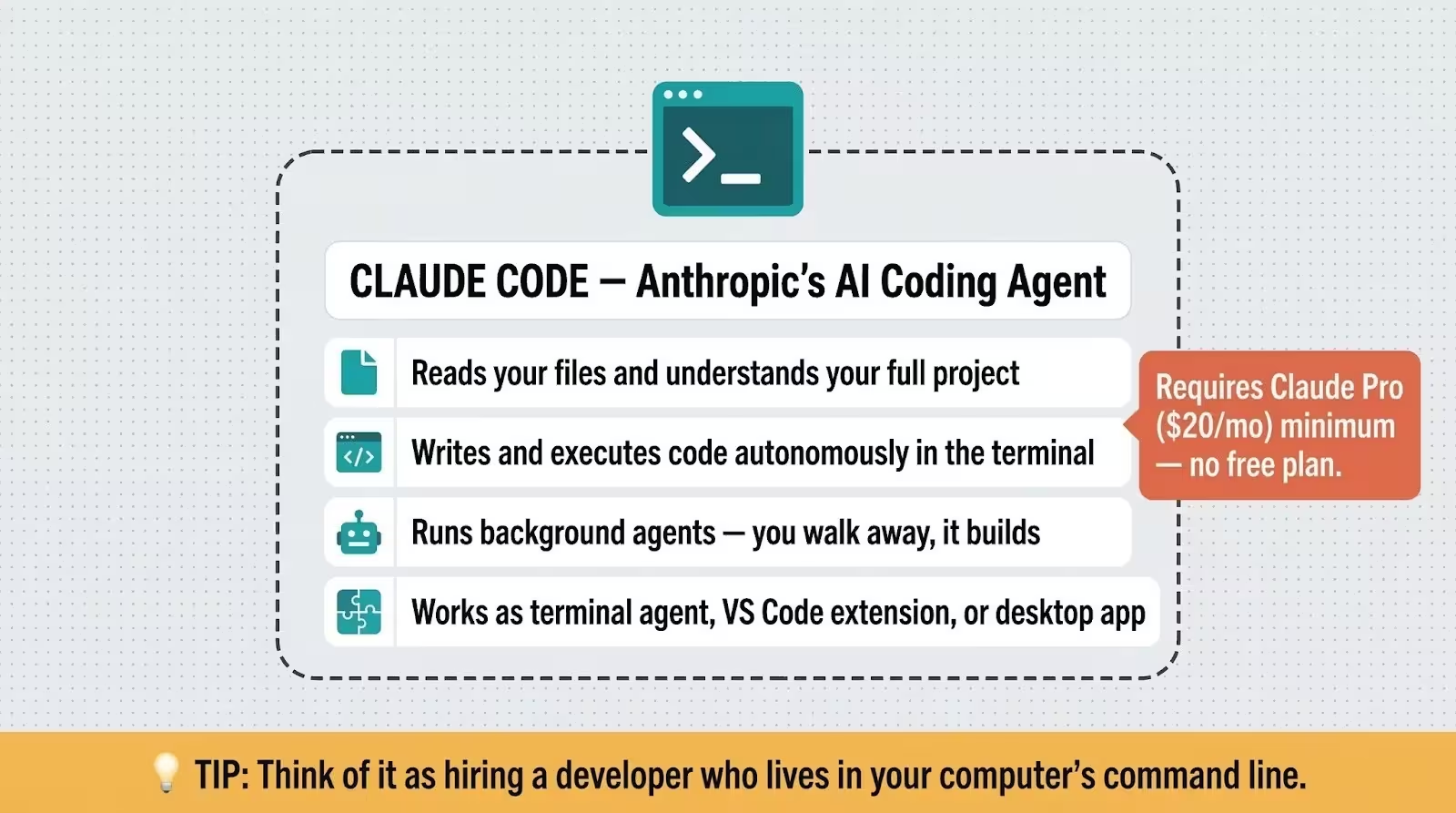
Claude Code is Anthropic's AI coding agent. You give it instructions in plain English, and it reads your files, writes code, runs terminal commands, and builds things autonomously. Think of it as hiring a developer who works inside your computer's command line.
It started as a terminal-only tool, but it's grown fast. In 2026, Claude Code also works as a VS Code extension, a desktop app, and even a browser-based IDE. You don't need to be a programmer to use it. Business owners use Claude Code for everything from organizing files to building internal tools.
Claude Code requires a paid Claude plan. The minimum is Claude Pro at $20/month. It runs on Anthropic's own models, with Sonnet 4.5 as the default and Opus 4.6 available on Max plans.
The killer feature? It can work in the background while you do other things, even running multiple agents in parallel on different tasks.
What Is Cursor?
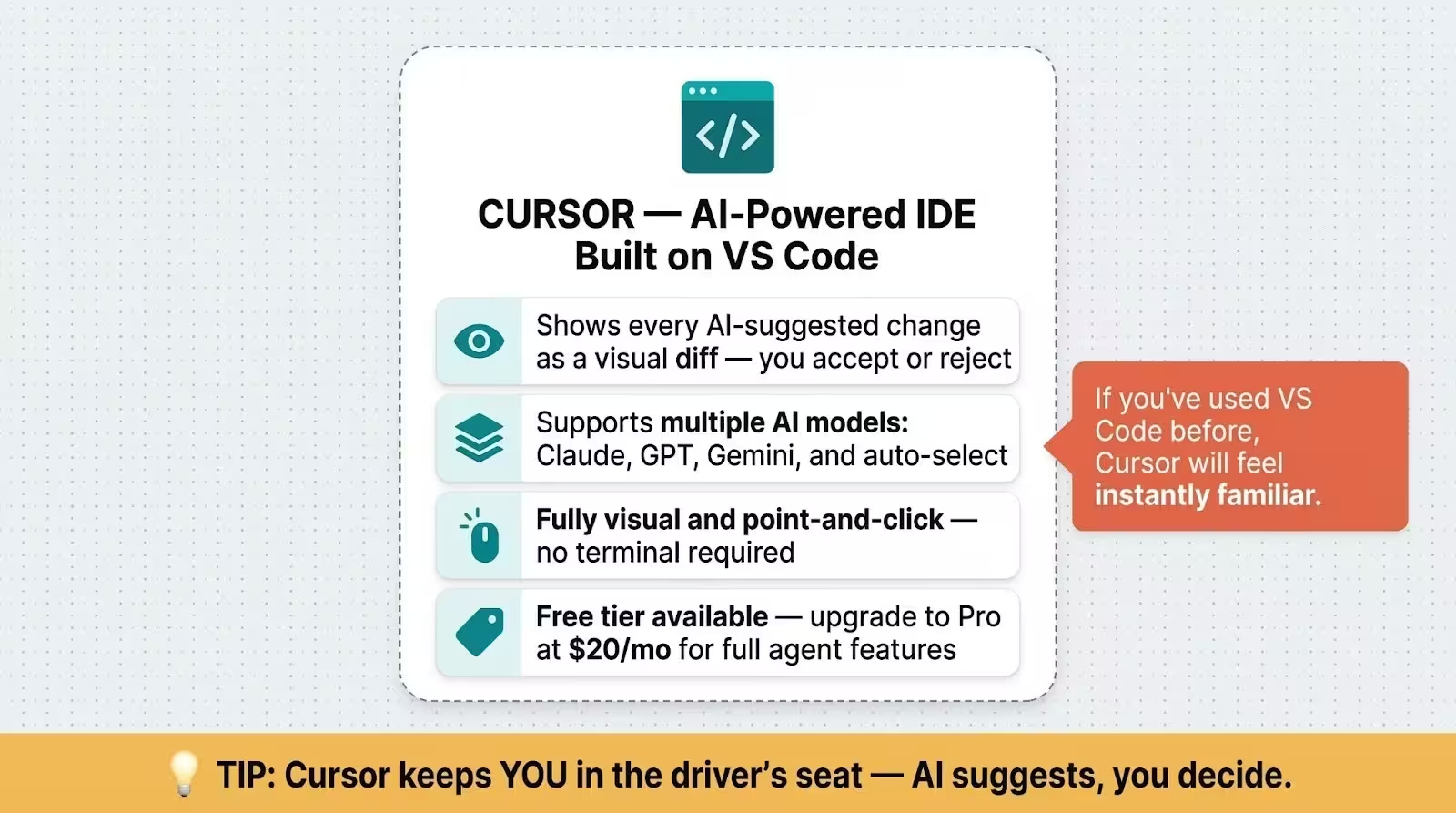
Cursor is an AI-powered code editor built on top of VS Code, the world's most popular development environment. If you've ever used VS Code (or even seen it on someone's screen), Cursor looks and feels exactly the same, just with AI superpowers baked in.
You type a prompt, and Cursor shows you the suggested changes as a visual diff. You accept or reject each change. It's like having a co-pilot who shows you the map before making any turns. Cursor supports multiple AI models, including Claude, GPT, and Gemini, so you're not locked into one provider.
The free tier gives you limited access to agent features and tab completions. Cursor Pro at $20/month extends those limits significantly and adds cloud agents. The big selling point is that everything happens inside a familiar visual interface. You never need to touch a terminal if you don't want to.
Claude Code vs Cursor — Feature Comparison
How They Work (IDE vs Terminal vs Both)
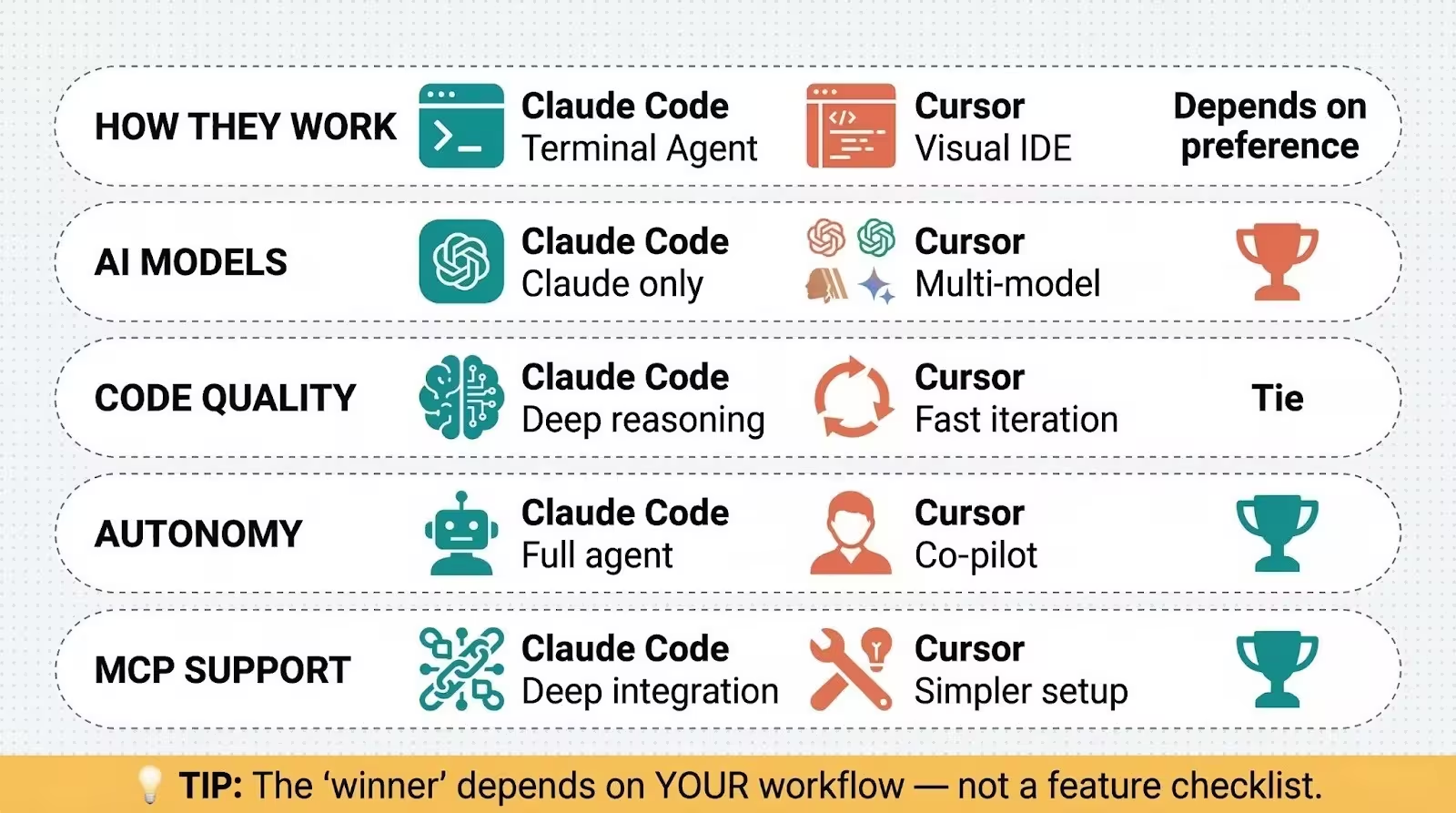
Claude Code was built as a terminal agent first. You'd open your command line, type claude, and start talking. It reads your project files, makes changes, runs commands, and reports back. If you aren't a developer, "terminal" means that black screen with text. It can feel intimidating at first, but it's simpler than it looks.
But here's what's changed in 2026: Claude Code now has a native VS Code extension that lets you interact with it inside a visual editor. You see inline diffs, @-mention specific files, and review changes before accepting them. So the "terminal-only" reputation isn't quite accurate anymore.
Cursor is a VS Code fork from the ground up. That means everything's visual, everything's point-and-click. You'll see your code on the left, AI suggestions on the right, and you approve changes with a click. For non-developers, Cursor feels more natural because you can see what's happening.
The practical difference? Claude Code defaults to doing things for you. Cursor defaults to showing you what it wants to do and waiting for your approval.
AI Models and Context Window
Claude Code uses only Claude models. Sonnet 4.5 is the default on Pro plans, and Opus 4.6 (Anthropic's most powerful model) is available on Max plans. The standard context window is 200,000 tokens.
On Opus 4.6, there's a beta 1 million token context window, which means the AI can "see" and understand massive codebases at once.
Cursor gives you options. You can switch between Claude, GPT, Gemini, and Cursor's own auto-select mode on the fly. Context windows depend on the model you pick, with some supporting up to 1 million tokens through Max Mode.
Why does this matter? If you just want something that works without thinking about models, Claude Code keeps it simple. One tool, one family of models, done.
If you'd rather test different models for different tasks (maybe GPT's better for one thing, Claude for another), Cursor gives you that flexibility.
Code Quality and Accuracy
Both tools produce high-quality code. In my testing, the actual output quality depends more on how clearly you've written your prompt than which tool you're using. A vague prompt gets vague results in both.
That said, Claude Code tends to produce fewer rewrites because it reasons more deeply before generating code. It thinks longer, gets it right more often. Cursor's faster for interactive edits, the kind where you're tweaking a button or adjusting a layout and want instant feedback.
If you're building something from scratch and want to hand off a big task, Claude Code's deeper reasoning wins. If you're iterating quickly on visual changes, Cursor's speed wins.
Autonomy and Agent Capabilities
This is where the two tools diverge most.
Claude Code is agent-first. You can tell it to "build me a booking page with a calendar, confirmation emails, and a Stripe integration," walk away, and come back to a working project.
It runs background agents, delegates subtasks to sub-agents, and even runs multiple parallel agents on different parts of your codebase. The checkpoint system saves your code state before each change, so you can rewind if something goes wrong.
Cursor is IDE-first. Its agent mode can handle multi-step tasks, but it shows you every change as a diff and waits for your approval (unless you configure auto-accept). You stay in control the entire time. Think of it as the difference between hiring a contractor who shows up with the finished kitchen, versus one who checks in at every step.
Neither approach is objectively better. It depends on your comfort level. Do you want AI to drive, or co-pilot? There's no wrong answer here.
MCP Server Support and Integrations
MCP (Model Context Protocol) is a standard that lets AI tools connect to external services like databases, APIs, and other software. Think of it as giving your AI assistant permission to use other apps. It's what turns a code-writing tool into a full automation platform.
Claude Code treats MCP as foundational. It's deeply integrated, and you can connect Claude Code to dozens of external tools. The best MCP servers extend what Claude Code can do, from pulling data from your CRM to interacting with GitHub.
Cursor supports MCP too, with a simpler one-click setup process. The trade-off is a 40-tool limit per project. For most users, that's plenty. But if you're building complex automations that chain multiple services together, Claude Code's deeper MCP integration gives you more room to grow.
Want to get more out of Claude Code? Check out our Claude Code prompt templates for ready-to-use prompts you can paste right into your terminal.
Claude Code vs Cursor — Pricing Breakdown
Both tools start at $20/month, but how they charge beyond that is different. Claude Code is usage-based under your Anthropic subscription. Cursor uses a credit pool system where your subscription amount equals your monthly credit balance.
A couple of things worth noting. Claude Code doesn't have a free plan. You'll need at least Claude Pro ($20/mo) to use it. Cursor's free tier does let you try the tool with limited features, which is a real advantage if you're not ready to commit.
At the $200 tier, both tools offer roughly similar "use it all day" access. The difference is that Claude Code's Max plans include access to Opus 4.6 (the most powerful Claude model), while Cursor Ultra gives you 20x usage credits across all supported models.
If you're on the fence, both offer $20/mo entry points, so you won't break the bank just testing them out.
Pricing changes frequently for both tools. Verify current prices at claude.com/pricing and cursor.com/pricing before making a decision.
Claude Code vs Cursor for Vibe Coding (Non-Developers)
"Vibe coding" means using natural language prompts to tell AI what to build, without writing code yourself. You describe what you want, the AI builds it. Both tools support this workflow, but the experience couldn't be more different.
Building Your First App
Say you want to build a simple booking page for your consulting business.
In Claude Code, you'd open your terminal (or the VS Code extension), type something like "Build me a booking page where clients can select a time slot from my availability, enter their name and email, and get a confirmation.
Use a clean, modern design." Claude Code reads any existing project files, generates the full application, and runs it for you. You wouldn't need to touch the code at all.
In Cursor, you'd open the editor, start a new project, and type a similar prompt in the agent panel. Cursor generates the code and shows you the files it created. You'll see each file, each change, and you click "Accept" to apply them.
The visual feedback makes it easier to understand what's happening, even if you can't read code.
Which Tool Requires Less Technical Knowledge?
Cursor has a lower barrier to entry. The familiar VS Code interface, visual diffs, and point-and-click workflow mean you can get started without knowing what a terminal is. If you've ever used a text editor, Cursor won't feel foreign.
Claude Code has a steeper initial learning curve, especially if you've never used a command line. But once you've gotten past that first hour of setup, it's actually more autonomous. You tell it what you want, it figures out the rest.
There's less hand-holding required on your part because the AI handles more of the process independently.
For the absolute lowest friction starting point, check out Claude Cowork for non-developers. It's designed specifically for people who want AI automation without any coding at all.
When to Use Claude Code (Best Use Cases)
Claude Code shines when you want to hand off entire tasks and get results back. Here's where it's strongest:
Large-scale refactors. You've got a project with dozens of files and need changes across all of them. Claude Code reads the whole codebase, understands the connections between files, and makes coordinated changes. It doesn't lose context halfway through.
Background automation. Need to process 500 data files, rename them, extract key information, and generate a summary report? Tell Claude Code, let it run in the background, and check back when it's done. You won't need to babysit the process.
Building complete features from a description. You describe a feature in plain English, Claude Code plans the implementation, writes the code, creates the tests, and runs them. It's start-to-finish delivery.
Non-coding business tasks. Claude Code isn't just for writing software. Business owners use it for file organization, data processing, research automation, and building custom tools. Pair it with system prompts to customize Claude and it becomes a personalized business assistant that knows your workflow.
Here's a prompt you can paste into Claude Code right now:
Build a simple landing page for my business. It should include:
- A hero section with a headline, subheadline, and a "Book a Call" button
- A section listing 3 services I offer (leave placeholder text)
- A testimonials section with 3 placeholder quotes
- A footer with contact info placeholders
Use clean, modern HTML and CSS. Make it mobile-responsive.
Save everything in a folder called "my-landing-page".
When to Use Cursor (Best Use Cases)
Cursor is the better pick when you want control over the process and fast visual feedback. Here's where it shines:
Interactive editing and prototyping. You're building a UI and want to tweak colors, layouts, and text in real-time. Cursor shows you every change before it's applied, so you can iterate fast without surprises.
Switching between AI models. Some tasks work better with different models. Cursor lets you use Claude for complex logic, GPT for creative generation, and Gemini for large-context tasks. You won't find that flexibility in Claude Code.
Learning as you build. Because Cursor shows you the code it generates and explains changes via inline comments, it's a great learning tool. You're not just getting the output. You're seeing how the AI thinks about your problem.
Team collaboration. Cursor's Teams plan ($40/user/month) includes shared rules, centralized billing, and usage analytics. If multiple people on your team are using AI coding tools, Cursor makes it easier to manage everything from one dashboard.
Here's a prompt you can try in Cursor's agent mode:
Create a React dashboard component that shows:
- A welcome message with the current date
- 3 stat cards (total revenue, new customers, active projects) with placeholder numbers
- A simple bar chart using dummy data
Use Tailwind CSS for styling. Keep it clean and minimal.
Can You Use Both? (The Power Combo)
Yes. And a lot of people do. It's actually the most common recommendation I've seen across developer communities.
The workflow that keeps coming up: use Cursor for visual editing, planning, and quick iterations. Use Claude Code for heavy autonomous execution, background tasks, and large-scale changes. You can even run Claude Code inside Cursor's integrated terminal, getting the best of both interfaces.
A practical combo workflow looks like this: plan your project structure in Cursor's visual editor, then hand off the heavy building to Claude Code via the terminal. Switch back to Cursor to review and fine-tune the output visually. It's not either/or. It's about matching the right tool to the right task.
If you want to supercharge your Claude Code setup, a solid CLAUDE.md setup guide gives the AI context about your project so it produces better results from the first prompt.
FAQ — Claude Code vs Cursor
Is Claude Code free?
No. Claude Code requires at least a Claude Pro subscription at $20/month. The free Claude plan doesn't include Claude Code access. You can check current plans at claude.com/pricing.
Can Cursor use Claude models?
Yes. Cursor supports Claude Sonnet and Opus alongside GPT, Gemini, and its own auto-select mode. You can switch models per-request depending on what you're working on. It's one of Cursor's biggest selling points.
Which is better for beginners?
Cursor, because of the visual interface and familiarity with VS Code. You'll see every change, approve or reject it, and learn as you go. Claude Code becomes the better choice once you're comfortable with the terminal or want more autonomy from the AI.
Is Claude Code just for developers?
Not at all. Business owners use it for file organization, data processing, research automation, and building custom internal tools. You don't need to understand the code Claude Code writes. You just need to describe what you want clearly. For an even more accessible option, try Claude Cowork for non-developers.
What is vibe coding?
Vibe coding means using natural language prompts to direct AI to write, test, and deploy code for you. You describe what you want in plain English, and the AI builds it. Both Claude Code and Cursor support this workflow. It's the reason non-developers can now build real software without learning to program. For a full walkthrough of Claude's coding capabilities, check out our complete Claude Code guide.
Ready to build something? Get the complete Claude prompt library with 30,000+ prompts for business, coding, and automation at godofprompt.ai/prompt-library.

Loved by Business Owners


Based on 1K reviews
Get smarter on AI every week.
Ready to transform your business?






Claude Code in 2026: The Complete Beginner's Guide (Installation, Features & Real Examples)
Complete Claude Code guide for 2026: installation, setup, prompting techniques, slash commands, keyboard shortcuts, good vs bad examples. Master Anthropic's AI coding tool from beginner to power user.

Alex Prompter